How to Migrate Your Ecommerce Platform Safely Without Losing Traffic or Sales
.avif)

How to Migrate Your Ecommerce Platform Safely Without Losing Traffic or Sales
Migrating an ecommerce platform safely requires a structured plan covering data backup, SEO preservation, thorough testing and a controlled go-live not just copying content from one system to another.
Done correctly, a migration accelerates performance, reduces costs, and opens capabilities your current platform cannot support. Done poorly, it can drop your organic traffic by 40–60% and disrupt revenue for weeks.
This blog walks through the full process: what to audit before you touch anything, how to protect your search rankings, how to migrate customer and product data without corruption and how to go live without downtime. Every section includes specific actions, not general advice.
What Is Ecommerce Platform Migration (and When Should You Do It)?
Before starting any migration, you need to be clear on whether you actually need one. Migrating for the wrong reasons wastes time and creates risk. Migrating at the right time, with the right goals, produces a measurable return.

Signs Your Current Platform Is Holding You Back
Not every frustration with your current platform justifies a migration. But certain signals indicate you have reached a ceiling that no amount of workarounds will fix.
- Core Web Vitals failures: Your store consistently scores below Google's thresholds for LCP, INP, or CLS on mobile and the platform architecture is the root cause, not individual page decisions
- Transaction fees eroding margins: Some platforms charge a percentage of every sale on top of payment gateway fees. At scale, these compound into a significant cost
- Missing features you cannot build around: Subscriptions, multi-currency pricing, Arabic RTL storefronts, or BNPL support (Tabby, Tamara) that your current platform simply does not support natively or via plugins
- Inability to handle peak seasons: In the UAE and Gulf, White Friday, Ramadan, and national holiday campaigns create traffic spikes. If your platform slows down or crashes under load, that is a structural problem, not a configuration one
- Poor mobile experience: Over 70% of ecommerce purchases in the UAE happen on mobile. If your platform's mobile output is inflexible, you are actively losing conversions
- Limited local payment gateway integrations: Telr, PayTabs, Network International, and Amazon Payment Services are standard UAE requirements. If integrating them requires hacks or is simply not supported, that is a hard constraint
Common Reasons Businesses Replatform
The most common migration paths in the UAE and Gulf market:
- WooCommerce to Shopify or Shopify Plus: Usually driven by the desire for a managed, faster-to-maintain platform with stronger out-of-the-box mobile performance
- Magento to headless or composable commerce: Typically triggered when Magento's maintenance overhead becomes unsustainable or performance optimisation hits a ceiling
- Custom build to a managed platform: Custom-built stores often serve the business well at launch but become expensive to maintain and difficult to update as the team changes
- Growing beyond current capacity: A platform that worked at 500 orders per month may not work at 5,000 and the problems show up gradually until they become critical
The Real Risks of Ecommerce Migration (And How to Avoid Them)
Most migration guides bury risks in a footnote. This section leads with them deliberately. Understanding what can go wrong before you start is what separates a planned migration from a damaging one.
SEO Ranking Drops
This is the most common and most painful migration failure. When URL structures change, meta data gets lost or Google re-crawls a half-built site, organic rankings collapse sometimes permanently for specific pages.
The mechanisms are straightforward:
- URL structure changes without properly implemented 301 redirects send users and search crawlers to dead pages
- Meta titles, descriptions, and H1 tags that were not exported and re-implemented on the new platform get replaced by auto-generated thin content
- Schema markup product schema, breadcrumb schema, review schema rarely transfers automatically between platforms
- If Google indexes the new site before it is fully built (because the staging environment was not blocked in robots.txt), it can register hundreds of incomplete or duplicate pages
Research from ecommerce migration specialists has documented traffic drops of 40–60% in the weeks following a poorly managed migration.
Recovery is possible, but it takes months and for stores with thin margins, those months are costly.
Data Loss and Corruption
Product data is rarely as clean as it looks in your current admin panel. During migration, the following failure points are common:
- Product variants not mapping correctly to the new platform's data structure
- Images failing to transfer or transferring at degraded quality
- Pricing rules, tiered pricing, or multi-currency configurations lost in translation between data schemas
- Customer records duplicated or merged incorrectly when email addresses are used as primary keys
- Order history truncated if the migration tool has a record limit
Downtime and Revenue Loss
Going live without a rollback plan is the single most avoidable migration risk. DNS propagation: the process of updating nameservers across global networks takes time.
If your go-live process does not account for this, there is a window where some users reach the old site, some reach the new site, and neither experience is fully functional.
Payment gateways not fully re-integrated and tested before launch are another common source of launch-day revenue loss.
A checkout that does not process payments does not just lose one sale it damages trust that takes time to rebuild.
Integration Failures
Modern ecommerce stores are not standalone systems. They connect to ERP platforms (SAP, Oracle, Zoho), accounting tools (QuickBooks, Xero), CRM systems (HubSpot, Salesforce), and marketing tools (Klaviyo, Mailchimp).
In the UAE and Gulf market, logistics integrations Aramex, Fetchr, Noon Express, Emirates Post are also common.
Every one of these integrations needs to be documented before migration, re-built in the staging environment and tested end-to-end before the site goes live.
Discovering a broken ERP sync after launch is not a minor inconvenience; it disrupts inventory management, order fulfilment, and financial reporting simultaneously.
Pre-Migration Planning: The Foundation of a Safe Move
The quality of your pre-migration planning determines everything that comes after. Businesses that rush this phase create problems that compound through every subsequent stage.
Step 1 Audit Your Current Store
Before selecting a new platform, before writing a project brief, before speaking to a single agency: audit what you have. A complete audit covers:
Product data:
Customer data:
Orders and transactions:
Integrations:
SEO assets:
Step 2 Define Your Migration Goals
A migration without defined success criteria has no way to measure whether it succeeded. Before scoping any work, set specific, measurable goals:
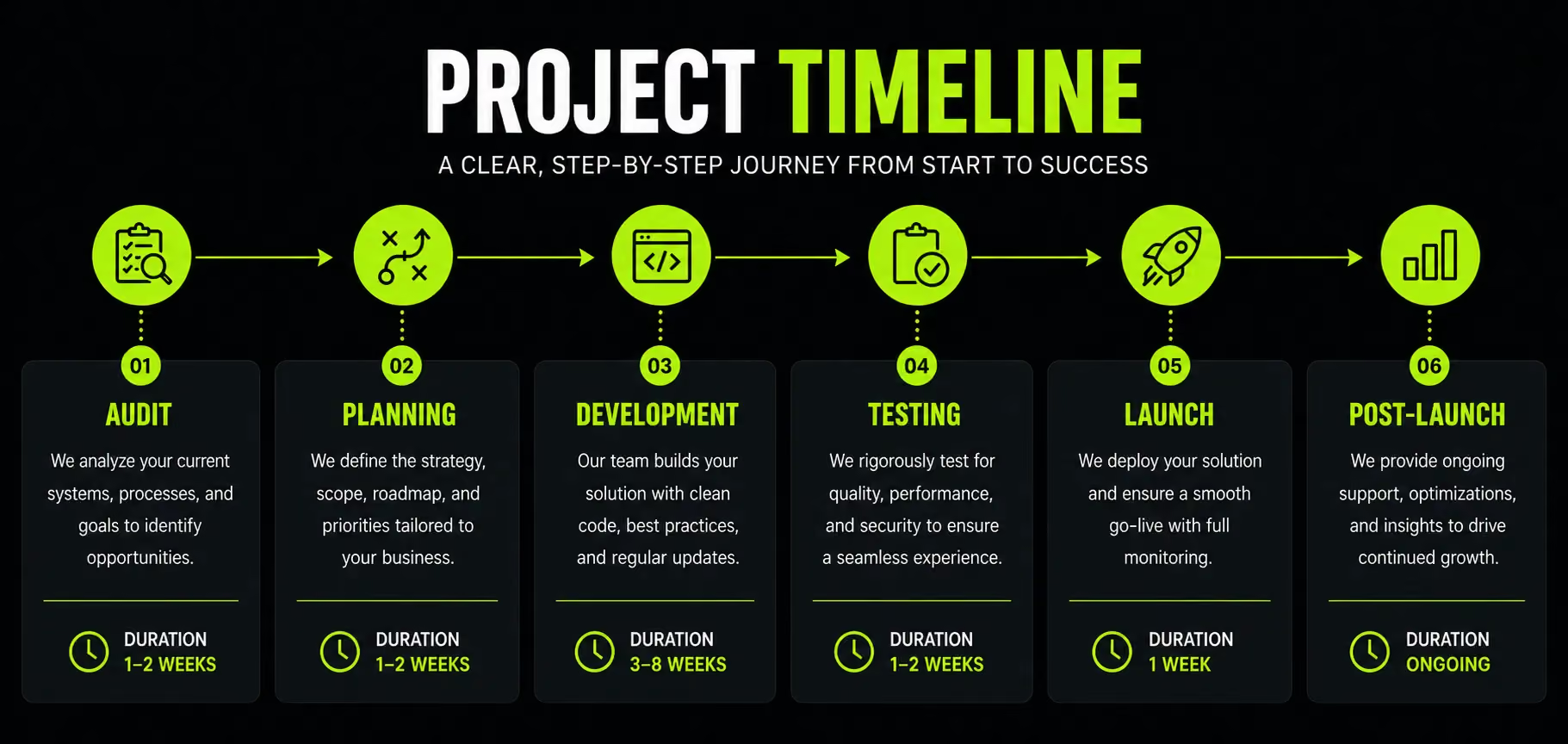
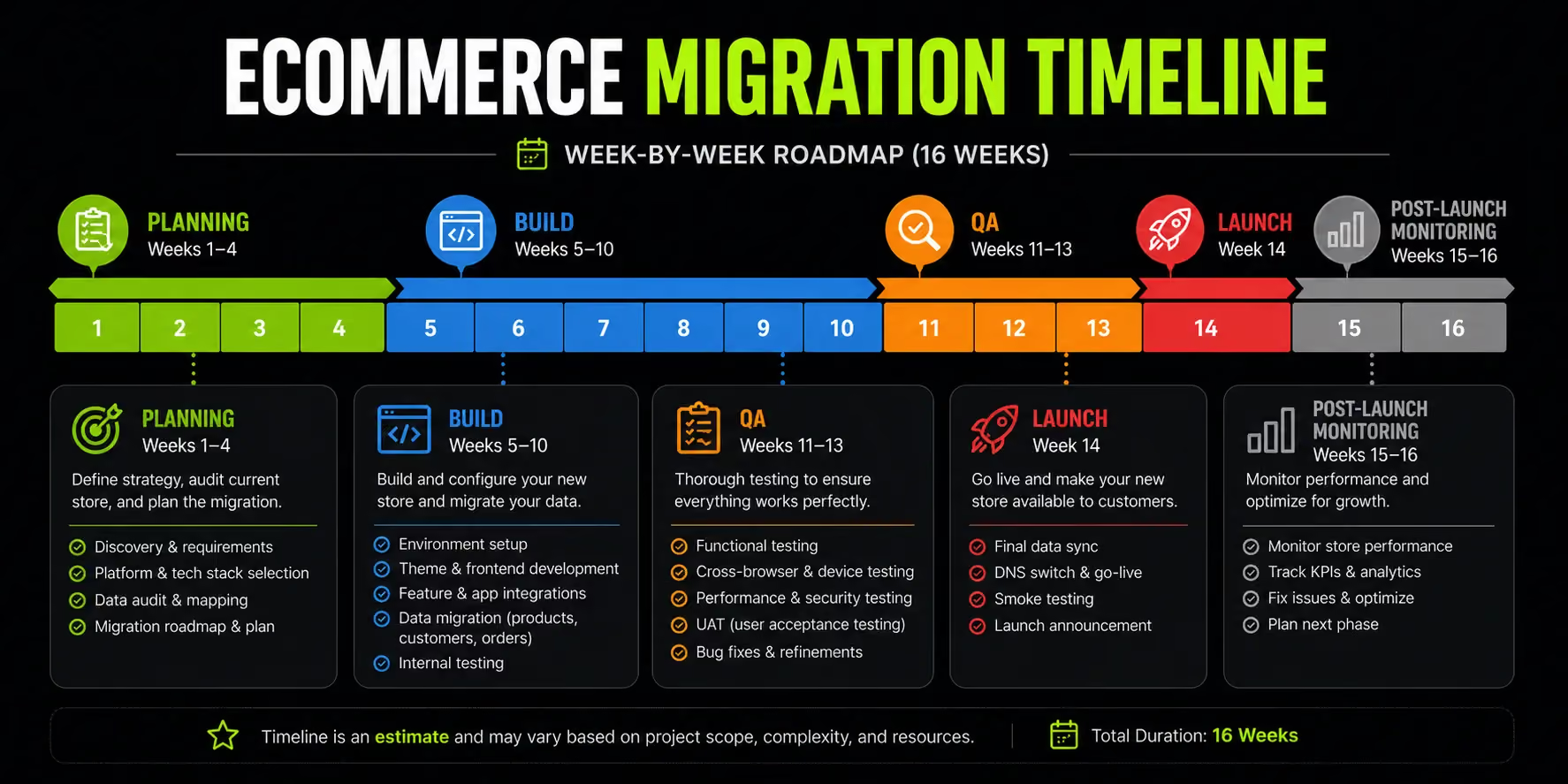
Timeline expectation: most mid-size ecommerce migrations take 8–16 weeks from planning to launch. Complex migrations, large catalogues, multiple integrations, custom features, Arabic localisation take longer. The phases that most commonly extend timelines are content preparation, client approvals, and discovering undocumented integrations mid-project.
Step 3 Choose the Right Platform
Platform selection deserves its own full guide, but the core evaluation criteria for UAE and Gulf market ecommerce stores are:
- Scalability: Can the platform handle your peak traffic without degraded performance?
- Total cost of ownership: Include platform fees, transaction fees, app costs, and agency maintenance over 3 years not just the launch cost
- Arabic / RTL support: Not all platforms handle RTL layouts equally. Shopify supports it with RTL-compatible themes and apps; Magento allows full custom RTL development; some platforms require significant workarounds
- Local payment support: Native or documented integrations with Telr, PayTabs, Checkout.com, Network International, Tabby, and Tamara
- VAT reporting: UAE's 5% VAT requires correct tax display, accurate invoice generation, and exportable tax reports
- PCI-DSS compliance: Any platform handling card data must meet PCI-DSS standards verify this specifically, not just assume it
Platforms commonly used in the UAE and Gulf market: Shopify Plus (most common for mid-market D2C), Magento 2 / Adobe Commerce (enterprise), WooCommerce (flexible, WordPress-native), VTEX (emerging enterprise option) and Salla (purpose-built for Saudi Arabia and GCC, Arabic-first).
Step 4 Assemble Your Migration Team
A migration is a cross-functional project. Treating it as purely a technical task is one of the most common failure modes.
Roles needed:
- Project manager: Owns the timeline, tracks dependencies, manages sign-off gates
- Ecommerce developer: Builds and configures the new platform, handles integrations and redirects
- SEO specialist: Owns the redirect map, meta data migration, schema re-implementation, and post-launch monitoring
- Content manager: Responsible for reviewing and approving migrated product data, descriptions, and imagery
- QA tester: Independent testing of all user-facing flows checkout, search, filtering, account creation, email triggers
If you are working with an external agency, define which of these roles the agency covers and which you own internally before the project starts, not after.
The Ecommerce Migration Checklist Phase by Phase
Structure your migration around these three checklists. Each item has a clear owner and a binary completion state. Nothing goes to the next phase until the current phase is fully checked off.
Pre-Migration Checklist
During Migration Checklist
Post-Migration Checklist
How to Preserve Your SEO During Ecommerce Platform Migration
SEO preservation gets one paragraph in most migration guides. It deserves significantly more. This is where migrations most commonly fail and where the damage is hardest to undo.

The Redirect Map Your Most Important Document
The redirect map is a spreadsheet that lists every URL on your current site alongside the corresponding URL it should redirect to on the new site.
Every URL. Not just the homepage and main categories, every product page, collection page, blog post, tag page, and static page.
How to build it:
- Crawl your current site with Screaming Frog (free up to 500 URLs; paid for larger sites) and export the full URL list
- Cross-reference with your Google Search Console to identify which URLs receive organic traffic prioritise these
- For each URL, identify the equivalent destination on the new platform
- Implement as 301 (permanent) redirects not 302 (temporary)
- After launch, verify every redirect using a bulk redirect checker (Screaming Frog can do this too)
A 301 redirect passes approximately 90–99% of link equity from the old URL to the new one. A missing redirect means a dead page and any backlinks or PageRank pointing to that URL are lost.
Preserve Your On-Page SEO
Meta titles and descriptions do not transfer automatically between platforms. They must be exported from your current platform, reviewed, and re-imported to the new one.
The risk of skipping this: your new platform auto-generates meta titles from product names and meta descriptions from the first sentence of the product description.
The result is thin, repetitive, and poorly optimised metadata across hundreds or thousands of pages and Google notices.
Export all SEO fields before migration, use a migration tool or SEO app to import them to the new platform, and audit a sample of 50–100 pages manually after migration to confirm accuracy.
Schema Markup and Structured Data
Schema markup the structured data that tells Google what your page contains almost never carries over between platforms automatically. It needs to be re-implemented intentionally.
For ecommerce, re-implement at minimum:
- Product schema: Name, price, availability, SKU, image, description
- AggregateRating schema: Star rating and review count shows directly in search results
- BreadcrumbList schema: Category hierarchy in the search snippet particularly valuable on mobile SERPs where space is limited
Validate your schema implementation with Google's Rich Results Test before and after migration.
Backlink Profile and Redirect Chains
Your inbound backlinks links from other websites pointing to your store represent years of accumulated authority.
They point to specific URLs. If those URLs disappear without redirects, the link equity they carry disappears with them.
The additional technical detail most guides miss: redirect chains. If URL A redirects to URL B, which redirects to URL C, the equity passed to the final destination is reduced at each hop.
After migration, audit for chains and collapse them wherever possible to direct 301 redirects.
Block Your Staging Environment
While the new site is being built, it must be invisible to search engines. A staging environment that Google can crawl will be indexed and if it is an incomplete or duplicate version of your current site, it creates a duplicate content problem that takes time to clean up.
Confirm your robots.txt on staging includes Disallow: / for all crawlers. Confirm it before development starts, not after.
Data Security During Ecommerce Migration
Data security is not optional and for UAE-based stores, it is not just an ethical consideration. It is a legal one.
How to Migrate Customer Data Safely
The UAE Personal Data Protection Law (PDPL), administered by the UAE's Telecommunications and Digital Government Regulatory Authority (TDRA), requires that personal data be processed and transferred with appropriate technical safeguards.
Any customer data name, email, address, purchase history is personal data under the PDPL.
Practically, this means:
- Customer data must be encrypted in transit using TLS 1.2 or higher
- Do not migrate customer records via plain CSV files left in publicly accessible folders
- If using a third-party migration tool, verify their data handling and security certifications before granting access to your customer database
For stores with customers based in EU countries, GDPR applies regardless of where your store is located. Ensure your data transfer complies with both frameworks if relevant.
Payment Data What You Can and Can't Migrate
PCI-DSS (Payment Card Industry Data Security Standard) compliance prohibits the storage of raw card data.
This means you cannot migrate actual card numbers from one platform to another and no legitimate migration tool will offer to do this.
Tokenized payment data is a different matter. If your current payment gateway tokenizes card data (storing a reference token rather than the card number), check whether the gateway can transfer those tokens to a new provider.
Some gateways (Stripe, Braintree) support token portability; others do not. Where token transfer is not possible, customers will need to re-enter their payment information.
Communicate this proactively and clearly do not let them discover it at checkout.
Secure Your Backup Before Anything Else
Before any migration activity begins, take a complete backup of your current store. This includes the full database and all media assets.
Store the backup in at least two locations: one cloud-based (AWS S3, Google Cloud Storage) and one local.
Then test the restore process. A backup that has never been tested is not a backup, it is a false sense of security.
Run a restore on a test environment and confirm the data is intact and functional before proceeding with migration.
Going Live Managing the Cutover
The go-live process is the highest-risk point of any migration. A well-planned cutover is methodical, timed deliberately and has a clear rollback path.
Staging vs. Production Launch
Never build and launch directly to your production environment. Every stage of the migration development, integration, QA, content review should happen in a staging environment that is invisible to the public and blocked from search engines.
Before switching DNS to the new site, run a direct performance comparison: test the staging version of the new platform against the live old site on the same metrics (load time, Core Web Vitals, checkout flow completion). If the new site underperforms, you need to know before customers do.
DNS Cutover Strategy
DNS propagation: the process of updating your domain's nameservers across global networks is not instantaneous.
It can take anywhere from a few minutes to 48 hours depending on your registrar, the TTL settings, and the DNS infrastructure involved.
To control this:
- Lower your DNS TTL to 300 seconds (5 minutes) at least 48 hours before planned go-live. This reduces the propagation window when you actually switch
- Schedule the DNS cutover during your lowest-traffic window typically a weekday between 10pm and 2am in your primary market's timezone
- Keep your old hosting environment live and accessible for at least 2 weeks after the cutover. If something critical breaks on the new site, you need the ability to roll back without rebuilding the old environment from scratch
Communicating the Migration to Customers
Most migrations can be executed with near-zero visible disruption. If yours requires a maintenance window, communicate it:
- Send an email to your customer base 24–48 hours before any planned downtime window
- Post an update on your social channels
- Display a simple banner on-site during the cutover period: "We're upgrading your experience. Back shortly."
If customer accounts or payment information will change in any way such as customers needing to re-enter saved card details, communicate this before launch, not at the moment of checkout.
Common Ecommerce Migration Mistakes (And How to Avoid Them)
These are the failures that appear repeatedly. Each one is preventable.
Skipping the redirect map. The most common cause of permanent SEO damage after a migration. There is no workaround and no quick fix once the old URLs are gone. Build the redirect map before development starts.
Migrating dirty data. Your current platform's database has accumulated years of duplicates, inactive accounts, orphaned images, and discontinued products. Migrating this data as-is transfers the mess to the new platform.
Clean before you migrate, remove duplicate products, archive inactive customers, and delete media assets that are no longer in use.
Not testing payment flows in staging. Checkout failures on launch day are not minor bugs. They destroy trust and lose real sales.
Every payment method, every gateway, every edge case (partial refund, declined card, 3D Secure prompt) needs to be tested before go-live, not after.
Going live during peak season. In the UAE and Gulf, this means no migrations during Ramadan, Eid, White Friday, or any period where an active sales campaign is running.
The risk of disruption during a high-revenue window is not justifiable regardless of the commercial pressure to launch.
Forgetting third-party scripts. Abandoned cart tools, live chat widgets, loyalty and referral apps, and heatmap trackers all need to be reinstalled and reconfigured on the new platform.
They do not transfer with product data. Create a list of every script currently running on your store and verify each one post-launch.
Testing only on desktop. Over 70% of ecommerce traffic in the UAE comes from mobile devices. Every user flow browsing, filtering, product pages, checkout must be tested on actual mobile hardware, not just browser emulation.
Emulators do not replicate real device performance, real network conditions, or real touch interaction patterns.
No post-launch monitoring plan. Crawl errors, broken redirects, and keyword ranking drops in the first two to four weeks after migration are normal and manageable if you catch them fast.
Without a structured monitoring plan, they compound silently until they become serious problems.
How Suplex Handles Ecommerce Migrations
Suplex is a Dubai-based ecommerce design and development studio working with D2C brands across the UAE, GCC, India, and the US. Migrations are a regular part of the work, particularly brands moving from WooCommerce or Magento to Shopify, and custom builds moving to a managed platform for reduced overhead and better mobile performance.

The approach is structured in phases. The audit phase documents every data asset, integration dependency, and SEO element on the current platform before any development work begins.
Architecture and development happen in a staging environment with UAT (user acceptance testing) gates before anything touches production. Go-live is timed and planned, not rushed.
The focus is on performance outcomes, not just a technical lift-and-shift. A migration that moves a slow, poorly optimised store to a new platform without addressing the underlying speed, UX and conversion issues does not improve business results.
The goal is a store that performs measurably better after launch than it did before.
Recent ecommerce work includes Shopify builds and UX redesigns for brands in health and wellness (Miduty), hospitality (Kimi Cafe, Dubai), lifestyle, and fashion across the UAE and wider Gulf region.
If you are evaluating a platform move, the right starting point is an audit of your current store. Talk to the Suplex team here.
Frequently Asked Questions
Q1: How long does an ecommerce platform migration take?
Most migrations for mid-size stores take 8–16 weeks from planning to launch. Complex migrations, large product catalogues, custom integrations, multiple storefronts, or Arabic localisation can run 4–6 months.
The phases that most commonly extend timelines are content preparation, client approvals, and undiscovered third-party integrations surfacing mid-project.
Q2: Will migrating my ecommerce platform affect my Google rankings?
It can, but it does not have to. Implementing 301 redirects for every URL, preserving all meta data, re-implementing schema markup, and submitting a new sitemap to Google Search Console gives your rankings the best chance of recovering within 4–8 weeks.
Skipping the redirect map is the single most common cause of permanent SEO loss after a migration.
Q3: What data do I need to migrate from my ecommerce platform?
At minimum: product catalogue with all variants and images, customer accounts, order history, active discount codes, gift card balances, blog content, and static pages.
Export all SEO metadata title tags, meta descriptions, and URL slugs before touching anything else. These are the assets most commonly lost when a migration is rushed.
Q4: Can I migrate my ecommerce store without any downtime? Near-zero downtime is achievable. Build and test fully on a staging environment, lower your DNS TTL to 300 seconds 48 hours before go-live, time the DNS cutover during your lowest-traffic window and keep the old server live for at least two weeks as a fallback.
Most users will not experience any visible disruption if this process is followed correctly.
Q5: How much does ecommerce platform migration cost?
A self-managed migration using tools like LitExtension or Cart2Cart costs $200–$1,500 and suits small stores with simple requirements.
Hiring an agency runs $5,000–$50,000 or more depending on store complexity, custom integrations, and design requirements. For UAE and GCC stores, factor in the additional cost of Arabic localisation, local payment gateway setup, and VAT configuration these are not included in generic migration tool pricing.
Q6: Should I hire an agency or do the migration myself?
For small stores with fewer than 500 products and no custom integrations, a self-service migration tool is often sufficient. For mid-to-large stores particularly those with strong SEO equity, complex integrations, or Arabic language requirements an experienced agency reduces risk significantly.
The cost of a failed migration (traffic loss, data corruption, checkout failures, customer trust damage) almost always exceeds the agency fee.
Q7: What is the difference between ecommerce migration and replatforming?
In practice, they mean the same thing. Replatforming emphasises the strategic decision to change platforms. Migration refers to the technical process of moving data, functionality, and configuration from one system to another. Both terms describe the same project moving your ecommerce store from one platform to a different one.
Hi, I’m Rishabh Jain
I believe great digital experiences have the power to shape perception, build trust, and move businesses forward. That belief led me to found Suplex Design Studio, a global digital design and development studio helping FMCG and D2C brands build websites and digital experiences that are strategic, thoughtful, and commercially meaningful.
I started Suplex at 25 with a clear intent, to create digital experiences that look appealing, work seamlessly, and help D2C businesses grow. By 28, the studio had scaled globally, guided by a strong foundation in integrated design that I developed during my academic journey in London, where I was honoured with the Dean’s Award.
Over the years, I’ve had the opportunity to work with 100+ brands, from Fortune 500 organisations to family-run businesses, helping them build websites, e-commerce experiences, and digital products that create clarity, credibility, and long-term value.
Our work has been recognised internationally, including the Manifest Award (2024), the Clutch Global Award (2025), and features across platforms such as The Dieline, Packaging of the World, and the World Brand Design Society.
None of this would be possible without the people behind the work. I’m deeply grateful to the Suplex team, whose commitment, creativity, and attention to detail turn ideas into meaningful digital experiences every day.
At the heart of our work is a simple philosophy, digital design should be intentional, functional, and built to create real business value. That continues to guide everything we create at Suplex.






































Let’s Make It Happen
E-Commerce Success Stories
%201.avif)






.avif)

.avif)
Build Your D2C Business The Right Way
Build It With Suplex.


