11 Ecommerce Audit Checks That Could Be Costing You Sales
.avif)

11 Ecommerce Audit Checks That Could Be Costing You Sales
Most ecommerce stores lose revenue through problems they don't know exist. A slow product page, a broken redirect, a checkout that doesn't work on mobile, these issues cost you rankings and sales every day. An ecommerce website audit finds them before they compound.
According to Portent, a one-second delay in page load time can reduce conversions by up to 20%. Google's own data shows that 53% of mobile users abandon a site that takes longer than three seconds to load.
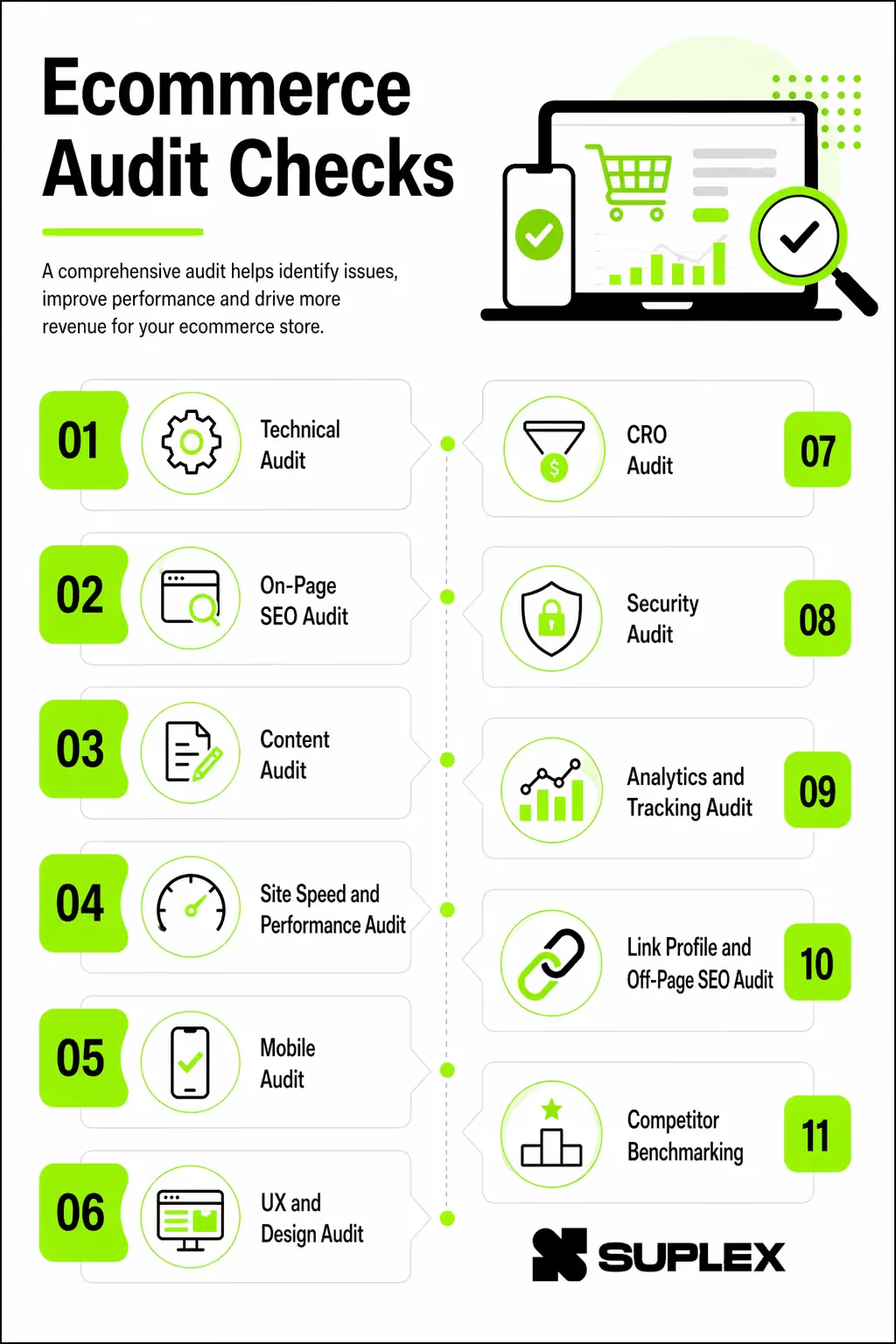
Speed is just one factor. An audit by Suplex Design covers 11 distinct areas: technical SEO, on-page SEO, content, site speed, mobile, UX, conversion rate optimisation (CRO), security, analytics, link profile and competitor benchmarking.
This checklist gives you a complete, repeatable process to audit your store, prioritise fixes and measure the impact. Bookmark this page and run through it quarterly.
What Is an Ecommerce Website Audit?
An audit is a structured review of your website to find anything that hurts performance from search visibility to revenue.
A general website audit looks at broad technical and content health. An ecommerce audit goes deeper. It covers product page SEO, checkout conversion, structured data for product listings, variant URL handling and revenue tracking.
The stakes are higher because every friction point directly affects sales.
Get Your Free Ecommerce Website Checklist – Download Now
How often should you audit?
- Monthly: Analytics review, Core Web Vitals, Google Search Console errors
- Quarterly: Full technical and on-page SEO audit
- Bi-annually: Content gaps, backlink profile, competitor benchmarking
- Annually: Full UX/CRO, security review, platform evaluation
- After major changes: Theme updates, migrations, URL structure changes
Tools You Need Before You Start
Having the right tools makes the audit faster and more accurate. Here is what you need across each category:
1. Technical Audit
Technical SEO is the foundation. If search engines can't crawl or index your pages correctly, everything else becomes irrelevant.
Crawlability and Indexability
Run a full crawl with Screaming Frog and cross-reference findings with Google Search Console. Your XML sitemap should be present, accurate and submitted to GSC. Your robots.txt file should not be accidentally blocking important pages.
This is a surprisingly common mistake on stores that have recently changed platforms or themes. Check GSC for crawl errors and resolve them, and look for orphan pages (pages with no internal links pointing to them) that search engines may never find.
URL Structure
Clean URLs improve both user experience and crawl efficiency. A URL like /mens-running-shoes/nike-air-zoom tells both users and search engines what the page is about. A URL like /product?id=4892 tells them nothing. Keep URLs lowercase with hyphens, avoid excessive length (under 100 characters where possible) and make sure faceted navigation URLs.
The filter combinations users create when browsing are canonicalized to the main category URL so you don't generate thousands of near-duplicate pages.
Canonicalization and Duplicate Content
Ecommerce sites are particularly vulnerable to duplicate content. The same product can appear under multiple categories, and product variants (different colours or sizes) often generate separate URLs with near-identical content.
Canonical tags should point paginated pages to the correct URL, www and non-www versions should resolve to one via a 301 redirect, and all HTTP pages should redirect to HTTPS. Variant pages should canonicalize to the primary product URL unless the variant genuinely warrants its own page.
Redirect Management
A redirect chain happens when A redirects to B, which redirects to C. Each hop adds latency and dilutes link equity.
Audit your redirects to eliminate chains and loops, ensure deleted product pages redirect to the closest live equivalent or category page, and clear out any soft 404s that GSC is flagging.
Structured Data / Schema
Product schema helps Google display rich results, star ratings, price, and stock availability directly in the search results. This can meaningfully improve click-through rates without changing your rankings.
At minimum, every product page should have a schema covering name, price, currency, availability, and review data. Add BreadcrumbList schema across product and category pages, Organisation schema on the homepage.
FAQPage schema where relevant. Validate everything using Google's Rich Results Test.
Site Architecture
Your site structure determines how link equity flows and how quickly users find products. The ideal hierarchy is Home > Category > Subcategory > Product, with no important page sitting more than three clicks from the homepage.
A well-defined internal linking strategy ensures authority flows to the pages that need it most, your high-converting category and product pages.
2. On-Page SEO Audit
On-page SEO ensures every page is optimised to rank for relevant keywords and satisfy search intent.
Title Tags and Meta Descriptions
Every page needs a unique title tag with the primary keyword near the start, kept between 50–60 characters. Duplicate title tags are one of the most common on-page issues on large ecommerce sites; a quick crawl with Screaming Frog will surface them immediately.
Meta descriptions don't directly affect rankings, but a well-written one improves CTR from search results. Keep them between 140–160 characters, include the primary keyword, and end with a clear reason to click.
Product Page SEO
Product pages need individual attention. Don't rely on manufacturer copy. Google sees it on dozens of other sites and gives it little weight.
Write unique descriptions for every product, lead with the primary keyword in the title tag, H1, and opening paragraph and make sure all product images have descriptive alt text that includes relevant keywords.
Review data should be marked up with schema, and related product links help distribute internal equity across the catalogue.

Category Page SEO
Category pages are often the highest-value pages on an ecommerce site, they rank for broad, high-volume keywords like "women's running shoes" or "office desks."
Yet many stores leave them with no copy at all. Add at least 100–150 words of unique introductory content to each category page, with the primary keyword in the H1 and opening paragraph.
Make sure faceted navigation isn't silently generating hundreds of duplicate category pages in the background.
Image Optimisation
Images are typically the biggest contributor to slow load times. Every product image should have descriptive alt text, be compressed and served in WebP format and have a descriptive filename (/black-leather-chelsea-boots.webp not /IMG_4832.jpg).
Enable lazy loading for images below the fold. There is no reason to load a product's fourth image on page load if the user hasn't scrolled there yet.
Internal Linking
Breadcrumbs on all product and category pages, related product links within product page content and blog posts that link to relevant products these three habits significantly improve how authority flows through your site and how easily users navigate between sections.
3. Content Audit
Content quality directly affects how both users and search engines evaluate your store. Thin, duplicate, or outdated content suppresses rankings and fails to convert.
Homepage and Product Descriptions
Your homepage should communicate your value proposition above the fold of what you sell, who it's for and why someone should buy from you rather than a competitor. Trust signals (reviews, customer count, certifications, press mentions) should be visible without scrolling.
Product descriptions are where many stores lose both SEO value and conversions. Generic manufacturer copy is a direct cause of duplicate content issues and features-only copy that skips the benefits rarely convinces anyone to buy.
Write unique descriptions for every product, lead with benefits, and include practical detail like size guides, materials and care instructions. If common questions keep coming up in customer service, answer them on the product page that content also improves SEO.
Blog and Content Hub
A blog connected to your product catalogue lets you capture informational search traffic and funnel it toward conversions.
Target keywords your audience searches before they are ready to buy "best running shoes for flat feet," "how to measure for a dining table" and close each post with a CTA linking to a relevant product or category.
Regularly audit your existing blog content: posts that rank for nothing and drive no traffic should be refreshed or removed. Thin content that adds no real value actively drags down your domain's content quality signals.
Content Gaps
Run a keyword gap analysis in Ahrefs or SEMrush against your top three competitors to find keywords they rank for that you don't.
FAQ pages, buying guides and comparison content are common gaps for ecommerce stores. User-generated content reviews and Q&A sections on product pages also contribute to content depth and build trust with new visitors.
4. Site Speed and Performance Audit
Site speed is both a ranking factor and a conversion factor. Slow sites rank lower and convert worse.
Core Web Vitals
Google uses Core Web Vitals as a ranking signal. Check your scores in the Core Web Vitals report inside Google Search Console.
Page Speed and Scripts
Serve all images in WebP or AVIF format, enable browser caching for static assets, minify CSS, JavaScript and HTML and use a CDN to reduce latency for users in different regions.
Your Time to First Byte (TTFB) should be under 200ms, anything above that points to server or hosting issues worth investigating.
Third-party scripts deserve their own audit. Every live chat widget, popup tool, affiliate tracker, and ad pixel adds load time.
Compile a full list of active scripts, remove anything unused and defer non-critical scripts so they don't block the initial page render.
5. Mobile Audit
Mobile accounts for over 60% of global ecommerce traffic (Statista, 2024). A desktop-only optimisation mindset will cost you.
Test your store on both iOS and Android across multiple screen sizes. Your site should be fully responsive with no broken layouts, pass Google's Mobile-Friendly
Test and have no horizontal scrolling at any breakpoint. Tap targets buttons, links, form fields should be at least 48x48px so users don't mis-tap on small screens. Body text should be at least 16px to avoid users having to zoom in.
Popups and banners that block core content on mobile directly cause bounce rate spikes, and mobile checkout should be streamlined with minimal steps, large input fields, and autofill enabled.

6. UX and Design Audit
Poor user experience drives users away before they have a chance to convert. This section covers navigation, product page design, trust signals, and accessibility.
Navigation and Product Pages
Navigation should let users reach any product category in one or two clicks. A cluttered mega-menu with 40 items is just as bad as a menu with nothing in it.
Pair clear menu structure with a prominent search bar that has autocomplete many high-intent users go straight to search rather than browse. Breadcrumbs should appear on all category and product pages.
On the product page itself, the Add to Cart button should be visible above the fold without scrolling.
Trust and Accessibility
Trust signals need to be visible. An active SSL certificate, payment provider logos, verified customer reviews with ratings, a clear return policy and accessible contact information should all be present on product and checkout pages.
Users who can't quickly establish that your store is legitimate will leave.
On accessibility: text and background colour combinations should meet WCAG 2.1 AA contrast ratio (minimum 4.5:1), all images need meaningful alt text, forms must be keyboard-navigable, and ARIA labels should be applied to interactive elements that lack visible text.
Accessibility is both a legal requirement in many markets and good practice for reaching the widest possible audience.
7. CRO Audit
Your conversion rate audit examines every step of the buying journey, from the homepage to completed purchase.
Homepage, Product Pages & Checkout
Above the fold on your homepage, users should see a clear CTA, visible social proof and any current promotions.
Urgency and scarcity elements, low stock warnings, sale countdowns should be genuine. Fabricated urgency erodes trust the moment a user notices it.
On product pages, customer reviews should sit near the Add to Cart button. Upsell and cross-sell sections should show genuinely related products.
For high-value products, live chat availability for pre-purchase questions can meaningfully lift conversions.
Checkout abandonment averages around 70% across ecommerce (Baymard Institute). Guest checkout should always be available forcing account creation before purchase is one of the most reliably studied causes of abandonment.
Limit the checkout to one or two pages, show a progress indicator and offer multiple payment methods including card, PayPal, Apple Pay and Buy Now Pay Later.
Have a cart abandonment email sequence running, and consider an exit-intent popup on the cart page with a discount or free shipping offer to recover users who were about to leave.
Post-Purchase
The order confirmation email should arrive immediately with full order details. The thank-you page is an underused opportunity.
It is the highest-engagement moment in the customer journey and worth using for a next CTA: related products, a referral offer, or a prompt to follow on social media.
Make the returns process easy to find and easy to initiate. A complicated returns process directly affects review scores and repeat purchase rates.
8. Security Audit
A security breach damages your reputation and can result in significant regulatory fines. This is especially true for stores processing payments.
Start with the basics: confirm your SSL certificate is valid at least 30 days before expiry, and that every page loads over HTTPS with no mixed content warnings.
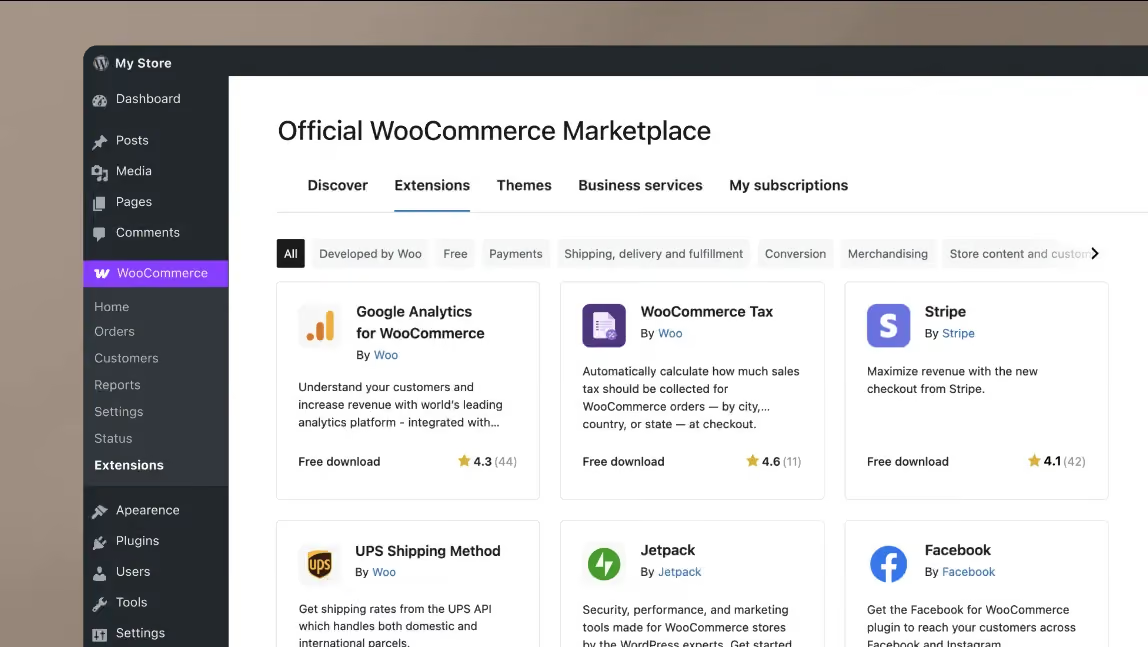
Then check your platform. Your ecommerce software whether Shopify, WooCommerce or Magento should be on the latest version and every plugin or extension should be up to date. Outdated plugins are one of the most common entry points for attacks on ecommerce sites.
On the admin side, two-factor authentication should be enabled on all accounts, automated daily backups should be in place and tested and active malware scanning should be running.
From a compliance standpoint, confirm your store meets PCI-DSS requirements for payment processing, your GDPR cookie consent banner is functioning correctly and a Web Application Firewall (WAF) is active. A WAF blocks malicious traffic before it reaches your server.
9. Analytics and Tracking Audit
If your tracking is broken, every decision you make is built on bad data. Tracking issues are more common than most store owners realise a theme update or new plugin can silently break conversion tracking overnight.
Start with the foundations: GA4 should be installed without duplicate tracking code, managed through Google Tag Manager for centralised control.
Enhanced ecommerce tracking must be enabled in GA4 so you can see add-to-cart events, checkout steps, and completed purchases not just sessions and pageviews.
Google Search Console should be connected and verified at the domain property level.
From there, check that purchase and lead conversion events are firing correctly in GA4's debug view. Heatmaps should be active on your highest-traffic pages at minimum the homepage, your top product pages, and the checkout.
If you run paid social, verify your Meta Pixel via Meta Events Manager. Your checkout funnel should be visualised so you can see exactly which step users are abandoning.
Also confirm that 404 errors are tracked as events, internal site search queries are captured, and your own team's traffic is filtered out of GA4 so internal visits don't skew your data.
10. Link Profile and Off-Page SEO Audit
Your backlink profile influences how much authority Google assigns to your domain, which directly affects how your product and category pages rank.
Start by reviewing your total backlink count and whether it is growing, flat, or declining over time. Benchmark your Domain Rating (Ahrefs) or Domain Authority (Moz) against your top competitors to understand where you stand.
Identify any toxic or spammy links and submit a disavow file via Google Search Console. Check that your anchor text distribution is natural; a high proportion of exact-match anchors can look manipulative to Google.
Tools like Ahrefs can surface unlinked brand mentions, which are often straightforward wins for link acquisition.
Finally, check NAP consistency across business directories and make sure your Google Business Profile is claimed, fully completed, and actively managed.
11. Competitor Benchmarking
Auditing your own site in isolation gives you half the picture. To understand what is actually required to rank and convert in your category, you need to benchmark against the stores already winning.
Identify your top three to five competitors, those ranking for the same product keywords you target. Compare Domain Rating, backlink count, and estimated organic traffic using Ahrefs or SEMrush.
Run a content gap analysis to find keywords they rank for that you don't. Test their site speed on PageSpeed Insights and compare it against yours.
Spend time on their product pages and note how they handle pricing, CTAs, image quality, and review volume. The gaps you find become your roadmap.
Useful tools: SEMrush, SimilarWeb, Ahrefs.
How Suplex Approaches Ecommerce Audits
Suplex is a Dubai-based ecommerce studio that builds and audits D2C stores across Shopify, Webflow and custom web platforms.
The team works across the UAE and internationally, with clients in food and beverage, fashion, health and wellness and hospitality.
The way Suplex runs audits is deliberately cross-disciplinary. Technical performance, UX, conversion paths and brand consistency are reviewed together, not by separate teams handing off isolated findings.
In practice, this matters because problems are rarely contained to one layer. A low add-to-cart rate might be a product description issue, an image quality issue, a trust signal issue, or a price anchoring issue. Diagnosing it correctly requires looking at all of them.
Every audit Suplex delivers is structured as a prioritised roadmap with specific actions, not a document listing everything that could theoretically be improved. The goal is a clear answer to one question: what do you fix first, and what impact should you expect?
If your store is live and you want to understand what's actually limiting your performance, you can get in touch with the Suplex team here.
Frequently Asked Questions About Ecommerce Website Audits
How often should I audit my ecommerce website?
Run a full ecommerce audit at minimum quarterly, or after any major platform update, seasonal campaign, or algorithm update. Smaller technical checks (crawl errors, page speed, broken links) should be monthly.
For high-traffic stores doing over AED 1M per year in revenue, a bi-monthly audit cycle is worth the investment.
What is the difference between an SEO audit and an ecommerce audit?
An SEO audit focuses on organic search visibility: keywords, technical indexation, backlinks, and on-page signals. An ecommerce audit is broader. It covers SEO, but also UX, conversion rate optimisation, trust signals, analytics tracking, and payment flow. SEO gets you traffic. A full ecommerce audit ensures that traffic actually converts.
What tools do I need to run an ecommerce website audit?
Core tools: Google Search Console (indexation and keyword data), GA4 (traffic and conversion tracking), Screaming Frog (technical crawl), Google PageSpeed Insights (Core Web Vitals), and Hotjar or Microsoft Clarity (UX heatmaps and session recordings). Paid tools like Ahrefs or SEMrush add competitive keyword data and backlink analysis.
How long does an ecommerce website audit take?
A basic technical and SEO audit takes 4-8 hours for a small store. A comprehensive audit covering all six dimensions (technical, SEO, UX, content, CRO, and trust) typically takes 2-5 business days, depending on catalogue size and analysis depth.
What are the most common ecommerce website problems found in audits?
The most frequently found issues are: slow page load speed on mobile, duplicate product descriptions, misconfigured GA4 ecommerce tracking, broken or redirect-heavy internal links, missing review schema markup, non-optimised checkout flows, and absent or unclear returns policies.
In UAE-based stores, missing Arabic content and unsupported local payment methods are also consistently found.
Can I do an ecommerce audit myself or do I need an agency?
You can run a basic audit in-house using free tools. But identifying the root cause of conversion drop-offs, fixing technical SEO issues, and restructuring UX flows generally requires specialist input.
An experienced ecommerce agency will also benchmark your metrics against industry standards and competitors. That context is something self-audits regularly miss.
Does an ecommerce audit include checking my Google Ads and Meta campaigns?
No. Paid media is a separate audit. However, a comprehensive ecommerce audit will verify that your tracking pixels (Meta, Google Ads, TikTok) are correctly installed and firing, since attribution accuracy directly affects how your campaign data is reported and how your budgets are optimised.
Hi, I’m Rishabh Jain
I believe great digital experiences have the power to shape perception, build trust, and move businesses forward. That belief led me to found Suplex Design Studio, a global digital design and development studio helping FMCG and D2C brands build websites and digital experiences that are strategic, thoughtful, and commercially meaningful.
I started Suplex at 25 with a clear intent, to create digital experiences that look appealing, work seamlessly, and help D2C businesses grow. By 28, the studio had scaled globally, guided by a strong foundation in integrated design that I developed during my academic journey in London, where I was honoured with the Dean’s Award.
Over the years, I’ve had the opportunity to work with 100+ brands, from Fortune 500 organisations to family-run businesses, helping them build websites, e-commerce experiences, and digital products that create clarity, credibility, and long-term value.
Our work has been recognised internationally, including the Manifest Award (2024), the Clutch Global Award (2025), and features across platforms such as The Dieline, Packaging of the World, and the World Brand Design Society.
None of this would be possible without the people behind the work. I’m deeply grateful to the Suplex team, whose commitment, creativity, and attention to detail turn ideas into meaningful digital experiences every day.
At the heart of our work is a simple philosophy, digital design should be intentional, functional, and built to create real business value. That continues to guide everything we create at Suplex.





































Let’s Make It Happen
E-Commerce Success Stories

%201.avif)






.avif)

.avif)
Build Your D2C Business The Right Way
Build It With Suplex.


