How to Redesign an Ecommerce Website Without Losing Traffic or Sales
.avif)

How to Redesign an Ecommerce Website Without Losing Traffic or Sales
A poorly executed ecommerce redesign can wipe out years of SEO progress in days. Done right, the same process can double your conversion rate and permanently improve revenue per visitor.
The difference is not budget or ambition, it is process. Redesigning an ecommerce website means auditing what you have, defining measurable goals, rebuilding your structure with SEO protection built in.
And launching with a testing protocol that catches problems before your customers do. This guide walks through every step in the order it needs to happen.
When Should You Redesign Your Ecommerce Website?
Not every underperforming store needs a full redesign. Before you commit time and budget, you need to know whether your problem is structural or cosmetic. The answer changes everything about how you approach the work.
Signs Your Ecommerce Site Needs a Redesign
These are the data signals that indicate a redesign not just a visual refresh is warranted:
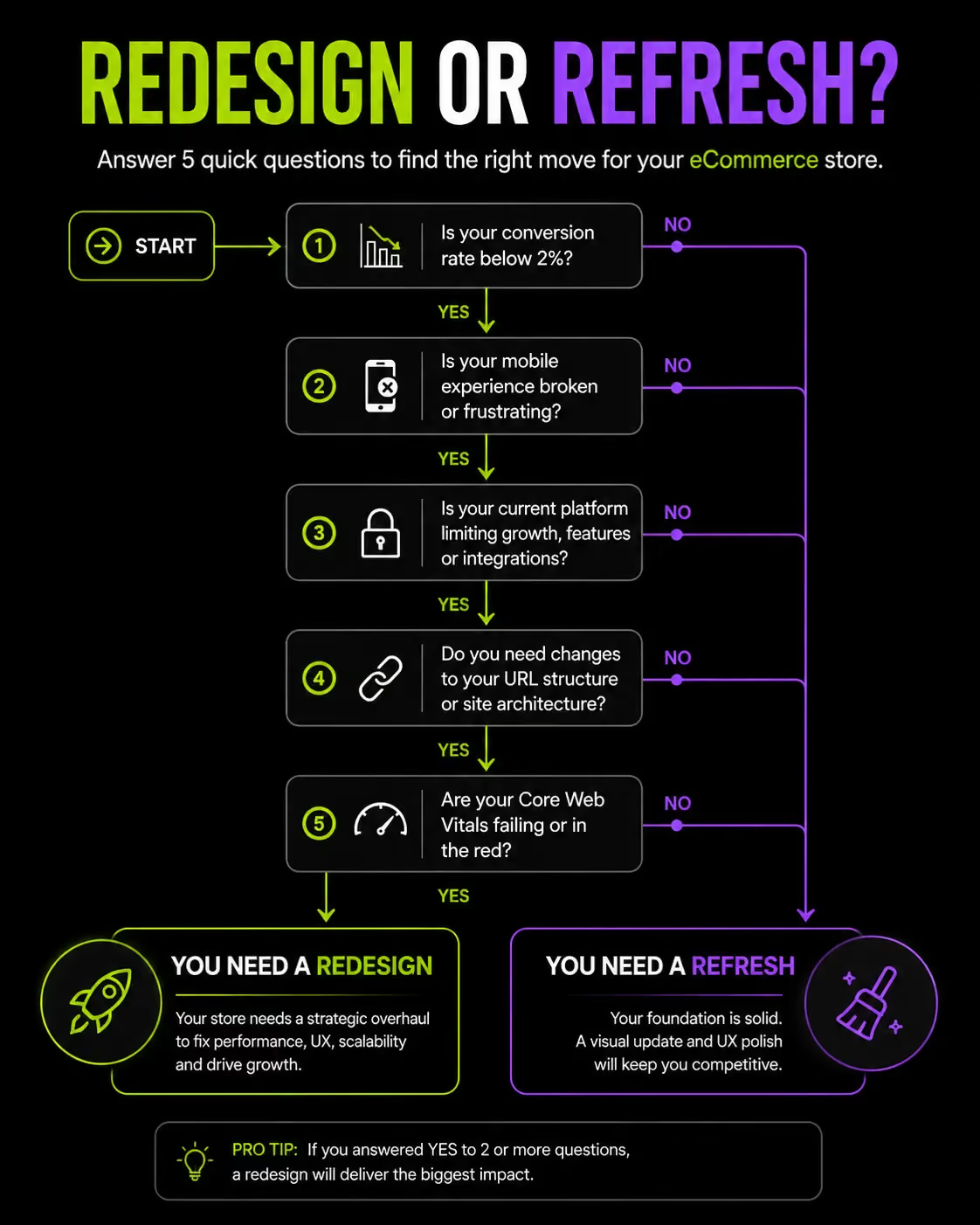
- Conversion rate below 2%: The ecommerce industry average is 2 – 4%. If you are consistently below that, the problem is likely structural site architecture, checkout flow, or UX not your marketing.
- Bounce rate above 55 – 60%: Visitors are landing and leaving without engaging. This points to relevance, page speed, or first-impression UX failure.
- Broken or clunky mobile experience: Over 70% of ecommerce traffic in the Gulf region comes from mobile devices. A desktop-first site in this market is a revenue leak.
- Core Web Vitals failing: If your Largest Contentful Paint (LCP) is above 2.5 seconds, Google is already penalising your rankings. Users are abandoning before they see your product.
- Platform limitations blocking growth: Your current platform cannot support the integrations, catalog size, or checkout customisation you need. You are building workarounds instead of building your business.
- Checkout abandonment above 70%: The global average is around 70%. If you are above it, your checkout flow has friction that a redesign can directly fix.
- Visual design is dated relative to competitors: Design credibility affects trust. If your store looks 2015 next to a competitor that launched in 2023, some visitors will not complete a purchase regardless of product quality.
Redesign vs. Refresh: Know the Difference
Before you scope work or brief an agency, be precise about what you actually need.
A refresh is a coat of paint. A redesign is structural work. If your conversion rate is 0.8% and your checkout abandonment is 78%, you need a redesign. If your store converts well but looks like it was built in 2017, a refresh is the proportionate response.
Step 1: Audit Your Current Ecommerce Website
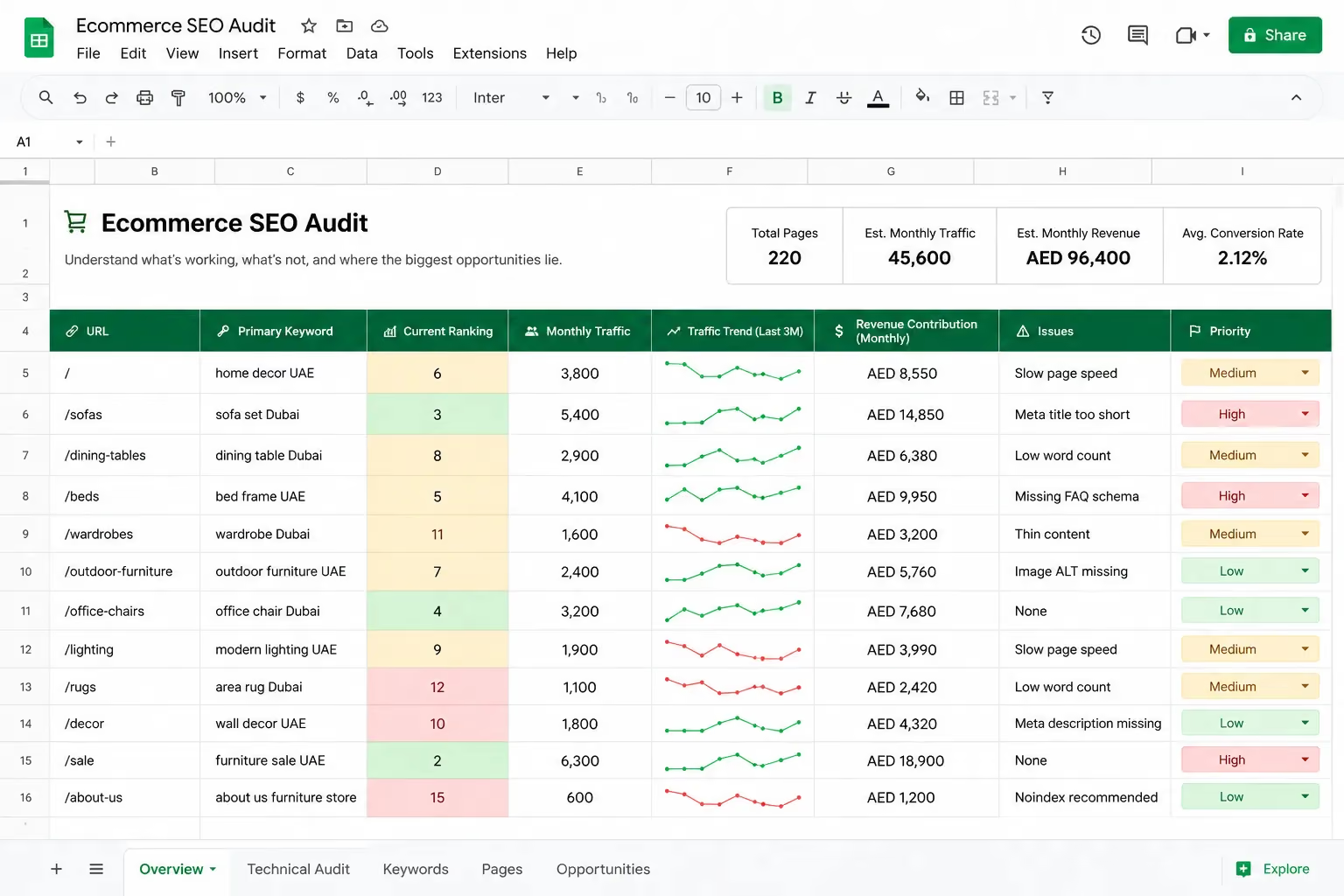
Skipping the audit is the most expensive mistake in a redesign. You cannot protect what you have not measured and you cannot improve what you do not understand. Before a single wireframe is drawn, your current site needs to be documented in full.
What to Include in Your Ecommerce Audit
Traffic data: Break down your traffic sources in GA4 organic, direct, referral, paid. Identify which channels are working and which are not. Understand seasonality before you plan your launch timing.
Top-performing pages by traffic and revenue: These are the pages you cannot afford to break. Every high-traffic category page, top-converting product page and high-ranking blog post needs to be documented, preserved, and redesigned with extra care.
Keyword rankings: Export your full keyword ranking report from Google Search Console before touching anything. This is your baseline. Any keyword you are ranking for on page one is an asset. Losing those rankings because of URL changes or missing redirects is avoidable but only if you know what you had.
Technical issues: Run a full crawl with Screaming Frog or Sitebulb. Identify broken links, crawl errors, duplicate content, missing meta tags, and redirect chains. Fix what you can before the redesign begins and do not carry technical debt into a new build.
UX behaviour data: Heatmaps and session recordings from Hotjar or Microsoft Clarity show you what users actually do on your site. Where do they click? Where do they stop scrolling? Where do they abandon checkout? This data should directly inform your redesign decisions.
Checkout funnel drop-off: Map every step in your current checkout and identify where users leave. If 40% of users abandon at the payment step, that is a design and trust signal problem not a marketing problem.
Tools to Use for Your Ecommerce Audit
At Suplex, every redesign engagement starts with this audit. It consistently surfaces issues that clients did not know existed and identifies the pages and rankings that need to be protected before the rebuild begins.
Step 2: Define Clear Goals and KPIs
A redesign without defined goals produces a site that looks different but performs the same. Every design decision layout, navigation, checkout flow needs to be anchored to a measurable outcome. "We want a better website" is not a goal.
Setting Goals That Guide Every Design Decision
Conversion rate gets most of the attention, but it is not always the best primary metric. Revenue per visitor (RPV) is more useful.
It accounts for both conversion rate and average order value, which means a redesign that improves both shows up more clearly in the numbers.
The KPIs worth tracking through a redesign:
- Revenue per visitor (RPV): Total revenue divided by total visitors. Your primary indicator of commercial performance.
- Average Order Value (AOV): Improved through upsells, bundles, and checkout design.
- Cart abandonment rate: A direct measure of checkout friction.
- Mobile conversion rate: Track separately from desktop the gap tells you where your biggest opportunity is.
- Organic keyword rankings: Protect, not just maintain. A good redesign should create opportunities for better rankings, not just preserve existing ones.
Align Business Goals With Design Outcomes
Abstract goals produce vague design briefs. Specific goals produce specific design decisions. Here is how to connect them:
When a KPI is attached to every major design decision, you can evaluate those decisions objectively during QA and post-launch review. "Does this checkout layout reduce abandonment?" is a testable question. "Does this look good?" is not.
Step 3: Research Your Target Audience and Competitors
Design for your actual customer, not a hypothetical one. In the UAE and Gulf market, this step has more variables than most global guides account for.
Mapping Your Customer Journey
Start with your analytics. Where do most customers enter your site? What path do they take from a product page to checkout? Where do they leave? This tells you which parts of the experience are working and which are creating friction.
For UAE and Gulf markets, buyer personas need to reflect regional behaviour:
- Language preference: A significant portion of UAE consumers prefer Arabic-language browsing. If your current site is English-only, your redesign is an opportunity to capture this audience.
- Payment habits: COD (cash on delivery) remains common in the GCC, particularly outside major cities and for first-time buyers. BNPL (Tabby, Tamara) is growing rapidly. Both need to be part of your checkout design.
- Device usage: Mobile commerce in the UAE runs above 70% of traffic. If your personas are based on desktop behaviour, your designs will not reflect how your customers actually shop.
- Trust signals: UAE consumers particularly for fashion, electronics, and health products respond strongly to return policy clarity, secure payment badging, and verified reviews.
Use heatmap data, session recordings, and exit surveys alongside personas. Real behaviour data is more reliable than demographic assumptions.
Competitor Ecommerce Website Analysis
Review your top three to five competitors and answer these questions directly:
- What do their product pages do well? Image quality, specification depth, review placement?
- Where does their checkout create friction that yours could eliminate?
- What content is driving organic traffic to their site that you are not producing?
- How do they handle Arabic and English content?
Tools: SEMrush or Ahrefs for keyword gap analysis, SimilarWeb for traffic source breakdown, and your own eyes for UX quality assessment. A manual review of a competitor's checkout flow from product page to order confirmation reveals more than any tool.
Step 4: Plan Your Site Architecture and URL Structure
This step gets skipped more than any other, and it causes more post-launch damage than any other mistake. Your site architecture affects both how Google crawls your store and how customers navigate it. Get this wrong and you pay for it in rankings and conversions simultaneously.
Why Site Structure Affects SEO and Conversions
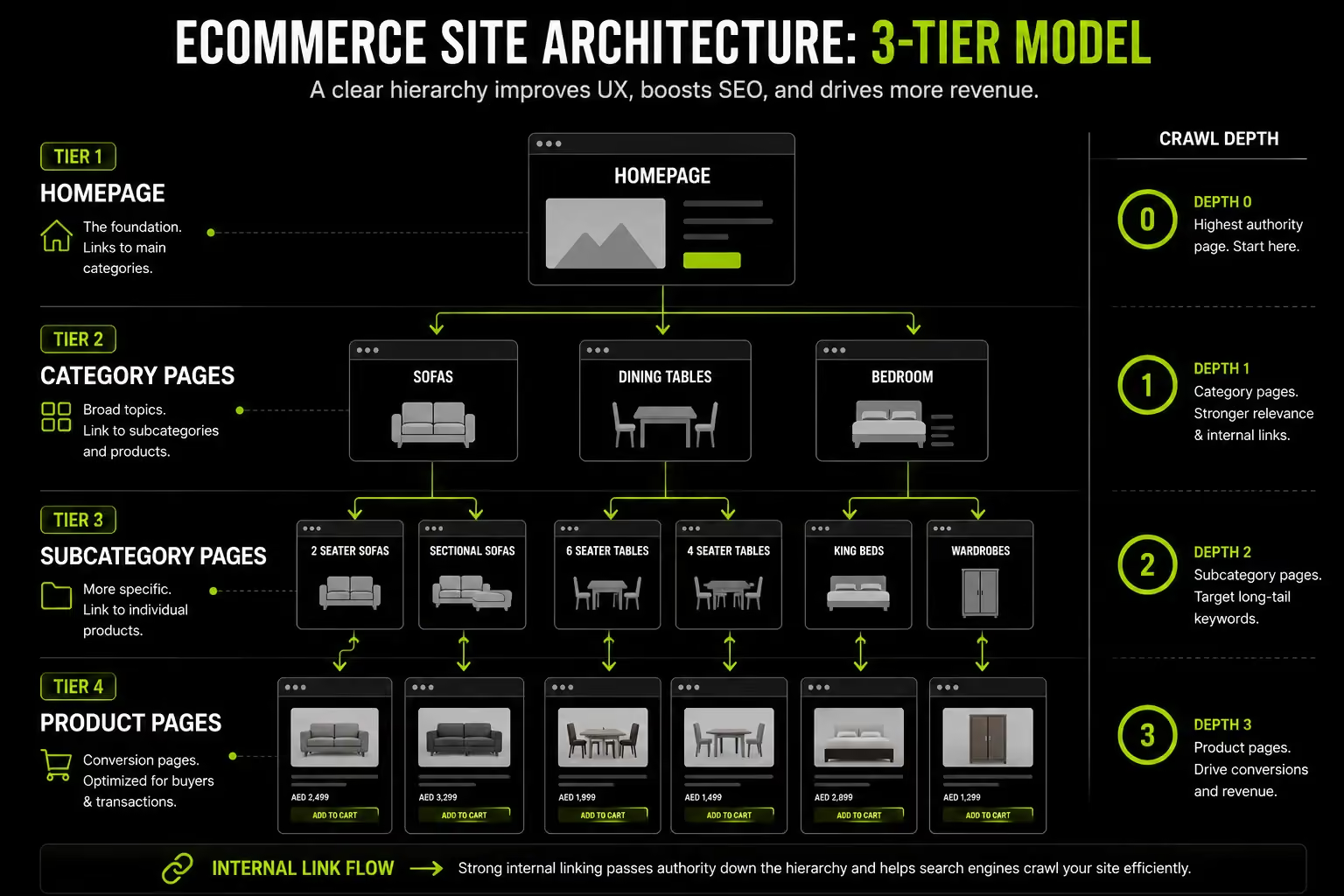
A flat site structure where any product is reachable within three clicks from the homepage is better for both crawlability and user experience. Google can discover and index your pages more efficiently. Users find products without friction.
The logic for an ecommerce site:
- Homepage → Category → Subcategory → Product (maximum depth: 3 levels)
- Every category page should aggregate link equity from product pages and pass it back up
- Internal linking should be intentional, not incidental related products, breadcrumbs, and cross-category links all contribute to crawl efficiency and page authority
Plan your category and subcategory structure before any design work begins. Adding a new top-level category after launch means URL changes, navigation updates, and redirect work. Get it right in a spreadsheet first.
How to Handle URLs During a Redesign
URL structure decisions made during a redesign have long-term SEO consequences. Follow these rules:
Keep URLs the same wherever possible. If your current URL is /products/mens-running-shoes-black and it ranks on page one, do not change it. The ranking is partially tied to the URL's age, backlinks and history.
If URLs must change, 301 redirects are non-negotiable. A 301 redirect tells Google that a page has permanently moved and passes the majority of its ranking signals to the new URL. A missing 301 redirect means lost link equity, a dead URL, and a ranking drop. No exceptions.
Build a redirect map before launch. A simple spreadsheet with old URL in column A and new URL in column B, covering every URL that is changing. This document should be reviewed and tested before launch day.
What happens if you skip this: Google recrawls your site after launch and finds hundreds of 404 errors where pages used to rank. Link equity built over years evaporates. Recovery takes months. This is the most common and most preventable cause of post-redesign traffic crashes.
Step 5: Design for Conversion, Not Just Aesthetics
A beautiful ecommerce site that does not convert is an expensive liability. Every design decision layout, typography, CTA placement, checkout flow should be evaluated against its impact on purchase behaviour.
Key Ecommerce UX Principles That Drive Sales
Mobile-first is mandatory. Design for the smallest screen first, then scale up. In the UAE, over 70% of ecommerce traffic is mobile. A product page designed for desktop and adapted for mobile will always underperform one designed mobile-first from the start.
Above-the-fold clarity: When a user lands on a product page, three things need to be visible without scrolling: the product image, the price, and the primary CTA. If any of these require scrolling to find, you are losing buyers at the first interaction.
Trust signals: Reviews, secure payment badges, return policy summaries, and verified purchase indicators all reduce purchase hesitation. On a product page, they belong near the CTA not buried in the footer or on a separate page.
Product page essentials:
- High-resolution images with zoom functionality (minimum 3–4 angles)
- Video where available especially for fashion, electronics, and home goods
- Clear specifications with filters for size, colour, and variant selection
- Social proof: review count, rating score, and recent reviews visible above the fold
Optimising the Checkout Flow
Checkout is where revenue is won or lost. Every additional step, every required account creation, every unclear error message is a point where a buyer can leave and not come back.
The principles that reduce abandonment:
- Reduce steps: Single-page or two-step checkout consistently outperforms three-step or longer flows. Every additional page is an opportunity to lose the buyer.
- Guest checkout is not optional: Forcing account creation before purchase is one of the top five reasons for checkout abandonment globally (Baymard Institute data). Offer it. You can invite account creation after the purchase is confirmed.
- Locally relevant payment methods: In the UAE market, your checkout needs Apple Pay, Tabby, Tamara, and a COD option alongside standard card payments. Missing a preferred payment method is a silent conversion killer; the user simply does not complete the purchase.
- Cart abandonment recovery: Exit-intent pop-ups with a clear offer and automated abandoned cart emails within one hour of abandonment are proven conversion recovery tools. Build them into the redesign, not as an afterthought.
Typography, Colour and Visual Hierarchy
These are not cosmetic choices; they directly affect how users process and act on information.
- Maintain WCAG 2.1 AA contrast ratios as a minimum. Low contrast text is not just an accessibility failure; it is a conversion failure for users on mobile screens in sunlight.
- CTA buttons need to be consistent in design and placement across every page. If your "Add to Cart" button looks different on product pages versus the cart page, you create micro-confusion that accumulates into hesitation.
- Whitespace is a conversion tool. Dense, cluttered layouts increase cognitive load. Giving key elements room to breathe improves focus on the actions you want users to take.
Step 6: Protect Your SEO During the Redesign
This is the step most redesign guides cover the least and most businesses regret skipping. SEO protection during a redesign is not a post-launch task. It is a pre-launch discipline that starts the moment the project is scoped.
Pre-Launch SEO Checklist for Ecommerce Redesigns
Work through this before anything goes live:
Technical SEO Considerations
Common SEO Mistakes During a Redesign
These are the errors that cause post-launch traffic drops. Most are avoidable with a pre-launch checklist:
- Launching without a redirect map. The single most damaging mistake. Every URL that changes without a redirect is a ranking asset you have given away.
- Changing URL structure across the board. Changing from /product/item-name to /shop/category/item-name across thousands of URLs requires thousands of redirects. Avoid it unless there is a structural reason to change.
- Removing content that ranks but "does not fit the new design." If a blog post drives 3,000 organic visitors per month, its design does not matter as much as its traffic value. Update the design. Do not delete the content.
- Forgetting to update internal links after URL changes. A redirect handles external link equity. Internal links pointing to redirected URLs create unnecessary redirect chains that slow crawling.
- Not testing the staging environment before going live. Your staging site should be a complete, functioning replica of the live site. Every redirect, every page, every transaction flow should be tested on staging before the launch switch is flipped.
Step 7: Choose the Right Platform
A redesign is often the right moment to evaluate whether your current platform still fits your business. Migrating platforms during a redesign adds cost and complexity but staying on the wrong platform and rebuilding 18 months later costs more.
Ecommerce Platform Comparison for Redesigns
Platform Migration vs. Same-Platform Redesign
Staying on your current platform is faster and lower risk. Migration should be considered when:
- Your current platform cannot support the features your redesign requires
- Performance under your catalog size or traffic volume is consistently poor
- The cost of maintaining your current platform exceeds the cost of migration within 24 months
If you do migrate, the risks are real: product data integrity, customer records, order history, and URL structure all need to be transferred and verified. Every URL change in a migration requires a redirect. Every missing redirect is a lost ranking. Budget for this work properly platform migrations done at the lowest cost almost always result in post-launch SEO and data problems.
Step 8: Test Before You Launch
Launching without thorough QA is the fastest way to turn a successful redesign project into a customer service crisis. Testing is not optional and it is not a half-day task.
Quality Assurance for Ecommerce Websites
Work through this QA matrix before you push the launch button:
Device and browser testing: Test on iOS Safari, Android Chrome, macOS Chrome, and Windows Chrome at minimum. Test at multiple screen sizes. A layout that looks correct at 375px may break at 390px.
Full transaction testing: Complete a purchase on every payment method you offer. Telr, Tabby, Tamara, Apple Pay, COD each need a successful test transaction before launch. A broken payment method on launch day is a revenue-stopping issue.
Speed testing: Run PageSpeed Insights on your homepage, a category page, and a product page. All three need to pass Core Web Vitals thresholds (LCP under 2.5s, CLS under 0.1, INP under 200ms). If they do not, fix them before launch, not after.
Redirect verification: Test every redirect in your map. Tools like Screaming Frog can crawl your redirect list and flag any that return a 404 or redirect chain. Every broken redirect is a ranking risk.
Form and function testing: Contact forms, newsletter signups, account creation, password reset flows test each one and verify that confirmation emails are sent correctly.
Soft Launch and A/B Testing
If your platform supports traffic splitting, consider a soft launch to 10 – 20% of visitors before full rollout. This exposes real-world issues server performance under real traffic, payment gateway behaviour, mobile edge cases before they affect your entire audience.
Set your pre-redesign KPIs as the baseline immediately. The first two weeks of data after launch will show you whether the redesign is performing as intended.
If the conversion rate drops significantly in the first week, you need to diagnose the cause immediately, not in the monthly review.
Step 9: Launch and Monitor
Launch day is not the finish line. The 30 days post-launch are when the real validation of your redesign work happens.
Post-Launch Monitoring Checklist
Run through this daily for the first two weeks, then weekly for the following month:
- Google Search Console: Monitor crawl errors daily. Any spike in 404s in the first week is a redirect problem. Fix it immediately.
- Keyword rankings: Expect minor fluctuations for up to four weeks after a major redesign. This is normal. A sustained drop across multiple high-value keywords after four weeks is a signal of a structural problem.
- GA4 conversions: Compare conversion rate, RPV, and AOV against your pre-launch baseline. Daily for the first two weeks.
- Server uptime and page speed: Monitor load speed under real traffic. Staging performance does not always replicate under full traffic load.
- Payment gateway confirmation: Confirm real transactions are processed correctly across all payment methods in the first 24 hours.
What to Do If Rankings Drop After Launch
A drop in rankings immediately after launch is not automatically a crisis. Google takes time to recrawl and reindex a redesigned site. But if rankings are dropping after four weeks, run this diagnostic in order:
- Check your redirect map for any 301s that are not firing correctly
- Resubmit your XML sitemap to Google Search Console
- Check for accidental noindex tags applied to pages during development
- Run a Screaming Frog crawl and compare it to your pre-launch crawl look for pages that have disappeared or changed URL
- Review your canonical tag implementation across category and filter pages
Most post-redesign ranking issues trace back to one of these five causes.

How Suplex Approaches Ecommerce Website Redesigns
Every redesign Suplex undertakes starts with data, not opinions. Before a wireframe is sketched, the existing site is audited in full traffic patterns, conversion bottlenecks, technical health, and keyword risks.
The audit defines what needs to be protected, what needs to be fixed, and what the redesign needs to achieve in measurable terms.
Design decisions at Suplex are tied directly to conversion outcomes. Product grid layout, checkout flow structure, CTA placement each choice is backed by UX research and behavioural data from the audit phase.
When a decision is made for visual reasons, it is tested against conversion performance, not defended on aesthetic grounds.
For businesses operating in the UAE and Gulf, Suplex builds in the regional requirements that generic redesign processes miss: Arabic RTL design and development, local payment gateway integration (Tabby, Tamara, Network International), VAT-compliant checkout flows, and mobile-first design calibrated for the high smartphone usage rates across the GCC.
The goal of every redesign Suplex delivers is a site that performs better than the one it replaced in organic rankings, conversion rate and revenue per visitor. Not a site that looks better at the cost of the performance the business spent years building.
If you are planning an ecommerce redesign in the UAE or need an honest assessment of your current site's performance, the Suplex team is worth talking to before you scope the project.
Frequently Asked Questions
How long does an ecommerce website redesign take?
Most redesigns take 8 to 20 weeks. Small stores can wrap in 2 to 3 months, while complex sites with integrations or migrations take 4 to 6 months. Rushing often leads to SEO drops and QA issues.
How much does it cost to redesign an ecommerce website?
Template-based redesigns start around $3,000 to $8,000 (AED 11,000 to 29,000). Custom builds typically range from $15,000 to $60,000+. Migrations and UAE-specific needs like Arabic RTL and local payments increase costs.
Will a website redesign hurt my SEO rankings?
It can, but it’s avoidable. Ranking drops usually come from missing redirects or removed content. With proper URL mapping, redirects, and SEO preservation, rankings can stay stable or improve.
Should I redesign my ecommerce website or just refresh it?
Refresh if the structure works and only visuals feel outdated. Redesign if conversion is low, mobile is weak, or the platform cannot scale. Strong SEO traffic means you should proceed carefully.
What is the most important thing to do before redesigning an ecommerce website?
Run a full audit first. Capture rankings, top pages, and your URL structure. This baseline prevents changes that hurt performance.
Hi, I’m Rishabh Jain
I believe great design has the power to shape perception, build trust, and move businesses forward. That belief is what led me to found Suplex Design Studio, a global branding and packaging studio working with FMCG and D2C brands across markets.I started suplex at 25 with a clear intent, to create design that is strategic, thoughtful, and commercially meaningful. By 28, the studio had scaled globally, guided by a strong foundation in Integrated Design that I developed during my academic journey in London, where I was honoured with the Dean’s Award.
Over the years, I’ve had the opportunity to work with 100+ brands, from Fortune 500 organizations to family-run businesses, helping them build packaging and brand systems that create recall, relevance, and long-term value.
Suplex’s work has been recognized internationally, including the Manifest Award (2024), the Clutch Global Award (2025), and features on platforms such as Packaging of the World, The Dieline, and the World Brand Design Society.
None of this would be possible without the people behind the work. I’m deeply grateful to the suplex team, whose commitment, creativity, and attention to detail turn ideas into meaningful brand experiences every day.
At the heart of my work is a simple philosophy, design should be intentional, honest, and built to last, and that continues to guide everything we create at suplex.






































Let’s Make It Happen
E-Commerce Success Stories
%201.avif)






.avif)

.avif)
Build Your D2C Business The Right Way
Build It With Suplex.


