Webflow vs Shopify for Ecommerce Brands: The Honest Comparison (2026)
.avif)
Webflow vs Shopify for Ecommerce Brands: The Honest Comparison (2026)
Shopify wins on ecommerce infrastructure. Webflow wins on design and brand control. Neither is universally better and choosing the wrong one at the architecture stage is expensive to reverse.
This blog breaks down both platforms across the factors that actually matter for ecommerce brands: design flexibility, selling features, SEO, pricing, and scalability.
It also covers the hybrid option using Webflow and Shopify together and gives you a clear decision framework by brand type.
If you are building or replatforming an ecommerce store in 2026, this is the comparison you need before you commit.
Webflow vs Shopify: The Core Difference in One Paragraph
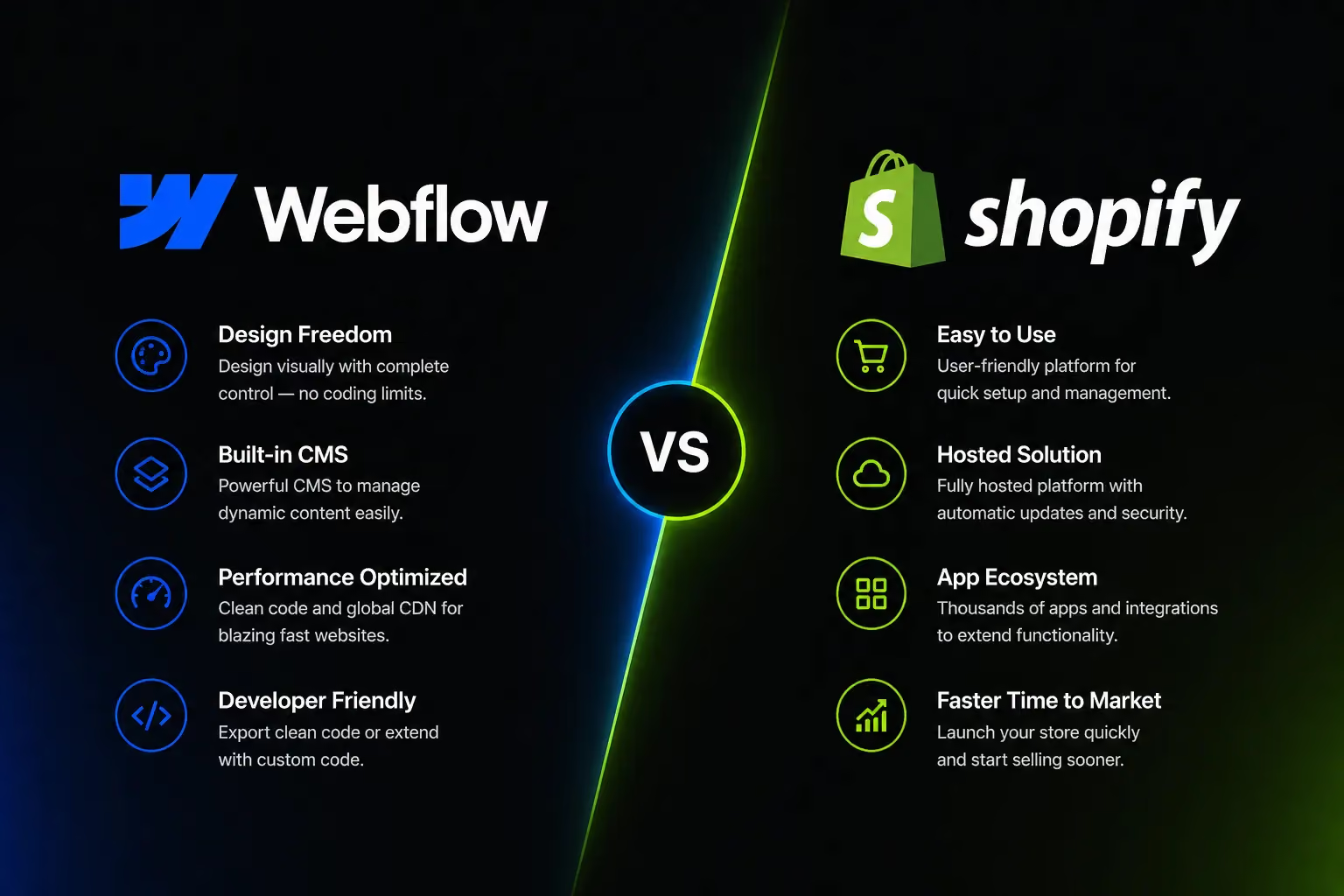
Webflow is a design-first visual website builder that adds ecommerce capability. Shopify is an ecommerce-first platform that adds design tools.
That order of priority shapes every decision both companies have made and it is the single most useful frame for this comparison.
What you are optimising for determines which platform wins. If your brand's visual identity is a competitive differentiator and your catalogue is manageable in size, Webflow gives you design control that Shopify's theme-based system cannot match.
If your priority is selling at scale more SKUs, more payment options, more integrations, more automation Shopify is the stronger infrastructure by a significant margin.
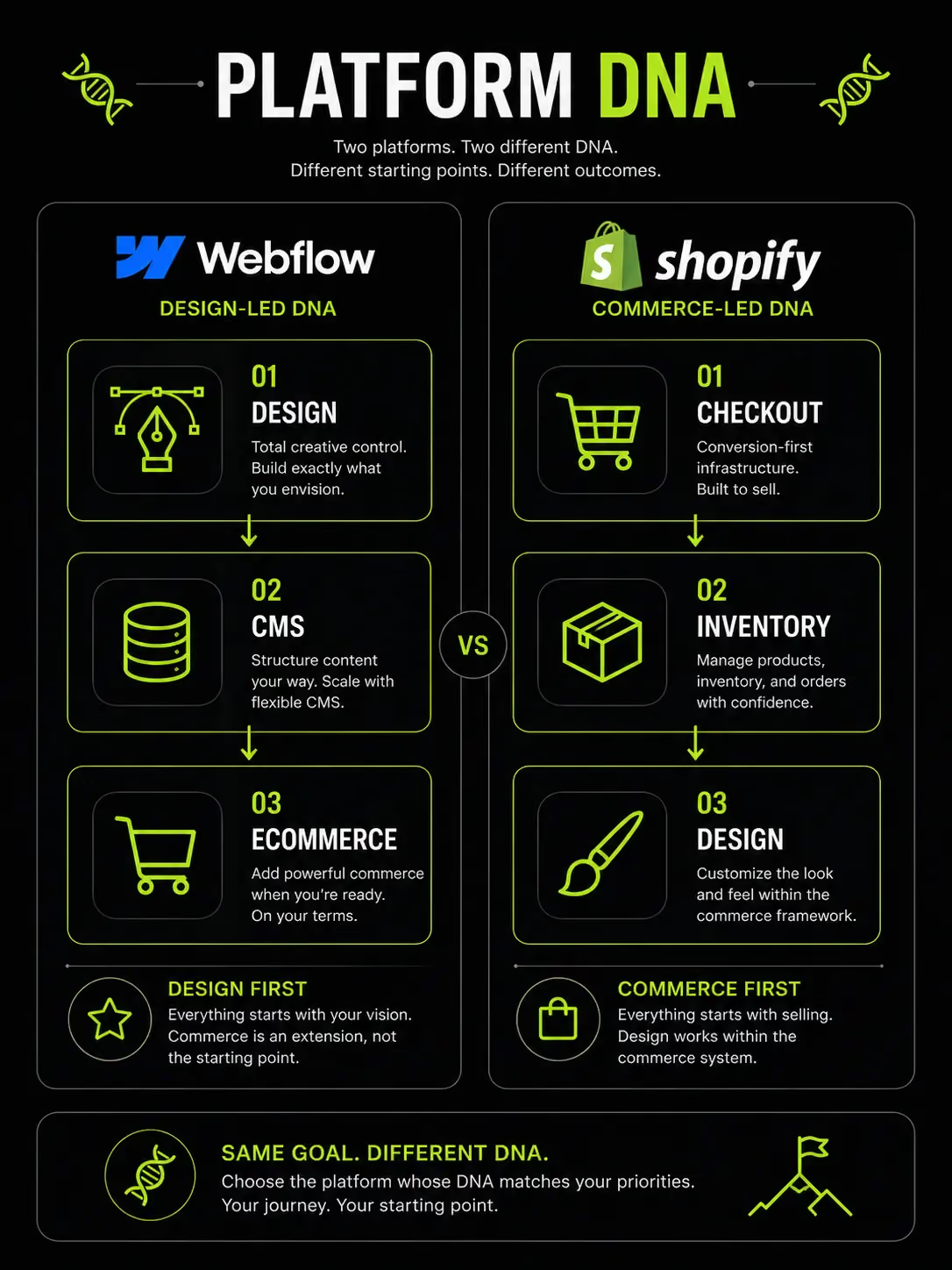
Platform Comparison at a Glance
The entry price is the same. Everything else diverges from there depending on what the business actually needs to do.
Design and Brand Control Where Webflow Wins
Design is not a cosmetic concern for ecommerce brands. It is a conversion factor, a trust signal, and increasingly, the main differentiator between brands selling similar products.
This is the category where Webflow's architecture gives it a genuine and significant advantage.

Pixel-Perfect Customisation Without Code
Webflow's visual canvas gives designers direct control over the DOM and the actual structure of the web page. There are no theme architecture constraints, no Liquid templating lock-in, and no platform-imposed layout grids that limit what you can build.
In Webflow, if you can design it, you can build it. Typography, spacing, layout, image treatment and interactive elements are all controlled visually without writing code.
This makes it the platform of choice for luxury brands, fashion labels, design studios, and lifestyle companies where the website experience is as important as the product itself.
For a brand where visual storytelling drives purchase intent, a high-end skincare brand, an independent furniture designer, a premium coffee company Webflow's design freedom is not a nice-to-have. It is a commercial requirement.
Shopify's Design Trade-Off
Shopify's design system is theme-based. You choose a theme, customise within its framework, and use the sections-and-blocks editor to adjust layout. Shopify 2.0 themes improved flexibility considerably over earlier versions but the system is still constrained relative to what Webflow allows.
Deep structural changes to a Shopify store require working in Liquid, Shopify's templating language. Liquid is accessible for experienced front-end developers, but there is a ceiling, there are platform-level decisions about how Shopify renders pages that merchants cannot override.
For brands where clean product presentation and reliable checkout performance matter more than visual uniqueness, Shopify's theme system is entirely sufficient. The constraint only becomes a problem when the brand's visual ambitions exceed what the theme architecture can deliver.
Custom Animations and Interactions
Webflow's Interactions panel is one of its most powerful differentiators. Scroll-triggered animations, parallax effects, hover micro-interactions, and page transitions are all built natively in the visual editor, no JavaScript libraries, no third-party apps, no custom code required.
For Shopify to achieve comparable effects, you need either third-party apps (which add script weight to every page and a monthly cost) or custom JavaScript development. The output is possible, but the effort and cost are higher.
For brands where motion design and site interactivity are part of the brand identity which is increasingly common in premium D2C, fashion, and wellness categories this is a meaningful capability gap.
Ecommerce Features Where Shopify Wins
Shopify's core product is selling. Every significant feature Shopify has built over its 20-year history is oriented toward helping merchants sell more, manage inventory better, and scale their operations. That focus shows.
Built for Selling at Scale
Shopify has processed over $800 billion in cumulative merchant sales. The platform is not a design tool that adds a cart, it is a commerce engine built to handle serious transaction volumes.
Native capabilities that matter operationally:
- Multi-currency and multi-language: Essential for Gulf brands selling across UAE, Saudi Arabia, Kuwait, and Bahrain simultaneously
- Abandoned cart recovery: Automated email and SMS sequences for users who leave without purchasing built in at no extra cost
- Subscription selling: Via apps like Recharge or Bold Subscriptions, Shopify supports recurring revenue models natively (Webflow has no native subscription capability)
- Point of sale: Shopify POS integrates physical retail with the online store inventory, customer records, and reporting unified. Webflow has no POS functionality
- Multichannel selling: Instagram, TikTok, Google Shopping, Amazon Shopify connects to all of them. Webflow does not
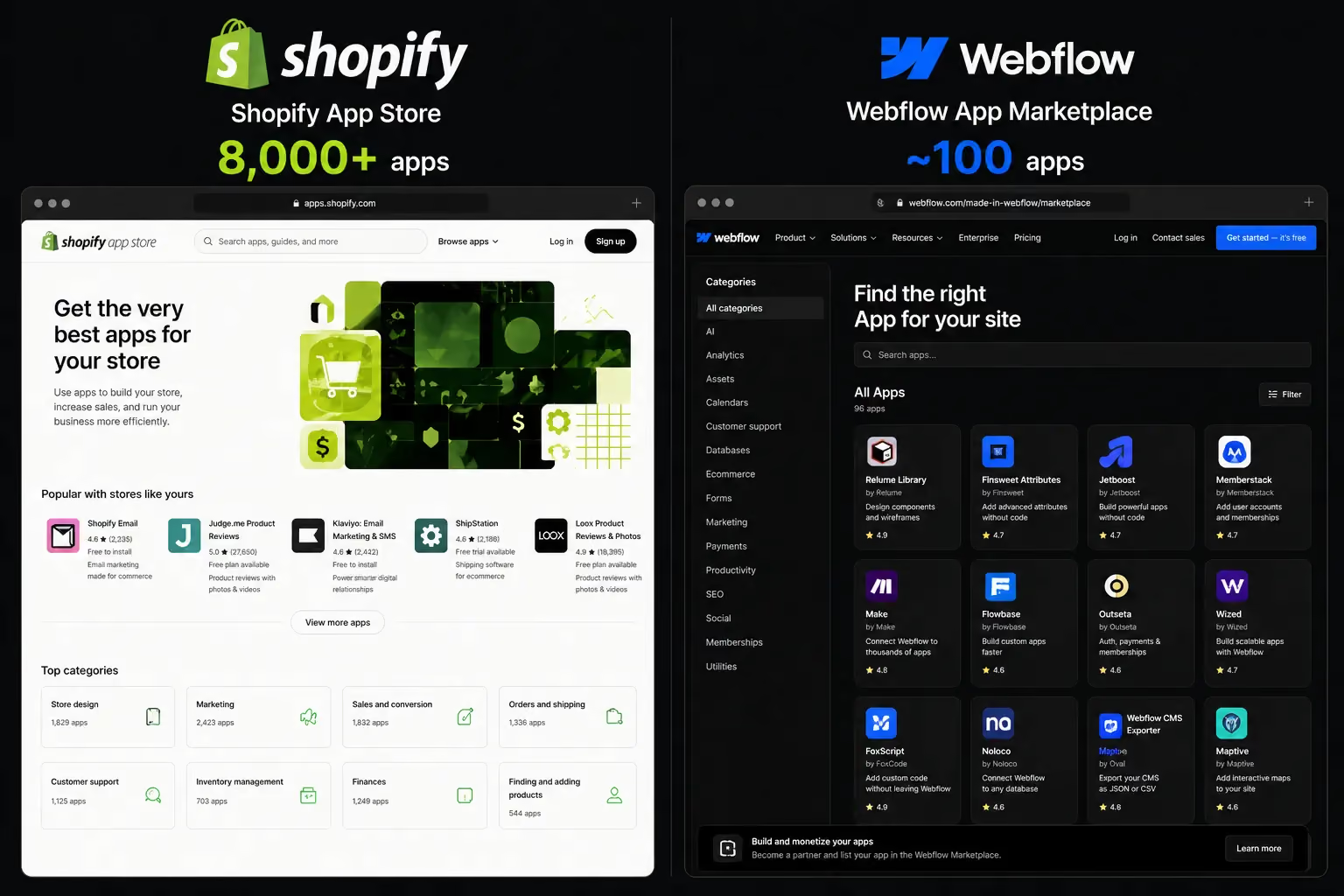
The 8,000+ app ecosystem covers every operational requirement a growing ecommerce business has loyalty programmes, review platforms, ERP integrations, upsell tools, returns management and heat mapping most with one-click installation.
Webflow Ecommerce Limitations
Webflow's ecommerce capability was designed for small-to-medium stores with manageable product catalogues and straightforward selling requirements. It works well within those parameters. Outside them, the constraints are real.
- 3,000 SKU cap: Webflow's ecommerce plans cap at 3,000 product variants across all products. For fashion brands with multiple colourways and sizes per product, this ceiling is reached faster than it looks
- No native subscriptions: Recurring billing, subscription boxes, and membership products are not supported natively. There is no Webflow equivalent of Shopify's subscription app ecosystem
- Limited payment gateways: Webflow supports Stripe and PayPal natively. For UAE and Gulf stores, this is a significant problem Telr, PayTabs, Tabby, Tamara, and Network International are not natively supported. Getting these gateways working on Webflow requires custom development or workarounds
- No POS: Physical retail integration does not exist in Webflow's ecommerce offering
- Basic inventory management: Webflow's inventory tools are functional for simple stores. For multi-location inventory, variant tracking at scale, or low-stock automation, Shopify's native tools and app ecosystem are substantially more capable
Checkout and Conversion
Shopify's checkout is one of the most optimised purchasing flows in ecommerce. Shopify's accelerated checkout converts at up to 91% faster than standard checkout flows, according to Shopify's own data, by storing customer details and enabling one-tap purchases.
The checkout is also battle-tested at a massive scale. Shopify's infrastructure handles flash sales, Black Friday traffic spikes, and simultaneous high-volume launches without degrading performance.
The platform's reliability under load is a commercial asset that non-technical business owners rarely think about until it fails.
Webflow's checkout is functional for standard purchase flows. It is not built to compete with Shopify's conversion optimisation depth, its accelerated checkout options, or its infrastructure resilience under high transaction volume.
SEO Capabilities Closer Than You Think
Both platforms can rank well in organic search. The gap between them on SEO is narrower than on ecommerce features but Webflow's technical SEO output is cleaner, and its CMS gives it a meaningful advantage for content-driven growth strategies.
Webflow's SEO Advantages
Webflow generates clean, semantic HTML by default. Pages are well-structured, headings are used correctly, and the codebase is lean which directly benefits Core Web Vitals scores.
Beyond output quality, Webflow gives full manual control over every SEO element:
- Meta titles and descriptions editable per page, including CMS-driven collection pages
- Open Graph tags for social sharing configured at page level
- Schema markup added without requiring a plugin
- Canonical tags set manually on any page
- URL structures fully configurable no platform-imposed prefixes
Webflow's CMS is significantly more flexible than Shopify's blog for content marketing. Collection pages, editorial layouts, and structured content types can be built exactly as the content strategy requires, not within the constraints of a basic blog template.
For brands investing seriously in organic search through content, Webflow's CMS is a genuine commercial advantage.
Shopify SEO Solid but with Friction
Shopify handles the SEO basics well. Sitemaps are generated automatically, SSL is standard across all plans, and canonical tags are applied by default to manage duplicate content from product-collection URL combinations.
The structural limitations are real but manageable. Shopify forces /collections/ and /products/ URL prefixes on category and product pages.
You cannot change this. For stores migrating from a different URL structure, this requires careful redirect management to preserve link equity.
Shopify's blog is functional but limited compared to Webflow's CMS. Advanced content structures, editorial series, author pages, content type filtering require apps or custom development to implement well.
For most ecommerce brands without an intensive content marketing operation, Shopify's SEO capabilities are sufficient. The gap with Webflow becomes significant only when content volume and structure are central to the organic growth strategy.
Core Web Vitals and Page Speed
Both platforms sit on strong hosting infrastructure Shopify on its own CDN, Webflow on AWS. Baseline performance is competitive from both.
The divergence happens in practice. Shopify stores that install 8–12 apps accumulate JavaScript that loads on every page increasing LCP times and creating CLS issues as third-party elements load asynchronously. This is the most common cause of Core Web Vitals failures on Shopify stores, and it compounds as the app stack grows.
Webflow's leaner codebase typically scores higher on Core Web Vitals out of the box, because there is less third-party code running on every page. For brands where organic search performance is a primary growth channel, this is a real consideration.
Pricing What You Actually Pay
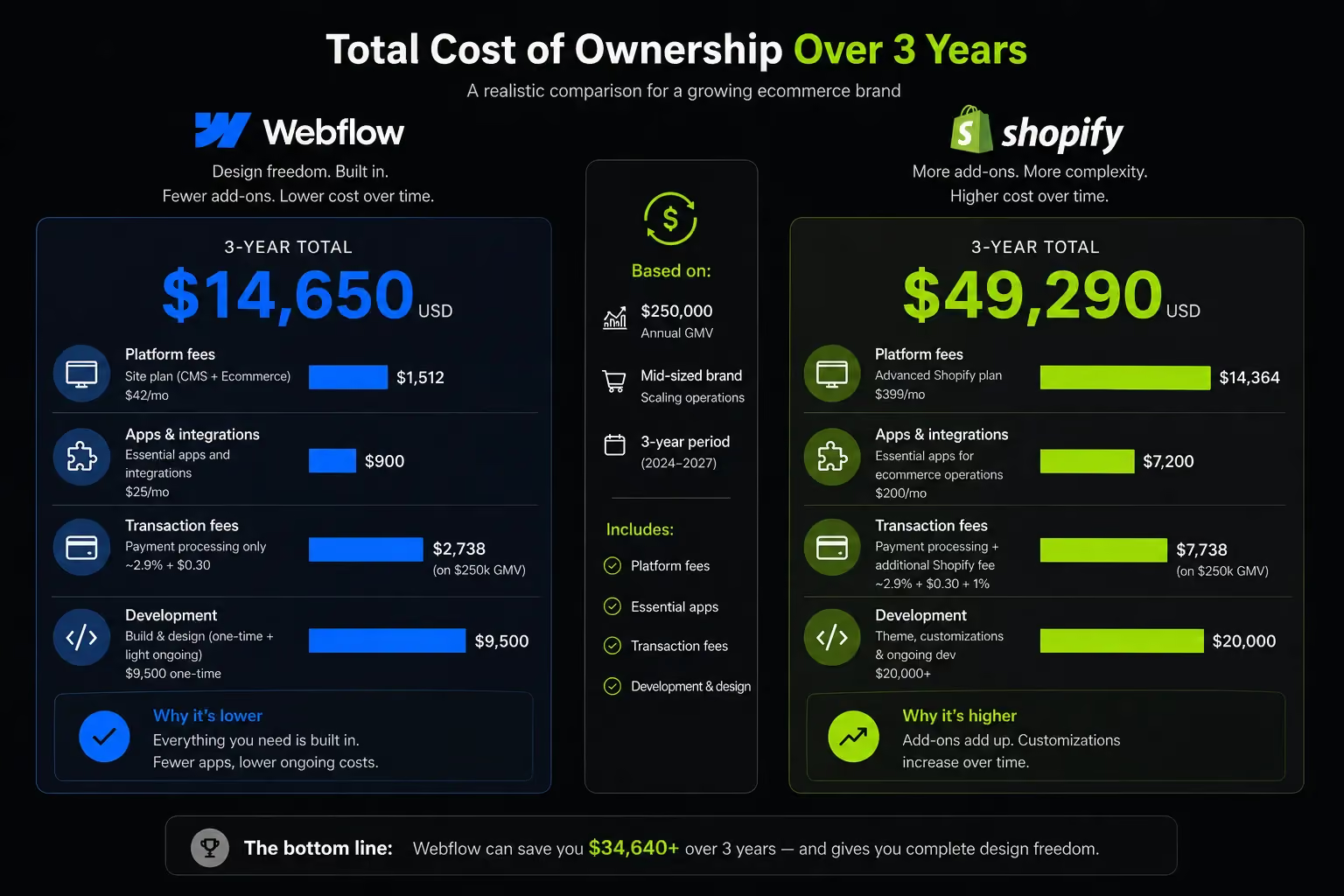
The starting price for ecommerce on both platforms is roughly equal. What you pay at month 12 and month 36 is where the comparison becomes more interesting.
Webflow Pricing for Ecommerce
Webflow's pricing structure bundles hosting, CMS, and ecommerce which can look cost-efficient at the entry level. The cost escalates as you need more CMS items, more team member seats, or more advanced ecommerce features.
The 2% transaction fee on the Basic plan is significant for any store doing meaningful volume; it is effectively the same penalty Shopify charges for not using Shopify Payments.
Shopify Pricing
App costs are the variable that most Shopify cost comparisons understate. A growing Shopify store commonly uses paid apps for email marketing, product reviews, loyalty, returns management, upsells and advanced analytics.
Combined, these subscriptions regularly total $200–$500 per month on top of the platform fee.
True Cost of Ownership
For simpler stores with smaller catalogues and limited app requirements, Webflow can be more cost-efficient particularly at the Business plan where transaction fees drop to zero. For stores that need Shopify's full app ecosystem to operate, the cost comparison tilts toward Shopify being more expensive in absolute terms, but justified by the commercial capability it provides.
The Webflow + Shopify Hybrid Option
The hybrid approach is less commonly discussed but genuinely worth evaluating for the right type of brand. It combines Webflow's design control with Shopify's commerce infrastructure addressing the main weakness of each platform individually.
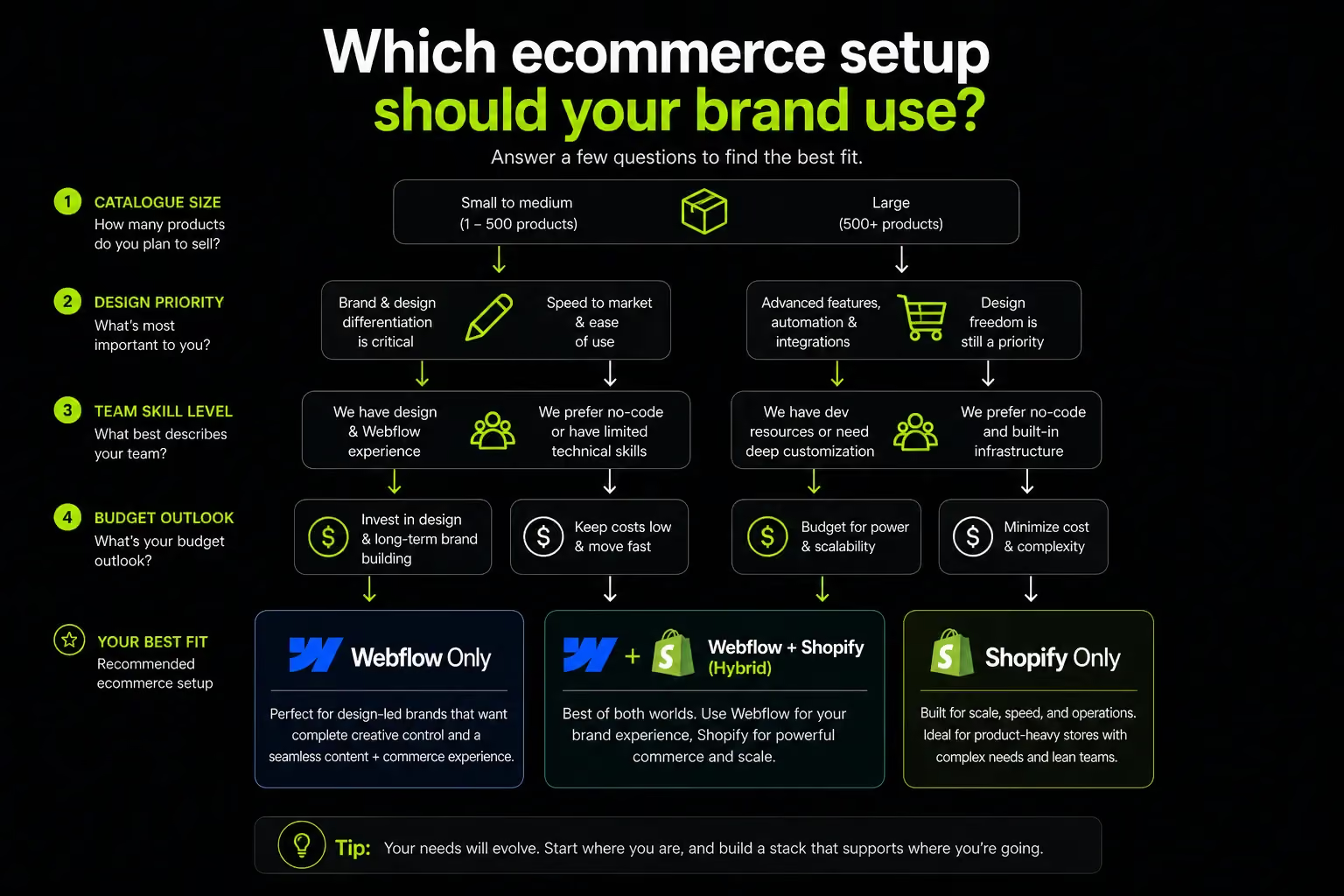
What Is the Webflow + Shopify Integration?
In a hybrid setup, Webflow handles the marketing site, editorial content, and brand experience. Shopify handles checkout, inventory, order management, and fulfillment.
The two connect via Shopify's Buy Button (embeddable checkout on any site), or through dedicated integration tools like Udesly or ShopyFlow that allow deeper synchronisation between the two platforms.
The result: Webflow's visual design freedom on every marketing and editorial page, with Shopify's battle-tested checkout and commerce infrastructure handling the transaction itself.
Customers browse and discover on a beautifully crafted Webflow site, then check out through Shopify's optimised, reliable purchase flow.
When This Makes Sense
The hybrid model works best in specific circumstances:
- Brand-forward D2C brands with strong editorial ambitions fashion, beauty, wellness, lifestyle where the website is as much a content platform as a store, and neither Webflow-only ecommerce nor a standard Shopify theme fully meets the design requirement
- Agencies and design studios building for clients where brand differentiation is non-negotiable and the client has the budget for two-platform maintenance
- Established brands that already have a high-performing Shopify store but want to upgrade their marketing and content experience without migrating the commerce backend
When It Does Not Work
The hybrid approach adds real complexity. Two platforms means two subscriptions, two codebases, two places where something can break, and two systems to keep synchronised when product data, pricing, or content changes.
It is not the right choice for:
- Lean teams without a dedicated developer or agency partner to manage the integration
- Brands in the early stages of building their ecommerce operation the complexity is unjustified until both the design and commerce requirements are well-understood
- Businesses where inventory and product data change frequently keeping Webflow and Shopify synchronised requires either manual discipline or a well-maintained integration layer
Which Platform Is Right for Your Ecommerce Brand?
The right platform depends on what your business needs to do, not what sounds impressive or what a competitor is using.
Choose Webflow If:
- Your brand identity is a primary commercial differentiator the site experience itself drives purchase intent
- Your catalogue is manageable: under 1,000 products with straightforward variant structures
- Content marketing and SEO are central to your growth strategy, and you need a flexible CMS to support them
- Your team includes a designer, or you are working with a Webflow-specialist agency that can maintain the site post-launch
- You are in a category where visual quality signals trust and premium positioning fashion, beauty, wellness, furniture, lifestyle, or B2B brands where the website is part of the sales conversation
- You do not need POS, subscriptions, or regional payment gateways beyond Stripe and PayPal
Choose Shopify If:
- You are launching fast and need ecommerce infrastructure operational from week one
- Your catalogue exceeds 1,000 SKUs or you anticipate rapid product growth
- You need POS for physical retail integration, multi-currency for GCC selling, or omnichannel capabilities across social and marketplace channels
- Access to a wide app ecosystem is important for your operations: loyalty, subscriptions, reviews, ERP, returns management
- Your focus is conversion and sales volume over visual uniqueness
- You need Gulf-specific payment gateways (Telr, PayTabs, Tabby, Tamara) working natively without custom development
Choose the Hybrid (Webflow + Shopify) If:
- You are an established brand with both strong editorial ambitions and serious ecommerce volume and neither platform alone fully serves both needs
- You have the development resources (in-house or via an agency) to set up and maintain the integration correctly
- Your design requirements definitively exceed what Shopify's best themes can deliver, but your commerce complexity also exceeds what Webflow ecommerce can handle
How Suplex Approaches Ecommerce Platform Strategy
Platform selection is one of the decisions Suplex engages with most frequently when working with brands across the UAE and Gulf because it is one of the most consequential and hardest to reverse.
The answer is never categorical. A fashion brand launching in Dubai with a curated catalogue and strong editorial ambitions has entirely different platform requirements from a multi-SKU home goods retailer scaling across GCC markets.
Starting from the platform first rather than starting from the business requirements is how brands end up on the wrong platform.
The approach at Suplex starts with the 12–24 month trajectory. Where is this business going? What does it need to do next year that it cannot do today?
Platform choices that feel appropriate at launch often become constraints within 18 months usually when catalogue size, B2B requirements, or multi-market expansion push the business into territory the original platform was not designed for.
Suplex works with Webflow for brand-forward ecommerce sites and editorial-driven DTC brands where design quality and content flexibility are central to the commercial strategy.
Shopify is the recommendation when catalogue complexity, Gulf payment integrations, or operational scale are the primary requirements.
The hybrid model is a legitimate option for the right brief and Suplex has built and maintained both sides of that setup for clients who need it.
If you are evaluating platforms for a new store or a replatforming project, the starting point is a clear brief on where the business is going, not a feature comparison table. Talk to the Suplex team here.
Frequently Asked Questions
Q1: Is Webflow or Shopify better for ecommerce?
Shopify is better for stores focused on scaling sales, managing large catalogues, and omnichannel selling. Webflow is better for brands where design quality, content marketing, and site experience are central to their identity.
If your catalogue has fewer than 1,000 SKUs and visual differentiation matters commercially, Webflow is a strong choice. If you are scaling inventory, need Gulf payment gateways, or require POS, Shopify is the more reliable foundation.
Q2: Can Webflow handle ecommerce at scale?
Webflow's ecommerce is designed for small-to-medium stores. It caps at 3,000 product variants, lacks native subscriptions, has no POS system, and does not support regional payment gateways like Telr or Tabby natively.
For brands scaling to high product volumes, omnichannel operations, or Gulf-market payment requirements, Shopify or a Webflow + Shopify hybrid is the more reliable choice.
Q3: What are the main disadvantages of Webflow for ecommerce?
Webflow's ecommerce limitations include a 3,000 SKU variant cap, no native subscription products, limited payment gateway support (Stripe and PayPal only natively), no POS system, and basic inventory management compared to Shopify.
The app ecosystem is also significantly smaller around 100 apps vs Shopify's 8,000+. For brands with complex selling operations, these constraints become material as the business grows.
Q4: Is Shopify available and recommended for UAE ecommerce brands?
Shopify works well in the UAE, but Shopify Payments is not available there. UAE merchants must use third-party gateways PayTabs, Telr, Checkout.com, or Tap Payments which incur transaction fees of 0.5%–2% per sale depending on the plan.
This is a real and ongoing cost that needs to be factored into total cost modelling from the start. Shopify's core ecommerce features are fully accessible to UAE businesses.
Q5: Can I use Webflow and Shopify together?
Yes. The hybrid model uses Webflow for the marketing site and editorial content, with Shopify's Buy Button or a connector tool like Udesly or ShopyFlow powering checkout and inventory. This gives Webflow's design control alongside Shopify's commerce infrastructure.
It adds maintenance complexity and requires two platform subscriptions, so it works best with a development partner managing both systems.
Q6: Which platform is better for SEO Webflow or Shopify?
Webflow offers more granular technical SEO control, clean semantic HTML output, fully configurable URL structures, native schema markup, and a more flexible CMS for content marketing at scale.
Shopify's SEO is solid but has forced URL structure limitations and relies on third-party apps for advanced configuration. For brands where organic search is a primary growth channel with significant content volume, Webflow has a technical edge.
Q7: Is Webflow cheaper than Shopify for ecommerce?
Entry-level plans are similar at around $29/month for both. Shopify's total cost rises significantly with app subscriptions growing. Stores often spend $200–$500 per month on tools for email, reviews, returns, and analytics. Webflow's cost scales with CMS items and team seats.
For simpler stores, Webflow can be more cost-efficient. For complex operations requiring Shopify's full app ecosystem, the costs are comparable but the commercial capability Shopify provides at that cost level is greater.
Hi, I’m Rishabh Jain
I believe great digital experiences have the power to shape perception, build trust, and move businesses forward. That belief led me to found Suplex Design Studio, a global digital design and development studio helping FMCG and D2C brands build websites and digital experiences that are strategic, thoughtful, and commercially meaningful.
I started Suplex at 25 with a clear intent, to create digital experiences that look appealing, work seamlessly, and help D2C businesses grow. By 28, the studio had scaled globally, guided by a strong foundation in integrated design that I developed during my academic journey in London, where I was honoured with the Dean’s Award.
Over the years, I’ve had the opportunity to work with 100+ brands, from Fortune 500 organisations to family-run businesses, helping them build websites, e-commerce experiences, and digital products that create clarity, credibility, and long-term value.
Our work has been recognised internationally, including the Manifest Award (2024), the Clutch Global Award (2025), and features across platforms such as The Dieline, Packaging of the World, and the World Brand Design Society.
None of this would be possible without the people behind the work. I’m deeply grateful to the Suplex team, whose commitment, creativity, and attention to detail turn ideas into meaningful digital experiences every day.
At the heart of our work is a simple philosophy, digital design should be intentional, functional, and built to create real business value. That continues to guide everything we create at Suplex.



































Let’s Make It Happen
E-Commerce Success Stories

%201.avif)






.avif)

.avif)
Build Your D2C Business The Right Way
Build It With Suplex.


