Shopify Store Launch Checklist: 30 Tasks to Complete Before You Go Live
.avif)
Shopify Store Launch Checklist: 30 Tasks to Complete Before You Go Live
Most Shopify stores don't fail because of a bad product. They fail because the store wasn't ready when it went live. Payment gateways left in sandbox mode.
No test orders placed. Legal pages missing. SEO metadata empty. These aren't complex problems, they're skipped steps. And each one costs you sales, trust, or both.
This checklist covers everything you need to do before, during, and after launch, including UAE and Gulf-specific requirements that most generic guides completely ignore.
How to Use This Shopify Launch Checklist
This guide is structured into three phases so you can work through it without backtracking. Use it as a working document, print it, save it, or copy it into a project management tool.
Pre-launch covers every setup step from legal registration to speed testing. Launch day is a short, focused checklist to get live without errors. Post-launch covers the first 30 days of marketing, conversion work, and operations.
Throughout the blog, UAE-specific callouts are clearly marked. If you're launching in the UAE or wider Gulf market, those sections are not optional, they contain requirements that apply directly to your business.
Phase 1: Pre-Launch Checklist
This is where the bulk of your work happens. Each section below covers a specific part of your store setup. Work through them in order, as some sections (like payments) affect others (like testing), so sequence matters.
1. Business & Legal Setup (UAE/Gulf Merchants: Read This First)
Before you touch your store, your business structure needs to be in order. In the UAE, this isn't optional. Operating an e-commerce business without the right license exposes you to fines and account suspension.
Your legal setup determines which payment gateways you can use, how you register for VAT, and whether you can legally collect payments at all.
UAE merchants:
Global merchants:
2. Domain & Branding
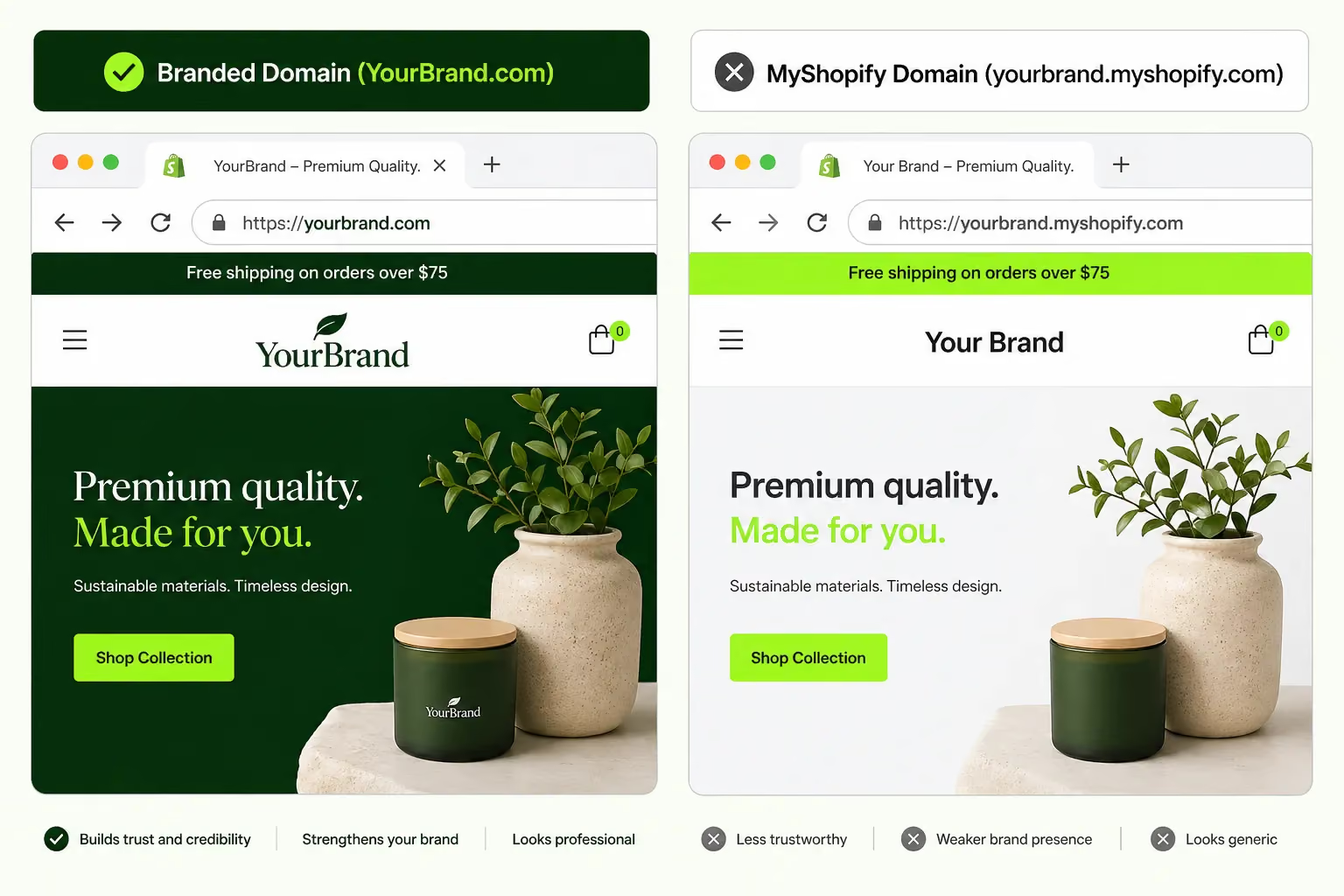
Your domain and branding set the first impression. A myshopify.com URL signals that your store isn't finished, even if the design is excellent. .com remains the most trusted extension globally, while .ae works well for UAE-focused brands.
Avoid hyphens, keep it short, and make it easy to type. Domain propagation takes up to 48 hours, so connect yours early.
3. Theme & Store Design
Your theme is not just aesthetics. It's the structure your customers navigate through to buy. A poorly configured theme kills conversion regardless of how good the product is.
The Gulf market skews heavily mobile; according to Statista, mobile internet usage in the UAE consistently exceeds 70% of total web traffic. Every design decision needs to reflect that.
Shopify's free themes (Dawn, Sense, Craft) are solid starting points. Premium themes like Prestige, Impulse, or Motion work well for fashion, beauty and lifestyle brands. Whatever you choose, don't launch with default placeholder content.

4. Product Pages
Product pages are where purchase decisions happen. Weak descriptions, missing images, and incorrect pricing are three of the fastest ways to lose a customer who was ready to buy.
For many customers arriving from Google or an Instagram ad, your product page is their first and only impression of your store. Treat each one as a standalone landing page.

5. Collections & Site Navigation
Collections are how customers browse your store. Poorly organised collections mean visitors can't find what they're looking for and they don't stay long enough to figure it out. Collection pages often rank higher in search results than individual product pages, so they deserve the same SEO attention.
6. Payment Gateway Setup
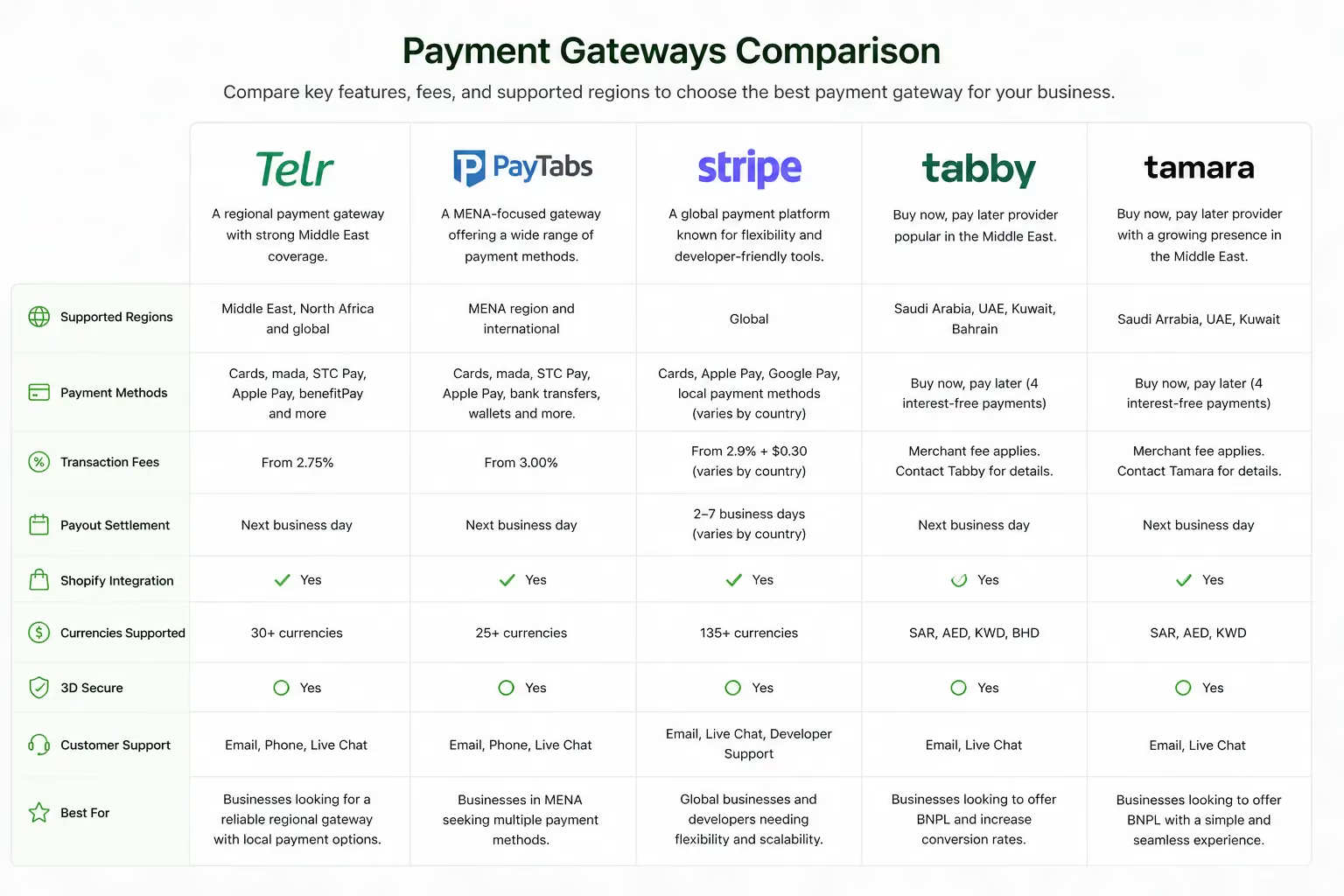
A broken or misconfigured payment gateway is the fastest way to lose a customer at the exact moment they've decided to buy. This section requires the most lead time, so start early. In the UAE, Shopify Payments is unavailable, which means you must set up and verify a third-party gateway before you can process a single order.
For buy-now-pay-later, Tabby and Tamara both integrate directly with Shopify and are widely used across the UAE, Saudi Arabia, Kuwait, and Bahrain. If your average order value is above AED 200, BNPL meaningfully increases conversion.
7. Shipping & Fulfilment Settings
Unexpected shipping costs at checkout are one of the top causes of cart abandonment. Customers who encounter a surprise fee at the final step leave, and they rarely come back.
In the Gulf market, free shipping thresholds are standard and expected; "Free shipping on orders over AED 150" increases average order value while removing checkout friction.
8. Taxes
Tax misconfiguration can cost you money or create legal exposure. In the UAE, VAT applies to most goods and services at 5%, though exemptions exist.
The question of whether to display VAT-inclusive or exclusive prices also affects how customers perceive your pricing, so decide this before launch.
9. Legal Pages
Legal pages protect your business from disputes and build trust with customers. Shopify provides templates, but they need to be customized to your actual policies, not left as generic placeholder text.
A specific, clear return policy increases purchase confidence. A vague one increases anxiety and pushes customers away at the final step.
10. Essential Store Pages
Beyond product and collection pages, your store needs a set of core pages that handle customer questions, build trust and support your SEO. These are not optional extras; they're what separates a store that converts from one that doesn't.
11. SEO Setup
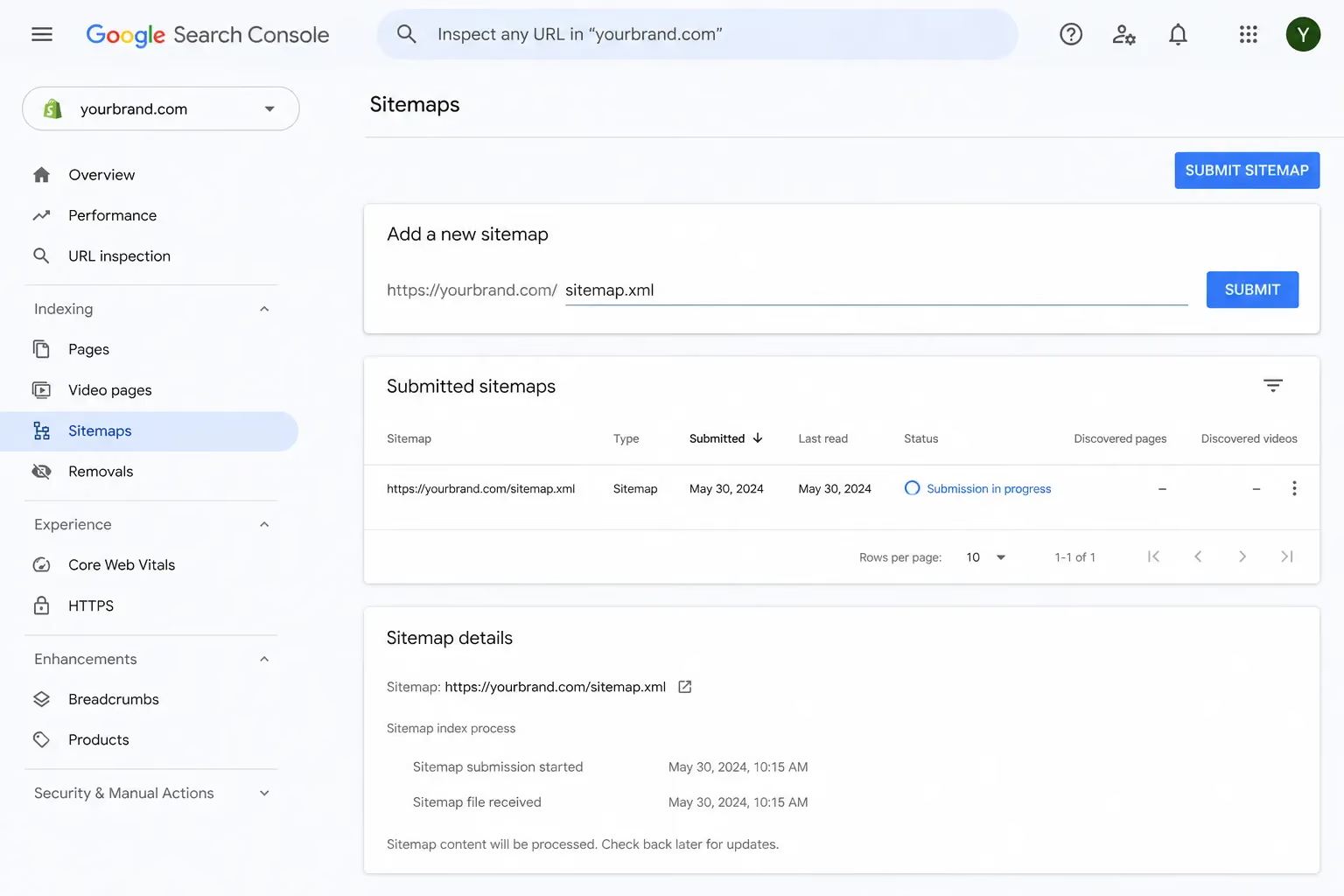
Search engines start indexing your store the moment you remove the password page. If your SEO metadata isn't in place before launch, you lose weeks of early indexing advantage. This is one of the most commonly skipped pre-launch steps, and one of the most costly.
On-page SEO format by page type:
12. Email & Marketing Automation Setup
Transactional emails are the first direct communication you have with a customer after they buy. If they arrive with placeholder text or broken formatting, it damages trust immediately.
Beyond transactional emails, three automated flows should be live before you launch, not added later as an afterthought.
13. Analytics & Tracking
If tracking isn't set up before launch, your first weeks of data are gone. You can't optimise what you're not measuring and you can't run effective paid ads without pixels firing correctly from day one.
Pixel installation priority for UAE/Gulf merchants:
14. Apps & Integrations
Every Shopify app adds JavaScript to your store. More JavaScript means slower load times. A bloated app stack is one of the most common causes of poor store performance. Merchants install 20+ apps during setup and then wonder why their PageSpeed score is 30. Install only what you need before launch.
15. Performance & Speed
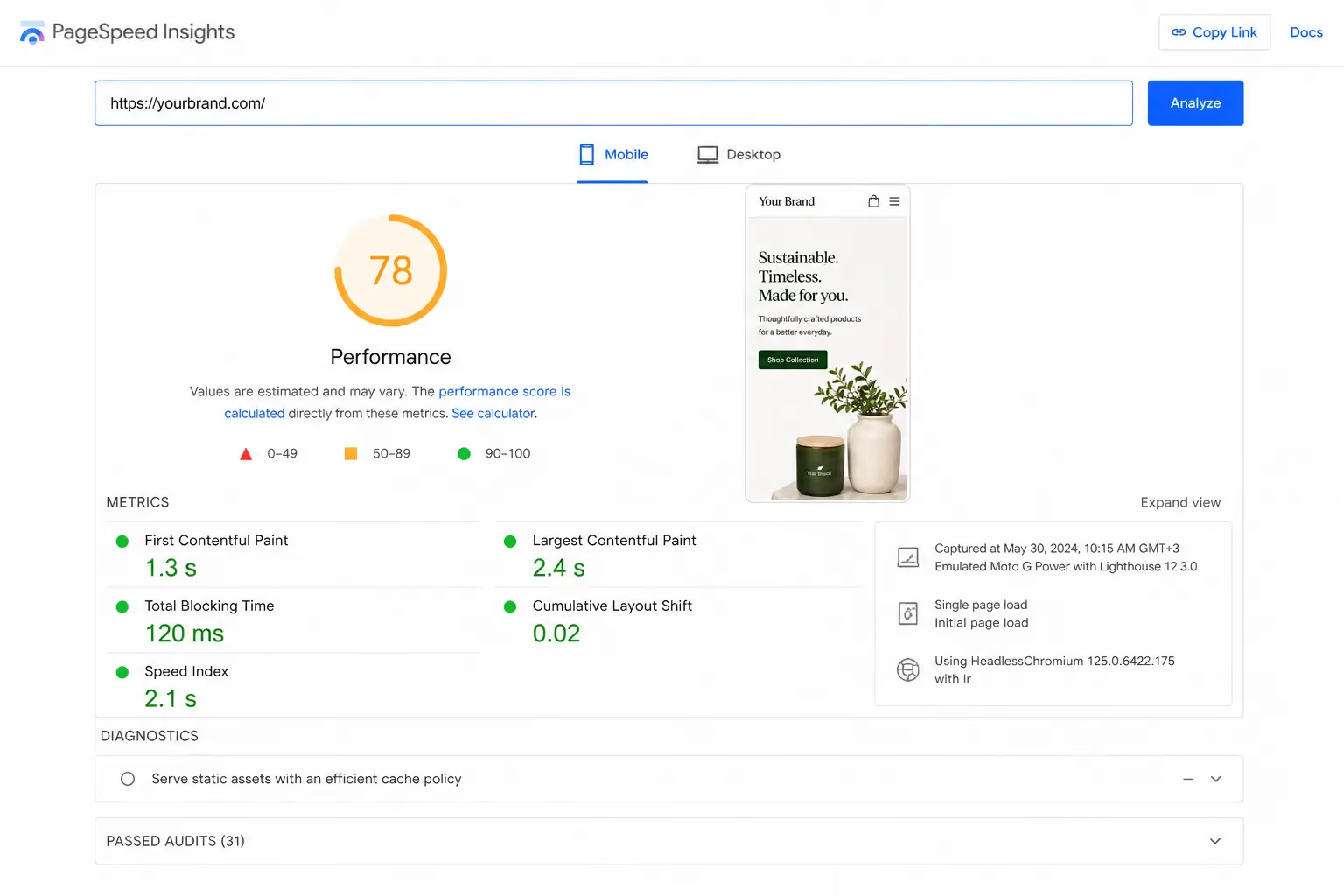
A 1-second delay in page load reduces conversion by 7%, according to Portent. On the mobile 4G networks common in the Gulf, a slow store is a store that doesn't sell. Speed issues are almost always caused by uncompressed images or too many apps; fix those two things and most stores improve significantly.
Core Web Vitals targets to hit before launch:
16. Store Testing Checklist (Pre-Launch QA)
Testing is not optional. It's the step that catches payment gateway errors, broken links, and mobile layout issues before your customers do. Work through this list methodically. Don't remove the password page until every item passes.
Orders & Payments
Navigation & Links
Checkout & Forms
Cross-browser & Cross-device
Phase 2: Launch Day Checklist
Launch day should be straightforward if Phase 1 is complete. There are only three things to do, but each one matters.
17. Remove the Password Page
The password page is what keeps your store private during setup. Removing it makes your store public. Do this deliberately.
18. Announce Across Channels
Your store being live means nothing if nobody knows. Announce simultaneously across every channel you have, and coordinate any influencer posts or paid campaigns to align with the live date.
19. Monitor in Real Time
The first few hours after launch are the most likely time to catch issues. Stay close to the data and be ready to act quickly.
Phase 3: Post-Launch Checklist (First 30 Days)
Going live is not the end of setup. It's the beginning of optimisation. The first 30 days determine whether your store builds momentum or stalls.
20. Marketing & Traffic Generation
Without traffic, you have no data. Without data, you can't improve. Your first job post-launch is to get qualified visitors to the store.
21. Conversion Optimisation After Launch
Your first real data will reveal where customers drop off. Address those gaps before scaling your ad spend. Spending more on traffic into a broken funnel only accelerates loss.
If your store is live but your conversion rate is under 1%, it's usually a design, UX, or trust issue and not a traffic issue. The Suplex team regularly audits live Shopify stores and identifies exactly where conversion is breaking down. A structured e-commerce audit costs less than a week of wasted ad spend.
22. Customer Reviews & Social Proof
No reviews means no social proof. No social proof means higher purchase anxiety, lower conversion, and more cart abandonment. Get reviews in place as fast as possible after launch and make them visible where they matter most: on the product page, before the customer has to scroll far.
23. Inventory & Operations
Your first 30 days will reveal gaps in your inventory management and fulfilment process. Address them before you scale volume, not after.
How Suplex Helps Brands Launch on Shopify Without Gaps
Suplex is a Dubai-based e-commerce design and build agency working with D2C brands across the UAE, Gulf, and internationally. As a certified Shopify Partner, Google Partner and Meta Business Partner, the team handles Shopify store setup, custom theme development, UX/UI design, performance optimisation, and conversion rate optimisation.
The brands Suplex works with, including Miduty, Kimi Cafe and a growing number of UAE-based D2C startups, typically come with one of three problems: they're launching for the first time and need a store built correctly from day one, they have an existing store that isn't converting or they've grown but the store can't handle the volume.
Most launch mistakes aren't product problems. They're design, UX, and technical failures, missed steps in exactly the kind of checklist you've just worked through.
If you want a pre-launch audit to catch what you might have missed, or if you're building from scratch and want a team that understands both the Gulf market and e-commerce conversion, Suplex offers a direct consultation with their founders.
Frequently Asked Questions
Q1: What should I check before launching my Shopify store?
Before launching, confirm your domain is connected, payment gateways are in production mode (not test or sandbox), all legal pages are published, product images and descriptions are complete, and at least one test order has gone through successfully. Also check mobile responsiveness, page speed, and that all transactional emails including order confirmation, shipping update, and abandoned cart are configured and sending correctly.
Q2: Is Shopify available in the UAE?
Yes, Shopify is fully operational in the UAE. However, Shopify Payments is not available for UAE merchants, so you'll need a third-party gateway such as Telr, PayTabs, Stripe, or Checkout.com. UAE merchants must also hold a valid trade license and an e-commerce activity permit, and register for VAT with the Federal Tax Authority if annual revenue exceeds AED 375,000.
Q3: How long does it take to launch a Shopify store?
A basic store with a small catalogue can be set up in 3 to 7 days if products and content are ready. A properly built store covering custom design, payment gateway integration, SEO setup, email automation, and full QA testing typically takes 4 to 8 weeks. Skipping time to do it right almost always results in payment failures, broken checkout flows, or poor performance at launch.
Q4: What payment gateways work in the UAE on Shopify?
The most reliable options are Telr, PayTabs, Stripe (requires UAE entity), Checkout.com, and 2Checkout. For buy-now-pay-later, Tabby and Tamara both integrate directly with Shopify and are widely used across the Gulf. Always verify your gateway is switched to production mode and run a live test transaction before removing the password page.
Q5: Do I need an SEO strategy before launching my Shopify store?
Yes. Set up Google Search Console, submit your sitemap, and fill in SEO titles and meta descriptions for all key pages before launch. Search engines begin indexing your store as soon as the password page comes down. Starting SEO at launch rather than weeks after gives you a meaningful head start on organic visibility.
Q6: What legal pages are required for a Shopify store in the UAE?
At minimum, you need a Privacy Policy aligned with UAE's Personal Data Protection Law, Terms of Service, Return & Refund Policy, and Shipping Policy. If you collect data from EU visitors, a Cookie Policy is also required. Missing or vague legal pages increase dispute risk and reduce purchase confidence.
Q7: What are the most common Shopify launch mistakes?
The most frequent mistakes are leaving the payment gateway in test or sandbox mode, skipping real test orders before launch, publishing vague return policies, launching without SEO metadata, not configuring email automations, and neglecting mobile performance. For UAE merchants specifically, the most common oversight is discovering Shopify Payments is unavailable only after store setup is otherwise complete, leaving too little time to set up and verify a third-party gateway.
Hi, I’m Rishabh Jain
I believe great digital experiences have the power to shape perception, build trust, and move businesses forward. That belief led me to found Suplex Design Studio, a global digital design and development studio helping FMCG and D2C brands build websites and digital experiences that are strategic, thoughtful, and commercially meaningful.
I started Suplex at 25 with a clear intent, to create digital experiences that look appealing, work seamlessly, and help D2C businesses grow. By 28, the studio had scaled globally, guided by a strong foundation in integrated design that I developed during my academic journey in London, where I was honoured with the Dean’s Award.
Over the years, I’ve had the opportunity to work with 100+ brands, from Fortune 500 organisations to family-run businesses, helping them build websites, e-commerce experiences, and digital products that create clarity, credibility, and long-term value.
Our work has been recognised internationally, including the Manifest Award (2024), the Clutch Global Award (2025), and features across platforms such as The Dieline, Packaging of the World, and the World Brand Design Society.
None of this would be possible without the people behind the work. I’m deeply grateful to the Suplex team, whose commitment, creativity, and attention to detail turn ideas into meaningful digital experiences every day.
At the heart of our work is a simple philosophy, digital design should be intentional, functional, and built to create real business value. That continues to guide everything we create at Suplex.



































Let’s Make It Happen
E-Commerce Success Stories
%201.avif)






.avif)
.avif)
Build Your D2C Business The Right Way
Build It With Suplex.


