Shopify Speed Optimization: Stop Losing Sales to Slow Load Times
.avif)
Shopify Speed Optimization: Stop Losing Sales to Slow Load Times
A 1-second delay in page load time reduces conversions by up to 7%. For a store doing AED 100,000 per month, that's AED 84,000 in lost revenue annually from one second.
In the UAE and broader GCC region, where mobile commerce accounts for over 73% of e-commerce traffic and competition in fashion, beauty, and electronics is fierce, speed is not a performance metric. It's a sales variable.
This blog tells you why Shopify stores slow down, how to diagnose your specific problem, and exactly what to do about it ordered by impact, not complexity.
What Is Shopify Speed Optimization and Why Does It Matter?
Shopify speed optimization is the process of reducing your store's page load time and improving how quickly users can interact with your site.
It covers everything from the size of your images and the weight of your theme to how many third-party apps are loading scripts on each page.
The goal is not just a higher Lighthouse score. It's more revenue, lower bounce rates, and better search rankings.
The Direct Link Between Page Speed and Sales
Speed affects your bottom line through three channels: conversion rate, bounce rate, and SEO visibility.
Google has made this explicit page experience, anchored by Core Web Vitals, is now a confirmed ranking factor.
Here's what the data says:
For Shopify merchants in competitive verticals like fashion and beauty, two of the fastest-growing categories in the UAE, these numbers are the difference between a profitable store and a leaky one.
How Google Scores Shopify Store Speed
Shopify generates an internal speed score (0–100) using Lighthouse, Google's open-source auditing tool. It runs a simulated test on your homepage, collection pages, and product pages, then averages the result.
But that score is based on a lab test. It doesn't reflect real user experience.
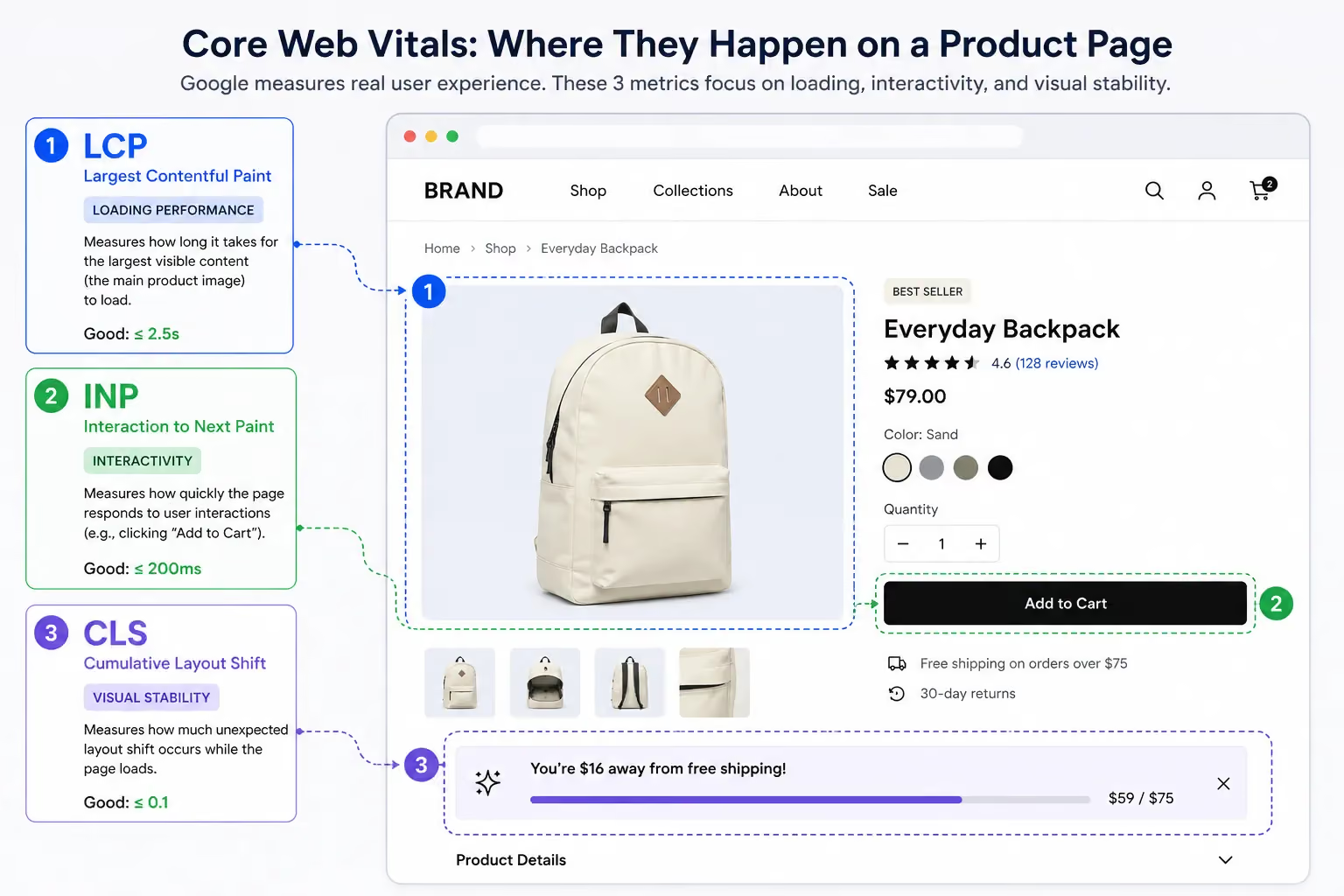
What actually matters are Core Web Vitals three metrics Google uses to measure real-world performance:
- LCP (Largest Contentful Paint): How long it takes for the largest visible element (usually your hero image or product photo) to load. Target: under 2.5 seconds.
- INP (Interaction to Next Paint): How quickly your store responds when a user clicks, taps, or types. Target: under 200 milliseconds.
- CLS (Cumulative Layout Shift): How much the page layout shifts unexpectedly as it loads like a button jumping down when an image loads above it. Target: under 0.1.
If your LCP is at 4 seconds, your hero image is taking too long. If your CLS is high, elements are jumping around on load. Both hurt conversions before a single user even sees your product.
How to Check Your Shopify Store Speed
Before making any changes, you need a clear picture of where you stand. Running on assumptions here is expensive.
Use these four tools, each measuring something slightly different.
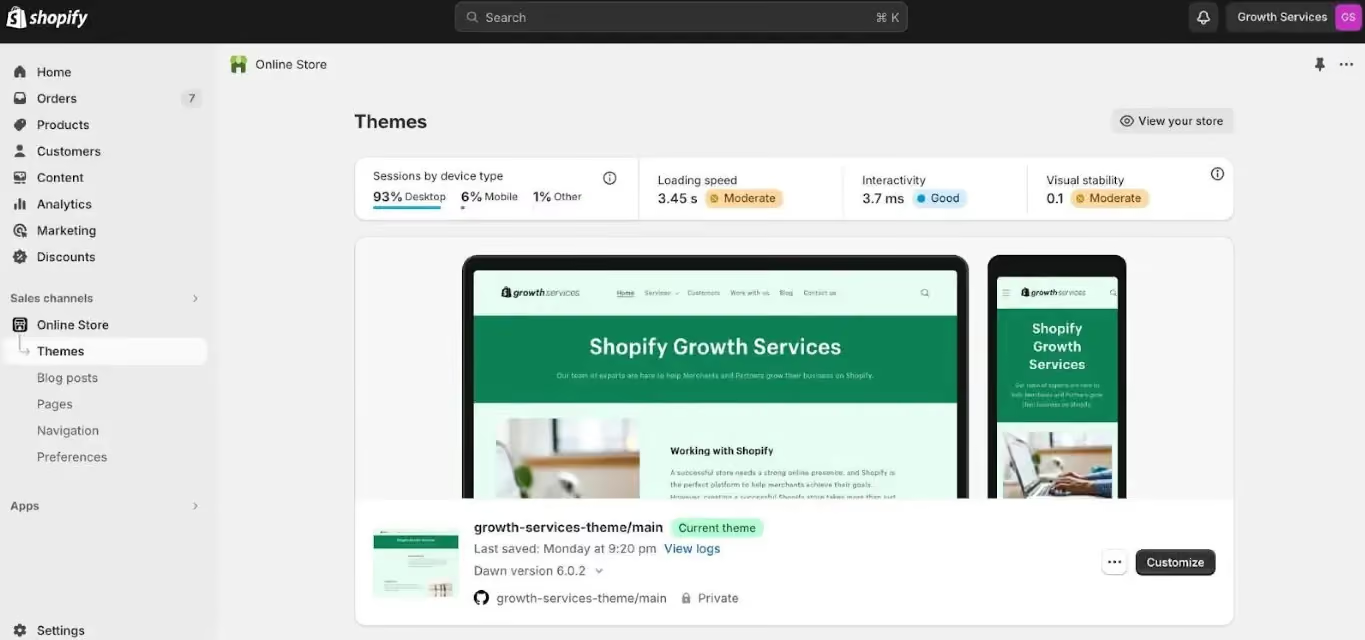
Native Shopify Speed Score
Your Shopify speed score gives a quick, theme-level snapshot of performance.
Where to find it: Admin → Online Store → Themes → click the "..." menu next to your theme → View report.
The score is useful for trend tracking. If it was 62 last month and is now 48, something changed: a new app, a theme update, a new section. Track it, but don't obsess over it. It doesn't account for real-user field data.
Free Speed Audit Tools to Use
Each tool below surfaces different issues. Run all of them at least once:
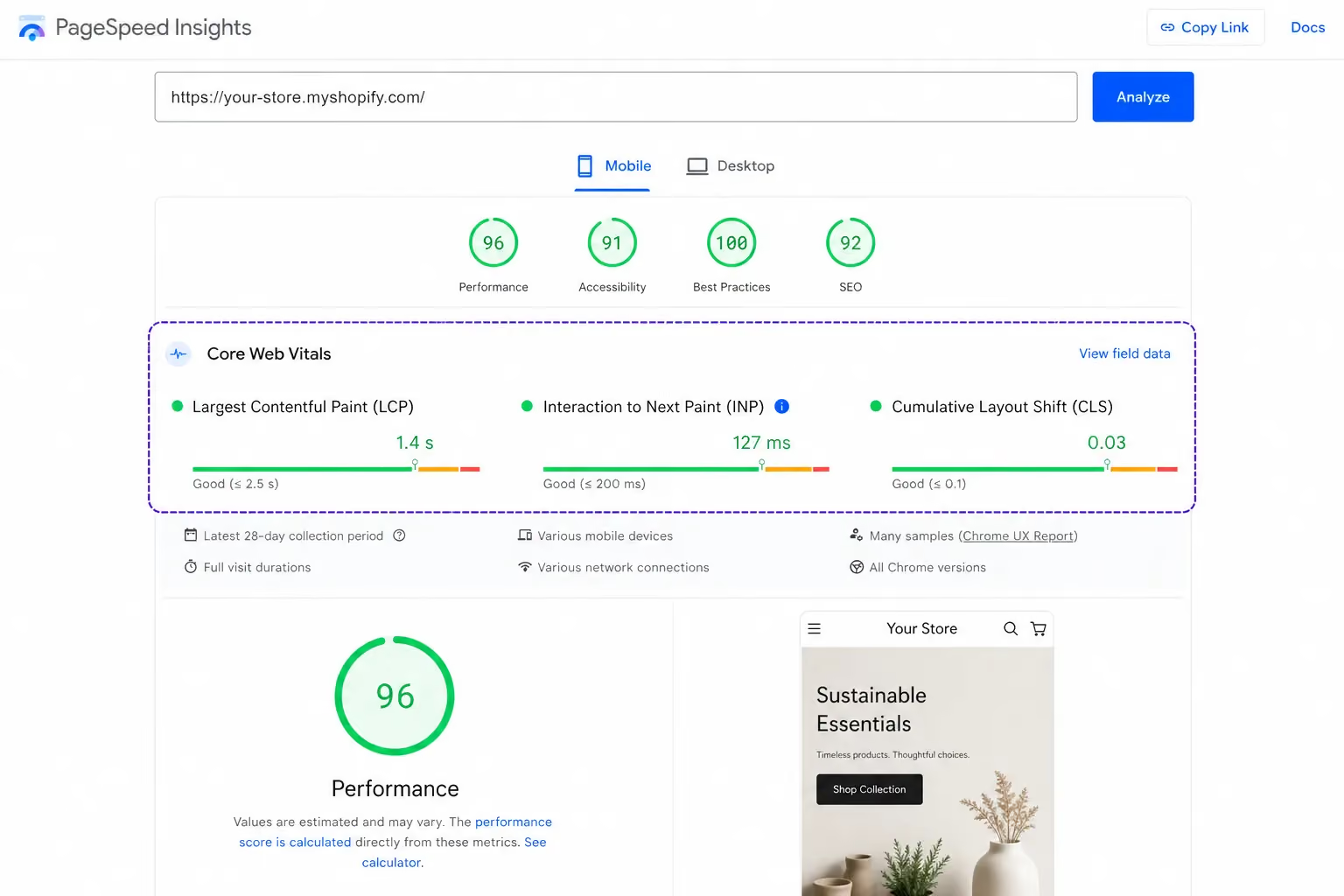
Run PageSpeed Insights first on both mobile and desktop, they often show wildly different scores, and for UAE stores, mobile is the one that matters most.
The 10 Most Effective Shopify Speed Optimization Techniques
These are ordered by impact. Start at the top.
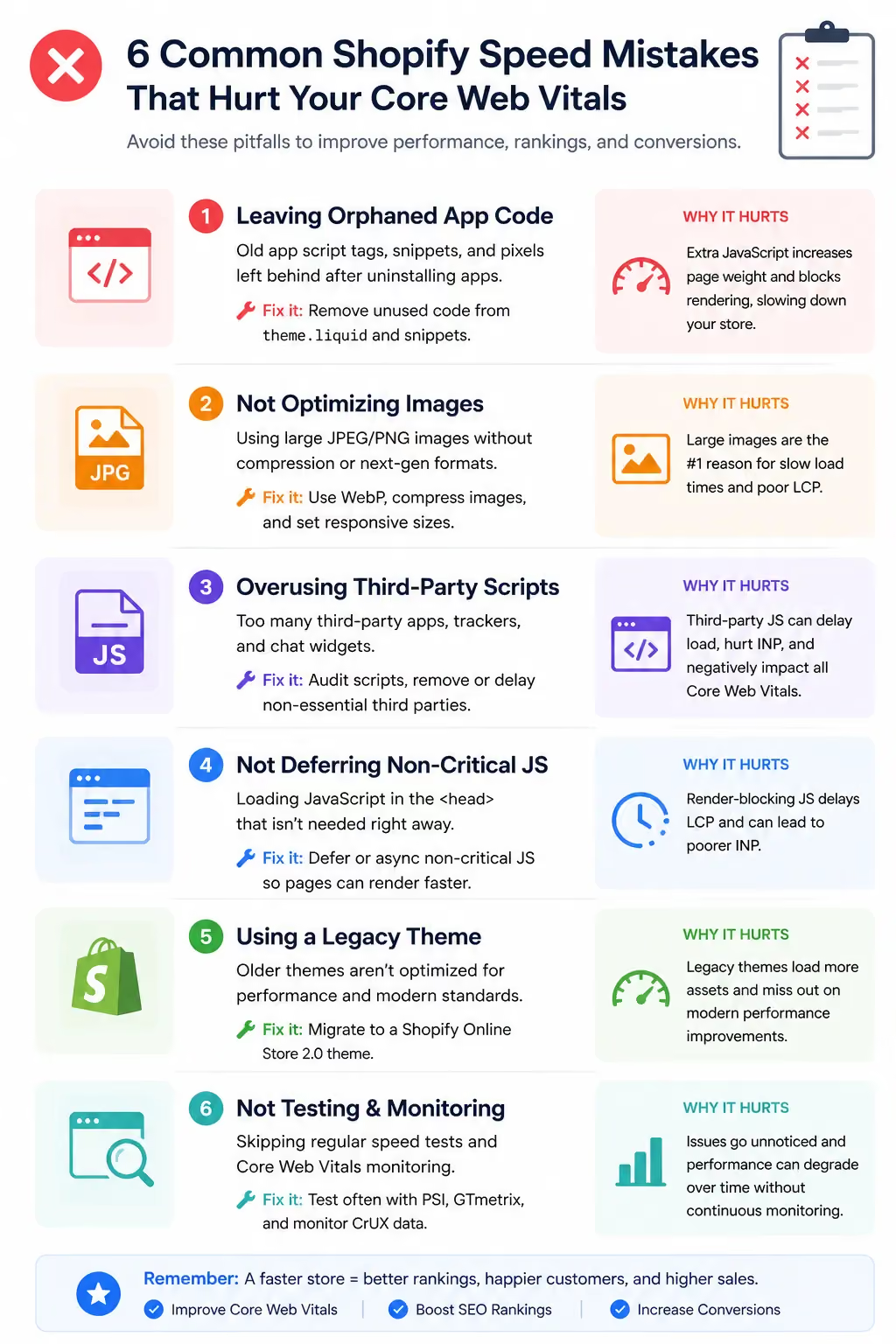
1. Switch to a Lightweight, Fast Shopify Theme
Your theme is the foundation of everything. A heavy theme can add 300–800ms of load time before a single product image loads.
Many premium third-party themes are built to look impressive in demos full-width sliders, parallax scrolling, animated headers.
All of that has a cost. Each animation and visual effect loads JavaScript. That JavaScript runs on every page, even when those effects aren't visible.
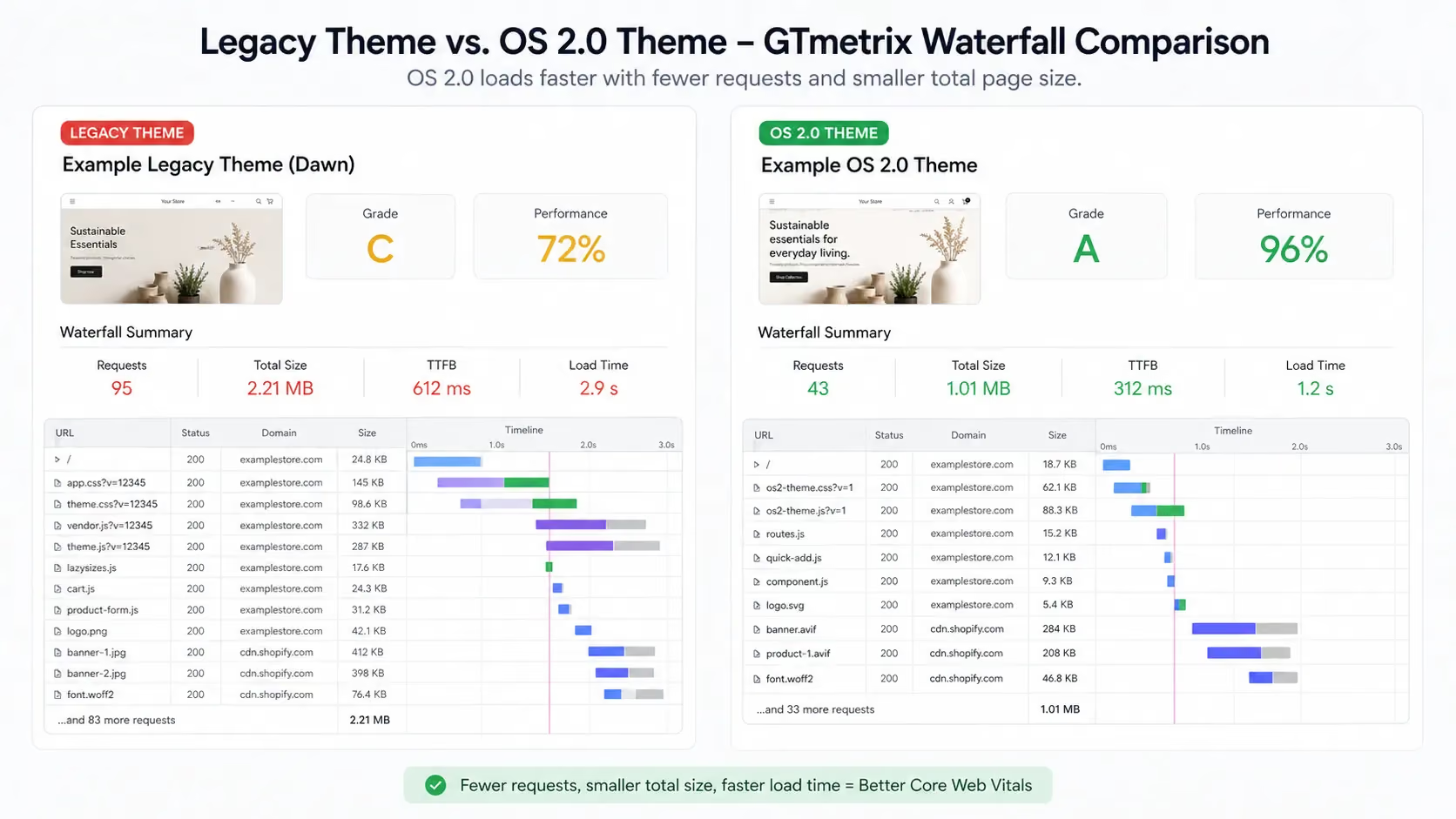
Shopify OS 2.0 themes changed this. Themes like Dawn, Sense, and Crave use a section-based architecture, which means only the sections present on a given page are loaded.
A collection page doesn't load the homepage hero logic. A product page doesn't run code for sections that aren't on it.
What to look for when choosing a theme:
- Native lazy-loading support (built in, no plugin needed)
- No jQuery dependency (older library that adds unnecessary weight)
- Liquid render speed check Shopify's Theme Store performance scores
- Minimal third-party JavaScript bundled by default
If you're on an older theme and your Lighthouse score is consistently below 40, a theme migration will move the needle more than any other single change.
2. Optimize and Compress All Images
Images are the single biggest cause of slow Shopify stores. Most merchants upload product photos straight from a camera or design tool files that are 3–8MB, displayed in a 400px product thumbnail.
That's like shipping a shipping container to deliver a letter.
What to do:
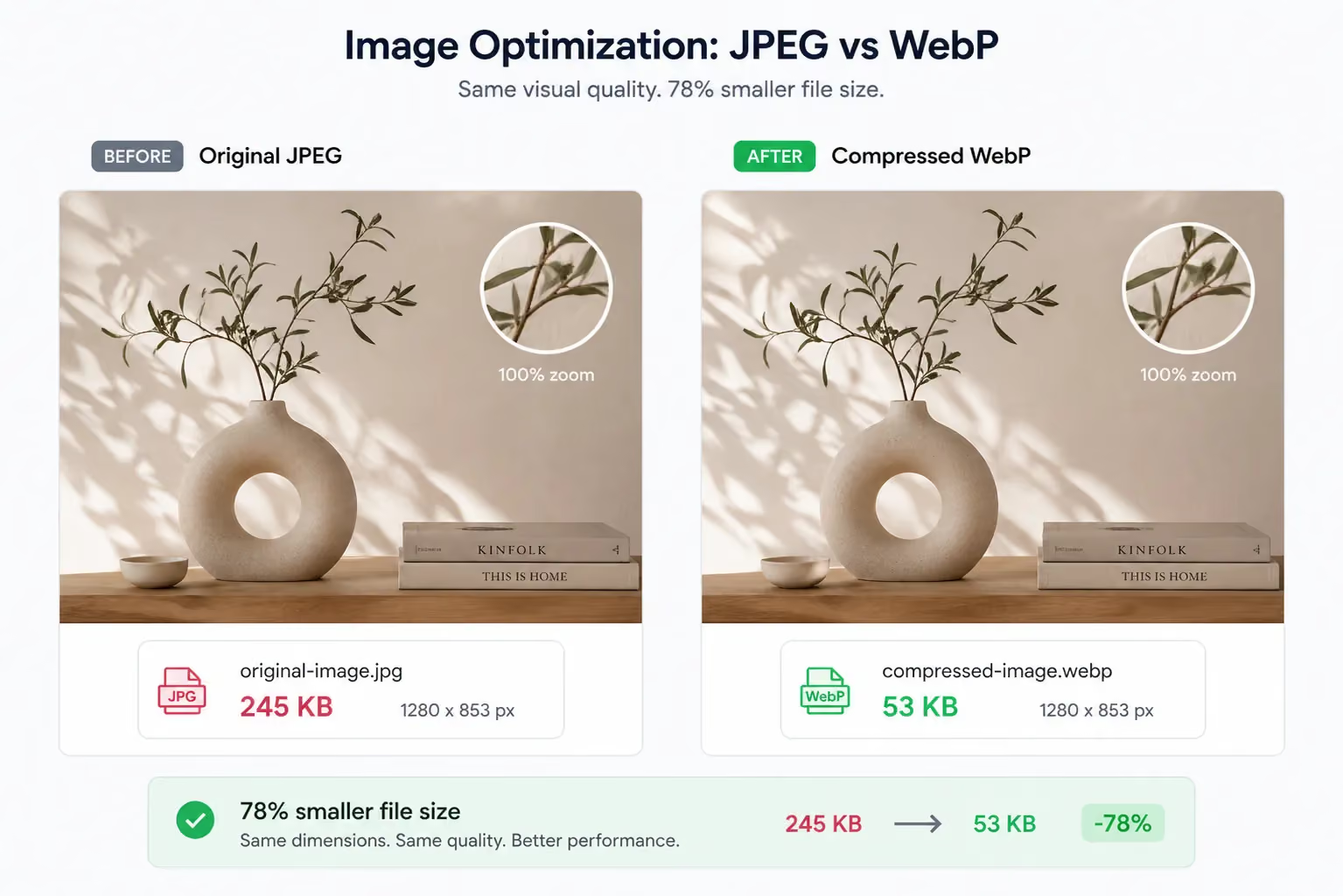
- Convert to WebP format. WebP files are 25–35% smaller than JPEG at equivalent quality. Shopify CDN supports WebP natively and will serve it to compatible browsers automatically but only if you upload WebP files to begin with, or use an app that converts them.
- Compress before uploading. Use TinyPNG, Squoosh, or a Shopify app like Crush.pics or TinyIMG. Aim for under 200KB per product image.
- Set correct dimensions. If your product grid displays images at 600px wide, don't upload a 4,000px file. Shopify will scale it down in the browser, but the full-size file still downloads.
One Shopify fashion store we reviewed at Suplex had 47 product images averaging 2.1MB each. After converting to WebP and compressing, the total image payload dropped by 68%. LCP improved by 1.4 seconds.
3. Enable Lazy Loading for Images and Videos
Lazy loading means off-screen images and videos don't load until the user scrolls to them. On a product page with 10 images, this prevents 9 of them from loading immediately on page open.
For stores with rich media multiple product angles, video banners, lifestyle images this is significant.
Shopify OS 2.0 themes support lazy loading natively. If you're already on Dawn or a similar theme, it's likely already active.
If you're on an older theme or a custom theme, add this attribute to image tags in your Liquid files:
<img src="{{ image | img_url: '800x' }}" loading="lazy" alt="{{ image.alt }}">For videos, use the preload="none" attribute on <video> tags. This prevents the browser from downloading video data until the user actively requests it.
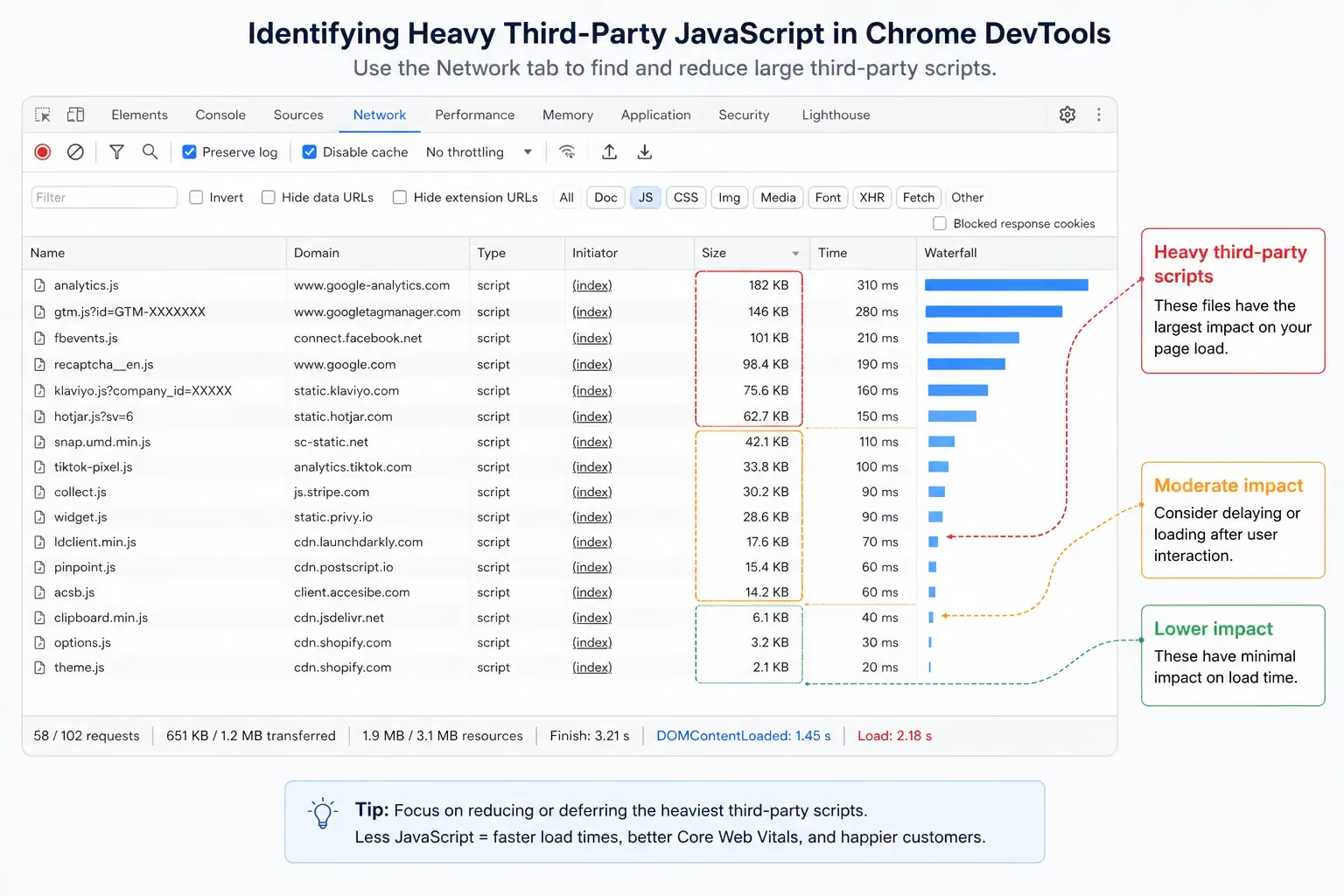
Every Shopify app you install adds at least one HTTP request per page load. Most apps inject JavaScript into your storefront that runs on every page whether that page uses the app or not.
A live chat widget running on your checkout page. A review app loading on your homepage. A loyalty program script on every collection page. These all add latency.
How to audit your app scripts:
- Open your store in Google Chrome
- Right-click → Inspect → go to the Network tab
- Reload the page
- Filter by "JS" sort by size or time
Look for files from third-party domains that are large or slow. Cross-reference against your installed apps. The ones loading 300ms+ of JavaScript on every page are your targets.
Common offenders:
- Live chat widgets (Tidio, Intercom, Drift)
- Pop-up builders (Privy, Justuno)
- Review apps with heavy embed scripts (Yotpo, Stamped)
- Loyalty/rewards programs (Smile.io, LoyaltyLion)
This doesn't mean remove them all. It means to audit them. If a live chat app is generating qualified leads for you, the conversion value likely outweighs the speed cost. If it's not, cut it.
5. Minify JavaScript and CSS Files
Minification strips whitespace, comments, and unnecessary characters from your code files. A JS file with 50 lines of well-formatted, commented code might minify to 8 lines. Same function, smaller file, faster download.
This typically reduces file sizes by 10–30%.
Good news: Shopify automatically minifies JS and CSS files when you use the standard theme compiler through the Shopify CLI. If you're using a Shopify-hosted theme without custom modifications, this is likely already happening.
If you have custom code added directly to theme files (common with Shopify liquid customizations), those additions may not be minified. For custom JavaScript files, run them through UglifyJS. For CSS, use CSSNano.
If you're working with a developer, confirm that your build process includes minification as a default step, it should not be optional.
6. Limit Custom Fonts and Load Them Efficiently
Custom fonts look good. They also add 50–200KB per font family to your page weight before any images load.
Most stores load 3–4 font weights (regular, medium, semibold, bold) plus an italic variant. That's 5 separate font files. Add a second font family for headings and you're at 10 files.
What to do:
- Use system fonts where your brand allows it. System fonts (SF Pro, Segoe UI, Georgia) are already on the user's device zero download required.
- If custom fonts are non-negotiable, preload the critical fonts, typically the body font at regular weight:
<link rel="preload" href="/fonts/brand-font-regular.woff2" as="font" type="font/woff2" crossorigin>- Cap your font variants. Pick the two or three weights you actually use and load only those. Remove the rest from your theme.
7. Use Shopify's Built-In CDN and Understand Its Limits
Shopify includes Fastly's global CDN by default. This means your static assets images, CSS, JS files are cached on servers distributed globally, and served from whichever node is geographically closest to each user.
For UAE-based shoppers, Fastly has infrastructure in Dubai. This means lower latency for local customers compared to stores hosted on slower, distant servers.
What you don't need to worry about: setting up the CDN. Shopify handles it automatically.
What you do need to manage:
- Third-party CDNs loaded by apps may not be geographically optimized for your audience. An app loaded from a US-only CDN adds latency for every UAE visitor.
- Script loading order. Even if individual files load fast, if they block rendering, they still hurt your LCP. The CDN delivers the file quickly but if your browser is waiting to parse it before showing anything, speed suffers.
8. Reduce App JavaScript with Deferred Loading
Not all scripts need to run the moment your page opens. Pop-ups should not fire immediately. Chatbots don't need to be interactive before your product images load. Loyalty widgets can wait.
Deferred loading tells the browser: download this script, but don't execute it until the page has finished loading everything else.
In your theme code, add defer or async to non-critical script tags:
<!-- Loads after HTML is parsed -->
<script src="chat-widget.js" defer></script>

<!-- Loads in parallel, executes when ready -->
<script src="analytics.js" async></script>
Use defer for scripts that depend on the DOM (chat widgets, review widgets, pop-ups). Use async for scripts that are independent (analytics, tracking pixels).
Before editing theme code, check your app's settings first. Some apps, particularly well-built ones offer a "deferred loading" or "delay until interaction" setting. Enable it before touching Liquid files.
9. Clean Up Unused Code and App Remnants
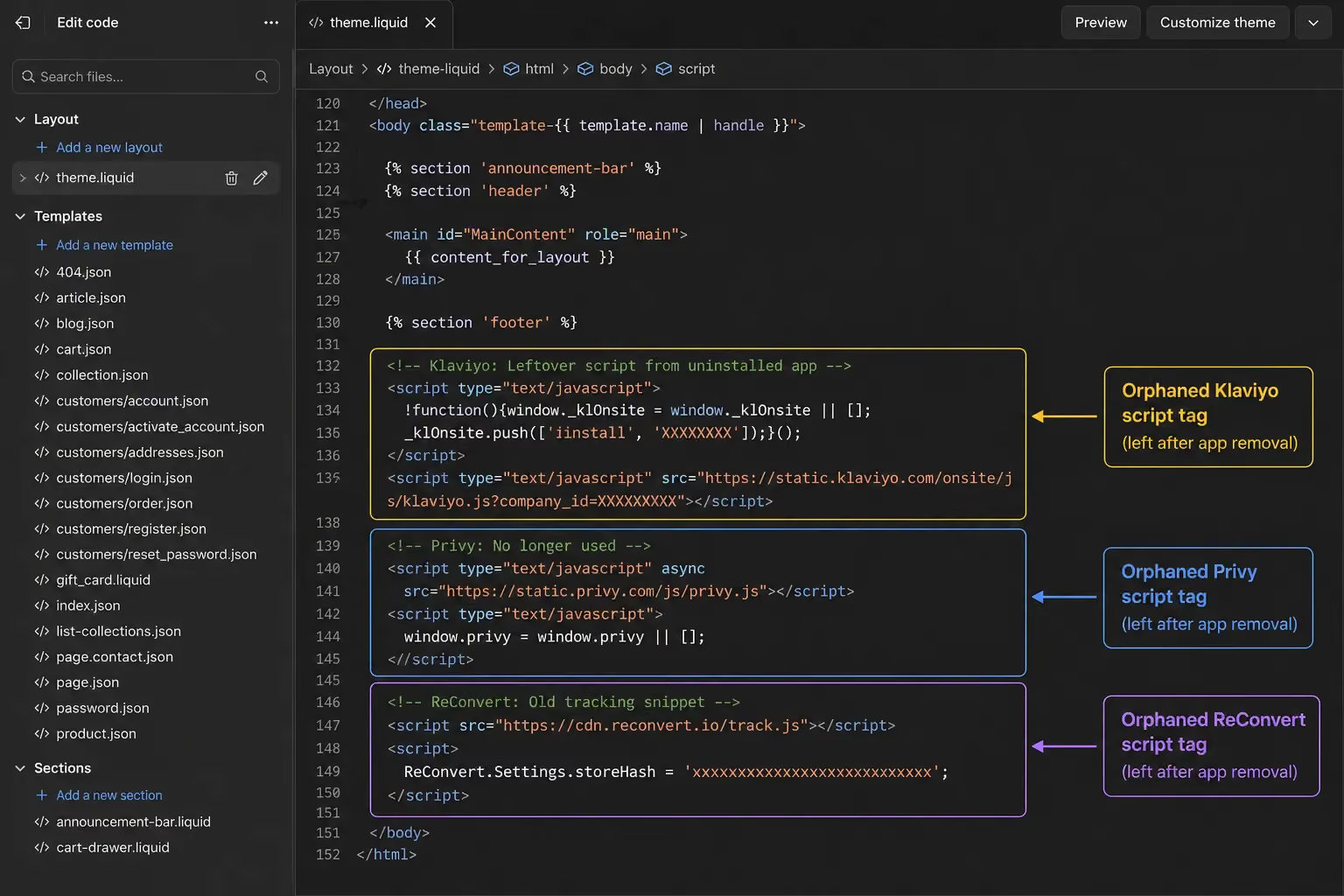
Uninstalling a Shopify app removes it from your app list. It does not always remove its code from your theme.
Scripts, stylesheets, and tracking pixels left behind by deleted apps continue to load on every page slowing down a store for features that no longer exist. This is one of the most overlooked speed issues in established Shopify stores.
How to find leftover code:
- Open Theme Editor → Edit Code
- In theme.liquid, search for script tags referencing external domains
- Cross-reference each domain against your currently installed apps
- If the app is gone, the code can go too
Be careful here. If you're not confident in what you're deleting, work with a developer. Removing the wrong script can break functionality you didn't know was connected.
Suplex includes a full app remnant audit as part of every Shopify performance optimization engagement. It's usually where we find the most low-hanging fruit in older stores.
10. Optimize Your Shopify Store's Critical Rendering Path
This is the most technical item on the list but for stores targeting strong Core Web Vitals scores, it's also one of the highest-impact.
The critical rendering path is the sequence of steps a browser takes before it can display anything on screen. If your CSS or JavaScript is blocking that sequence, your page appears blank to users while the browser waits.
Two specific techniques:
Critical CSS inlining: Identify the CSS required to render your above-the-fold content (header, hero image, first product section).
Paste it directly into a <style> block in your <head>. This means the browser doesn't need to download a CSS file before it can display the page. Defer the rest of your CSS to load after.
Preconnect to external domains: If your store loads fonts from Google Fonts or analytics from a third-party domain, tell the browser to establish that connection early:
<link rel="preconnect" href="https://fonts.googleapis.com">
<link rel="preconnect" href="https://fonts.gstatic.com" crossorigin>
This saves 100–500ms on each external resource, depending on DNS lookup time.
Both techniques require developer involvement to implement safely. But the payoff is measurable, often a 0.3–0.8 second reduction in LCP.
Shopify Speed Optimization for Mobile Specific Considerations
Over 73% of e-commerce traffic comes from mobile devices. That figure is even higher during peak shopping events like Ramadan sales and White Friday.
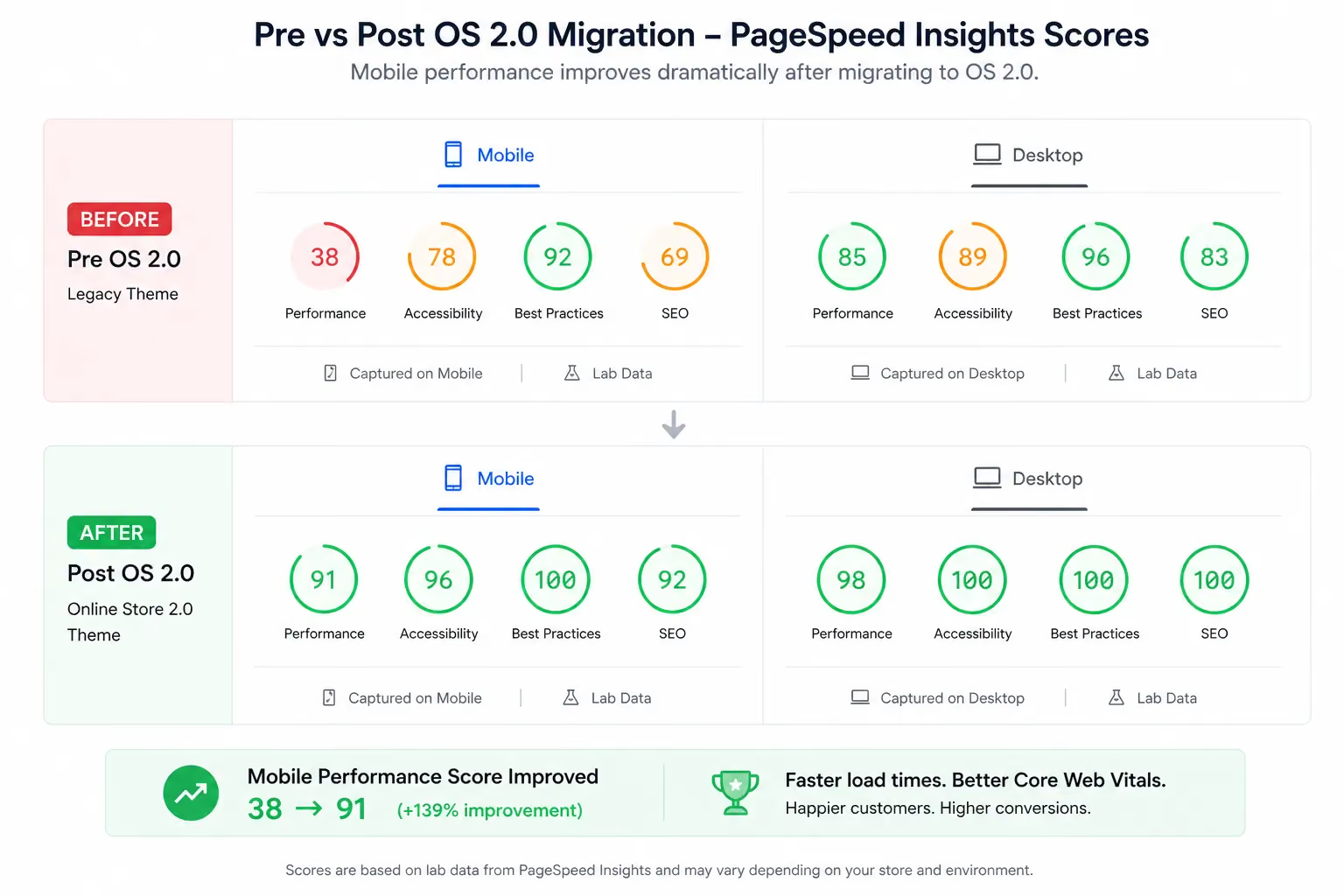
Google scores mobile and desktop performance separately and ranks your store based on your mobile Core Web Vitals not your desktop score. A store with a desktop Lighthouse score of 85 and a mobile score of 38 will rank based on 38.
Mobile has additional constraints. Smaller screens, slower processors and variable network conditions (moving between 4G and Wi-Fi) all mean your mobile LCP is almost always slower than desktop.
What to prioritize for mobile:
- Above-the-fold LCP image: Preload your hero image on mobile. This is usually the largest element the browser renders first, and it directly controls your LCP score.
- Tap target sizing: Buttons and links must be at least 48x48px to avoid mobile usability issues that Google flags in PageSpeed Insights.
- No interstitials blocking content: Pop-ups that cover the full screen on mobile page load are a Core Web Vitals penalty. If you use pop-ups, configure them to trigger after 5 seconds or on exit intent not on arrival.
Test specifically on mobile using Google PageSpeed Insights (it separates mobile and desktop) and WebPageTest (lets you simulate real devices on real networks).
Shopify OS 2.0 and Mobile Performance
Shopify Online Store 2.0 was built with mobile performance as a primary consideration, not an afterthought.
Two structural improvements make a real difference on mobile:
- Section-based rendering means a product page only loads the sections present on that page. No global theme code running for sections that don't exist on that URL.
- App blocks replace older app embed scripts. Instead of injecting JavaScript into every page globally, app blocks load only on the pages where they're explicitly placed by the merchant.
In practice, migrating from a legacy theme to a Shopify OS 2.0 theme often improves mobile speed scores by 20–40 Lighthouse points. The architecture is simply more efficient at the core level.
If your store is still running on a custom theme from 2019 or 2020, that architecture gap is likely the single biggest contributor to your mobile speed problem.
Common Shopify Speed Mistakes to Avoid
These are the mistakes we see repeatedly when auditing stores across different industries, different markets, different store sizes.
- Installing multiple speed optimizer apps. Apps like Booster, TinyIMG, and Hyperspeed sometimes conflict with each other. Two apps trying to defer the same scripts can break functionality. Pick one and configure it properly.
- Uploading SVG files for product photos. SVGs are vector files designed for logos and icons. Product photography should be JPEG or WebP. Uploading SVGs for photos causes rendering issues and doesn't compress efficiently.
- Using a page builder on every page. Tools like Shogun and GemPages are powerful, but they inject heavy JavaScript on every page they touch. If you're using a page builder for all collection and product pages, that JS is loading site-wide. Use page builders selectively for landing pages and campaigns, not your entire storefront architecture.
- Running too many homepage sections. Each section in your homepage adds render time. A homepage with 12 sections hero, announcement bar, featured collection, testimonials, video, brand story, Instagram feed, trust badges, newsletter, bestsellers, FAQs, footer is asking a lot of a mobile browser on a variable connection.
- Running multiple chat and pop-up apps simultaneously. Two chat widgets. A pop-up for email capture. A push notification prompt. All loading at once. Pick the tools that serve your conversion goals and cut the rest.
- Not testing speed after every app install. App installs are the most common cause of sudden speed regressions. Run a PageSpeed Insights test before and after every new app. If the score drops significantly, the app is the cause.
How Suplex Approaches Shopify Speed Optimization
Suplex is a Shopify Partner agency based in Dubai, working with brands across the UAE and the GCC. Speed is built into every store we design and build from the ground up not added at the end as a checklist item.
When we audit an existing store, we start with Core Web Vitals field data from Google's CrUX (Chrome User Experience Report) dataset.
The Shopify speed score gives you a directional signal. It's useful but it's a lab simulation. CrUX data tells you what real users on real devices are actually experiencing when they visit your store.
Our speed audit process covers:
- Theme architecture review: Is the theme OS 2.0? How many global scripts are loading? Is lazy loading native or patched on?
- Image pipeline audit: Format, compression ratios, dimensions vs display sizes
- App script analysis: Which apps are loading what on which pages, and what's the actual latency cost?
- Critical path optimization: What's blocking the first render? Is it a render-blocking CSS file? A synchronous JS call to a third-party domain?
- Before/after benchmarking: For stores with existing traffic, we run A/B speed tests to quantify the conversion impact of performance improvements, not just score improvements.
For businesses building in the UAE market, we also account for local CDN performance and mobile-first rendering because a store that loads well in a desktop test in the UK may perform very differently on a 4G connection in Dubai.
If your store is underperforming or you want to build one that doesn't, the performance optimization service is a good place to start. Or if you want a broader look, the Shopify audit covers speed alongside UX, conversion, and design.
FAQs: Shopify Speed Optimization
What is a good Shopify speed score?
Shopify considers anything above 50 acceptable. In practice, aim for 70 or above but don't let the number distract from what matters more. Your Core Web Vitals thresholds are the real measure: LCP under 2.5 seconds, INP under 200 milliseconds, and CLS under 0.1. These directly affect your Google search rankings and the experience real users have on your store.
Why is my Shopify store so slow?
The most common causes, in order of frequency:
- Oversized or uncompressed images
- Too many third-party app scripts loading on every page
- A heavy theme with animations, sliders, or embedded video
- Leftover scripts from apps that have been uninstalled
- Custom fonts loaded without preloading or compression
Run a Google PageSpeed Insights audit to identify which issues contribute most to your specific store's latency. The "Opportunities" section gives you a prioritized list with estimated time savings.
Does Shopify speed affect SEO?
Yes. Google uses Core Web Vitals as a ranking signal specifically for mobile search. A slow store ranks lower, particularly in competitive markets where multiple stores are targeting the same search terms. In the UAE, where fashion, beauty, and electronics brands compete for the same keywords, page speed can determine whether you appear on page one or page two.
How many Shopify apps are too many?
There's no fixed number, but the right framework is: every app that isn't actively generating measurable value (sales, conversions, retained customers) is a candidate for removal. Audit your app list quarterly. If you can't attribute revenue or retention to an app, cut it and test what happens.
Can I improve Shopify speed without a developer?
Several high-impact optimizations require no coding:
- Compress and convert images to WebP before uploading
- Remove unused apps from your store
- Switch to a lightweight Shopify OS 2.0 theme like Dawn or Sense
- Use a single speed optimizer app (TinyIMG or Booster)
- Reduce the number of homepage sections
For critical CSS inlining, script deferral, and code cleanup, a developer will produce faster and safer results. These changes touch core theme files where mistakes are harder to reverse.
Does changing Shopify themes improve speed?
It can significantly. Legacy premium themes, especially those built before Shopify OS 2.0, often carry heavy JavaScript dependencies that load globally. Migrating to an OS 2.0 theme typically improves Lighthouse scores by 20–40 points and reduces mobile LCP by 1–2 seconds in stores we've migrated.
How often should I check my Shopify store speed?
Set a monthly reminder to run a PageSpeed Insights audit. Beyond that, test immediately after any of the following: installing a new app, updating your theme, making a major design change, or ahead of a sale campaign. Speed degrades gradually as apps and content accumulate. A monthly baseline makes regressions easy to catch.
Hi, I’m Rishabh Jain
I believe great digital experiences have the power to shape perception, build trust, and move businesses forward. That belief led me to found Suplex Design Studio, a global digital design and development studio helping FMCG and D2C brands build websites and digital experiences that are strategic, thoughtful, and commercially meaningful.
I started Suplex at 25 with a clear intent, to create digital experiences that look appealing, work seamlessly, and help D2C businesses grow. By 28, the studio had scaled globally, guided by a strong foundation in integrated design that I developed during my academic journey in London, where I was honoured with the Dean’s Award.
Over the years, I’ve had the opportunity to work with 100+ brands, from Fortune 500 organisations to family-run businesses, helping them build websites, e-commerce experiences, and digital products that create clarity, credibility, and long-term value.
Our work has been recognised internationally, including the Manifest Award (2024), the Clutch Global Award (2025), and features across platforms such as The Dieline, Packaging of the World, and the World Brand Design Society.
None of this would be possible without the people behind the work. I’m deeply grateful to the Suplex team, whose commitment, creativity, and attention to detail turn ideas into meaningful digital experiences every day.
At the heart of our work is a simple philosophy, digital design should be intentional, functional, and built to create real business value. That continues to guide everything we create at Suplex.



































Let’s Make It Happen
E-Commerce Success Stories
%201.avif)






.avif)
.avif)
Build Your D2C Business The Right Way
Build It With Suplex.


