Shopify Agency Deliverables Checklist: What You Should Get
.avif)
Shopify Agency Deliverables Checklist: What You Should Get
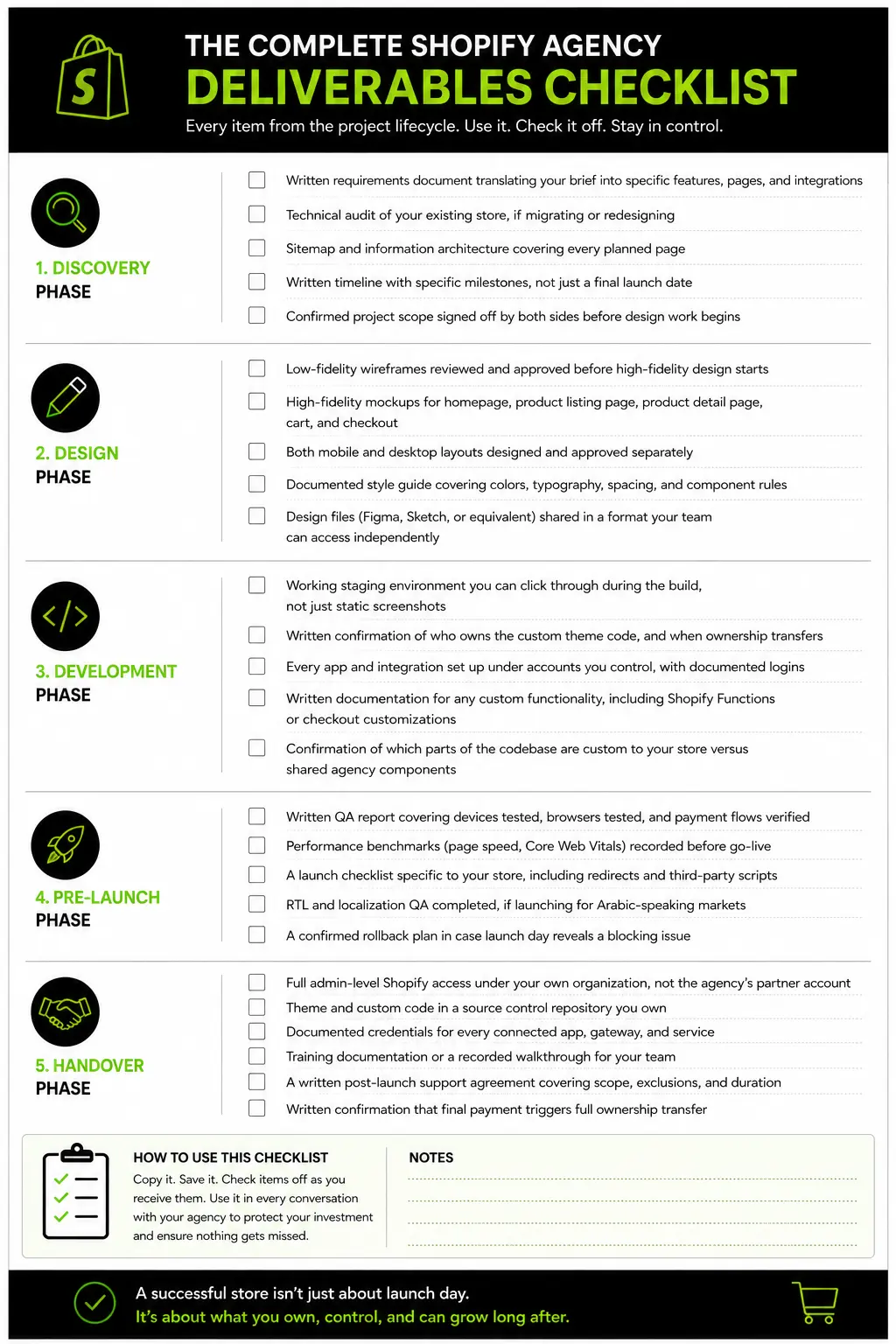
A Shopify agency deliverables checklist should cover five stages, discovery, design, development, pre-launch and handover.
Most brands only track the first four, then find out months later they don't own their own source code or admin credentials.
This Suplex guide covers what to ask for at every stage, especially the part most contracts leave vague.
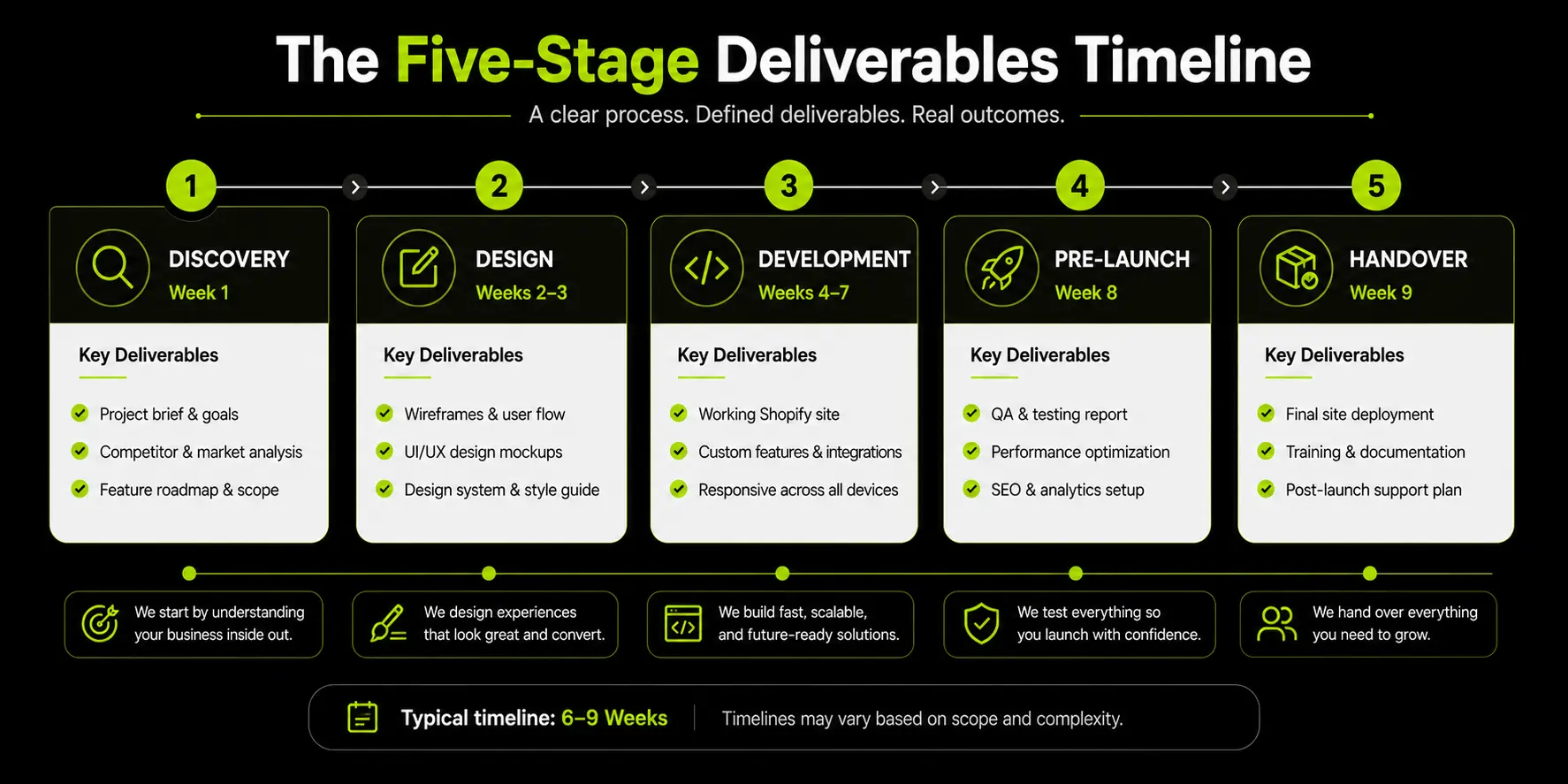
Why "Deliverables" Needs a Clearer Definition Than Most Contracts Give It
Most Shopify agency contracts describe deliverables in terms of what gets built, not what gets handed over. That gap is where brands lose real ownership without ever signing off on losing it.
This matters more than it sounds like it should, because most brands only find out about the gap once, and usually at the worst possible time.
A dispute over an invoice, a sudden need to move fast on a competitor's launch, or simply wanting to bring development in-house are all moments where the difference between "the site works" and "we own the site" becomes very real, very fast.
The checklist below exists to close that gap before it becomes a problem, not after.
The Difference Between "Completed Work" and "Delivered, Owned Work"
A finished, live store is completed. Delivered, owned work means you hold the admin access, the source code, and the credentials that let you operate, modify, or move the store without needing the original agency's permission.
These sound like the same thing until they aren't. A theme can be fully built, tested, and pushed live, and the brand still might not have owner-level access to the Shopify admin, might not have the theme's source files outside the agency's own repository and might not know which email address the payment gateway account is actually registered under.
None of that shows up as a problem on launch day. It shows up the first time something needs to change.
Why This Gap Rarely Shows Up Until You Need to Switch Agencies or Add a Feature
Ownership gaps stay invisible as long as you keep working with the same agency. The moment you try to switch developers, add a feature independently, or resolve a dispute, missing access becomes a real, expensive problem.
Picture a brand that launched successfully, ran the store for eight months and then decided to bring development in-house. They asked for admin-level Shopify access and were told the store was set up under the agency's own partner account, not the brand's.
Getting full control back took weeks of back-and-forth, and in the meantime, they couldn't make even minor changes to their own site. Nothing about the original launch looked broken. The gap was in what "delivered" actually meant.
Discovery Phase Deliverables
Discovery is where the project gets scoped, and it should produce written documentation, not just meeting notes. If you've already used our guide to briefing a Shopify agency, this is what a good agency should hand back in response.
Requirements Documentation and Scope Confirmation
You should receive a written document confirming what's actually being built, translated from your brief into specific features, pages, and integrations. This is your reference point for every later conversation about scope.
This document is what separates a project that stays on budget from one that drifts through scope creep nobody agreed to in writing.
If a feature gets added mid-project, it should show up as a documented change against this baseline, not as a verbal "sure, we can add that" that neither side remembers the same way three months later.
Technical Audit of Existing Store (If Migrating or Redesigning)
If you're migrating or redesigning, the agency should audit your current store first: what's working, what's causing problems and what data or functionality needs to carry over. Skipping this step is how migrations lose data or break integrations nobody flagged in advance.
Sitemap and Information Architecture
A sitemap defines every page and how they connect, before any design work starts. This prevents the common problem of a beautiful homepage built around navigation that doesn't actually reflect how the catalog is structured.
Timeline and Milestone Plan
You should get a written timeline with specific milestones, not just a launch date. Milestones let you track whether the project is actually on schedule long before the deadline arrives, instead of finding out two weeks before launch that development hasn't started.
Design Phase Deliverables
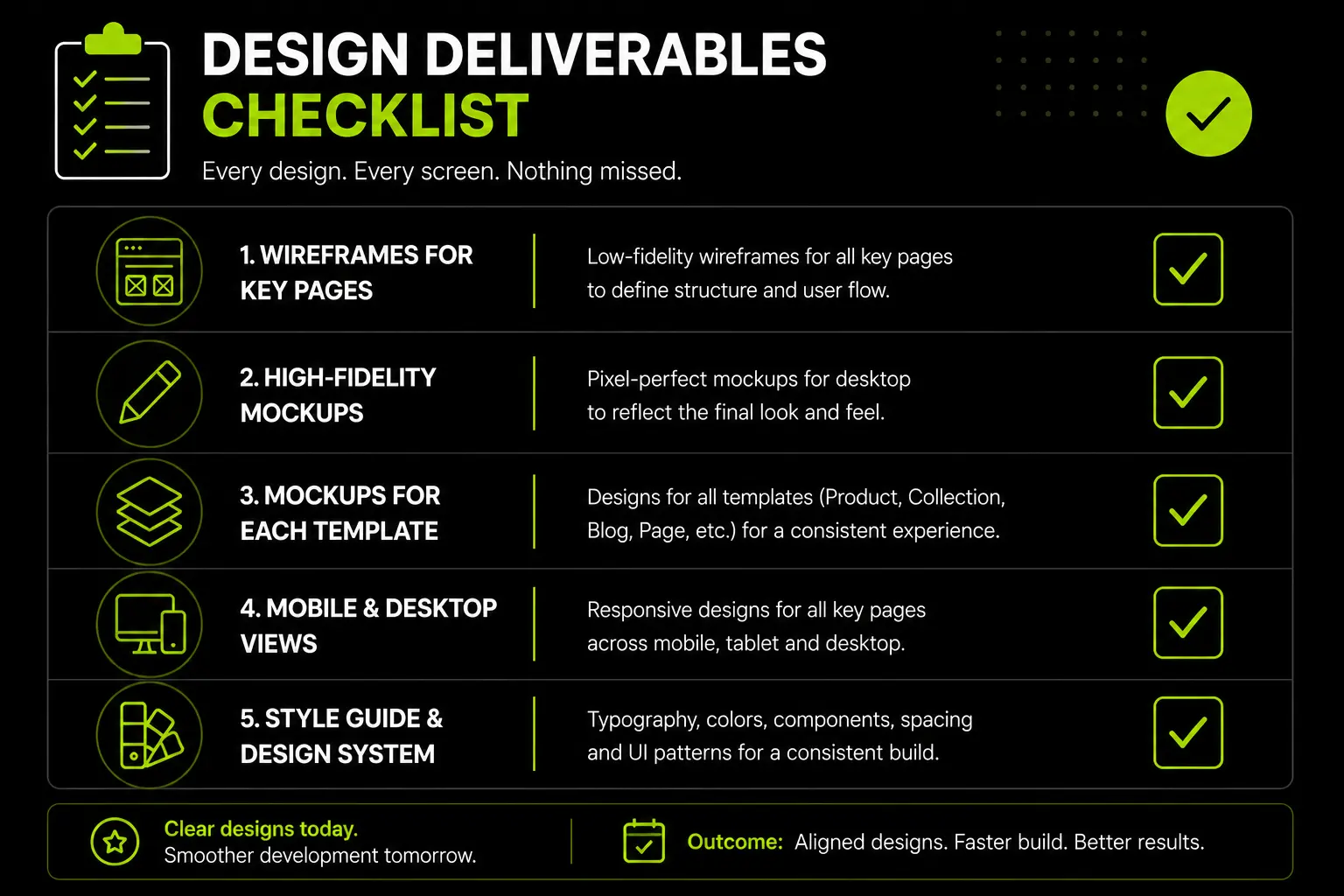
Design deliverables should cover every core template, in both fidelities, across both devices, and should include the design system behind the screens, not just the screens themselves.
Wireframes (Low-Fidelity Before High-Fidelity)
Wireframes map out layout and hierarchy before visual design begins. Reviewing wireframes first is far cheaper than requesting layout changes after full mockups are built, since restructuring a wireframe takes minutes and restructuring a finished mockup takes hours.
High-Fidelity Mockups Across Key Templates
You should see fully designed mockups for the homepage, product listing page, product detail page, cart, and checkout, not just the homepage.
A beautiful homepage means little if the product page, where most buying decisions actually happen, wasn't given the same attention.
Mobile and Desktop Versions, Not Just One
Both mobile and desktop layouts should be designed and approved separately, since most Shopify traffic is mobile and a desktop-first design doesn't translate automatically.
If your agency only shows you desktop mockups, ask directly for mobile before approving anything.
A Documented Style Guide, Not Just Final Screens
A style guide documents your colors, typography, spacing, and component rules as a reusable system, separate from the finished screens themselves.
Without one, every future page or campaign your team builds ends up needing the same agency again, just to stay visually consistent.
Our wireframing service treats this documentation as a standard deliverable, not an optional add-on.
Development Phase Deliverables
Development deliverables should give you visibility into the build as it happens, not just a finished product at the end, along with clear documentation of anything custom.
A Working Staging Environment, Not Just Final Screenshots
You should be able to click through a working staging site during development, not just review static screenshots. A staging environment lets you and your team catch real usability issues before launch, instead of discovering them with live customers.
Custom Theme Code, and Confirmation of Who Owns It
Confirm in writing, before development starts, that the theme code belongs to you once the project is paid for and complete. This single line item prevents most of the ownership disputes that surface later.
Some agencies build on top of proprietary internal frameworks or boilerplate code they reuse across every client, which raises a fair question about what parts of the codebase are actually yours versus theirs. That's a reasonable thing for an agency to have.
It just needs to be spelled out clearly: which parts of the final code are custom to your store and fully yours, and which parts (if any) are licensed or shared framework components you're using under a separate arrangement. Ask this question directly if the contract doesn't already answer it.
App and Integration Setup
Every connected app, whether it's a payment gateway, reviews platform, email tool, or analytics suite, should be set up under accounts you control, with documented logins.
If you're still choosing a payment gateway, our UAE payment gateway comparison guide is worth reviewing before this stage begins, since gateway choice affects setup and documentation needs.
Documentation of Any Custom Functionality Built
Anything custom, like a Shopify Function, a checkout customization, or a bespoke app integration, should come with written documentation explaining what it does and how it was built.
Undocumented custom code becomes a black box the next developer has to reverse-engineer from scratch, which costs real time and money down the line.
Pre-Launch Deliverables
Pre-launch deliverables prove the store is actually ready, with evidence, not just an agency's word that testing happened.
A Documented QA Pass
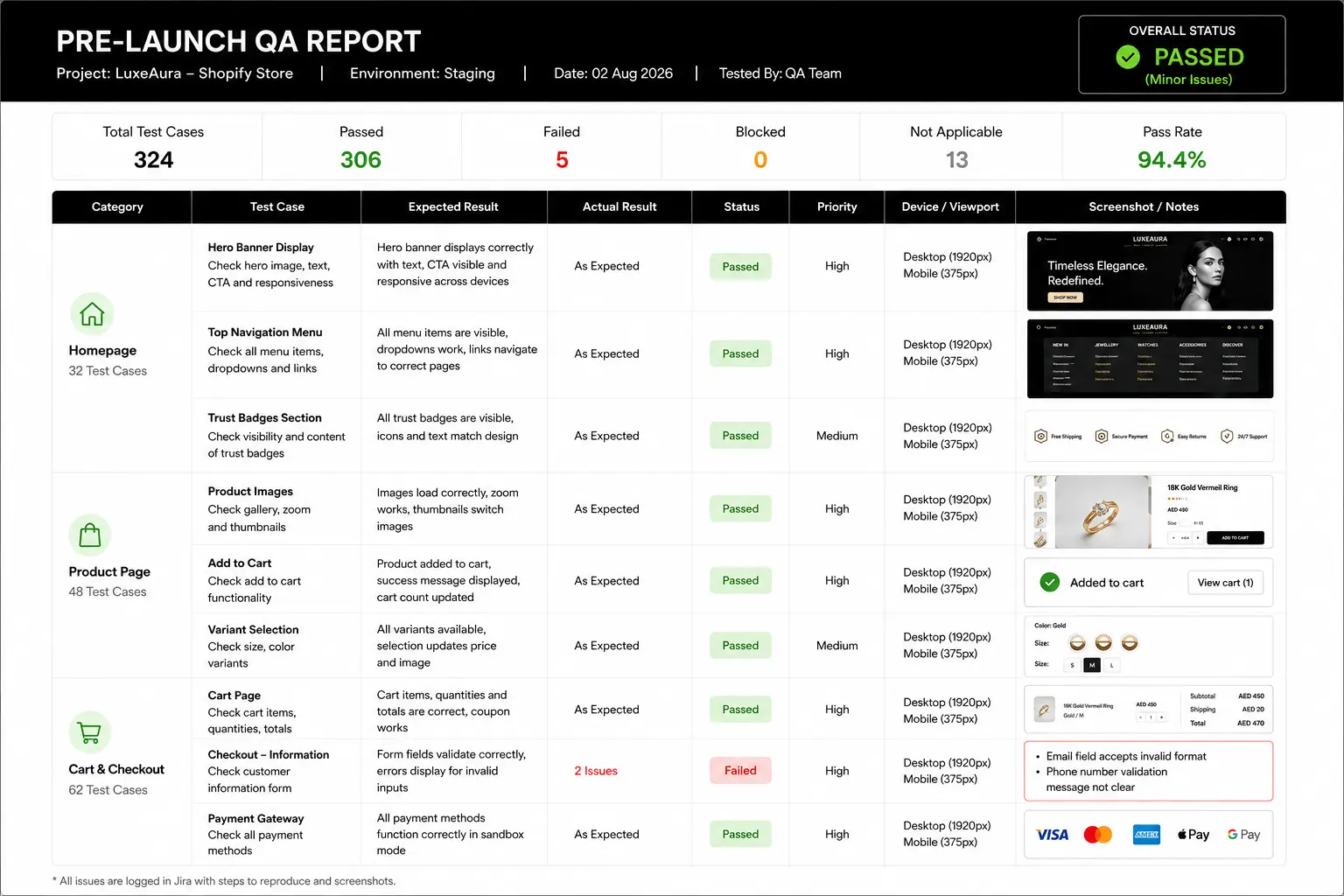
You should receive a written QA report covering the devices tested, browsers tested, and payment flows verified, not just a verbal confirmation that "everything's been tested." Written QA reports also give you something concrete to reference if an issue surfaces after launch.
At minimum, this report should confirm testing across the two or three browsers your actual customers use most, on both iOS and Android devices, and a completed test purchase through every payment method the store supports.
If a payment method wasn't tested end to end before launch, that's worth flagging before go-live, not discovering when a real customer's order fails.
Performance Benchmarks Before Go-Live
Page load speed and Core Web Vitals scores should be measured and shared before launch, giving you a baseline to compare against after the store goes live.
A slow store costs real conversions, and you can't know if performance dropped after launch without a pre-launch number to compare it to.
A simple benchmark, homepage and product page load times on both mobile and desktop, recorded before launch and again a week after, tells you quickly whether anything regressed once real traffic and real apps started running.
A Launch Checklist Specific to the Store, Not a Generic Template
The final pre-launch checklist should reference your actual store, your actual apps, and your actual redirects, not a generic list copied from another project.
A generic checklist misses store-specific risks like old URLs that need redirects or third-party scripts that need re-testing.
RTL and Localization QA, If Applicable to Your Market
If you're launching for Arabic-speaking markets, right-to-left layout testing needs to happen as its own QA pass, not as an assumption that the same layout logic just flips automatically.
Our Arabic ecommerce website design guide covers the specific UX issues that RTL QA needs to catch before launch.
Launch and Handover Deliverables: Where Brands Get Shortchanged Most
Handover is the stage where a brand's real leverage gets decided. If any of the five items below are missing at handover, you don't fully own your store yet, regardless of what "launched" means.
Full Admin Access Under the Brand's Own Ownership
The Shopify store should be set up under your own organization, with you holding owner-level access, not access granted through the agency's partner account.
Owner-level access under your own name is what lets you add or remove staff, change billing, and grant access to a new developer without needing the original agency's cooperation.
This is worth checking as early as project kickoff, not at handover, since the store's organizational ownership gets set up once, early on, and rarely gets revisited unless someone specifically raises it.
If your agency proposes setting up the store under their own partner account "for convenience," ask for it to be transferred to your organization instead, or at minimum, confirm in writing exactly how and when that transfer will happen.
Source Code in a Repository the Brand Controls
Theme code and any custom development should live in a source control repository (like GitHub) that you own, not just one the agency maintains internally.
If the agency disappears, changes ownership, or you simply have a falling out, code sitting only in their internal systems is code you don't actually control.
Setting this up costs almost nothing at project start, a repository under your organization's account, with the agency's developers added as collaborators, and it costs a great deal to fix after the fact if it wasn't done from day one.
All Third-Party App and Service Credentials, Documented
Every connected app, gateway, and service should come with documented login credentials, registered under accounts you control, handed over in writing.
A shared spreadsheet or password manager entry for each service is a reasonable minimum standard here.
Training Documentation or a Recorded Walkthrough
Your team should receive either written documentation or a recorded walkthrough showing how to manage day-to-day tasks in the admin, like updating products, running discounts, or checking order status.
Without this, your team stays dependent on the agency even for tasks that should take five minutes internally.
A Written Post-Launch Support Agreement
Get clear, written terms on what post-launch support includes, what counts as a bug fix versus new paid work, and how long the support period lasts.
Verbal assurances about "being around if you need anything" aren't a support agreement, and they won't hold up if a dispute comes up later.
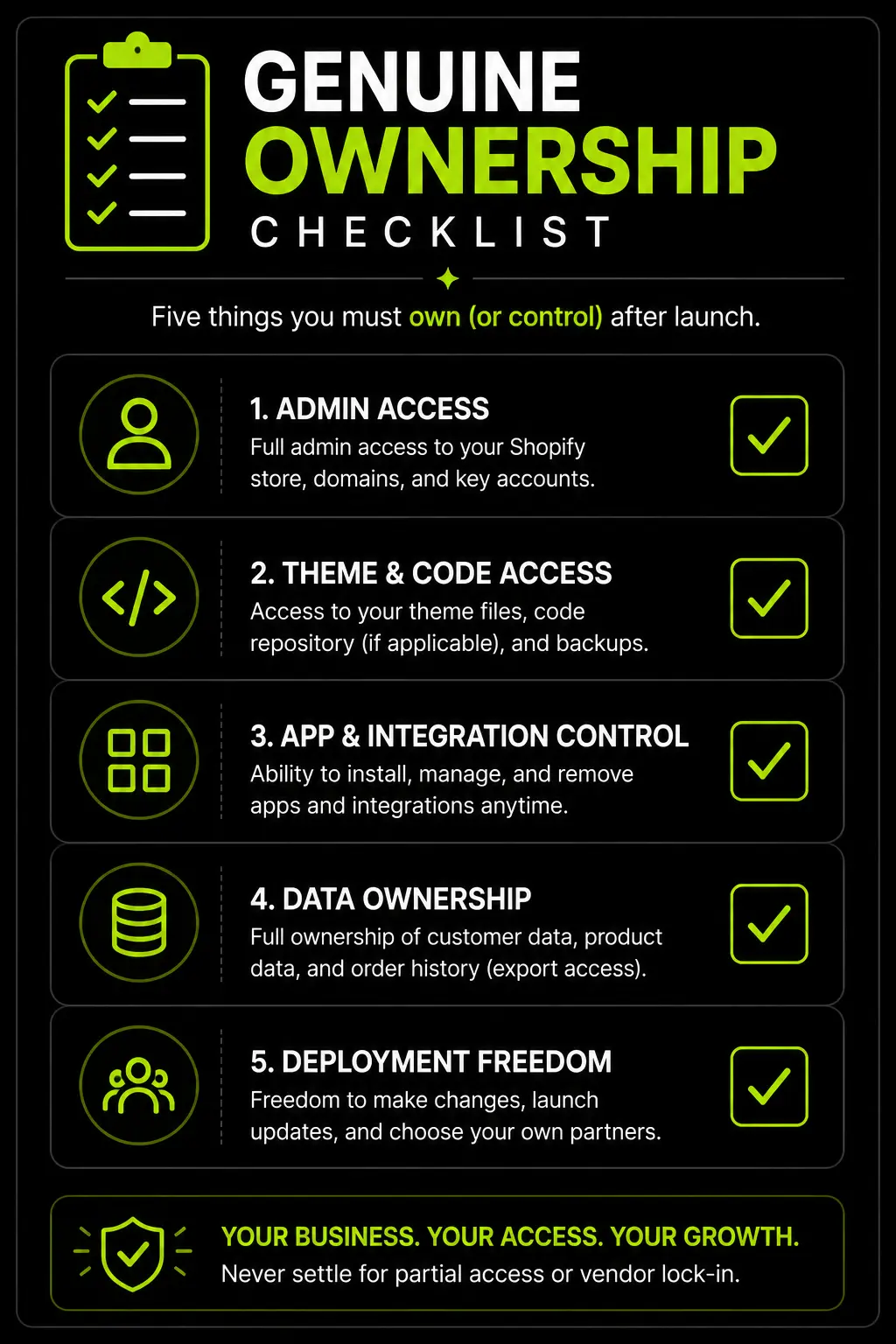
Genuine Ownership Checklist
- You hold owner-level Shopify admin access under your own organization
- Theme and custom code sit in a repository you control
- Every connected app and service has documented, brand-owned credentials
- Your team has training documentation or a recorded walkthrough
- Post-launch support terms are written down, not assumed
How We Handle Deliverables and Handover at Suplex
We treat handover as a defined milestone in every project, not a final email after everything else is done. Full ownership transfer, admin access, source code, and documentation, is standard practice, not something a client has to request separately.
Our ecommerce store setup process builds handover requirements into the project plan from day one, so there's no scramble at the end to gather credentials or explain custom code after the fact.
If you're earlier in the process and still deciding on scope or platform, our platform consultation service and wireframing process are both built around the same principle: you should understand exactly what you're getting, at every stage, before you pay for it.
[Screenshot Suggestion 2: Screenshot of a sample handover documentation package or admin access confirmation, placed after this section.]
Red Flags That Signal Deliverables Won't Be Complete
These six signals tend to show up early, often before development even starts, and they're worth raising directly rather than waiting to see how the project unfolds.
If you're still vetting agencies rather than working with one, our questions to ask an ecommerce agency guide covers what to raise before signing anything, which catches most of these issues before they become real problems.
Frequently Asked Questions
What Should I Receive When a Shopify Project Is Officially "Done"?
Full admin-level store access under your own ownership, source code in a repository you control, documented credentials for all connected apps and services, a style guide, and either training documentation or a walkthrough for your team.
Do I Own the Custom Code an Agency Builds for My Shopify Store?
It depends on the contract, but you should. Confirm code ownership explicitly before the project starts, not after. This is one of the most commonly assumed-but-unconfirmed points in agency agreements.
What's the Difference Between a Launch Checklist and a Deliverables Checklist?
A launch checklist covers whether the store is ready to go live, such as speed, QA, and payment testing. A deliverables checklist covers whether you've actually received and own everything you're entitled to from the engagement, including after launch.
Should Post-Launch Support Be Included Automatically?
Not always, and that's fine, but it should be explicitly defined either way. Get clarity in writing on what's included, what counts as a bug fix versus new work, and for how long support is covered.
What if My Agency Won't Hand Over Admin Access or Source Code?
This is a significant red flag. Raise it directly and in writing before final payment. Reputable agencies expect to hand over full ownership as standard practice, not as a special request.
Do I Need a Style Guide if the Design Already Looks Finished?
Yes, if you plan to add pages, campaigns, or features later without the same agency. A style guide documents the design system behind the screens, not just the screens themselves.
How Do I Document QA Before Launch if I'm Not Technical?
Ask your agency for a written QA report covering devices tested, browsers tested, and payment flows verified. You don't need to run the tests yourself, but you should receive evidence they were run.
Hi, I’m Rishabh Jain
I believe great design has the power to shape perception, build trust, and move businesses forward. That belief is what led me to found Suplex Design Studio, a global branding and packaging studio working with FMCG and D2C brands across markets.I started suplex at 25 with a clear intent, to create design that is strategic, thoughtful, and commercially meaningful. By 28, the studio had scaled globally, guided by a strong foundation in Integrated Design that I developed during my academic journey in London, where I was honoured with the Dean’s Award.
Over the years, I’ve had the opportunity to work with 100+ brands, from Fortune 500 organizations to family-run businesses, helping them build packaging and brand systems that create recall, relevance, and long-term value.
Suplex’s work has been recognized internationally, including the Manifest Award (2024), the Clutch Global Award (2025), and features on platforms such as Packaging of the World, The Dieline, and the World Brand Design Society.
None of this would be possible without the people behind the work. I’m deeply grateful to the suplex team, whose commitment, creativity, and attention to detail turn ideas into meaningful brand experiences every day.
At the heart of my work is a simple philosophy, design should be intentional, honest, and built to last, and that continues to guide everything we create at suplex.




































Let’s Make It Happen
E-Commerce Success Stories

%201.avif)






.avif)
.avif)
Build Your D2C Business The Right Way
Build It With Suplex.


