Arabic Ecommerce Website Design: The Complete UX Guide
.avif)
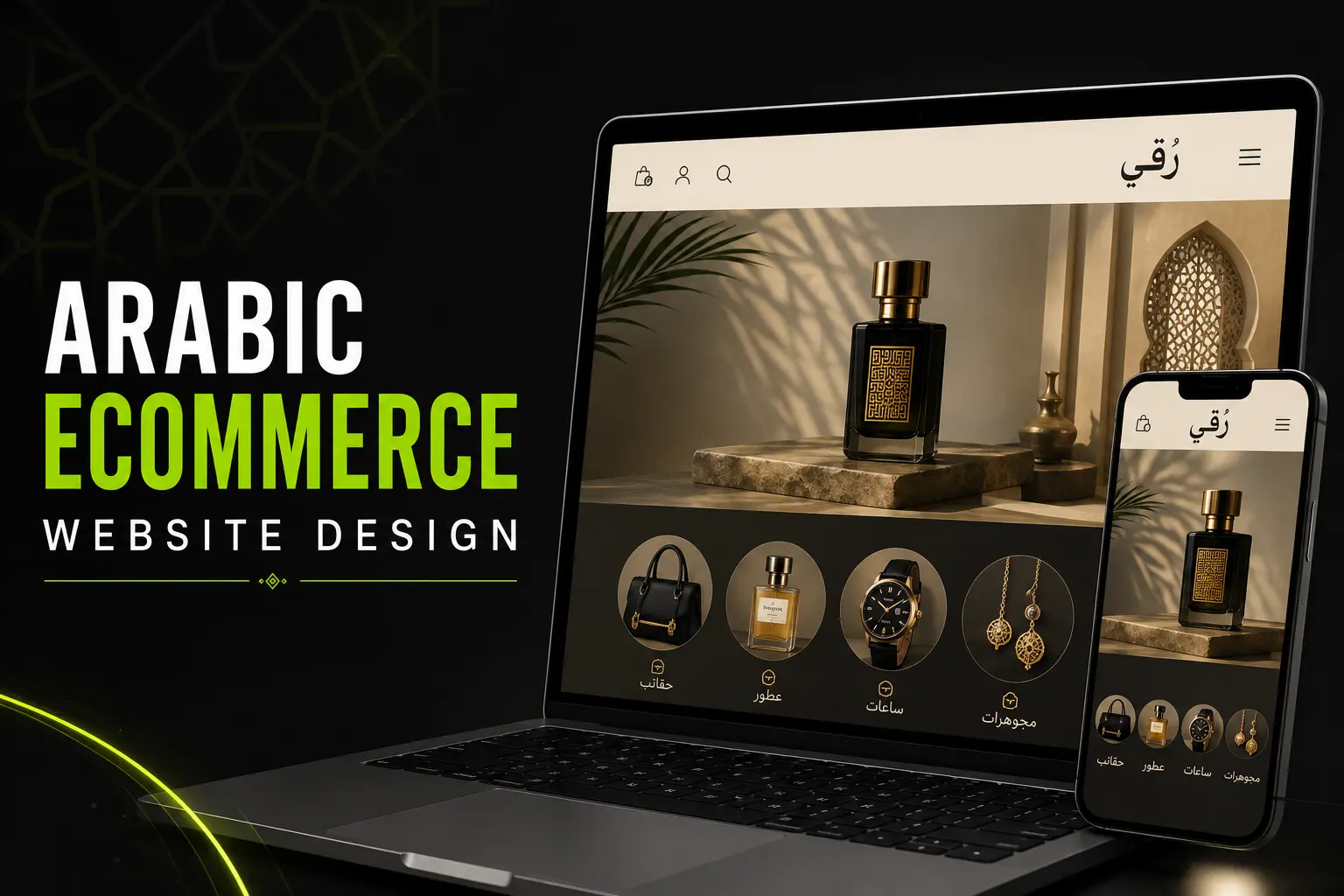
Arabic Ecommerce Website Design: The Complete UX Guide
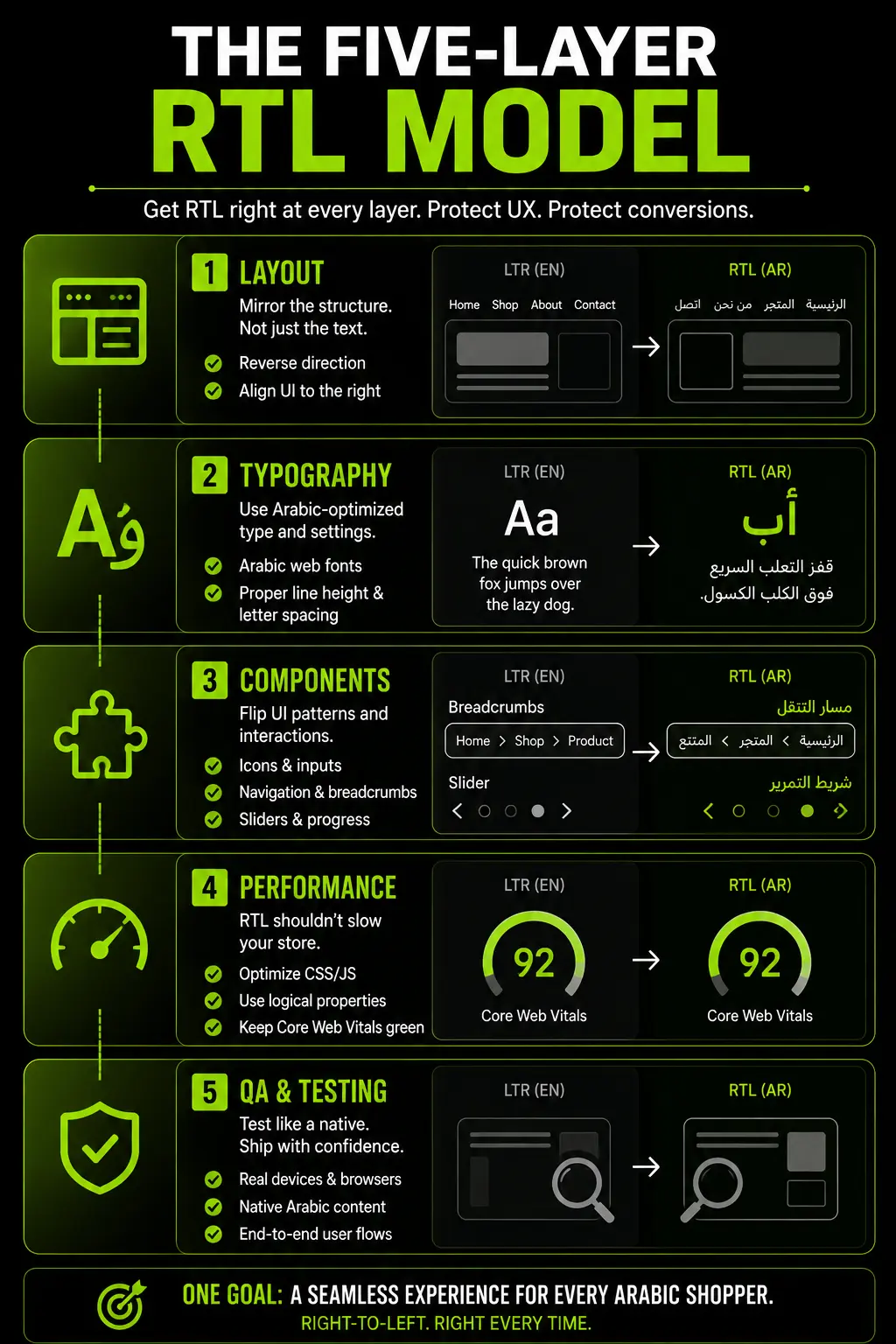
Arabic ecommerce website design is not a CSS property and a translation job. It is five distinct layers of work: layout direction, typography, ecommerce-specific components, performance and quality assurance.
Most sites in the region only get the first layer right, which is why so many Arabic storefronts look finished but convert poorly.
This Suplex guide covers all five, in order, with the specific decisions that determine whether your Arabic store actually sells.
What Arabic Ecommerce Website Design Actually Involves
Arabic ecommerce design is not one task, it's five interconnected layers. Ignoring any one of them creates conversion problems, often at checkout where fixes are most expensive.
Most teams focus on RTL layout but overlook typography, components, search, performance and QA. As a result, a store can have a perfect RTL layout and still lose sales because the font is difficult to read or the search experience fails.
The best Arabic storefronts treat localization as a complete system, not just a mirrored layout.
The Five Layers Most Teams Only Solve One Of
Layout direction is the layer every team solves, because it is the most visible and the easiest to demo.
Typography, ecommerce components, performance and QA get far less attention, even though they affect conversion more directly than layout does on its own.
A stakeholder reviewing a homepage screenshot cannot tell whether your checkout validation messages read naturally in Arabic.
They can immediately tell whether the navigation is mirrored. That visibility gap is why layout gets budget and the other four layers get skipped.
Each layer has its own budget, testing method, and failure mode. Layout issues are immediately visible, typography problems often appear only on real devices, component issues hide in untested Arabic user flows, and performance problems show up later in analytics.
QA ties everything together. Without a structured QA process, you discover these issues from customers instead of before launch.
Why dir="rtl" Is Only the Starting Point
Adding dir="rtl" tells the browser to switch the page direction, but it does not fix typography, custom components, search, checkout, or third-party apps.
It does handle browser-level behavior such as text alignment, default form controls, and the direction of flex and grid layouts.
However, that's only a small part of a complete Arabic ecommerce experience.
Many Shopify apps, review tools, and chat widgets are built with English-first assumptions. They still require manual RTL support and testing.
A site that relies on dir="rtl" alone may look correct in a screenshot but still break during a real shopping journey.
Layer One: Layout and Information Architecture in RTL
Layout is the foundation layer, and it is also the layer with the biggest long-term cost decision buried inside it: whether you build with CSS logical properties or hardcoded left and right values.
Get this decision right at the start of a build and every future update, feature addition, and app integration inherits correct RTL behavior automatically.
Get it wrong, and every one of those future changes needs a second, manual RTL pass.
Reading Pattern: Why Arabic Scans Top-Right, Not Top-Left
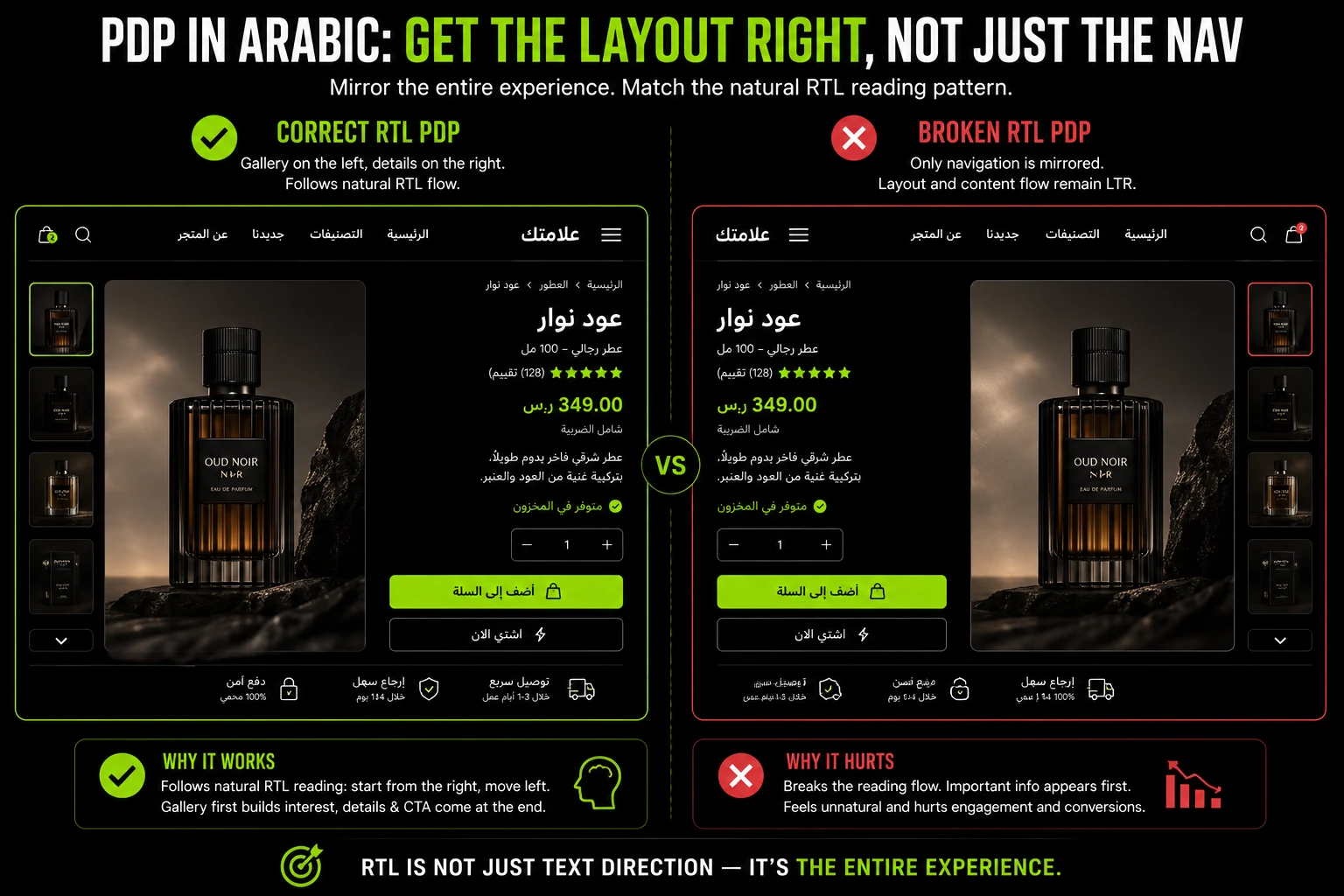
Arabic readers scan a page starting from the top right, the mirror image of the F-shaped pattern common in English-language UX research.
Your logo, primary navigation entry point, and highest-priority content should sit on the right side of the layout, not the left.
This is not a stylistic preference. It follows directly from how Arabic script is read, letter by letter, right to left, and it shapes where a shopper's eye lands first on any given page.
The practical consequence is that your visual hierarchy needs rebuilding, not just relocating. A hero banner that puts a product image on the left and a headline with a CTA on the right in your English template usually needs both elements swapped, not just the text direction.
The image, being the visual anchor that draws the eye first, generally performs better on the right in an Arabic layout, with the headline and CTA following the natural right-to-left scan path toward the left side of the screen.
Navigation, Breadcrumbs, and Pagination: What Actually Reverses
Navigation menus, breadcrumb trails, and pagination controls all need to reverse direction, since a "next page" arrow that still points right after the rest of the layout has mirrored reads as broken, not just inconsistent. This extends beyond the obvious main navigation bar.
- Primary Navigation: Menu items should read right to left, with the first-priority category appearing on the right.
- Breadcrumbs: "Home > Category > Product" becomes a right-to-left chain, with Home anchored on the right.
- Pagination: Page number controls and "next" and "previous" arrows both need to reverse. A "next" arrow that still points right in a mirrored layout will send users backward, not forward, in their mental model.
- Progress Indicators: Multi-step checkout progress bars need to fill from right to left, matching the reading direction or they create a subtle but persistent sense that something is wrong even when a shopper cannot articulate what.
- Carousels and Sliders: Swipe direction on mobile product carousels needs to match the reading direction. A carousel that advances left to right in an otherwise mirrored Arabic page feels disorienting on a touchscreen.
What Stays Left-to-Right Inside an RTL Page
Not everything flips. Numbers, phone numbers, email addresses, embedded code, and URLs stay left-to-right even inside an otherwise mirrored Arabic page.
This is bidirectional text (BiDi) handling, and getting it wrong produces prices and phone numbers that display in the wrong digit order.
- Numerals in prices and order totals
- Phone numbers and international dialing codes
- URLs, email addresses, and product SKUs
- Embedded Latin-script brand names or code snippets
- Dates, when formatted numerically (day, month, year sequences)
BiDi handling is one of the more technically demanding parts of Arabic ecommerce design, because it requires the browser to correctly interpret which segments of a string are Arabic and which are Latin or numeric, then render each segment in its correct internal direction while preserving the overall right-to-left flow of the sentence.
Get this wrong in a product title that mixes an English brand name with Arabic descriptive text, and the brand name can appear reversed or misplaced relative to the surrounding words.
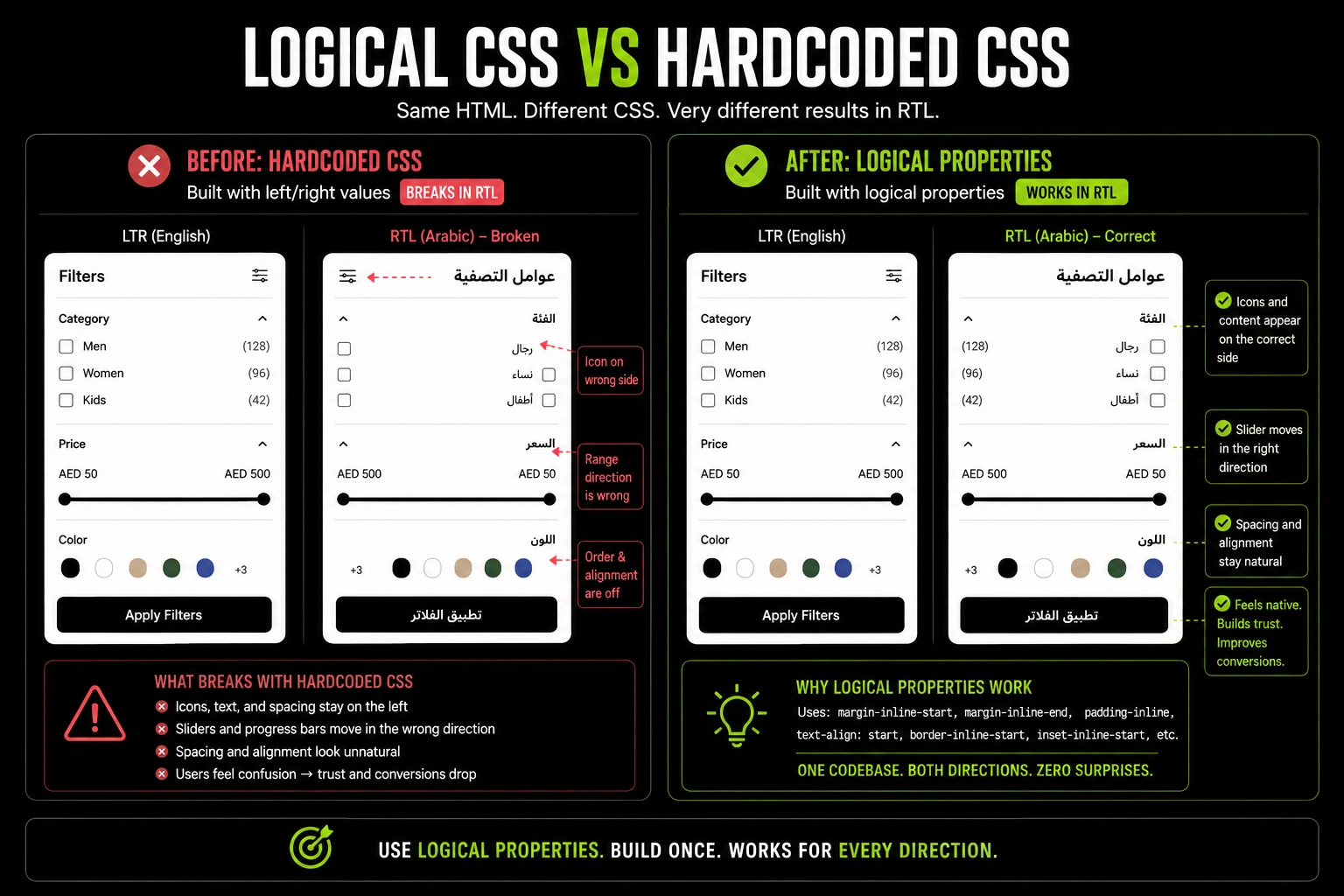
CSS Logical Properties vs. Hardcoded Left and Right: A Decision That Affects Years of Maintenance
This choice determines whether your RTL build stays easy to maintain or becomes increasingly expensive. CSS logical properties (margin-inline-start instead of margin-left, padding-inline-end instead of padding-right) automatically adapt to page direction.
Hardcoded left and right values require separate RTL overrides, doubling the amount of CSS your team has to maintain.
For example, a sidebar filter built with logical properties automatically moves from left to right in RTL. The same component built with hardcoded CSS needs a separate RTL stylesheet, and every future update must be made and tested twice.
Over time, that duplicated effort becomes a significant engineering cost. Migrating from hardcoded CSS to logical properties later often requires a full stylesheet audit and major refactoring.
Starting with logical properties from day one avoids that cost and makes every future update simpler.
Layer Two: Arabic Typography That Actually Performs
Typography is where the biggest brand-tone decision hides in plain sight, and it is the layer most competing guides stop at "increase your line-height" without going any further.
Typography in Arabic ecommerce design does three jobs at once: it needs to render legibly, it needs to load fast, and it needs to communicate the right brand personality. Most teams solve for legibility and stop there.
Why English Web Fonts Don't Translate to Arabic Glyphs
Most Latin font stacks either lack Arabic glyphs or fall back to a generic system font, breaking your brand's visual consistency when shoppers switch languages.
Choosing an Arabic typeface is a separate branding decision, not an extension of your English font. Many fonts claim "Arabic support" but use poorly matched or low-quality Arabic glyphs.
Always evaluate Arabic typography the same way you evaluate your primary brand font: review real text at real sizes instead of relying on a font provider's language-support label.
Line Height, Letter Spacing, and Font Weight: the Numbers That Change
Arabic script has more vertical complexity in its letterforms than Latin script, with connecting strokes and diacritical marks that need more breathing room.
Increase your line-height beyond what feels correct for the English version, and test your font weight choices separately, since a weight that reads as regular in Latin text can render as visually heavier in Arabic.
A few concrete adjustments worth making as a starting point, then refining against your specific typeface:
- Line Height: Arabic body text generally needs 10 to 20 percent more line height than the equivalent English text to accommodate ascending and descending strokes without letters from adjacent lines visually colliding.
- Letter Spacing: Arabic script is cursive and connected by design. Adding positive letter spacing, a common technique in Latin typography for improving legibility, actually breaks the connections between Arabic letters and should generally be avoided or applied far more conservatively than in English.
- Font Weight: A "Regular" weight Arabic font often needs to be paired with a lighter English weight than you would normally use, because Arabic letterforms tend to carry more visual density at equivalent weights.
- Glyph Size: Arabic glyphs frequently render visually smaller than Latin characters at the same declared point size, since the x-height and overall visual mass of Arabic script differs structurally from Latin script. Many teams find they need to bump their base Arabic font size by roughly 1 to 2 points relative to the English version to achieve equivalent perceived legibility.
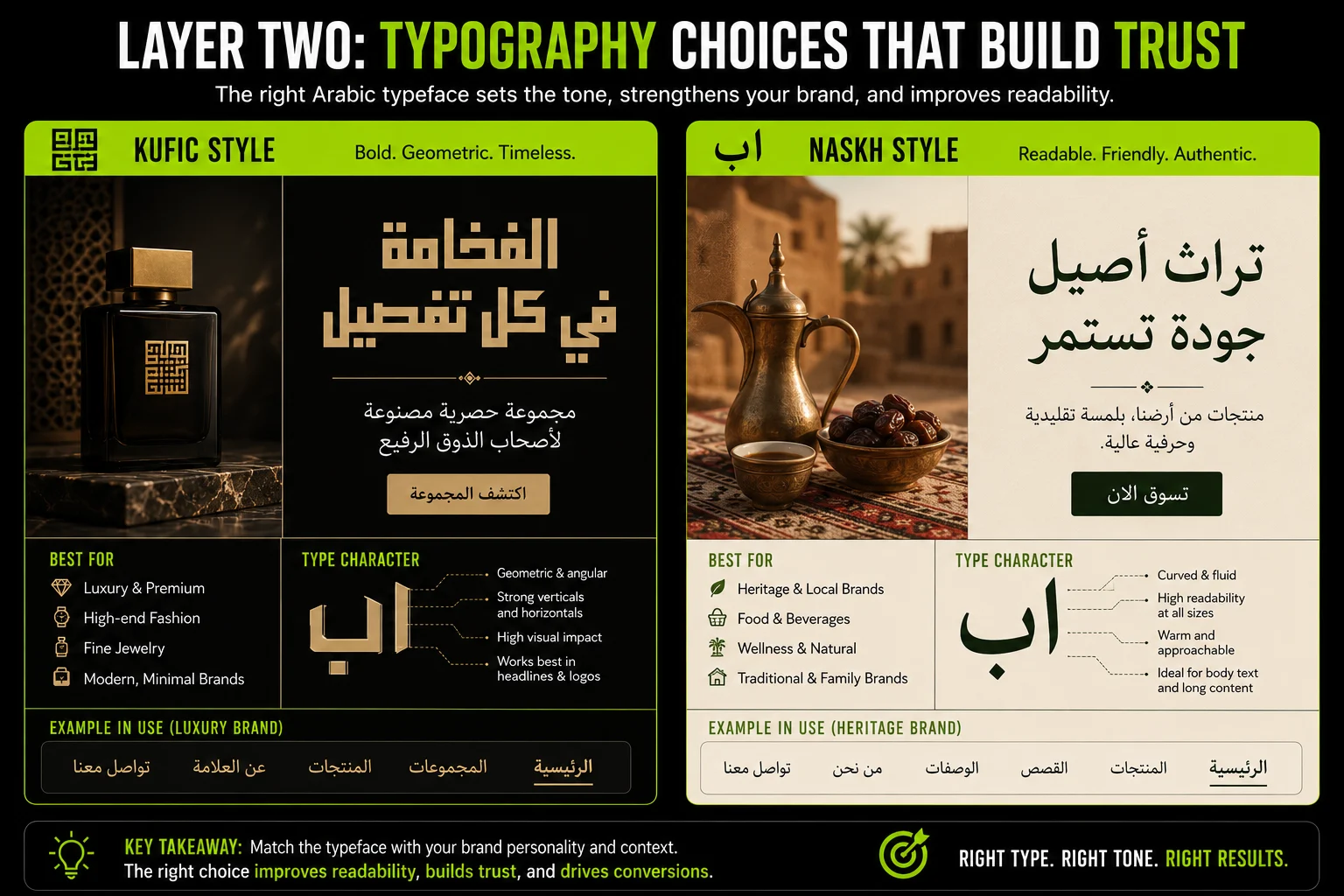
Choosing Between Kufic-Style and Naskh-Style Arabic Fonts for Brand Tone
This is a strategic branding decision, not just a typography choice. Geometric, Kufic-inspired Arabic typefaces feel modern and minimal, making them a strong fit for skincare, tech, and luxury brands.
Naskh-style typefaces, with their flowing, connected letterforms, feel warmer and more traditional. They are designed for comfortable reading and are often a better choice for food, hospitality and heritage brands where familiarity and trust matter.
Getting this checklist right at the wireframe stage saves a full development pass later. This is exactly the kind of decision that belongs in wireframing and user-flow design work, before a single line of theme code gets written.
Mapping every component's mirror status against real user flows, searching, filtering, viewing a product, checking out, catches gaps that a page-by-page visual review often misses, because a visual review naturally focuses on static screens rather than the transitions and interactions between them.
Not Sure Which Components on Your Store Are Actually Mirrored Correctly?
A Global Aesthetic Audit checks your PDP, search, and checkout against the Component Mirroring Checklist before you spend on a rebuild.
Layer Four: Performance and Technical Implementation
Performance decisions made at the architecture stage determine how expensive every future update becomes, and this is where the shared-codebase versus forked-theme decision needs to be made deliberately, not by default.
Shopify Markets and Dual-Direction Themes: Shared Codebase vs. Forked Theme
Shopify Markets lets you serve multiple languages and currencies from a single store, but your theme still needs to support both LTR and RTL layouts.
A shared theme built with CSS logical properties handles English and Arabic from one codebase, making updates faster and easier to maintain.
A separate Arabic theme offers more design flexibility but requires maintaining two codebases. Every new feature, bug fix, and test must be duplicated, increasing long-term development costs.
For most D2C brands, a shared codebase is the better choice. A separate Arabic theme only makes sense when each market needs a significantly different experience and your team has the resources to maintain both.
Bidirectional Text (BiDi) Handling for Mixed Arabic-English Content
Product names that combine English and Arabic, or customer reviews that mix both languages, need proper bidirectional (BiDi) support so the text displays in the correct order.
This is a common issue in user-generated content, which is often missed during RTL testing.
Don't limit BiDi testing to page templates. Check dynamic content such as reviews, search autocomplete, order confirmation emails, and customer support chats.
These are the areas where mixed-language text is most likely to break and create a poor user experience.
Testing RTL Across Devices Without a Native Arabic Speaker in the Room
Automated RTL testing can catch layout and rendering issues, but it cannot tell you whether Arabic copy feels natural or whether mirrored icons make sense. Treat automation as a baseline, then validate the experience with native Arabic speakers.
Also test across different devices and browsers to catch font rendering issues, RTL layout bugs, and text overflow caused by Arabic translations.
Performance matters too. Arabic web fonts that are not subsetted can significantly increase page weight, slowing mobile experiences across the GCC. Optimizing font loading should be part of your custom Shopify theme development and performance optimisation strategy, not something added after launch.
Layer Five: QA and Testing Before Launch
Most competing guides end at launch. QA is a distinct phase with its own checklist, not an open-ended task that happens whenever someone notices a bug.
Treating QA as a defined, scoped phase with clear pass and fail criteria is what gives the Five-Layer Model an actual finish line, rather than leaving Arabic quality as a permanently unfinished background task.
The RTL QA Checklist Most Launches Skip
Each area in this checklist needs its own QA pass. A single RTL walkthrough will catch obvious layout issues but miss problems with typography, components, performance, and accessibility.
Use the right testing method for each area: visual review for layouts, device testing for typography, task-based testing for interactive components, performance tools for speed and screen readers for accessibility. This approach uncovers issues that a general QA pass is likely to miss.
Testing With Real Arabic-Speaking Users, Not Just Automated RTL Linters
Automated RTL tests can detect CSS and layout issues, but they cannot tell you whether the experience feels natural to Arabic-speaking shoppers. Include task-based testing with native Arabic speakers as part of your QA process.
Give testers realistic tasks, such as searching for a product, applying filters, adding it to the cart, and completing checkout. Watch where they pause, misclick or reread content.
These hesitation points often reveal usability issues that automated testing cannot detect but can still reduce conversions.
Post-Launch Signals That Indicate a Broken RTL Experience
Once live, watch bounce rate on your Arabic pages relative to your English pages, and pay close attention to cart abandonment at specific checkout steps rather than the checkout funnel as a whole.
A spike in abandonment at the payment step, isolated to Arabic-language sessions, usually points to a component-level RTL bug, not a pricing or product problem.
A few specific analytics patterns worth setting up dashboards to monitor:
- Bounce Rate By Language: A significantly higher bounce rate on Arabic-language landing pages compared to equivalent English pages often signals a first-impression layout or typography problem.
- Step-By-Step Checkout Drop-Off: Segment your checkout funnel by language and compare drop-off at each individual step, not just overall completion rate, since a single broken step can be masked by strong performance elsewhere in the funnel.
- Search Zero-Results Rate: A high proportion of Arabic searches returning zero results, compared to English searches for equivalent product categories, usually points to a stemming or diacritic-handling gap.
- Mobile Page Speed By Language: Compare Core Web Vitals for Arabic and English pages specifically, since unsubsetted fonts and untested BiDi rendering both tend to affect Arabic pages disproportionately.
Cultural and Brand-Tone Considerations Beyond Direction
A functional RTL layout is only part of localization. Your brand also needs to feel natural and relevant to Arabic-speaking shoppers through its visuals, messaging, and tone.
Imagery, Color and Iconography
Colors, images, and icons can have different meanings across Arabic-speaking markets. Test them with your target audience instead of relying on generic design guidelines. Even common icons and promotional colors may be interpreted differently in different GCC markets.
Adapting Brand Voice in Arabic
Translating your copy is not enough. Use transcreation to preserve your brand's personality in Arabic, especially for headlines, CTAs, error messages, empty states, and other microcopy that directly influences the shopping experience.
Choosing the Right Arabic Style
Use Modern Standard Arabic (MSA) for product descriptions, category pages, legal content, and SEO-focused pages. For marketing copy aimed at UAE and Saudi audiences, a Gulf-influenced tone often feels more natural and engaging while still remaining easy to understand.
This ties directly into the cultural and market-mapping work covered in our D2C website localization guide for the Middle East, which goes deeper into dialect strategy, payments, and compliance across the GCC.
How Suplex Designs Arabic Ecommerce Experiences
Suplex applies the Five-Layer Model from the start of every project instead of treating Arabic as a post-launch translation task.
- Start with a Global Aesthetic Audit: to identify gaps across all five layers, not just RTL layout.
- Create Persona-Driven Wireframes: that define navigation, filters, PDPs, and checkout before visual design.
- Build A Bilingual Typography System: that works equally well in English and Arabic.
- Develop a shared Shopify theme: using CSS logical properties to support both LTR and RTL from a single codebase.
Example: Miho
For Miho, a contemporary fashion brand, we began with wireframing to define product discovery, PDP layout, and checkout flows before moving into visual design. We then built the typography and component system around how the brand's customers actually shop in both languages.
Why the Audit Comes First
As a Dubai-based Shopify Partner, Suplex typically begins Arabic localization with a Global Aesthetic Audit. This reveals which parts of the experience need attention across the Five-Layer Model.
Many stores already have a functional RTL layout but still struggle with:
- Typography
- Search
- Checkout
- Interactive components
Without a structured audit, these issues often remain hidden until customers encounter them.
For most D2C brands, we then build a custom Shopify theme using a shared codebase with CSS logical properties, making long-term maintenance far simpler than managing separate English and Arabic themes.
What Localization Costs and What It Returns
The cost of Arabic ecommerce localization depends on how much of your store is already optimized. Most projects are not full rebuilds—they are targeted improvements across the Five-Layer Model.
Scope the Project by Layer
Instead of treating an "Arabic version of the site" as a single project, evaluate each layer separately:
- Layer 1: RTL layout
- Layer 2: Typography
- Layer 3: Components and interactions
- Layer 4: Performance
- Layer 5: QA and accessibility
For example:
- Higher effort: An English-only Shopify store with no Arabic support.
- Lower effort: A store with Arabic and basic RTL already in place that only needs improvements to components, search, checkout, performance, and QA.
This approach produces more accurate budgets and prevents critical work from being overlooked.
Measuring ROI
The biggest return usually comes from improving the experience for shoppers who are already trying to buy not from increasing traffic.
Track metrics such as:
- Arabic checkout completion rate
- Cart abandonment for Arabic sessions
- Conversion rate by language
- Search success rate for Arabic queries
Common improvements such as fixing checkout field order, improving Arabic payment labels, and resolving BiDi text issues can increase checkout completion without any additional marketing spend.
Segment these metrics by language so you can measure the impact of each RTL improvement instead of relying on blended sitewide analytics.
Common Arabic Ecommerce Design Mistakes
Frequently Asked Questions
What's the difference between Arabic web design and RTL web design?
RTL (right-to-left) design refers to layout direction. Arabic web design includes RTL layout plus typography, cultural adaptation, and Arabic-specific ecommerce components like search and checkout. RTL is one layer, not the whole task.
Do I need a separate Arabic theme or can I use one theme for both languages?
Both approaches work. A shared theme built with CSS logical properties handles both directions from one codebase and is easier to maintain. A forked theme gives more design control per market but doubles maintenance work long-term.
What font should I use for Arabic ecommerce sites?
It depends on brand tone. Geometric, Kufic-style fonts suit modern or luxury brands. Naskh-style fonts feel warmer and more traditional. Either way, test readability at small sizes, since many Arabic fonts break down below 14px.
Why does my Arabic site load slower than the English version?
Arabic web fonts are often larger files than Latin fonts, and many sites load the full character set instead of a subset. Font subsetting, loading only the glyphs actually used, is the most common fix.
Does the entire website need to mirror, including images and icons?
Not entirely. Layout, navigation, and directional icons like arrows and progress indicators should mirror. Logos, phone numbers, and embedded Latin text stay left-to-right. Photography generally doesn't need mirroring.
How do I test if my Arabic ecommerce site is actually usable, not just mirrored? Automated RTL linters catch layout bugs but miss usability issues. Testing with native Arabic-speaking users on real tasks, searching, filtering, checking out, surfaces problems automated tools can't detect.
Can Shopify handle Arabic RTL ecommerce natively?
Shopify supports RTL through Shopify Markets and RTL-compatible themes, but native support has limits. Most brands need custom theme work to properly handle PDP layout, checkout fields, and search behavior in Arabic.
Hi, I’m Rishabh Jain
I believe great digital experiences have the power to shape perception, build trust, and move businesses forward. That belief led me to found Suplex Design Studio, a global digital design and development studio helping FMCG and D2C brands build websites and digital experiences that are strategic, thoughtful, and commercially meaningful.
I started Suplex at 25 with a clear intent, to create digital experiences that look appealing, work seamlessly, and help D2C businesses grow. By 28, the studio had scaled globally, guided by a strong foundation in integrated design that I developed during my academic journey in London, where I was honoured with the Dean’s Award.
Over the years, I’ve had the opportunity to work with 100+ brands, from Fortune 500 organisations to family-run businesses, helping them build websites, e-commerce experiences, and digital products that create clarity, credibility, and long-term value.
Our work has been recognised internationally, including the Manifest Award (2024), the Clutch Global Award (2025), and features across platforms such as The Dieline, Packaging of the World, and the World Brand Design Society.
None of this would be possible without the people behind the work. I’m deeply grateful to the Suplex team, whose commitment, creativity, and attention to detail turn ideas into meaningful digital experiences every day.
At the heart of our work is a simple philosophy, digital design should be intentional, functional, and built to create real business value. That continues to guide everything we create at Suplex.














Let’s Make It Happen
E-Commerce Success Stories

%201.avif)





.avif)
.avif)
Build Your D2C Business The Right Way
Build It With Suplex.


