Shopify vs WordPress for Ecommerce (2026): Which Platform Should You Build On?
.avif)

Shopify vs WordPress for Ecommerce (2026): Which Platform Should You Build On?
If you're deciding between Shopify and WordPress for your online store, here's the short answer: Shopify is faster to launch and easier to manage.
WordPress with WooCommerce gives you more control, lower long-term costs, and a stronger foundation for content-driven growth. Which one is right for you depends on your business model, your technical capacity, and how you plan to acquire customers.
This guide breaks down both platforms across cost, SEO, design, scalability factors so you can make the decision with clarity, not guesswork.
Shopify vs WordPress for Ecommerce: The Quick Answer
Both platforms can power a serious ecommerce business. Shopify is a hosted, all-in-one platform built specifically for selling.
WordPress, combined with the WooCommerce plugin, is a self-hosted, open-source solution that gives you full ownership of your store. Shopify gets you live faster; WordPress gives you more room to build exactly what you need.
What Are Shopify and WordPress, Actually?
Before you compare features, it helps to understand what each platform is built to do.
Shopify is Built for Selling
Shopify launched in 2006 and is a Software-as-a-Service (SaaS) platform. That means everything is managed for you hosting, security, software updates and payment infrastructure.
As of 2025, it powers over 4.8 million live stores globally (BuiltWith) and for good reason: hosting, SSL, and checkout all come included, alongside an app store with 8,000+ integrations.
For most product-first businesses, it works out of the box without touching a single server setting.
The trade-off is that Shopify controls the infrastructure. You're building on rented land. That is not necessarily a problem — but it does limit what you can change at a fundamental level.
WordPress + WooCommerce is Built for Everything
WordPress powers 43% of all websites on the internet as of 2025 (W3Techs). It is an open-source content management system, meaning you own the software, the code and all your data.
WooCommerce is a free plugin that adds ecommerce functionality on top of its product management, cart, checkout, and order tracking. You choose your own hosting, payment gateways, and infrastructure and you have full access to the PHP code, which means you can build or change virtually anything.
The platform is powerful precisely because nothing is locked. But that freedom comes with responsibility. You need to manage it, or work with someone who does.
Pricing and True Cost of Ownership
The headline prices for both platforms are misleading. Here is what you actually pay.
Shopify Pricing Plans (2026)
Important for UAE merchants: Shopify Payments is not available in the UAE or anywhere in the GCC.
This means every sale you process through a third-party gateway (Telr, PayTabs, Checkout.com) incurs an additional transaction fee on top of your plan cost.
On the Basic plan, that is 2% per transaction — which adds up fast at volume.
WordPress + WooCommerce Real Costs
WordPress software is free. Running a store on it is not.
Unlike Shopify, there are no transaction fees on WooCommerce by default. You pay your payment gateway directly typically 1.5% to 2.9% plus a fixed fee per transaction, which is standard across all platforms.
Two-Year Total Cost of Ownership (Mid-Size Store)
At lower revenue, Shopify's simplicity keeps costs manageable. Once you are processing significant volume, WooCommerce's lack of transaction fees becomes a meaningful financial advantage.
Ease of Use and Setup
This is where the two platforms diverge most sharply.
Getting Started on Shopify
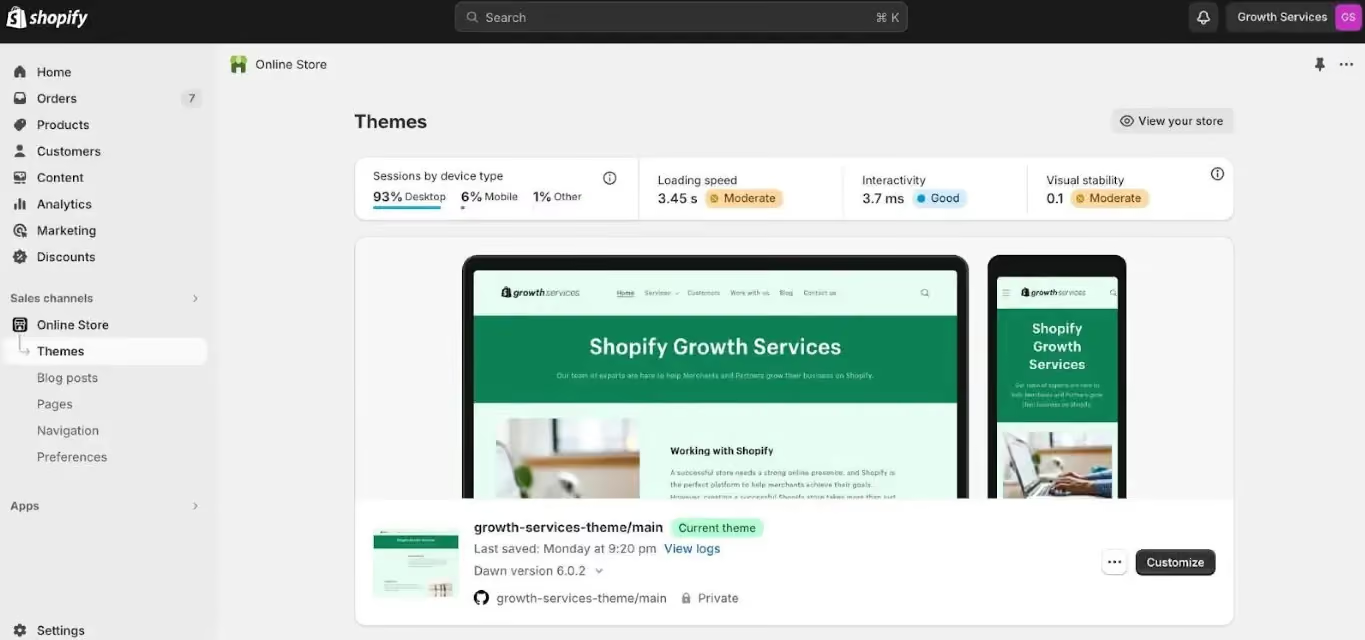
Shopify's setup process is guided and fast. You can have a working store with products, checkout and a live domain in a few hours. There is no server configuration, no plugin conflicts, no hosting decisions to make.
The Shopify 2.0 theme editor is drag-and-drop, payment gateway setup is built in, and 24/7 support is available via chat, email and phone. No technical knowledge required to get started.
For a founder who wants to focus on the product and marketing not the platform Shopify removes a significant amount of friction.
Setting Up WordPress for Ecommerce
Getting a WooCommerce store live involves more steps. The typical setup path looks like this:
- Purchase hosting (SiteGround, Kinsta, WP Engine, etc.)
- Install WordPress via your hosting dashboard
- Install and activate WooCommerce
- Choose a theme and configure it
- Install plugins: Yoast or Rank Math (SEO), Wordfence (security), WPForms or Gravity Forms, UpdraftPlus (backups)
- Configure payment gateways
- Set up shipping zones and tax rules
This process takes days, not hours and requires either technical knowledge or a developer. There is no dedicated support team. You rely on the WordPress community, plugin documentation, or a hired developer when things go wrong.
Verdict on Usability
If you are a non-technical founder without a development team, Shopify is the more practical choice. If you have an agency or a developer managing the site, the setup cost of WordPress becomes irrelevant and the long-term benefits of full control take over.
Ecommerce Features Compared
Both platforms can handle most ecommerce use cases. Where they differ is in how much you need to configure versus how much comes ready out of the box.
Shopify's Native Ecommerce Features
Shopify's ecommerce functionality is deep and ready to use on day one. The one-page checkout with Shop Pay consistently delivers some of the highest conversion rates of any hosted platform. Multi-currency and multi-language support come via Shopify Markets and abandoned cart recovery emails are built in.
For brands selling both online and in-person, the integrated POS system connects both channels without third-party tools. Dropshipping via DSers or Zendrop, subscriptions via Recharge or Shopify's native tools, and full inventory and order management round out the core feature set.
One limitation worth noting: Shopify caps product variants at 100 per product. If you sell highly configurable products, custom engraving, multiple size/colour/material combinations you will hit this ceiling.
WooCommerce's Ecommerce Features
WooCommerce's strength is in its flexibility. There are no variant limits, no platform-level transaction fees, and no ceiling on what you can configure. Subscriptions, memberships, and bookings are handled through dedicated plugins (WooCommerce Subscriptions, MemberPress).
Every field, flow, and upsell in the checkout is yours to control. For complex B2B setups wholesale pricing, customer-specific catalogs, purchase order workflows WooCommerce handles them far better than Shopify. Multi-vendor marketplace functionality is also possible via plugins like Dokan or WCFM.
UAE-Specific Ecommerce Considerations
These factors matter specifically if you are building a store in the UAE or wider Gulf region.
Arabic RTL Support: Both platforms support right-to-left layouts. WordPress/WooCommerce has a more mature ecosystem of Arabic themes and RTL-optimised templates. On Shopify, RTL support depends heavily on the theme you choose.
VAT Compliance: UAE introduced 5% VAT in 2018. Both platforms handle VAT calculation. WooCommerce gives you more granular control over tax rule logic useful if your store spans multiple GCC markets with different tax structures.
Payment Gateways: Telr, PayTabs, Tap Payments, and Checkout.com all integrate with both Shopify and WooCommerce. The key difference: Shopify adds its own transaction fee on top of the gateway fee. WooCommerce does not.
Cash on Delivery: CoD remains one of the most-used payment methods in the GCC. WooCommerce handles this natively. On Shopify, you need a plugin or a custom configuration.
SEO Capabilities: Which Platform Ranks Better?
This is one of the most important factors for long-term store growth and where the platforms differ most in practice.
Shopify SEO: What It Does Well
Shopify handles the basics of technical SEO reliably. It auto-generates XML sitemaps, serves pages through a global CDN for fast load times and gives you clean URL structures for product and collection pages. On-page controls title tags, meta descriptions, alt text, header tags are all accessible without additional tools. Automatic canonical tags handle most duplicate content scenarios without intervention.
Shopify SEO Limitations
These are real constraints, not minor inconveniences.
Forced URL structure: Shopify forces /products/ and /collections/ into all product and category URLs. You cannot change this. For stores where URL structure matters for SEO, this is a hard limitation.
Duplicate content: Product pages can be accessed via both /products/product-name and /collections/collection-name/products/product-name. Shopify adds canonical tags to handle this, but it creates crawl inefficiency at scale.
Basic blog: Shopify's blogging interface is functional but minimal compared to WordPress. No native table of contents, limited taxonomy options, no advanced content relationships between posts.
Schema markup: Structured data is limited unless you install third-party apps or edit Liquid templates manually neither of which is straightforward for non-developers.
WordPress SEO Advantages
WordPress is the stronger technical SEO platform. Full stop. You have complete control over URL structure, which means you can configure it to match your keyword strategy exactly.
Plugins like Yoast SEO and Rank Math give granular control over every on-page element title patterns, meta, Open Graph, schema markup, breadcrumb schema, and hreflang for multilingual stores.
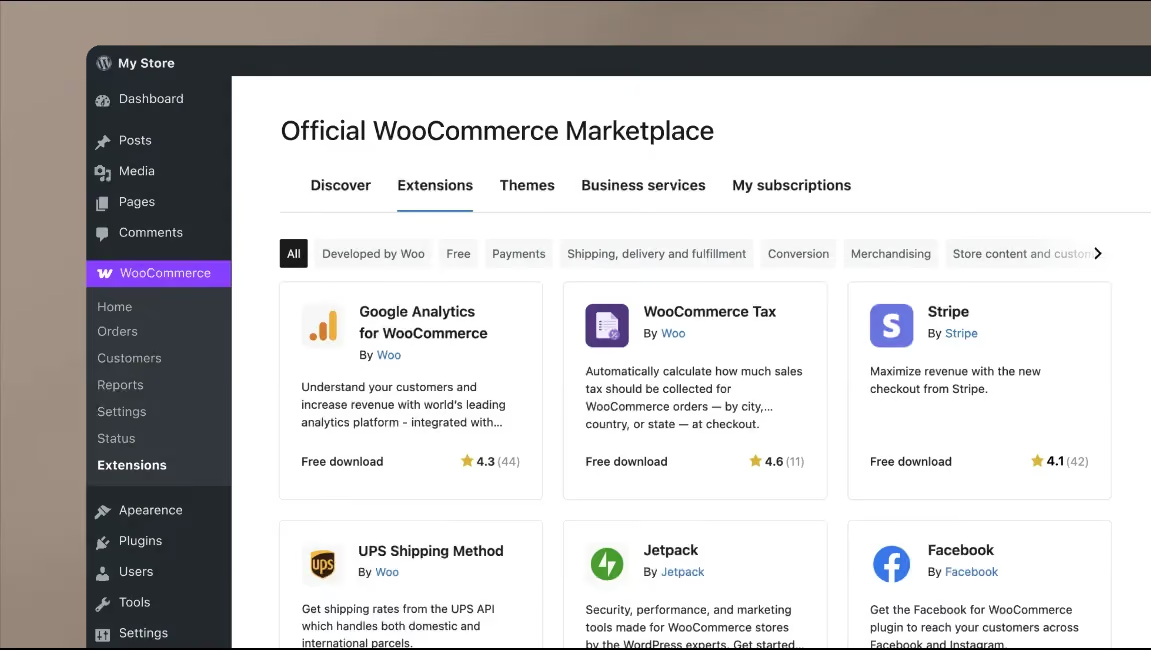
Content publishing is genuinely superior: categories, tags, custom post types, pillar pages and content clusters all work natively. Canonical tags, noindex rules, robots.txt, XML sitemaps with custom configurations and redirect management are all within reach without writing a single line of code.
If your acquisition strategy depends on content marketing, organic traffic, or ranking for competitive informational keywords, WordPress gives you the tools to build that properly.
Shopify is adequate for transactional and product-level SEO but limited for content-heavy strategies.
Core Web Vitals and Page Speed
Shopify hosts all stores on a global CDN, which means baseline performance is consistent and reliable. Most Shopify stores achieve reasonable Core Web Vitals scores without significant optimisation.
WordPress performance is variable. A well-configured site with quality managed hosting (Kinsta, WP Engine), a lightweight theme, and proper caching (WP Rocket, Cloudflare) can outperform Shopify on speed.
A poorly configured one will significantly underperform it. The ceiling is higher on WordPress; the floor is lower.
Design and Customisation
How much control do you actually have over how your store looks and behaves?
Shopify Themes and Design
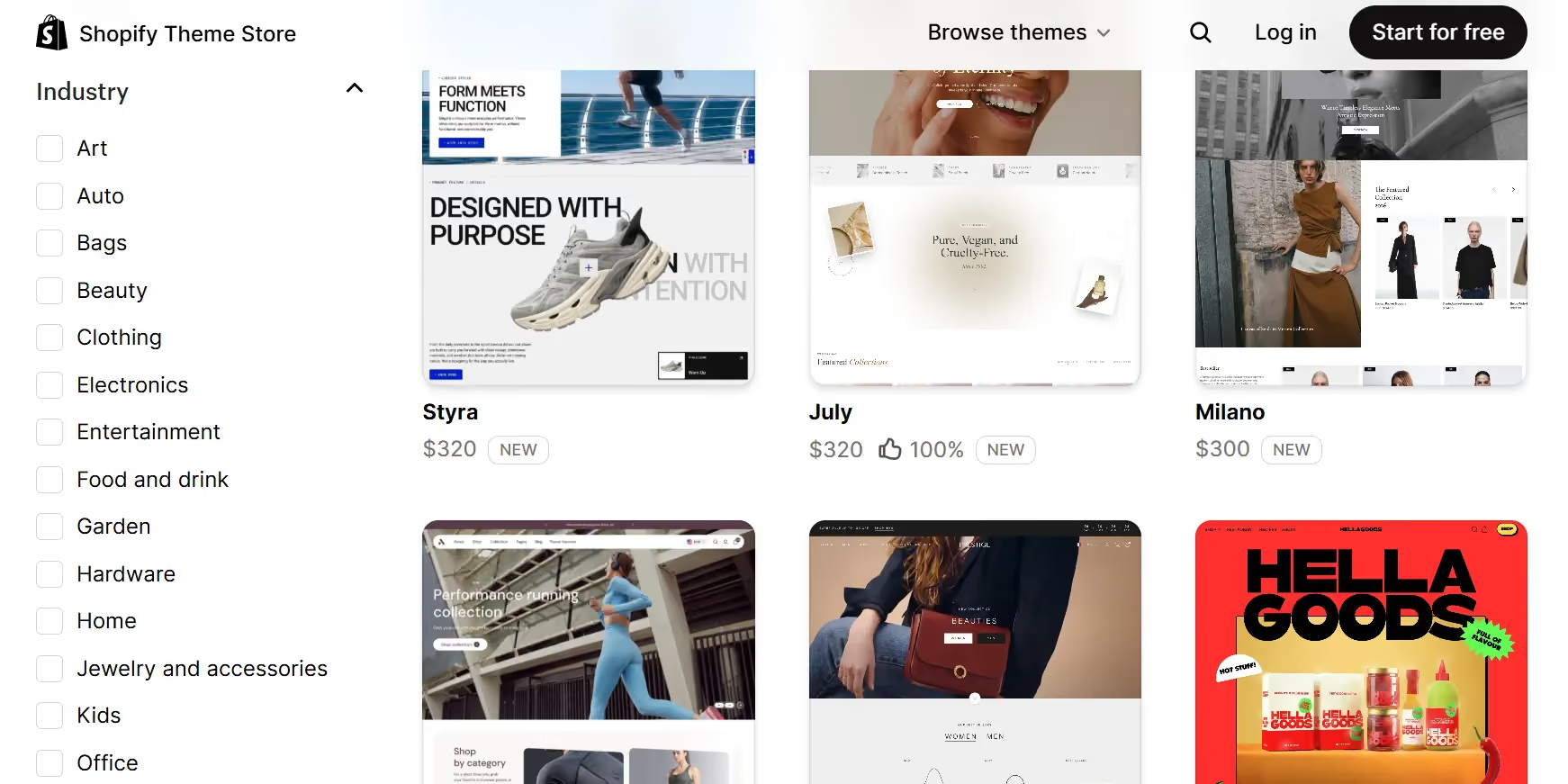
Shopify offers 100+ free and paid themes, with premium options ranging from $150 to $350. Shopify 2.0 themes support drag-and-drop sections on all pages not just the homepage and the built-in theme editor is clean and accessible for non-developers.
That said, anything beyond surface-level changes requires Liquid, Shopify's proprietary templating language, which means you need a developer for deep customisation.
Checkout page appearance and flow are also limited on standard plans that level of control is locked behind Shopify Plus.
If your brand requires a unique checkout experience, custom cart logic, or a highly specific UI, the standard Shopify plans will constrain you.
Shopify Plus removes many of these restrictions, but at $2,300+/month, that is a significant cost jump.
WordPress Design Freedom
WordPress gives you a fundamentally different level of creative control. There are thousands of themes available free and commercial and page builders like Elementor, Divi, and Bricks allow no-code layout control across the entire site, including the checkout.
Direct PHP and CSS access means you can build anything without hitting a platform ceiling. WooCommerce hooks and filters give developers precise control over every element of the shopping experience, with no restrictions on cart, checkout, or page design.
For brands with specific design requirements, or for agencies building custom storefronts, WordPress is a blank canvas. Shopify is a template you can rearrange.
Security, Hosting and Maintenance
How much do you want to manage and how much do you want handled for you?
Shopify Managed Security
Security is one of Shopify's strongest selling points. Every store is PCI DSS Level 1 compliant out of the box with no configuration needed. SSL is included on all plans.
Shopify manages all server patches, software updates and security monitoring, and backs everything with a 99.99% uptime SLA and infrastructure built to handle traffic spikes.
Black Friday, product launches, viral moments. You do not need to think about security on Shopify. That is genuinely valuable, particularly for founders without a technical background.
WordPress Your Responsibility
Security on WordPress requires active management. This does not mean WordPress is insecure, it means the responsibility sits with you or your team.
You need a firewall and malware scanning tool (Wordfence or Sucuri), regular updates for WordPress core, WooCommerce, themes and all plugins, SSL certificate management, daily backups (UpdraftPlus or managed hosting backups) and hosting-level security configuration.
Outdated plugins are the single most common vector for WordPress vulnerabilities. If your site is actively maintained, the risk is low. If it is left unattended, the risk grows over time.
Teams working with a development partner like those who build with Suplex Design typically offload this responsibility entirely, which makes the WordPress security question much less relevant for day-to-day operations.
Scalability: Can It Grow With Your Business?
Both platforms can scale, but they do it differently. Shopify scales through infrastructure that is managed for you; WordPress scales through infrastructure that you control.
The platform you choose determines how much that growth costs you and how much flexibility you retain as the business gets bigger.
Shopify at Scale
Shopify Plus is used by high-volume merchants including Gymshark, Heinz and Red Bull. The infrastructure scales automatically; you do not need to upgrade servers when traffic spikes.
However, enterprise-level customisation on Shopify is complex and expensive. Customising checkout logic, building headless commerce setups or deeply integrating with external ERP systems requires significant Shopify Plus development investment.
The platform scales well; the customisation costs scale with it.
WordPress at Scale
WordPress can handle very high traffic and transaction volumes with the right infrastructure. Dedicated VPS hosting, managed WordPress hosting (Kinsta, WP Engine) or cloud infrastructure (AWS, Google Cloud) can all support large-scale stores.
At this level, the advantages compound: no platform transaction fees, no plan-tier limitations, and full control over architecture. Enterprise brands on WordPress often run headless setups using WordPress as the backend with a custom React or Next.js frontend — something not easily replicable on standard Shopify without Plus.
Migrations: What If You Need to Switch?
Most comparison guides skip this section. It matters because the platform you choose today affects what it costs to change later.
Migrating from WordPress to Shopify: Products, customers and orders can be moved using tools like LitExtension or Cart2Cart. Migrating content (blog posts, pages) is more manual. The bigger risk is SEO, changing URL structures causes ranking drops if 301 redirects are not properly implemented across every URL.
Migrating from Shopify to WordPress: Technically more straightforward. The same migration tools work in reverse. Shopify's data export (CSV for products, customer exports) is fairly clean and WooCommerce's import tools handle it well.
The real cost of migration: It is not the tool cost. It is the developer time, the SEO recovery period and the business disruption. Migrations typically take two to eight weeks depending on store size and SEO recovery can take three to six months if URL mapping is not handled correctly.
The most important decision you make is the first one. Choosing the right platform from the start is significantly cheaper than switching later.
How Suplex Approaches Platform Selection
At Suplex Design, platform selection is one of the first conversations the team has with every new client.
Before recommending Shopify or WordPress, the team evaluates four things: the business model, the technical capacity of the client's internal team, the content and SEO strategy and the growth trajectory over the next two to three years.
As a Shopify Partner and Google Partner based in Dubai, Suplex builds on both platforms and that matters. Agencies that only work with one platform tend to recommend it regardless of fit. Suplex has built Shopify storefronts for D2C brands like Miduty and Kimi Cafe and handles WordPress development for businesses that need more flexibility.
For product-first DTC brands in the Gulf wanting speed to market, Shopify is typically the recommendation with custom theme development to avoid generic template aesthetics.
For content-driven businesses, B2B brands or stores with complex integration requirements, WordPress + WooCommerce is usually the stronger foundation. Brands unsure which platform fits can book a Platform Consultation with the Suplex team, where the decision is made based on data rather than preference.
Getting this decision right from the start saves significant cost and headache down the line.
Shopify vs WordPress: Which Should You Choose?
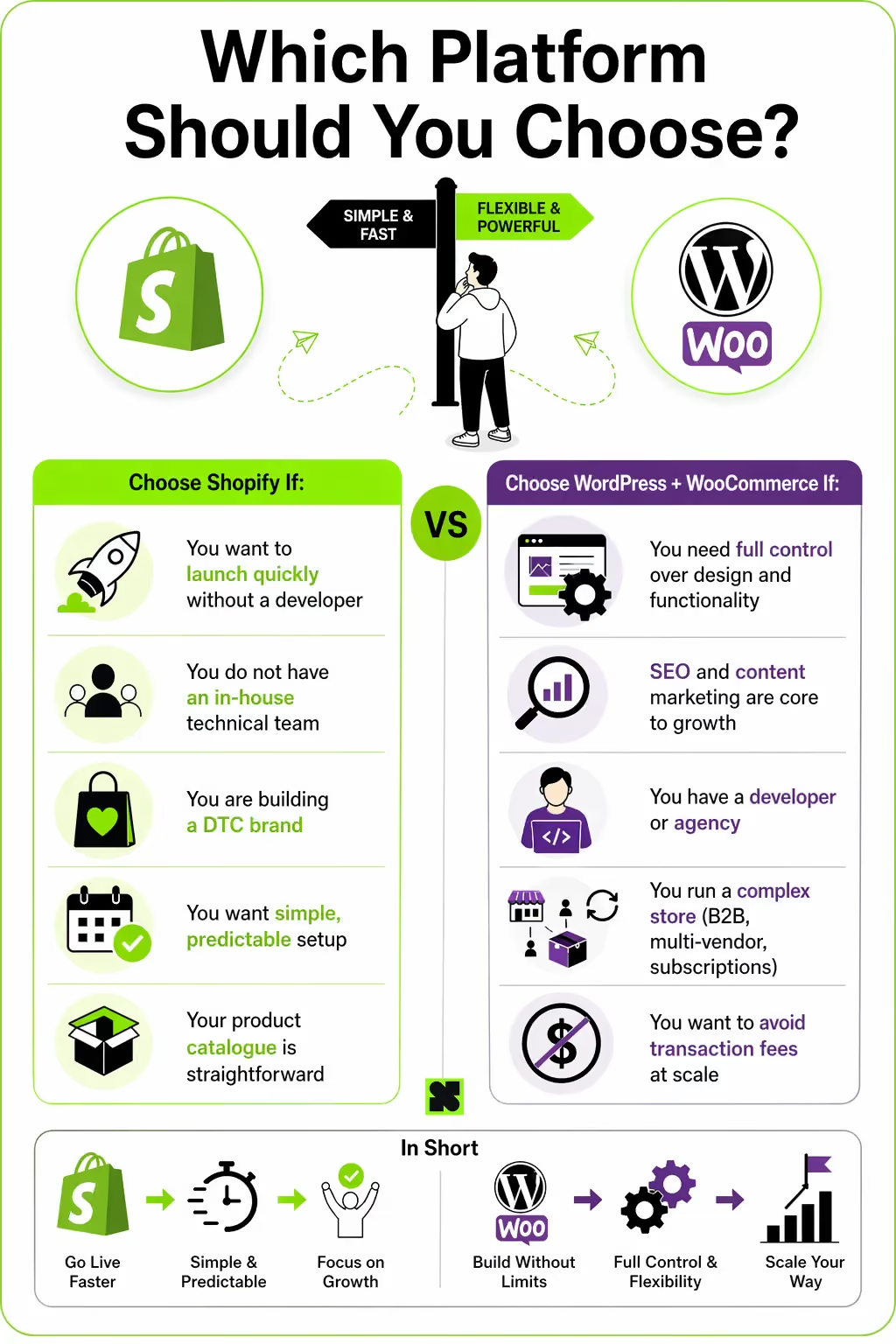
Neither platform is universally better, the right answer depends on your business model, your team, and how you plan to grow.
Frequently Asked Questions
Is Shopify better than WordPress for ecommerce?
It depends on your business. Shopify is faster to set up and better for pure product-focused stores. WordPress with WooCommerce offers more flexibility and performs better for content-heavy or complex businesses.
For most first-time store owners, Shopify is the faster path to launch. For long-term flexibility and control, WordPress is stronger.
What are the main disadvantages of Shopify?
Shopify charges transaction fees of 0.5% to 2% unless you use Shopify Payments which is unavailable in the UAE and GCC. Checkout customisation is locked behind the Shopify Plus plan ($2,300+/month).
URL structures cannot be fully modified, which limits certain technical SEO options. At high volumes or complex use cases, Shopify's constraints become costly to work around.
Is WordPress free for ecommerce?
The WordPress software is free, but running a store on it is not. You need paid hosting, an SSL certificate, payment gateway integrations, and typically several premium plugins. Realistic first-year costs for a properly configured WooCommerce store range from $500 to $2,000, depending on complexity and ongoing costs continue from there.
Which platform is better for SEO — Shopify or WordPress?
WordPress gives more control over technical SEO, URL structure, schema markup, and content publishing. Shopify handles on-page SEO adequately but has known limitations for forced URL paths, basic blog functionality, and limited structured data without apps.
If SEO and content marketing are central to your growth strategy, WordPress has a clear edge.
Can I use Shopify in the UAE?
Yes. Shopify operates in the UAE and supports Arabic language and RTL layouts. However, Shopify Payments is not available, so merchants must use third-party gateways like Telr, PayTabs, or Checkout.com.
These gateways work well, but Shopify adds its own transaction fee on top of every order. UAE VAT compliance and Arabic support are both manageable on the platform.
Can I switch from Shopify to WordPress (or vice versa) later?
Yes, but it requires planning. Product data, customer records, and orders can be migrated using tools like LitExtension or Cart2Cart. The bigger risk is SEO, URL structure changes cause traffic loss if 301 redirects are not correctly implemented across every URL. Migrations typically take two to eight weeks and SEO recovery can take several months.
Which ecommerce platform is best for small businesses in the Gulf?
Shopify is generally more accessible for small businesses in the Gulf due to its managed setup and ease of use.
However, the absence of Shopify Payments in the region means transaction fees apply on every order, a meaningful cost for lower-margin businesses or high-volume stores. WordPress + WooCommerce avoids this but requires more technical investment upfront.
Hi, I’m Rishabh Jain
I believe great digital experiences have the power to shape perception, build trust, and move businesses forward. That belief led me to found Suplex Design Studio, a global digital design and development studio helping FMCG and D2C brands build websites and digital experiences that are strategic, thoughtful, and commercially meaningful.
I started Suplex at 25 with a clear intent, to create digital experiences that look appealing, work seamlessly, and help D2C businesses grow. By 28, the studio had scaled globally, guided by a strong foundation in integrated design that I developed during my academic journey in London, where I was honoured with the Dean’s Award.
Over the years, I’ve had the opportunity to work with 100+ brands, from Fortune 500 organisations to family-run businesses, helping them build websites, e-commerce experiences, and digital products that create clarity, credibility, and long-term value.
Our work has been recognised internationally, including the Manifest Award (2024), the Clutch Global Award (2025), and features across platforms such as The Dieline, Packaging of the World, and the World Brand Design Society.
None of this would be possible without the people behind the work. I’m deeply grateful to the Suplex team, whose commitment, creativity, and attention to detail turn ideas into meaningful digital experiences every day.
At the heart of our work is a simple philosophy, digital design should be intentional, functional, and built to create real business value. That continues to guide everything we create at Suplex.





































Let’s Make It Happen
E-Commerce Success Stories
%201.avif)






.avif)

.avif)
Build Your D2C Business The Right Way
Build It With Suplex.


