Why Is My Shopify Website Slow? 9 Real Causes, Ranked by Impact
.avif)

Why Is My Shopify Website Slow? 9 Real Causes, Ranked by Impact
Your Shopify store is slow because of app scripts, oversized images, render-blocking third-party code, bloated themes, poor Core Web Vitals, redirects, Shopify-hosted videos, leftover app code or unused CSS and JavaScript.
In most cases, multiple issues stack together, while Shopify's infrastructure is rarely the cause.The impact is significant: stores loading in under 2 seconds convert at 2.4% versus the 1.4% platform average.
This blog covers the nine most common causes, how to identify them, and which fixes deliver the biggest performance gains first.
What Your Shopify Speed Score Is Actually Telling You (And What It Is Not)
Before diagnosing what is slowing your store, you need to understand what the speed metrics you are looking at actually measure because optimizing for the wrong signal produces a better score on a store that still converts poorly.
Shopify Speed Score vs. Google PageSpeed vs. Real User Experience
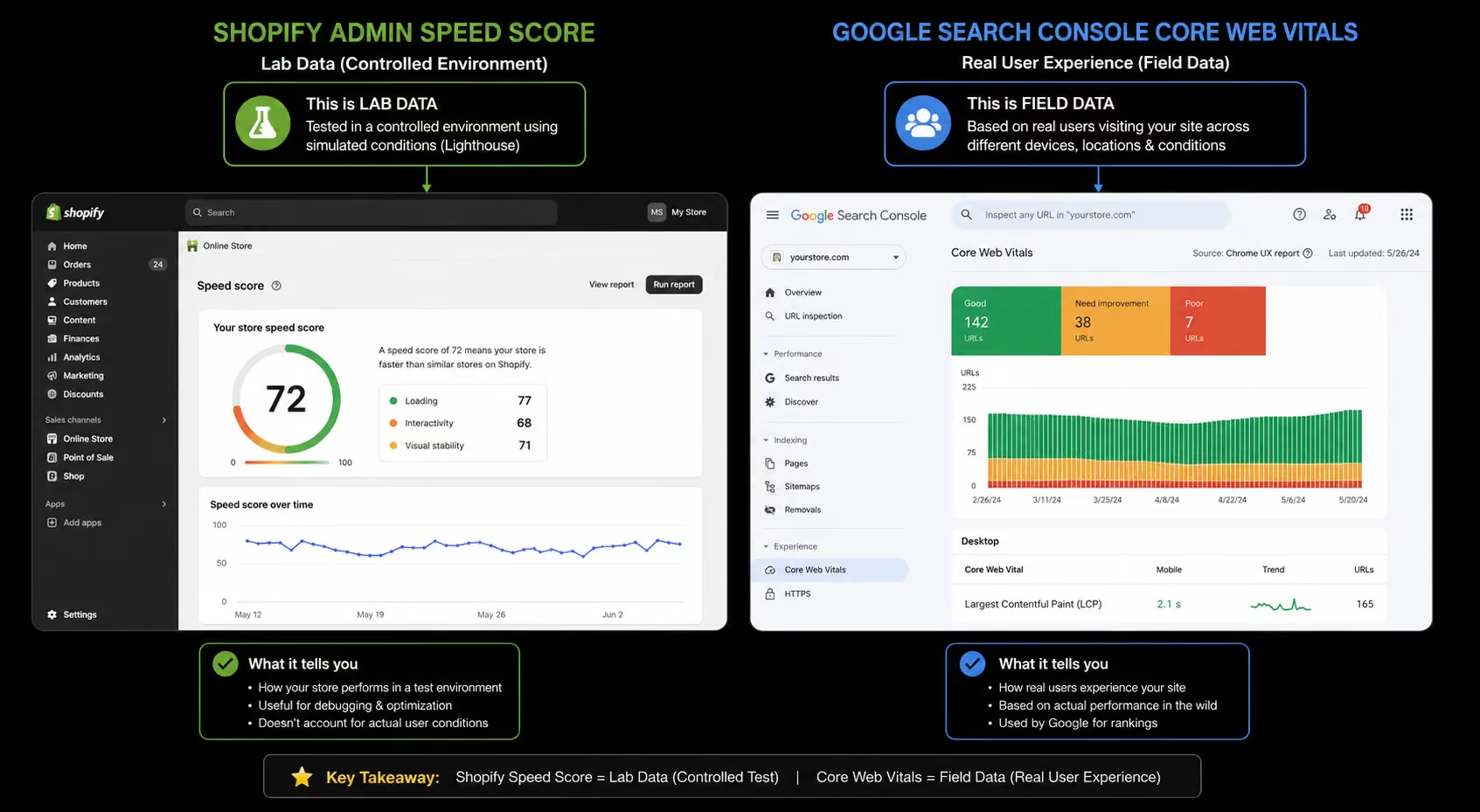
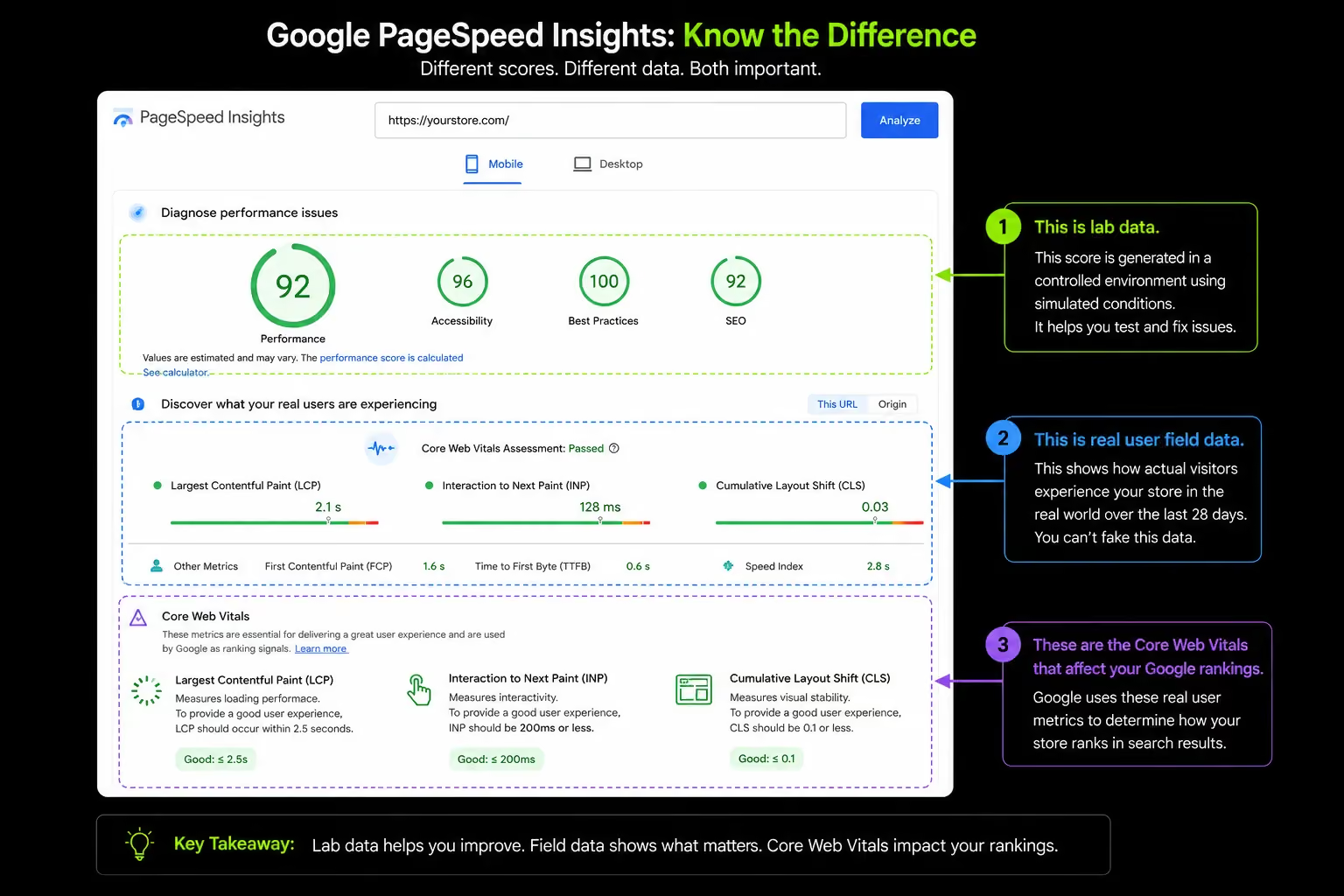
Shopify's built-in speed score (found under Online Store → Preferences → Online Store Speed) uses Google Lighthouse in a controlled lab environment. It measures your store on simulated hardware with a simulated network connection.
Not on an iPhone 13 in Dubai switching between 4G and 5G. Not on a mid-range Android in Riyadh with 15 browser tabs open. A simulated device on a controlled connection.
A store can jump from a score of 30 to 60 by removing a single app, yet real customers notice no difference because the bottleneck was in a different part of the load sequence entirely. The score improved. The experience did not.
The three metrics that actually determine whether customers buy from you:
INP (Interaction to Next Paint) measures how responsive your store feels when customers tap buttons, select variants, or add products to cart. A page can load quickly yet still feel slow if heavy app JavaScript delays these interactions.
Unlike Shopify's speed score, Core Web Vitals use real user data from Chrome (CrUX). You can view these metrics in Google Search Console.
This is the data Google uses and the metric you should focus on improving. Shopify's speed score is useful for tracking trends, not diagnosing performance issues.
How Shopify Stores Accumulate Speed Problems Over Time: The Speed Debt Pattern
Most store owners think of speed as either fast or slow. A better analogy is a bucket filled with water.
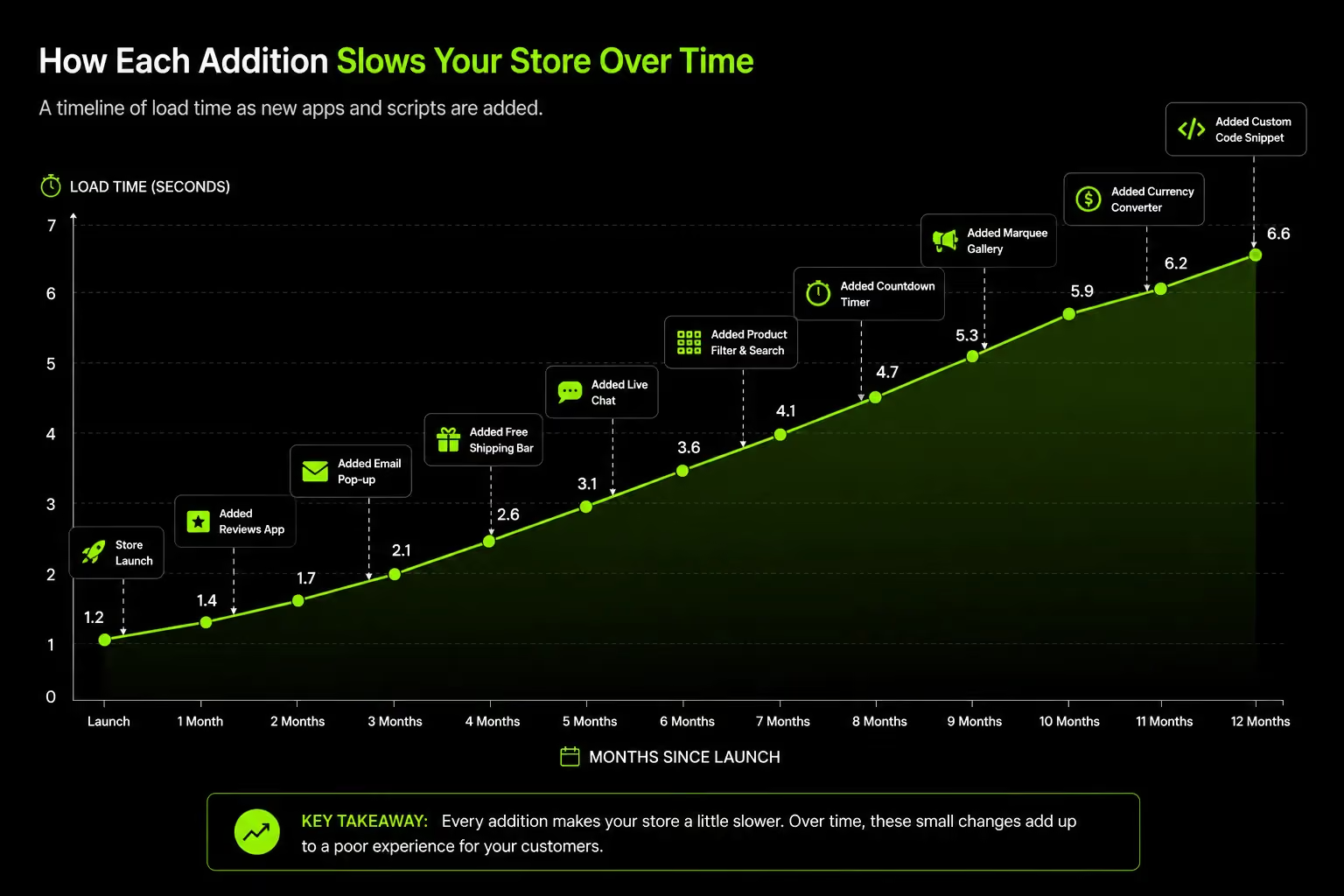
Every app, tracking pixel, image, and third-party widget adds a little weight. Individually they're harmless. Together they slow the store enough to hurt conversions.
That's why a Shopify store can feel noticeably slower 12 to 18 months after launch. Not because of a single mistake, but because new features were added without removing old ones.
The four stages of speed debt accumulation:
Launch: The store is lean. Four to six apps, a clean theme, a small image library. Load time is 1.6 – 2 seconds on mobile. Everything feels fast.
Growth: Apps are added for reviews, loyalty, live chat, pop-ups, size guides, and countdown timers. Each adds one to three scripts. Load time climbs to 2.8 – 3.5 seconds. The slowdown is gradual enough not to trigger an alarm.
Scale: More tracking pixels arrive as paid channels expand Meta, Google, TikTok, Pinterest, Klaviyo. The product catalog grows with more images. A quiz tool is added. A bundle builder. Load time is now 4 – 5 seconds on mobile. Conversion rate is declining but the cause is not obvious.
Debt stage: The cumulative load from 14 – 18 apps, five tracking pixels, a modified theme, and three years of accumulated images has compounded into a performance problem that affects rankings, conversion rate, and customer experience simultaneously. No single addition caused it. All of them together did.
The average Shopify store uses 15 – 20 apps. Each app adds approximately 200 – 500ms to load time. At 10 apps averaging 300ms each, that is 3 full seconds of added load time from apps alone before images, fonts, or theme code are counted.
Cause 1: App Bloat The Biggest Performance Culprit by Impact
App script accumulation is the primary cause of slow Shopify stores. Not because any single app is a problem but because the cumulative JavaScript weight of a grown store's app stack is often the dominant factor in load time.
How Apps Add JavaScript to Every Page, Even Pages That Do Not Need Them
Every Shopify app adds JavaScript to your store, and many load on every page whether they're needed or not. A subscription app on a blog post or a cart recovery app on a collection page still adds weight and slows the experience.
Online Store 2.0 themes solve much of this by using app blocks, which load app code only where it's needed. Older OS 1.0 themes lack this capability, causing app scripts to load sitewide.
If you're still using an OS 1.0 theme, migrating to an OS 2.0 theme is often one of the most effective speed improvements available.
The Problem Nobody Talks About: Orphaned Scripts from Deleted Apps
Uninstalling a Shopify app often removes it from your admin but not from your theme code. These leftover scripts can continue loading on every page, creating unnecessary requests and JavaScript processing without providing any functionality.
Over time, stores that have tested multiple apps can accumulate significant "ghost code" from old review, loyalty or upsell tools.
Identifying and removing these orphaned scripts from theme files is a developer-level task, but it's often one of the highest-impact performance improvements for mature Shopify stores.
The App Audit Matrix
Not all apps should be removed. The decision is a commercial one, not just a technical one.
Before removing any app, consider its impact on revenue. We've seen stores gain PageSpeed points by removing review apps, only to lose conversions because social proof disappeared from product pages.
Speed improvements should never come at the expense of sales. The goal is a faster store that converts better, not simply a higher performance score.
Cause 2: Unoptimized Images The Silent Weight on Every Page
Images account for 60 – 70% of a webpage's total file size on a product-heavy Shopify store.
On a store with a large catalog and multiple product images per page, unoptimized images are frequently the single largest contributor to load time after app scripts.
Format: Why WebP Should Be Your Default
Many Shopify stores upload oversized product images straight from photographers, often several megabytes each. If images aren't resized and optimized, customers download far more data than needed.
Shopify can automatically serve efficient WebP images, but only when themes use Shopify's image optimization pipeline correctly.
A product page carrying tens of megabytes of image data can often be reduced to under 2MB with proper resizing and compression, delivering much faster load times with virtually no visible loss in quality.
Lazy Loading: Where Most Stores Get It Wrong
Lazy loading improves performance by delaying below-the-fold images until users scroll to them, reducing initial page weight and helping Core Web Vitals.
The common mistake is lazy loading hero banners or primary product images. These are visible immediately and should load as quickly as possible.
For best performance, key above-the-fold images should use eager loading and high fetch priority, while secondary and below-the-fold images should be lazy loaded.
Cause 3: Your Shopify Theme May Be Architected for Features, Not Speed
A slow theme is not always a bad theme. It is often a good theme that has accumulated technical weight from customizations, integrations, and iterative development across multiple teams.
The Architectural Difference Between OS 1.0 and OS 2.0 Themes
Shopify's Online Store 2.0 architecture, introduced in 2021, fundamentally changed how themes handle apps and page sections.
In OS 1.0 themes, app code is injected globally and it loads on every page, in every context, regardless of whether that page uses the app's functionality.
In OS 2.0 themes like Dawn, apps are contained within "app blocks" in specific sections. They load only where they are placed and configured.
Migrating from an OS 1.0 theme to a clean OS 2.0 build is often the highest-impact structural fix for a store whose speed has degraded over time.
It does not just improve scores, it creates an architectural foundation that stays faster as the store grows, because each app addition is scoped rather than global.
How Custom Modifications Accumulate Technical Weight
Over time, Shopify themes accumulate technical debt. New sections, custom integrations, CSS patches, and quick fixes are added, but old code is rarely removed. The result is a theme carrying far more code than it originally did.
This is common even on premium themes with strong performance foundations. When a mature store has a poor PageSpeed score, the issue is usually not the theme itself, but the years of customizations layered on top of it.
Cause 4: Render-Blocking Scripts and Third-Party Code
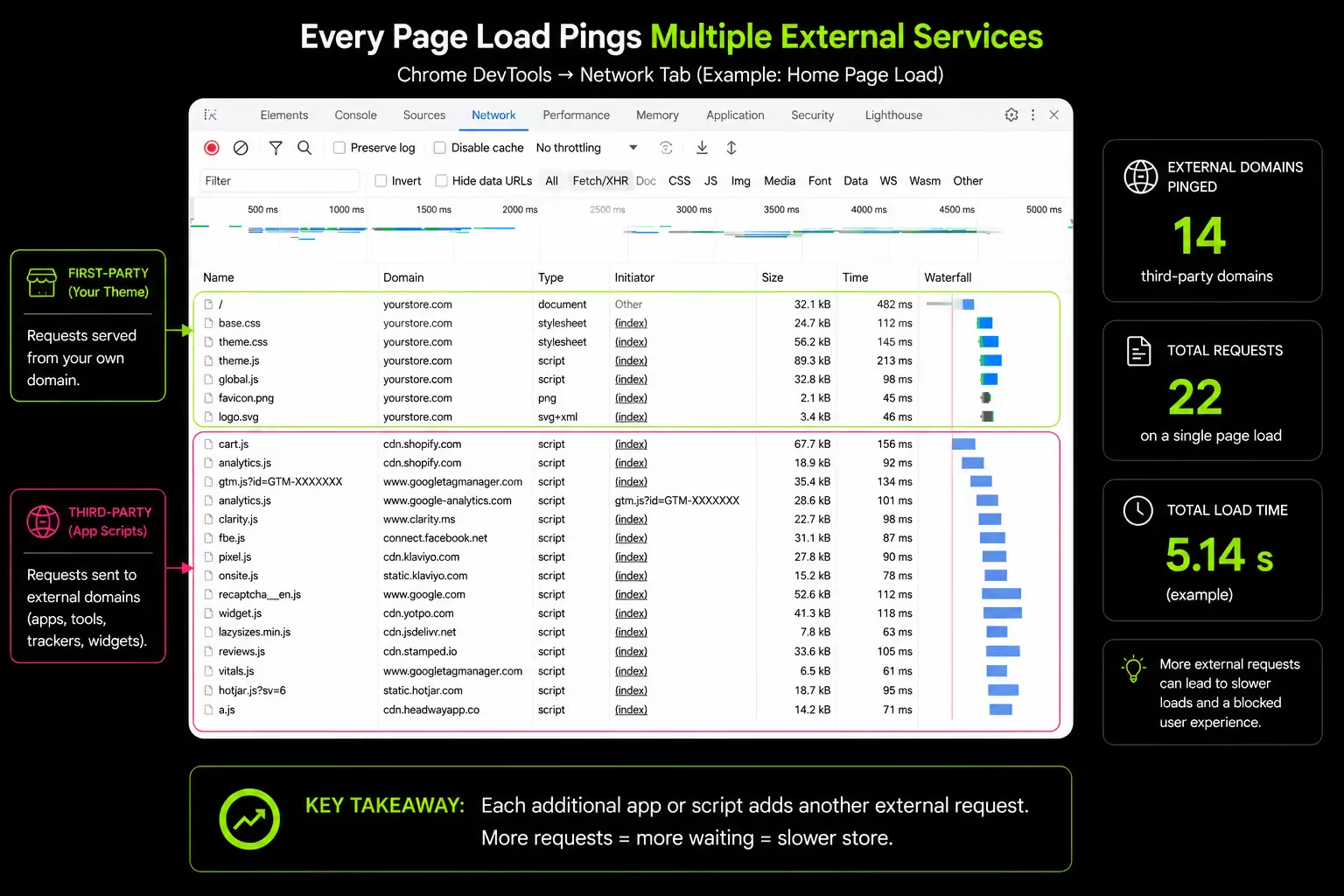
Third-party scripts, analytics, pixels, live chat, A/B testing tools are loaded by the browser before or during page rendering. When the browser encounters a script tag in the HTML head, it often pauses rendering to wait for that script to load.
This is render-blocking: the customer sees a blank or partially rendered page while the browser waits for a script that has nothing to do with displaying the product.
Why Marketing Pixels Are Slowing Your Store's First Paint
A store running Meta Pixel, Google Analytics 4, TikTok Pixel, Pinterest Tag, and Klaviyo tracking is making five separate external server requests before a single product image can render.
Each request depends on the speed of an external server, not Shopify's infrastructure. If TikTok's script delivery is slow that afternoon, your product page waits for it.
For growing UAE and Gulf D2C brands advertising across Meta, TikTok, and Snapchat, tracking pixels alone can add 800ms to 1.5 seconds to mobile load times. Each platform requires its own pixel, and every pixel fires on every page.
Tag Managers: Helpful or Harmful?
Google Tag Manager (GTM) promises better performance by consolidating multiple marketing scripts into a single container. In reality, it introduces its own overhead and, without strict governance, often loads more scripts than a direct implementation.
Marketing teams frequently add tags for new campaigns but rarely remove old ones. Tags end up firing on pages where they are not needed, turning GTM from an optimization tool into another layer of script debt.
GTM is valuable when managed properly. Regular tag audits, removing outdated tags, and restricting firing rules to relevant pages keep containers lean. Without that discipline, GTM can amplify the very performance issues it was meant to solve.
Cause 5: Less-Common Causes That Still Cost Real Load Time
These causes appear in fewer competitor articles but consistently surface in real store audits. Each one is a fixable problem that adds meaningful load time.
Redirect Chains: Silent Performance Killers
Every redirect adds an extra server request. Over time, Shopify stores accumulate redirects from product updates, URL changes, SEO work and migrations.
When redirects chain together, they create unnecessary latency and slower page loads.
Migrated stores often have the most redirect debt, with legacy URLs triggering multiple redirects before reaching the final destination. At scale, these chains can noticeably impact performance.
Video Hosted Directly on Shopify
Shopify allows video uploads, but it is not a dedicated video hosting platform. Videos served directly from Shopify lack adaptive streaming, meaning every user downloads the same file size regardless of connection speed.
A large hero video can significantly slow mobile performance. Hosting videos on YouTube, Vimeo, or a video optimization platform enables adaptive delivery and reduces the performance impact.
INP: The Core Web Vital Many Shopify Stores Ignore
INP (Interaction to Next Paint) measures how quickly a page responds after a user action, such as clicking Add to Cart or selecting a product variant.
A store can load fast yet feel slow if interactions lag. When users tap a button and nothing happens for half a second or more, the site feels broken.
Poor INP is usually caused by heavy JavaScript running during interactions, often from review apps, cart drawers, and loyalty widgets.
Unused CSS and JavaScript Left by Past Developers
Every theme customization, removed app, A/B test, and campaign-specific code addition leaves behind CSS and JavaScript that the browser still downloads and parses on every page load.
A store that has had three development teams over five years may be loading twice the CSS it actually uses. Browser parsers process all of it regardless of whether any element on the page references it. For heavily modified themes, cleaning unused code can reduce stylesheet and script payload by 30 – 50%.
How to Diagnose What Is Actually Slowing Your Shopify Store
Knowing the causes is not the same as knowing which causes are affecting your specific store. This section gives you a structured diagnostic process to identify the real culprits before spending time or money on fixes.
The Three Pages You Must Test (And Why Each Is Different)
Most guides say "run PageSpeed Insights on your store" without specifying which page. The page you test matters because different pages have different performance profiles.
Homepage: Usually the lightest page on the store. High traffic but often not where purchases happen. Optimizing only the homepage gives an inflated sense of your store's overall performance and misses the pages where speed most affects revenue.
Product pages: Where purchase decisions are made and money changes hands. Almost always the heaviest pages multiple product images, review widgets, loyalty banners, bundle apps, size guide tools, and variant selectors all load simultaneously. This is the most commercially important page to test and the most commonly neglected.
Collection pages: Where browsing decisions are made. Filtering and sorting JavaScript adds interaction complexity. Poor collection page speed leads to high bounce rates before customers reach a product page, making it invisible in conversion analytics but significant in revenue impact.
Test all three. The variance between a store's homepage score and its product page score is often 25 – 35 points on mobile. Knowing only the homepage score means not knowing the performance of the page where customers decide whether to buy.
Which Tools to Use and How to Read Them
Mobile Score Is the Number That Matters
70%+ of Shopify traffic arrives on mobile devices. Mobile conversion rates average 1.2% versus 1.9% on desktop, a gap that widens further as mobile speeds slow.
Yet most store owners and agencies test desktop performance because desktop scores are dramatically better and less alarming.
A store with a desktop PageSpeed score of 78 can have a mobile score of 24. It is the mobile score that reflects most of the revenue risk.
The 3-Page Diagnostic Protocol:
- Test homepage on mobile establish the baseline
- Test the highest-traffic product page on mobile highest revenue impact
- Test the highest-traffic collection page on mobile browsing-stage experience
- Compare scores and identify which page has the worst performance gap that page is where to start
Not sure where your store's speed problems are coming from? We run detailed Shopify speed audits that identify the real causes, not just what the tools flag first. Book a call with the Suplex team.
How We Approach Shopify Speed Optimization at Suplex
Most agencies optimize for tool scores. We optimize for customer experience and conversions.
We Start with Real User Data
Tool scores are a starting point, not the goal. We analyze real-world performance data, customer behavior, and Core Web Vitals across key page types to identify where shoppers actually experience delays.
We Evaluate Apps Before Removing Them
Not every slow app should be removed. We assess each app based on its business value versus performance cost. High-value apps are optimized, replaced, or loaded conditionally. Low-value, high-cost apps are removed.
We Treat Performance as a System
Slow stores rarely have a single cause. App scripts, theme code, images, pixels, and redirects often combine to create performance issues. Our approach addresses the entire ecosystem rather than isolated problems.
We Build for Long-Term Performance
Optimization is not a one-time project. After improvements are implemented, we establish monitoring and maintenance processes to prevent speed debt from returning as new apps, content, and tracking scripts are added.
At Suplex, performance optimization is ultimately about one thing: removing friction from the buying journey so customers can purchase faster and more confidently.
Frequently Asked Questions
Why is my Shopify store slow even with few apps?
Apps are a common cause, but heavy themes, unoptimized images, direct video uploads, and multiple tracking pixels can slow a store just as much. Check your highest-traffic product page in Google PageSpeed Insights to identify bottlenecks.
How do I know which app is slowing my store?
Use Chrome DevTools' Network tab to identify slow third-party requests. You can also disable apps one by one and retest performance. Shopify Theme Inspector helps pinpoint slow app assets and Liquid sections.
Will switching to a new Shopify theme make my store faster?
Often, yes. Modern OS 2.0 themes are generally more efficient and better at isolating app code. However, migrating without cleaning old integrations and unused code may deliver only limited improvements.
Why does my store score well on PageSpeed but still feel slow?
PageSpeed measures lab performance, not real user interactions. A store can load quickly but still feel sluggish if actions like Add to Cart respond slowly due to poor INP caused by heavy JavaScript.
Is Shopify itself causing my store to be slow?
Usually not. Shopify's hosting, CDN, and infrastructure are highly optimized. Most performance issues come from apps, custom code, tracking scripts, and unoptimized assets added to the store.
How much speed improvement is possible without a developer?
You can improve performance by optimizing images, removing unused apps, and identifying slow pages with PageSpeed Insights. More advanced fixes, such as removing orphaned code and optimizing theme assets, typically require developer support.
Does Shopify speed affect SEO?
Yes. Core Web Vitals are Google ranking signals, and site speed also influences user behavior metrics such as bounce rate, engagement, and conversion rate. Faster stores generally perform better in both search visibility and customer experience.
Hi, I’m Rishabh Jain
I believe great digital experiences have the power to shape perception, build trust, and move businesses forward. That belief led me to found Suplex Design Studio, a global digital design and development studio helping FMCG and D2C brands build websites and digital experiences that are strategic, thoughtful, and commercially meaningful.
I started Suplex at 25 with a clear intent, to create digital experiences that look appealing, work seamlessly, and help D2C businesses grow. By 28, the studio had scaled globally, guided by a strong foundation in integrated design that I developed during my academic journey in London, where I was honoured with the Dean’s Award.
Over the years, I’ve had the opportunity to work with 100+ brands, from Fortune 500 organisations to family-run businesses, helping them build websites, e-commerce experiences, and digital products that create clarity, credibility, and long-term value.
Our work has been recognised internationally, including the Manifest Award (2024), the Clutch Global Award (2025), and features across platforms such as The Dieline, Packaging of the World, and the World Brand Design Society.
None of this would be possible without the people behind the work. I’m deeply grateful to the Suplex team, whose commitment, creativity, and attention to detail turn ideas into meaningful digital experiences every day.
At the heart of our work is a simple philosophy, digital design should be intentional, functional, and built to create real business value. That continues to guide everything we create at Suplex.





































Let’s Make It Happen
E-Commerce Success Stories

%201.avif)






.avif)

.avif)
Build Your D2C Business The Right Way
Build It With Suplex.


