Shopify Plus Migration Checklist: The Complete Pre-Launch Guide (2026)
.avif)
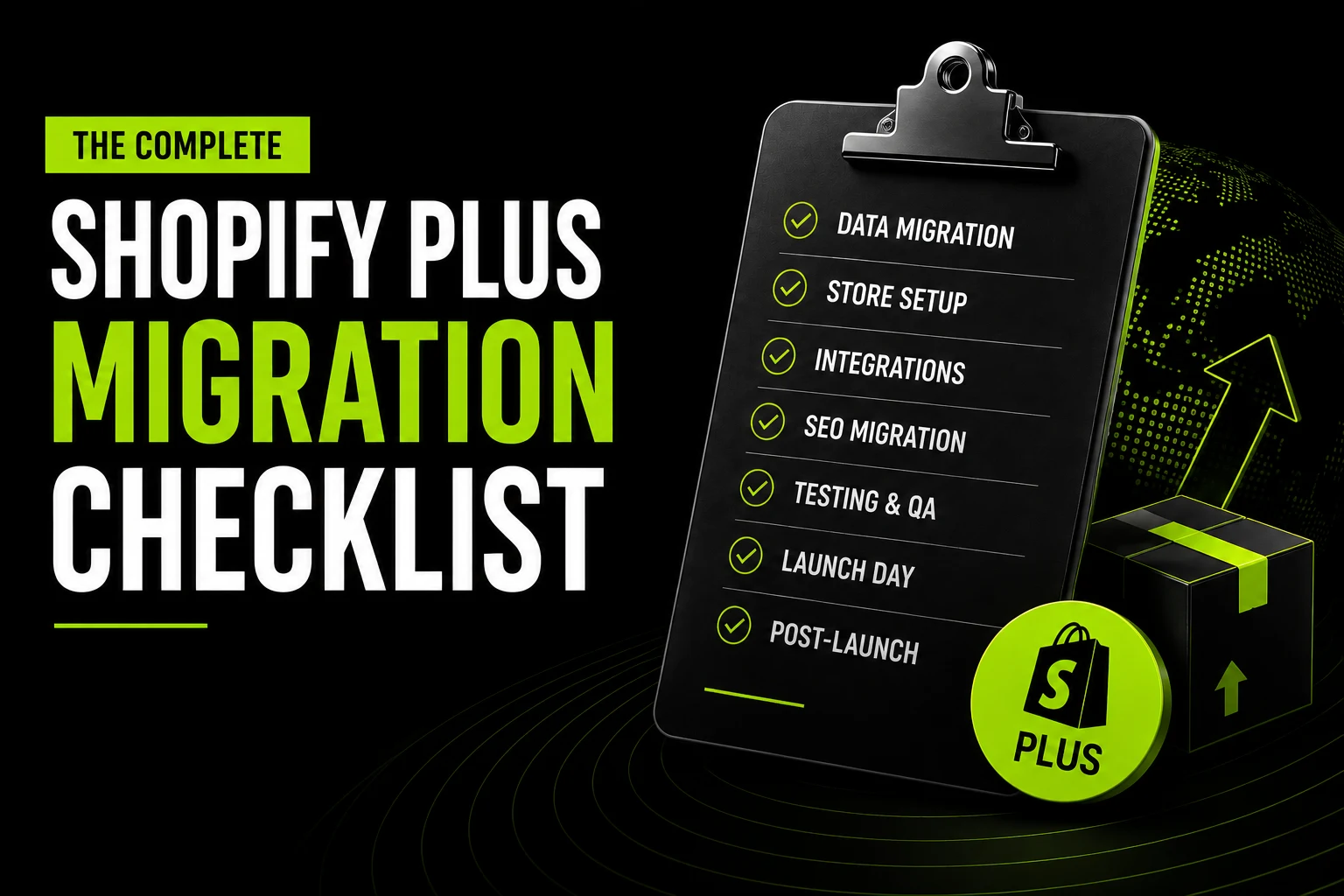
Shopify Plus Migration Checklist: The Complete Pre-Launch Guide (2026)
A Shopify Plus migration checklist needs to answer one question first: which migration are you running? A standard Shopify merchant upgrading to Plus is unlocking features on data that already lives in Shopify.
A brand leaving Magento, WooCommerce, or a custom platform is rebuilding its entire commerce infrastructure. Same destination, completely different projects
Most checklists treat both scenarios as one project. That's how timelines slip and budgets blow past their limit. This guide separates the two tracks at every phase, so you only work through what actually applies to you.
Timeline at a glance:

If you want a second opinion on which track applies to your store before you start building a plan, Suplex runs a Shopify Plus scoping call that settles this in one conversation.
Download Shopify Plus Migration Checklist
Before You Start: The Pre-Migration Foundation
This is the phase most teams rush through, and it's the phase that decides whether the rest of the project stays on schedule. Get the scope wrong here and every later phase inherits the error.
Strategic Alignment (Both Scenarios)
Set your targets and your team before any build work starts.
- Define migration objectives in numbers: Not "improve performance." Set a target page load under 2.5s LCP, a target conversion rate above 2.5%, and organic traffic held within 10% of baseline at 60 days post-launch.
- Set your go-live date and work backwards: Avoid launching during BFCM, Eid, or any major campaign window. Build in a two-week buffer before any high-traffic event.
- Assign a named owner for each workstream: Data migration, theme development, integration rebuilds, SEO mapping, QA, and launch-day operations each need one person accountable. Shared ownership means no ownership.
- Confirm your Shopify Plus contract: Plus starts at $2,300/month, with revenue-based pricing kicking in above $800K monthly GMV. Confirm your contract term, included features, and your assigned Merchant Success Manager.
Store and Data Audit (External Platform → Shopify Plus Only)
Skip this section if you're upgrading from standard Shopify. Your data already sits in Shopify.
- Product catalogue inventory: Count SKUs, variants, collections, tags, metafields, bundles, and subscriptions. Flag any product with more than 100 variant combinations, since Shopify Plus caps at 100 variants per product, same as standard Shopify. Magento configurable products with deep attribute inheritance hit this limit often and need an explicit mapping decision before migration.
- Customer and order data audit: Document total customer records, how far back your order history needs to go, active subscriptions, loyalty balances, and outstanding gift card values. Shopify cannot import passwords. Every customer needs an account reactivation email after launch.
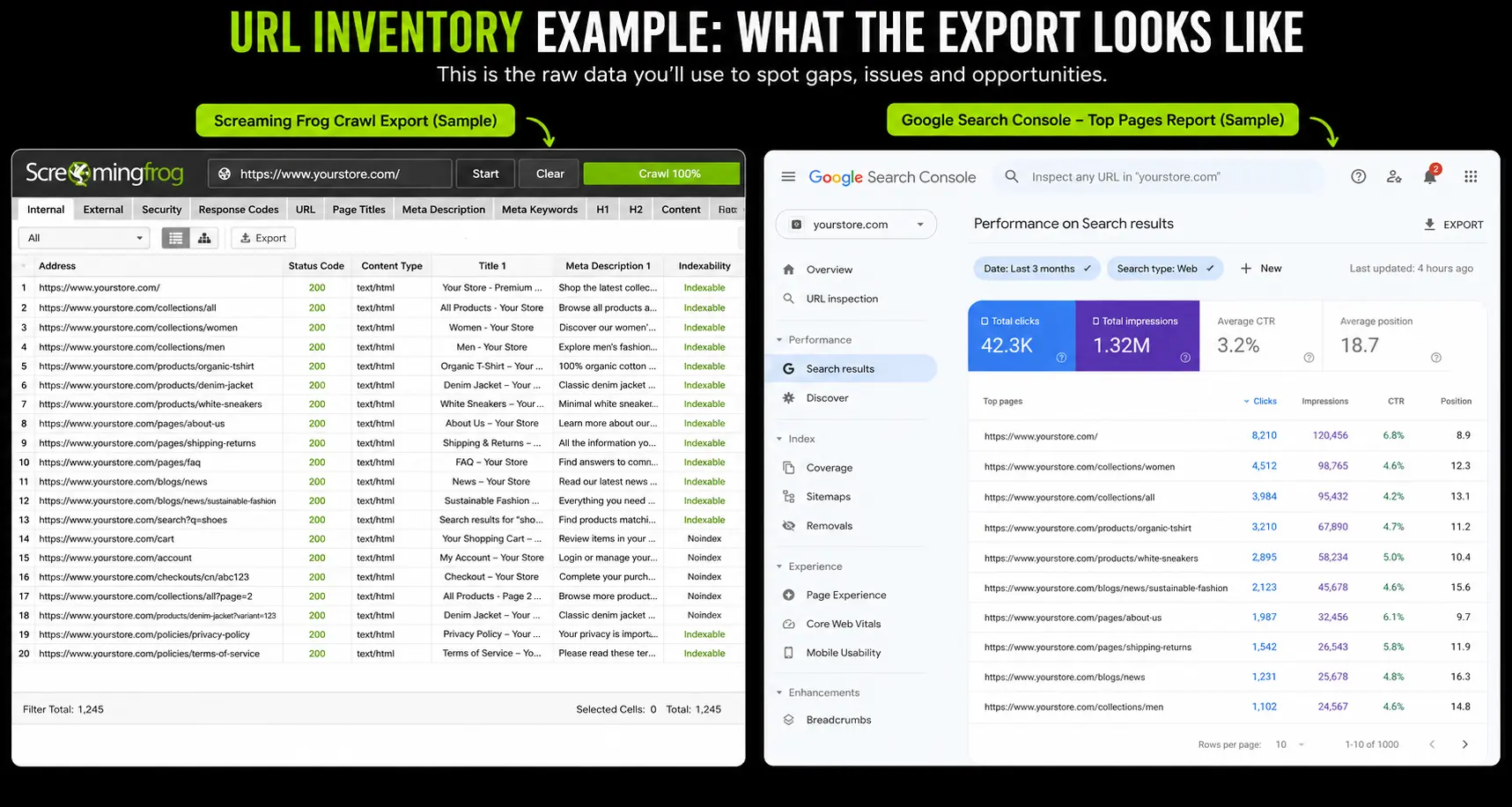
- URL inventory: Crawl your current site with Screaming Frog or Ahrefs and export every indexed URL: products, collections, blog posts, landing pages, filtered views. Cross-reference against Google Search Console to find your highest-traffic URLs. This becomes your redirect map, and you should not start the build without it.
- Integration inventory: List every connected system: ERP, 3PL, CRM, email marketing, SMS, reviews, loyalty, subscriptions, tax engine, payment gateways, fraud tools, analytics. For each, note what data flows, in which direction, and who owns it.
- SEO baseline snapshot: Export your top 100 keyword rankings, monthly organic traffic by channel, and top 50 landing pages by clicks from Search Console. This is your benchmark for measuring what the migration preserved.
- Custom code inventory: Document every theme customisation, custom module, and hard-coded pricing rule. On Magento stores older than five years, this list is almost always longer than anyone remembers. Each item needs a decision: replicate, replace with a native feature, or drop.
At Suplex, we spend the first one to two weeks of every Shopify Plus migration in audit-only mode, no design work, no development, because the decisions made in this window set the scope for everything after it.
Phase 1: Data Migration (External Platform → Shopify Plus Only)
If you're upgrading from standard Shopify to Plus, skip this whole phase. Your products, customers, and orders are already in Shopify.
Product Data Migration
- Map your source schema to Shopify's product model. Shopify structures products as Product > Variants > Options, with a maximum of 3 options and 100 variants per product. Anything beyond that needs a mapping decision: flatten variants, split into multiple products, or use Shopify Functions for pricing logic.
- Clean data before migration, not after. Remove duplicate SKUs, inactive products, and orphaned variants. Cleaning legacy data before it moves is far cheaper than fixing it once it's live.
- Run a test migration to staging first. Never migrate directly to a live store. Check product titles, descriptions, variants, images, metafields, and tags. Open 20–30 random product pages by hand. Automated validation misses subtle breaks in HTML descriptions and embedded videos.
- Verify image migration. Large image libraries take the most time to migrate correctly. Check for broken references and missing alt text.
- Validate inventory levels. Confirm stock counts match the source system, and set a clean cutoff point after which inventory only updates in Shopify.
Customer and Order Data Migration
Shopify cannot import hashed passwords from any platform. Build your reactivation email now, not after launch, since this is a retention moment as much as a technical necessity.
Phase 2: Store Build and Configuration (Both Scenarios)
This is the theme, design, and store architecture phase. Both scenarios touch it, but the scope differs sharply between the two.
Theme and Design
- Select or Build Your Theme: For an upgrade, audit your current theme for Plus-feature support: does it use OS 2.0, and does it support Checkout Extensibility app blocks? If not, plan a theme update alongside the upgrade. For an external migration, choose a premium theme (Prestige, Impulse, or Stiletto suit fashion, beauty, and lifestyle brands) or commission a custom build.
- Configure Checkout Extensibility: Checkout.liquid was fully deprecated in August 2025. Any old checkout customisations (custom fields, branding, upsells) need to be rebuilt in Checkout Extensibility, the Plus-exclusive checkout framework. Plan for custom checkout fields, checkout branding, upsell blocks, and any custom discount logic through Shopify Functions.
- Rebuild Navigation and Collection Structure: Match your top-level menu to your planned collection structure and confirm mega menus work on both desktop and mobile.
- Migrate Blog Content: Keep original publish dates and URLs where possible, or set up redirects if URLs change. Blog content carries accumulated organic traffic that's easy to lose in a rebuild.
- Configure Shopify Markets: Set market-specific pricing, currencies, languages, and checkout flows. UAE and Gulf brands need AED pricing, Arabic language support, and inclusive VAT display at 5%.
Shopify Plus Feature Configuration
- Shopify Flow. Rebuild automated workflows from your old platform: order tagging, inventory alerts, fulfilment routing, fraud flagging.
- Launchpad. If you run flash sales or scheduled launches, configure at least one test launch before going live.
- B2B Features. Company accounts, price lists, and net 30/60 payment terms are native to Plus. If you ran a separate wholesale channel before, confirm this configuration works before launch.
- Organisation Admin. For multi-store brands, set staff permissions and access levels across the unified admin layer.

Talk to our founders
- Discuss your idea
- Understand our process
- Get timelines & price estimate
Phase 3: Integrations (Both Scenarios)
Integrations are the highest-risk phase for external migrations. For Plus upgrades, the risk is lower but the commercial impact of a broken integration at launch is identical. Tier every integration by launch criticality before building any of them.
Integration Tier Prioritization
Tier 1: Launch-Critical: Must work on day one. Payment gateway failure means you cannot take orders. Tax calculation errors create compliance exposure. Shipping rate failure blocks checkout completion. ERP sync failure breaks inventory and fulfillment.
- Payment Gateway: Configure and test live transactions. Not test mode. Real transactions. For UAE stores: Telr, PayTabs, Tap Payments, or Shopify Payments UAE. Confirm 3DS authentication works.
- Tax Calculation: UAE VAT at 5% displayed inclusive on all product pages. KSA VAT at 15% for brands selling into Saudi Arabia. Configure Avalara or Shopify's native tax settings per market.
- Shipping Rates: Recreate all shipping zones, rates, and carrier integrations. Test at checkout with addresses from each target market.
- ERP or OMS Sync: For brands running NetSuite, SAP, or Microsoft Dynamics: ERP integration is the single most time-consuming element of a Shopify Plus migration. Allow 4–6 weeks for build and test. Confirm inventory sync, order creation, and fulfillment update flows all function end-to-end before launch.
- COD Configuration For UAE and Gulf Markets: Enable cash on delivery. COD still represents 20–25% of UAE transactions. Missing COD at checkout is direct revenue loss from day one.
Tier 2: Launch-Important: Aim to launch with these. Have a fallback plan.
- Email Marketing (Klaviyo or Equivalent:. Confirm customer data sync, list segmentation, and trigger events (abandoned cart, post-purchase, welcome series) all fire correctly via test orders.
- Reviews Platform: Migrate existing reviews. Confirm display on product pages.
- Loyalty Programme: Transfer balances. Confirm programme rules apply correctly at checkout.
- Subscription Management: For brands with recurring orders using ReCharge, Skio, or Shopify Subscriptions: confirm subscription data transferred and customer billing will continue correctly.
Tier 3: Launch-Eventual: These can ship within two weeks of go-live without commercial risk: analytics enrichment tools, BI pipelines, and non-critical reporting apps.
- Analytics enrichment tools
- BI pipelines and data warehouse connections
- Non-critical reporting apps
Rebuild integrations using Shopify's webhook and event model natively. Attempting to port legacy integration architecture produces fragile middleware that breaks on the first rate-limit event.
Shopify's API model differs enough from Magento or custom platforms that preservation attempts create more problems than fresh builds.
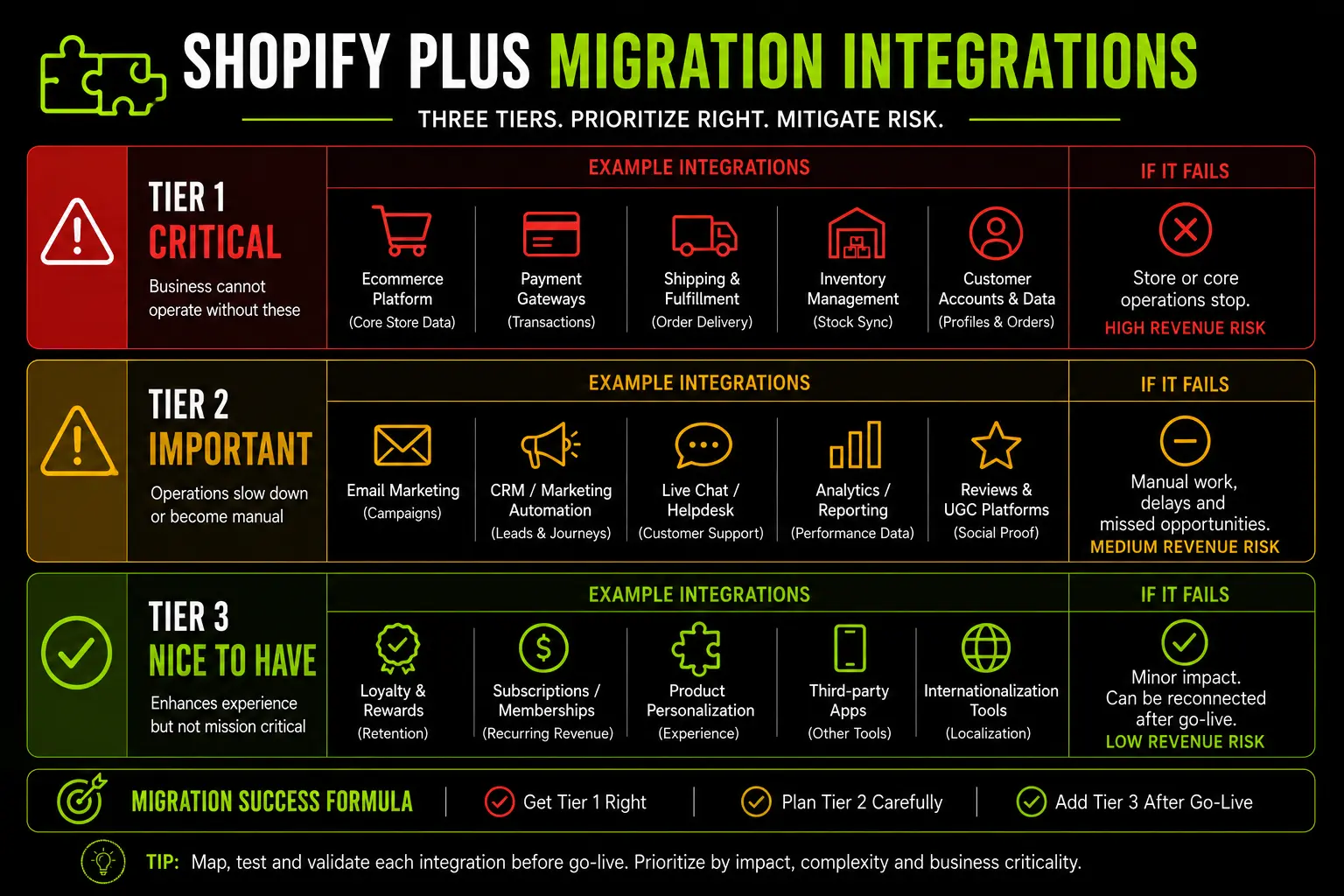
Porting existing integration architecture straight from a legacy platform to Shopify Plus usually produces fragile middleware.
Suplex rebuilds integrations natively on Shopify's webhook and event model, since preservation attempts typically break on the first rate-limit event.
Considering a Shopify Plus migration for your store?
Get a scoped assessment before you commit to a timeline or a budget. Our platform consultation starts with the audit, not the proposal, so you know your real integration complexity and SEO risk before any development begins.
Phase 4: SEO Migration (External Platform → Shopify Plus Only)
This phase decides whether your migration preserves organic traffic or destroys it. If you're upgrading from standard Shopify with no domain or URL change, most of this is irrelevant.
Your URLs stay the same and your SEO equity stays intact. Just confirm your new theme doesn't introduce noindex tags or break schema markup by accident.
URL Redirect Mapping
Build a complete 301 redirect map covering every old URL with organic traffic: products, collections, blog posts, landing pages, and filtered views that get clicks in Search Console.
Shopify's URL structure is fixed and cannot be customised:
- Implement redirects with Shopify's native tool (Online Store → Navigation → URL Redirects) or a bulk CSV upload for large sets. Avoid JavaScript redirects and redirect apps for anything SEO-critical.
- Audit for redirect chains. Every redirect should be one hop: old URL to new URL, never through an intermediate step. Chains dilute link equity and slow load times.
- Test a minimum of 50 redirects manually in staging, then run a full crawl to verify the complete map systematically.
- Never redirect everything to the homepage. This tells Google the product no longer exists and destroys its accumulated link equity. Redirect to the most specific relevant page instead.
Brands that skip proper redirect mapping lose 30–60% of organic traffic in the weeks after launch, and missing redirects are consistently the top cause of post-migration SEO loss across agency studies.
On-Page SEO Migration
- Export meta titles and descriptions from your current platform and migrate them accurately. Don't let a migration tool auto-generate descriptions from product copy; the result reads truncated and generic.
- Migrate H1 tags carefully. Product names and collection titles become H1s in Shopify, so match them to your original H1s on high-traffic pages.
- Rebuild image alt text systematically, starting with your top-revenue product pages.
- Verify structured data with Google's Rich Results Test: Product schema, BreadcrumbList on collection and product pages, and OfferCatalog on collections.
- Check canonical tags. For products appearing in multiple collections, confirm the canonical points to the primary /products/[handle] URL.
- Handle hreflang for multi-market or multilingual stores. Shopify Markets manages this correctly once configured.
- Confirm your sitemap generates correctly at yourdomain.com/sitemap.xml and excludes any staging or test pages.
- Submit your sitemap to Google Search Console after DNS cutover, and request indexing for your top-priority pages.
For the technical side of URL changes, Google's own guidance on site moves is worth reading alongside this checklist.
Phase 5: Testing and QA (Both Scenarios)
This phase decides whether launch day is controlled or chaotic. Run every check below on staging before you go anywhere near DNS.
Full Customer Journey Test
Run a complete purchase flow end to end, every step, before launch:
- Homepage loads correctly on desktop and mobile
- Navigation displays correctly on both, including RTL for Arabic
- Collection pages filter and sort correctly
- Product pages display images, variants, price, and reviews correctly
- Add to cart works, and cart totals include tax correctly
- Checkout completes for both guest and account flows
- Payment processes with a real card, not just test mode
- Order confirmation email fires
- ERP receives the order and triggers fulfilment
- Abandoned cart email triggers if checkout isn't completed
Mobile, Performance and Tracking QA
UAE/Gulf Market QA
For stores targeting the UAE and Gulf markets, verify that VAT-inclusive AED pricing is displayed consistently across product pages, the cart, and checkout.
Confirm that Cash on Delivery (COD) and configured Buy Now, Pay Later (BNPL) options such as Tabby or Tamara appear correctly.
Test the Arabic experience to ensure RTL layouts, navigation, breadcrumbs, product swatches, and Arabic content render without formatting or encoding issues.
Finally, confirm that UAE addresses can be entered without requiring a postal code and that your payment gateway (such as Telr, PayTabs, or Tap Payments) successfully processes a live transaction.
If your QA process needs a wider review of your current store first, a Shopify audit from Suplex flags issues before they carry over into the new build.
Launch Day: The Go-Live Checklist
Launch day should be a controlled execution of a plan you already wrote, not improvisation. Run these steps in order.
Post-Launch Monitoring: The First 30 Days
A migration that looks fine on launch day can still deteriorate quietly over the following weeks. Monitor on this schedule.
Days 1–7: Immediate Monitoring
Weeks 2–4: SEO Stabilisation
Weeks 4–12: Performance Optimisation
How Suplex Runs Shopify Plus Migrations
Shopify Plus migrations leave little room for error. A missing redirect can cost organic traffic within hours, while a failed ERP integration can disrupt fulfillment from day one.
That's why every migration starts with a detailed audit before design or development begins. We identify critical integrations, map redirects, and define migration priorities, then rigorously test every payment gateway, integration, and redirect in staging before launch.
For UAE and Gulf brands, we also build in regional requirements from the outset, including VAT-inclusive pricing, COD, Tabby and Tamara, Telr or PayTabs, and native Arabic RTL support.
If you're planning a Shopify Plus migration and want a scoped assessment of your timeline, integration complexity, and SEO risk, our platform consultation starts with the audit, not the proposal. Book a call.
Frequently Asked Questions
How long does a Shopify Plus migration take?
The timeline depends on your starting point. Upgrading from standard Shopify to Plus takes 2–6 weeks, since there's no data migration and the focus is feature configuration. Migrating from Magento, WooCommerce, or BigCommerce takes 8–16 weeks for most mid-market brands. Complex migrations with ERP integrations and international markets can run 4–6 months.
What is the difference between a Shopify Plus upgrade and a Shopify Plus migration?
An upgrade moves a brand already on Shopify (Basic, Grow, Advanced) to the Plus plan, with no data movement since products, orders, and customers stay in place. A migration moves a brand from a different platform to Shopify Plus, and includes full data migration, redirect mapping, integration rebuilds, and theme development.
Can you migrate customer passwords to Shopify Plus?
No. Shopify cannot import hashed passwords from any external platform. Existing customers need to set a new password through an account activation email after migration. Send this within 24–48 hours of launch, paired with a welcome-back offer to drive reactivation.
How do you preserve SEO rankings during a Shopify Plus migration?
Crawl your current site to inventory every indexed URL, build a 301 redirect map to the Shopify Plus equivalent for each one, implement redirects with Shopify's native tool, and verify the full map in staging before launch. Brands that skip this step routinely lose 30–60% of organic traffic in the following weeks. Keep every redirect to one hop.
What happens to checkout.liquid customisations during a Shopify Plus migration?
Checkout.liquid was fully deprecated in August 2025. Any customisations built there, custom fields, branding, or upsell blocks, need to be rebuilt using Checkout Extensibility, the Plus-exclusive framework built on app blocks and Shopify Functions. This is a development rebuild, not a straight migration of old code.
What should be migrated first, data or integrations?
Migrate and validate data in staging first, before connecting any integrations. Then tier integrations by launch criticality: Tier 1 (payment, tax, shipping, ERP) must be tested and signed off before go-live, Tier 2 (email, reviews, loyalty) should aim to launch on day one, and Tier 3 (analytics, BI) can follow within two weeks.
What are the specific Shopify Plus migration requirements for UAE stores?
UAE stores need 5% VAT configured for inclusive pricing across products and checkout, COD enabled (20–25% of UAE transactions use it), Tabby and Tamara BNPL at checkout, a regional payment gateway (Telr, PayTabs, Tap Payments, or Shopify Payments UAE) tested with live transactions, Arabic RTL built natively into the theme, and UAE address format accepted without a mandatory postal code.
Hi, I’m Rishabh Jain
I believe great digital experiences have the power to shape perception, build trust, and move businesses forward. That belief led me to found Suplex Design Studio, a global digital design and development studio helping FMCG and D2C brands build websites and digital experiences that are strategic, thoughtful, and commercially meaningful.
I started Suplex at 25 with a clear intent, to create digital experiences that look appealing, work seamlessly, and help D2C businesses grow. By 28, the studio had scaled globally, guided by a strong foundation in integrated design that I developed during my academic journey in London, where I was honoured with the Dean’s Award.
Over the years, I’ve had the opportunity to work with 100+ brands, from Fortune 500 organisations to family-run businesses, helping them build websites, e-commerce experiences, and digital products that create clarity, credibility, and long-term value.
Our work has been recognised internationally, including the Manifest Award (2024), the Clutch Global Award (2025), and features across platforms such as The Dieline, Packaging of the World, and the World Brand Design Society.
None of this would be possible without the people behind the work. I’m deeply grateful to the Suplex team, whose commitment, creativity, and attention to detail turn ideas into meaningful digital experiences every day.
At the heart of our work is a simple philosophy, digital design should be intentional, functional, and built to create real business value. That continues to guide everything we create at Suplex.





































Let’s Make It Happen
E-Commerce Success Stories

%201.avif)






.avif)

.avif)
Build Your D2C Business The Right Way
Build It With Suplex.


