When to Upgrade to Shopify Plus: A Decision Framework for Growing Brands
.avif)
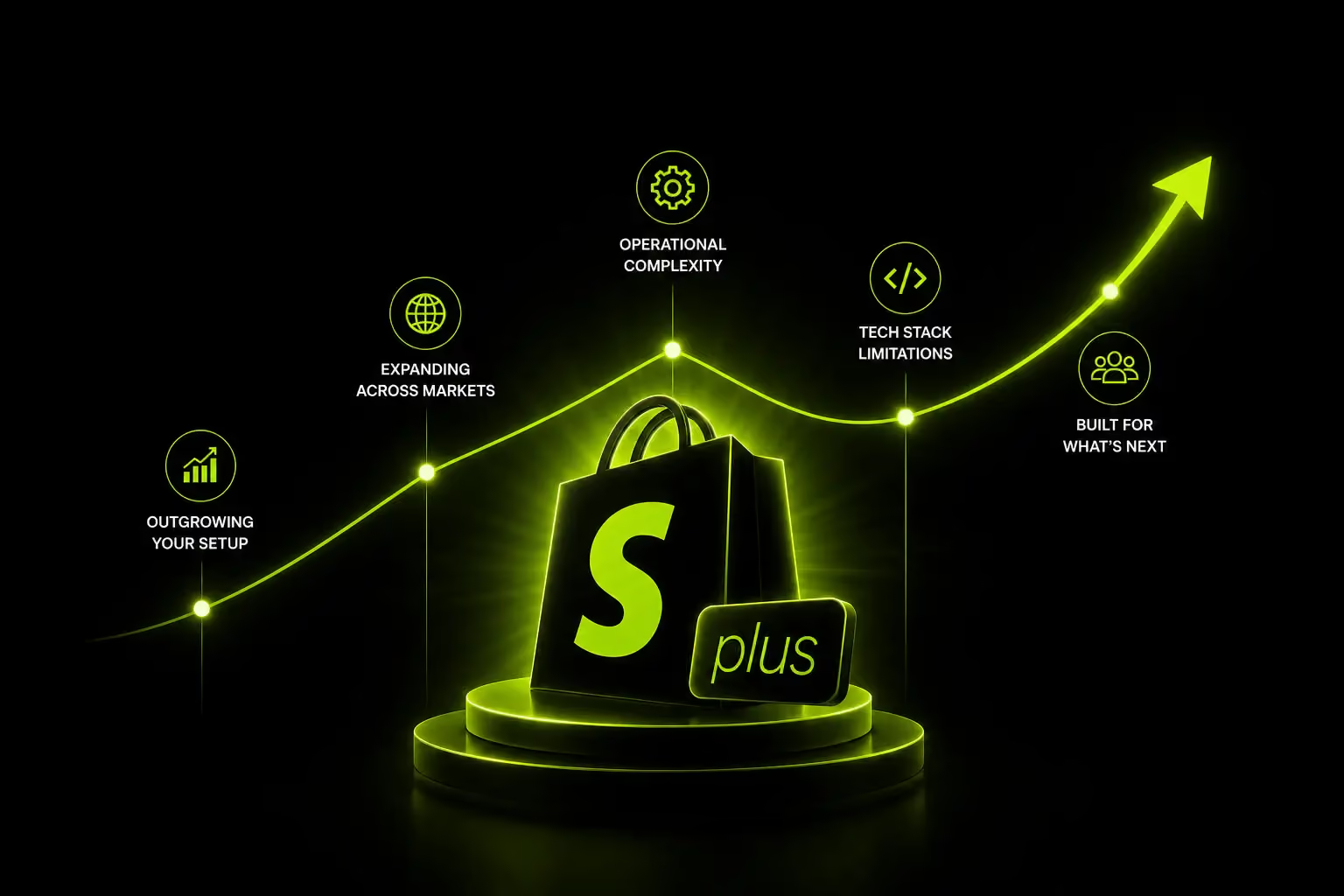
When to Upgrade to Shopify Plus: A Decision Framework for Growing Brands
When to upgrade to Shopify Plus is less about hitting a specific revenue milestone and more about overcoming operational limitations.
Most merchants do not need Plus, but brands generating $1M-$2M+ in annual GMV often benefit when checkout restrictions, API limits, staff account constraints, manual campaign management or multi-store complexity begin slowing growth.
The right time to upgrade is when platform limitations start impacting efficiency, scalability, and revenue.
What Is Shopify Plus and What Makes It Different?
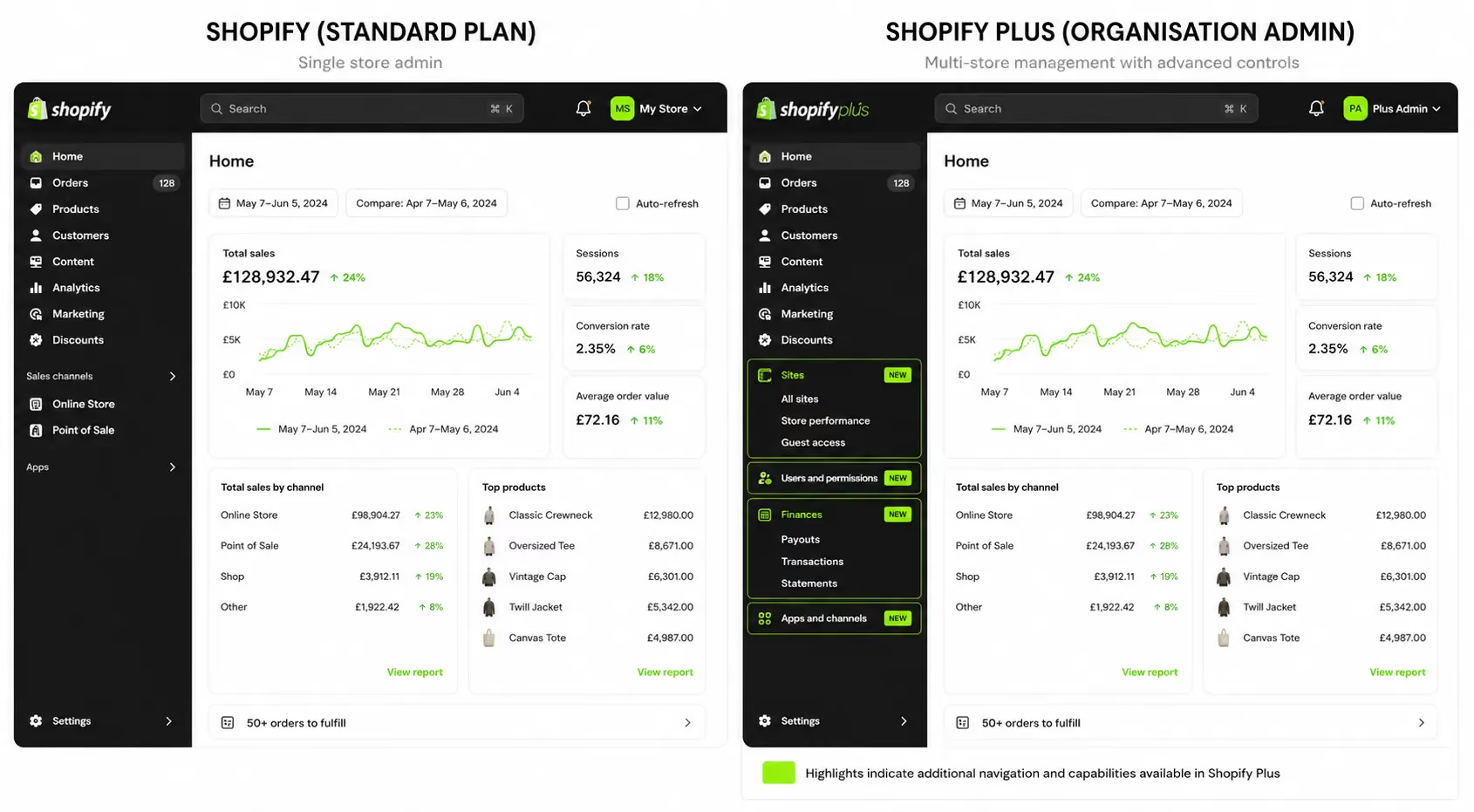
Shopify Plus is the enterprise tier of Shopify, positioned above the Advanced plan. It uses the same underlying platform, but unlocks a different layer of infrastructure.
One built for operational complexity, multiple teams and serious campaign management.
Understanding what Plus actually changes (versus what it only adds) is the fastest way to decide whether you need it.
The Same Platform, a Different Layer of Control
Shopify Plus does not move you to a different platform. Your store structure, products, orders, and theme all stay the same. What changes is what you can do with them.
Key capabilities that are exclusive to Shopify Plus:
- Checkout Extensibility: Via Shopify Functions and the Branding API the only way to build fully custom checkout flows, dynamic discount logic and segment-specific experiences. As of August 2025, checkout.liquid has been fully sunset. Every Plus merchant now operates on Checkout Extensibility. This change also has a deadline implication for any Advanced store still running deprecated scripts.
- Launchpad: a campaign scheduling tool that automates inventory holds, price changes, theme publishing and post-launch reversion. Nothing comparable exists on Advanced.
- Native B2B Suite: company accounts, price lists, net payment terms, and B2B-specific catalogues. On Advanced, this requires third-party apps that rarely cover the full scope.
- Organisation Admin: a unified control layer across multiple stores. Useful for brands operating under one parent entity across multiple markets or product lines.
- Up to 9 expansion stores: Each with its own products, pricing, currency, and branding. Additional stores cost $300/month each.
- Unlimited staff accounts: With granular permission controls.
- 10x higher API rate limits: Critical for brands running ERP, WMS, PIM, or CRM integrations.
- Shopify Flow: (also on Advanced, but with additional automation capabilities on Plus)
- Dedicated Merchant Success Manager: Proactive platform guidance, not just support tickets.
One important point on the technical side: Shopify Plus processes over 10,000 transactions per minute with 99.99% uptime.
That infrastructure matters for brands running flash sales, peak-season traffic spikes, or high-frequency B2B order flows.
Learn more about Shopify Plus development and setup.
Shopify Plus vs Shopify Advanced: The Real Difference
The transaction fee difference alone can close a significant portion of the cost gap at scale.
But it only does so at volumes where the maths actually works which this guide covers in detail in the ROI section.
The Revenue Threshold Question & Why It Is Only Half the Answer
Every article on Shopify Plus mentions the $80K/month threshold. That number exists for a reason, but it does not tell the full story. Revenue is one input into the decision, not the decision itself.
What the Revenue Numbers Actually Tell You
Shopify's internal benchmark is that brands typically upgrade when monthly online sales reach around $80,000 or roughly $960,000/year.
Most industry practitioners put the ROI inflection point at $1M–$2M in annual GMV.
Here is what the maths looks like at different revenue levels:
- At $1M/year: Plus costs approximately 2.3% of revenue. That is justifiable if Plus features generate even a modest improvement in checkout conversion or campaign efficiency.
- At $2M+: Transaction fee savings on a third-party gateway start to offset a meaningful share of the platform cost.
- At $3M/year: A store paying 0.5% on Advanced (third-party gateway) spends ~$15,000/year in fees. On Plus at 0.2%, that drops to ~$6,000/year, a $9,000 annual saving before counting any operational benefit.
Is Shopify Plus worth it financially?
For brands above $1M–$2M annual GMV using third-party payment gateways, the answer is generally yes particularly when transaction fee savings are combined with reduced app costs and operational efficiency gains from native Plus features.
Below $500K–$800K annual revenue, Shopify Advanced with targeted third-party apps typically delivers better ROI.
When Revenue Alone Is the Wrong Signal
Some brands upgrade to Plus before hitting $1M. Not because they are spending carelessly, but because operational constraints appear earlier than revenue thresholds do.
Three non-revenue triggers that consistently drive earlier-than-expected upgrade decisions:
1. Checkout Customisation Limits: If your conversion strategy requires custom fields, B2B-specific logic, dynamic discount stacking or trust-signal placement in checkout and you are on Advanced you cannot build it. App-based overlays have structural limits that Plus's Checkout Extensibility does not.
2. Team and Admin Scaling: The 15-account cap on Advanced hits fast. Customer service, operations, marketing, finance, developers and agency partners all need access. Shared logins create audit problems and operational risk.
3. API and Integration Bottlenecks: Brands connecting ERP, WMS, and loyalty systems simultaneously run into API rate limits on Advanced. This does not appear as a platform error, it appears as intermittent sync failures that get blamed on apps.
For brands expanding across the UAE, KSA, Kuwait, and Bahrain each with different VAT rules, currency preferences, and fulfilment requirements Shopify Markets operates cleanly at scale on Plus.
Trying to manage multi-market complexity on Advanced through third-party solutions adds cost, fragility, and maintenance overhead.
Revenue is a lagging indicator. The operational friction that justifies Plus usually shows up months before the revenue numbers do.
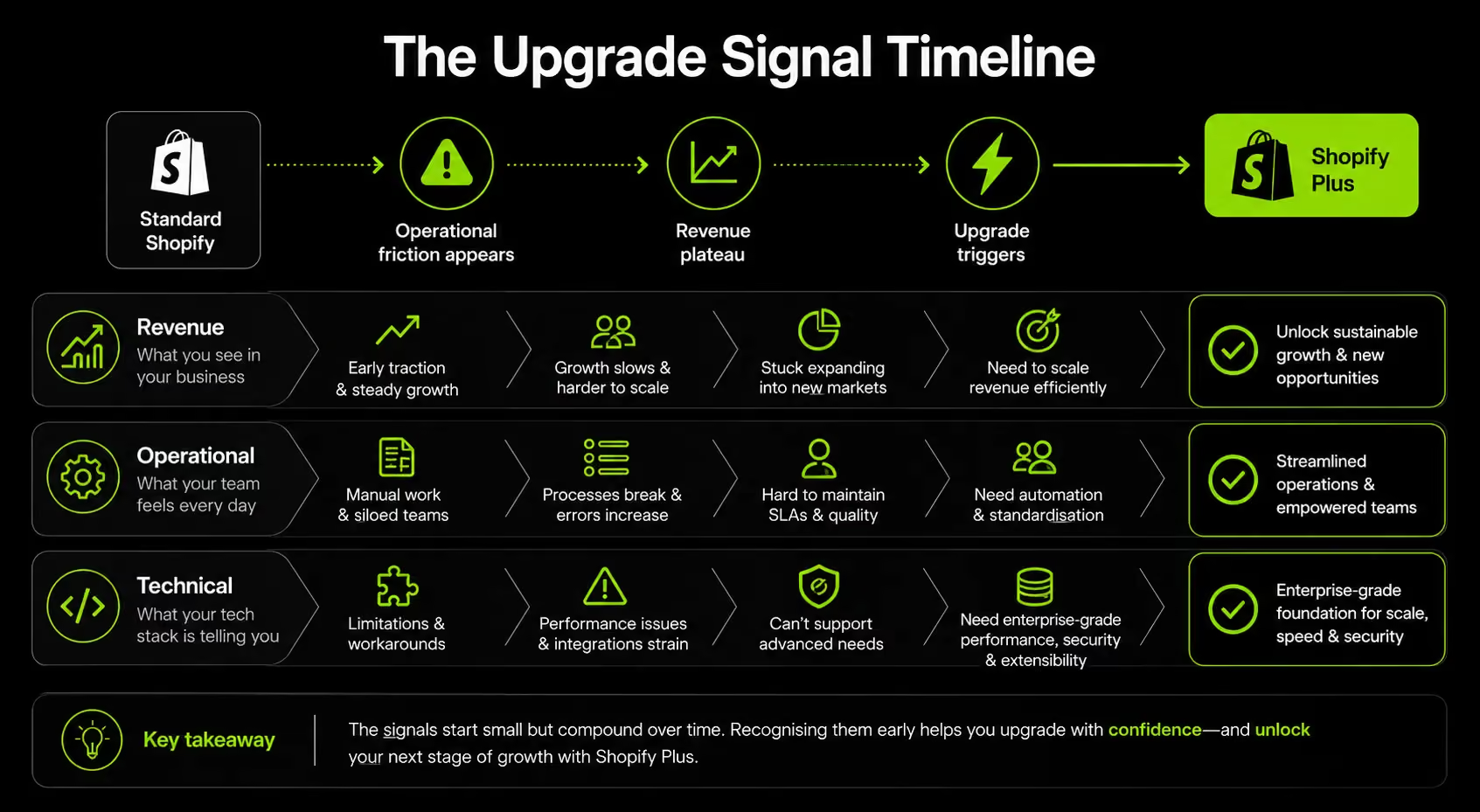
The 5 Real Signals That You Are Ready for Shopify Plus
This section is the core diagnostic. Run through each signal honestly. If two or more apply to your store right now, the upgrade conversation is worth having seriously.
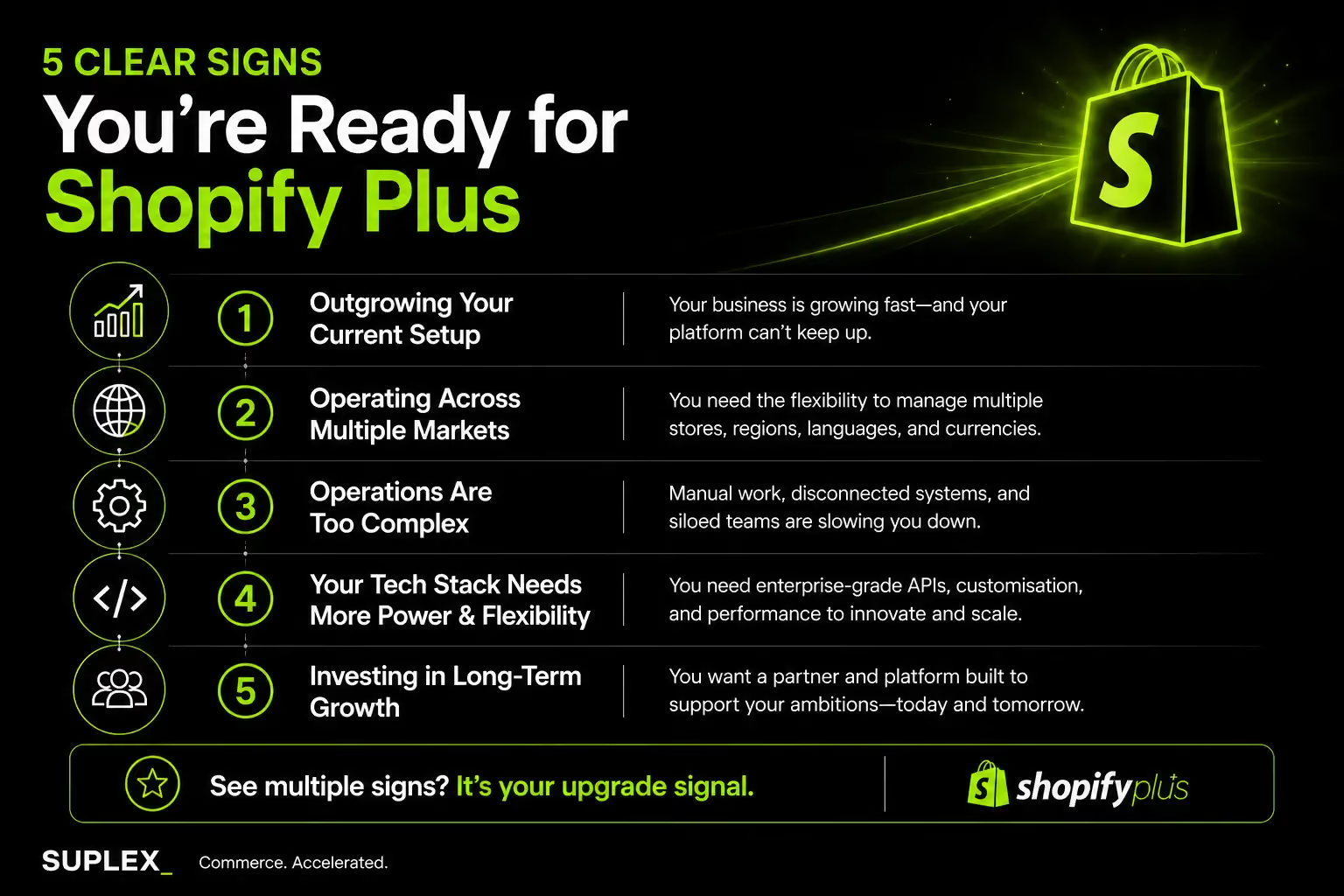
Signal 1: Your Checkout Is a Bottleneck
The checkout is the single highest-leverage point in any ecommerce store. Every piece of friction you remove or every optimization you introduce at this stage can have a direct impact on revenue.
On Shopify Advanced, checkout customisation is limited to app-based overlays. These solutions cannot access core checkout logic, payment method rendering, or customer-specific checkout flows.
If any of the following apply to your store, you have likely reached the limits of what Advanced can support:
- Custom fields at checkout (purchase order numbers, B2B references, or conditional gift messages)
- Dynamic discount stacking based on cart contents or customer segments
- Loyalty tier discounts displayed and applied during checkout
- Compliance disclaimers or age-verification logic by product type
- Payment method filtering based on customer group or order value
All of these capabilities require Shopify Functions, which are exclusive to Shopify Plus.
There is also an important platform deadline to consider. As of June 30, 2026, checkout.liquid is fully deprecated.
Any store that previously relied on custom checkout scripts has already lost that functionality, making Shopify Plus the only path forward for brands that need advanced checkout experiences.
At Suplex, checkout optimisation is often where we see the fastest return after a Plus migration. Brands that combine Shopify Plus capabilities with a structured conversion strategy typically see measurable gains within 60 to 90 days of launch.
In many cases, the upgrade itself is only the first step. The real performance lift comes from ongoing checkout testing, customer journey analysis and conversion-focused improvements.
Which is why many brands pair their Plus migration with our conversion rate optimisation services to maximise the impact of their new checkout capabilities.
Signal 2: You Are Running Flash Sales, Product Launches, or Campaign Events
Manual campaign execution on Advanced creates hidden operational costs. Without Launchpad, product launches require manual inventory holds, scheduled price changes, developer oversight and post-launch cleanup, increasing both workload and the risk of errors.
Launchpad automates the entire process, including inventory holds, price changes, theme publishing, and automatic rollback after the campaign ends. Since 2017, it has supported over $3 billion in Shopify Plus merchant sales.
This is especially relevant for D2C supplement brands, fashion brands running seasonal drops, FMCG companies coordinating launches, and any business managing four or more major campaigns each year.
Signal 3: Your Team Has Outgrown 15 Staff Accounts
The 15-account cap on Advanced sounds like it should last for years. It does not. A typical mid-market brand's access requirements look something like this:
- Customer service team: 3–6 accounts
- Warehouse or fulfilment staff: 2–4 accounts
- Marketing team: 2–3 accounts
- Finance/ops: 1–2 accounts
- Developers: 2–3 accounts
- Agency partners: 2–4 accounts
That total can hit or exceed 15 before the brand reaches $1M in revenue. Shared logins create accountability problems. Queued access requests slow down day-to-day operations.
On Plus, there is no account limit and permissions are granular enough to give each role exactly the access they need.
Signal 4: You Are Expanding to Multiple Markets or Running Multiple Brands
Shopify Plus includes up to nine expansion stores, each operating independently with its own products, pricing, branding, languages, and payment settings.
The Organisation Admin provides a unified view across all stores, eliminating the need to constantly switch between separate logins.
For brands managing multiple product lines, regional storefronts, or both B2B and D2C channels, this architecture reduces operational complexity and lowers the administrative overhead that would otherwise fall on internal teams.
Shopify Markets, fully unlocked on Plus, supports up to 50 international markets from a single store.
It enables localised pricing, duties and import tax calculations, currency management, and country-specific checkout experiences.
For brands in the UAE and wider Gulf region expanding into KSA, Kuwait, and Bahrain, each with distinct VAT structures, currency preferences and customer expectations.
Plus provides the infrastructure needed to scale efficiently without rebuilding the ecommerce stack for every new market.
The technology itself is only one part of successful international expansion. Store architecture, localisation, tax configuration, payment methods and regional customer experience all need to be implemented correctly to avoid operational complexity as new markets are added.
This is why many growing brands pair Shopify Plus with a dedicated international ecommerce strategy and setup process to ensure they can scale globally without creating unnecessary overhead later.
For brands planning cross-border growth, our International Ecommerce Setup service helps build and optimise Shopify stores for multi-market operations from day one.
Signal 5: API Throttling Is Slowing Down Your Integrations
This signal is the least visible and often the most misdiagnosed. When API rate limits are hit on Advanced, the failure mode is not a clear error message.
It looks like intermittent sync failures, delayed order updates, slow inventory reconciliation, or analytics gaps. Development teams spend hours diagnosing problems that are actually platform-level constraints.
Plus provides approximately 10x higher API rate limits. For brands running:
- ERP systems syncing large product catalogues or order volumes
- WMS integrations with frequent fulfilment updates
- Loyalty, subscription, and analytics tools running simultaneously
- CRM platforms pulling customer data in real time
The additional API headroom removes a constraint that otherwise caps how well the integrated stack can perform.
Supplement and beauty brands running subscription + loyalty + analytics simultaneously are a particular fit here. The tools work. The integration volume just exceeds what Advanced can handle cleanly.
When You Should NOT Upgrade Yet
Most content on Shopify Plus skips this section entirely. It should not be skipped. Upgrading when the conditions are not right wastes money and can amplify existing problems rather than solve them.
Do not upgrade to Shopify Plus if:
Your Annual Revenue is Under $500K and Operations are Running Smoothly.
The transaction fee savings do not offset the platform cost at this volume, and if your current plan is not creating friction, there is nothing to unlock.
Your Operations are Simple
No B2B selling, no flash sales, no multi-store requirements, and a team under 10 people. Advanced combined with targeted apps is more cost-effective for this profile.
Your App Stack is Messy and Your Data Architecture is Unclear:
Plus does not organise a chaotic setup it scales one. Brands that upgrade with unresolved data and integration problems end up with the same problems at higher cost.
Cash Flow is Constrained:
Shopify Plus requires a minimum 12-month commitment. At $2,300/month, that is a $27,600 annual floor. On a 3-year term, it is $82,800 total. This is a meaningful commitment for a brand that has not de-risked it with the ROI analysis first.
You Have No Development Resource or Agency Partner
Checkout Extensibility, Shopify Functions, and advanced automations all require development resources to implement effectively.
Upgrading to Shopify Plus without the technical capacity to use these features means paying for capabilities that may never deliver their full value.
Plus also does not fix a weak foundation. A pre-upgrade assessment often uncovers opportunities to improve checkout flows, remove app overlap, resolve integration issues, and optimise store performance before any plan change is necessary.
In many cases, these improvements can deliver meaningful gains on the existing platform.
This is why many brands begin with a Shopify Audit to evaluate technical readiness, identify operational bottlenecks, and determine whether a Shopify Plus upgrade is justified by actual business requirements.
How to Calculate the ROI Before You Upgrade
Do not make the upgrade decision without running the numbers. The framework below is designed for decision-makers who need a clear financial picture, not a general recommendation.
The Transaction Fee Savings Model
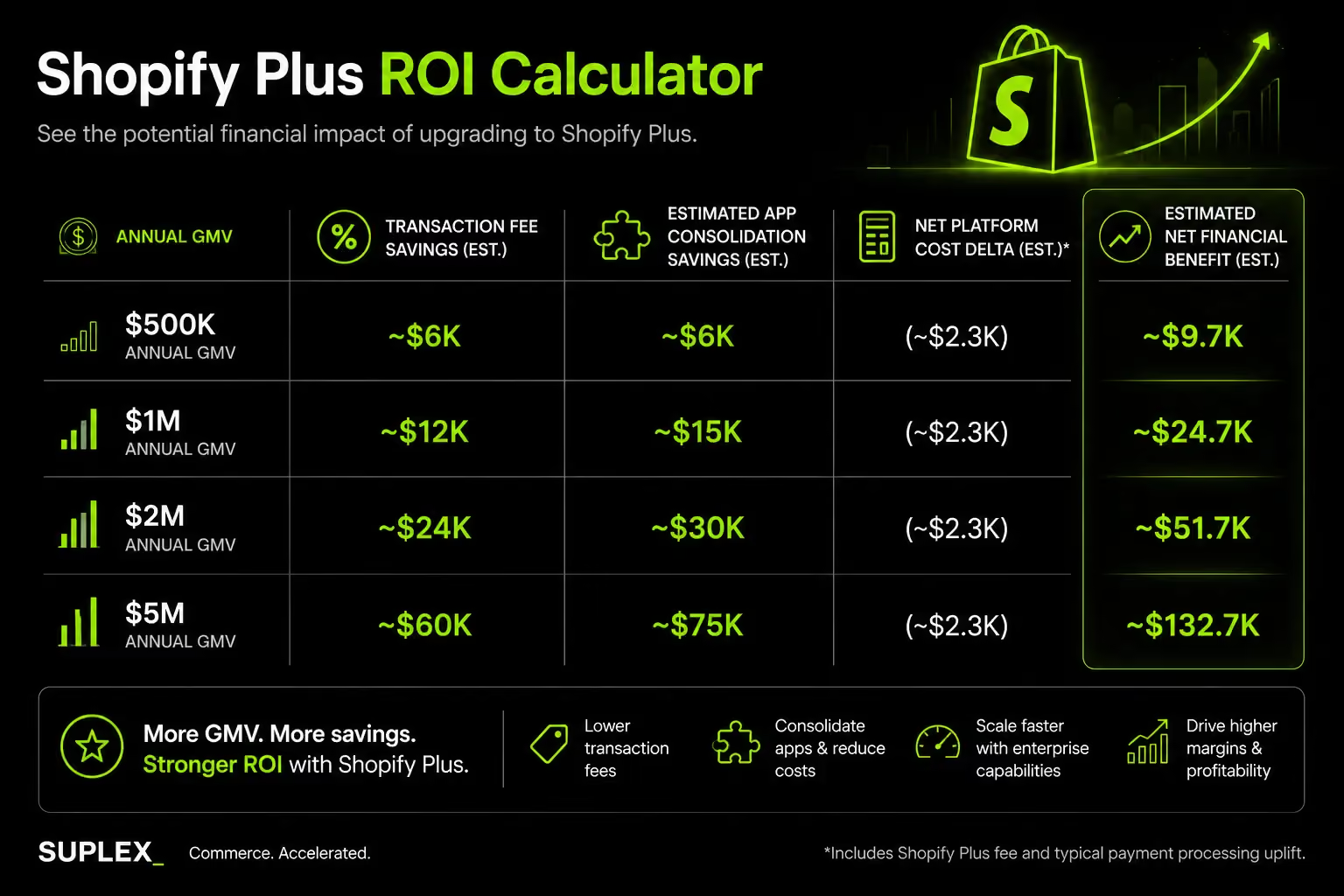
Transaction fee savings are the most straightforward financial argument for Plus. Here is how they work across two realistic GMV scenarios:
Store A $150,000/month GMV on Advanced (third-party gateway)
- Transaction fee at 0.5%: $750/month = $9,000/year
- Transaction fee on Plus at 0.2%: $300/month = $3,600/year
- Annual fee saving: $5,400
- Plus platform cost: $2,300 x 12 = $27,600/year
- Net: Plus costs $22,200/year more at this volume
At $150K/month GMV, transaction fee savings alone do not justify Plus.
You need operational or revenue benefits on top to close that gap.
Store B $500,000/month GMV on Advanced (third-party gateway)
- Transaction fee at 0.5%: $2,500/month = $30,000/year
- Transaction fee on Plus at 0.2%: $1,000/month = $12,000/year
- Annual fee saving: $18,000
- Plus platform cost: $27,600/year
- Net: Plus costs $9,600/year more
At $500K/month, the maths shift significantly.
The gap is $9,600 a number that one well-executed Launchpad campaign or a checkout CVR improvement of even 0.2% could close quickly.
What to Factor In Beyond Transaction Fees
Transaction fee savings are the floor of the ROI case, not the ceiling. A complete model should include:
- App consolidation savings: Plus's native B2B suite, Launchpad, and advanced Flow automations replace apps that cost anywhere from $50 to $500/month individually. Consolidating four apps at an average of $150/month saves $7,200/year.
- Operational time savings: A campaign that previously required three staff members monitoring and executing manually for four hours now runs automatically. At 12 campaigns/year, that is significant.
- Checkout CVR improvement: A 0.3% conversion rate improvement on a store doing $500K/month GMV adds $1,500/month in revenue $18,000/year. That is before any changes to traffic or product.
- Merchant Success Manager: Access to proactive platform guidance reduces the time your team or agency spends diagnosing platform-level issues. That has a real cost-equivalent even if it does not appear as a line item.
The Plus Readiness Score (Suplex Framework)
Score your brand across five criteria, each rated 1 to 3. Add the scores.
Scoring:
- 13–15: Upgrade now. The operational and financial case is clear.
- 9–12: Plan for upgrade within 6 months. Identify the top two friction points and address them immediately post-upgrade.
- 5–8: Stay on Advanced. Optimise your current setup. Revisit in 12 months.
This framework surfaces operational readiness, not just financial thresholds. Two brands with identical revenue can score very differently based on how they operate.
A $1.2M/year D2C brand running monthly drops with a 20-person team and Klaviyo + loyalty + ERP integrations scores a 13. A $1.2M/year brand with a simple catalogue, two staff, and no integrations scores a 7.
How We Help Brands Navigate the Shopify Plus Upgrade
At Suplex, we have taken brands through Shopify Plus builds and migrations across D2C, health and wellness, fashion, supplement, and luxury verticals in the UAE, Gulf, and UK markets. The consistent pattern we see before upgrade conversations: merchants are making the decision based on revenue benchmarks they have read online, not on an audit of where their current store is actually losing operational efficiency or conversion.
The most impactful Plus upgrades we have executed started with a thorough Shopify audit. That audit identifies whether checkout, automation, or team-access limitations are active constraints before committing to a contract. It also surfaces quick wins on the current plan improvements that cost nothing but execution time, and that give the brand a stronger baseline to migrate from.
Our migrations typically run 8–12 weeks from scoping to launch on a standard Plus setup. Stores with ERP connections, multi-store architecture, or complex integrations can extend to 4–5 months when those dependencies are not properly inventoried upfront. The discovery phase is the single highest-leverage investment in keeping the project on track and on budget.
A few brands from our portfolio that are relevant to the decisions covered in this guide:
- Miduty: A D2C supplement brand that Suplex built on Shopify to grow their nutraceutical sales. High-volume, repeat-purchase operations with a need for checkout and CVR optimisation. [View the Miduty case study at suplex.design/case-study/miduty]
- Loomsona: A multi-SKU fashion brand with a campaign-driven sales cycle. Relevant for any brand considering Plus for Launchpad and checkout customisation.
- Celesti: A luxury and lifestyle brand. Relevant for brands combining a visual upgrade with platform migration.
If you're evaluating whether Shopify Plus is the right move, we recommend starting with a Shopify Audit or Platform Consultation.
The goal is not to justify an upgrade, but to determine whether the investment aligns with your current business requirements and growth plans.
The Upgrade Process: What to Expect
Deciding to upgrade is one step. Executing the upgrade well is another. Brands that treat it as a plan change rather than a conversion and operations project consistently underperform on Plus in the first 6 months.
Pre-Upgrade Preparation
Before you sign a Plus contract, do four things:
- Audit your app stack: Identify every app that duplicates a native Plus feature B2B apps, checkout customisation tools, campaign management tools, automation platforms. Calculate the cost you will save by consolidating onto Plus-native features. This also shapes your implementation priority list.
- Inventory all custom code and integrations: Map every API dependency, deprecated checkout script, and custom theme modification. Anything that touches the checkout or API layer needs to be accounted for before migration begins.
- Map staff account needs and permissions: Know exactly who needs access and at what permission level before you configure the Plus account. This avoids permission restructuring post-launch.
- Back up all store data: Products, customer records, order history, metafields everything. Even though this is a plan upgrade and not a platform migration, having a clean backup is non-negotiable.
The Migration Timeline
The discovery phase is where most projects go wrong. Under-investing in scoping extends the total timeline by more than any other single factor.
Integrations that were not inventoried upfront surface mid-development, requiring rework that delays launch by weeks.
Common Mistakes Brands Make During a Shopify Plus Upgrade
Skipping the app audit: Many brands move to Plus while continuing to pay for apps that duplicate native Shopify Plus functionality. This can leave merchants spending hundreds of dollars each month on tools they no longer need.
Treating the upgrade as a simple plan change: A Shopify Plus migration is also an opportunity to improve checkout performance. The transition to Checkout Extensibility is often the best time to review and optimise the customer journey rather than postponing checkout improvements for a separate project later.
Not activating Launchpad early: For brands that run regular promotions, product launches, or seasonal campaigns, Launchpad can deliver value almost immediately. Delaying implementation often delays the operational and revenue benefits that justify the upgrade.
Underestimating integration requirements: ERP, WMS, CRM, and third-party system integrations should be identified during the discovery phase. When critical dependencies are missed during planning, they often become expensive project delays later in the migration.
Many of these issues are not unique to Shopify Plus. They are common ecommerce migration challenges that arise when technical requirements, integrations and operational workflows are not fully assessed before launch. For a detailed overview of the planning process, see our Ecommerce Platform Migration Guide.
Frequently Asked Questions
When should you upgrade to Shopify Plus?
Upgrade when annual revenue reaches $1M–$2M and you are experiencing operational friction checkout customisation limits, API throttling, staff account caps, or complex campaign management needs. Revenue thresholds matter, but operational bottlenecks are often the more accurate trigger. If your current plan is actively limiting growth or team efficiency, that is the real signal.
Is Shopify Plus worth the cost?
For brands above $1M–$2M annual GMV, yes particularly when using third-party payment gateways (transaction fee savings offset a meaningful portion of platform cost), running frequent campaigns (Launchpad), or needing custom checkout flows. Below $500K–$800K annual revenue, Shopify Advanced with targeted apps typically delivers better ROI.
What is the difference between Shopify Advanced and Shopify Plus?
Shopify Advanced costs $399/month and includes advanced reporting and up to 15 staff accounts. Shopify Plus starts at $2,300/month and adds full checkout extensibility, Shopify Launchpad, native B2B tools, unlimited staff accounts, up to 9 expansion stores, a dedicated Merchant Success Manager, and approximately 10x higher API rate limits.
How much does Shopify Plus cost in 2026?
Shopify Plus starts at $2,300/month on a 3-year term, or $2,500/month on a 1-year term. Above $800,000/month in GMV, pricing shifts to a revenue-based model at 0.25% of monthly GMV. Each additional expansion store costs $300/month. A minimum 12-month commitment is required.
Can a small business use Shopify Plus?
Technically yes, but it is rarely the right financial decision. Shopify Plus is designed for operational complexity and high-volume scale. For most small businesses, Shopify Advanced combined with specialist apps delivers better ROI. Plus becomes genuinely valuable when checkout customisation, B2B selling, multi-store management, or campaign automation are active business needs.
Hi, I’m Rishabh Jain
I believe great design has the power to shape perception, build trust, and move businesses forward. That belief is what led me to found Suplex Design Studio, a global branding and packaging studio working with FMCG and D2C brands across markets.I started suplex at 25 with a clear intent, to create design that is strategic, thoughtful, and commercially meaningful. By 28, the studio had scaled globally, guided by a strong foundation in Integrated Design that I developed during my academic journey in London, where I was honoured with the Dean’s Award.
Over the years, I’ve had the opportunity to work with 100+ brands, from Fortune 500 organizations to family-run businesses, helping them build packaging and brand systems that create recall, relevance, and long-term value.
Suplex’s work has been recognized internationally, including the Manifest Award (2024), the Clutch Global Award (2025), and features on platforms such as Packaging of the World, The Dieline, and the World Brand Design Society.
None of this would be possible without the people behind the work. I’m deeply grateful to the suplex team, whose commitment, creativity, and attention to detail turn ideas into meaningful brand experiences every day.
At the heart of my work is a simple philosophy, design should be intentional, honest, and built to last, and that continues to guide everything we create at suplex.




































Let’s Make It Happen
E-Commerce Success Stories
%201.avif)






.avif)

.avif)
Build Your D2C Business The Right Way
Build It With Suplex.


