WooCommerce Scalability for Large Businesses: What Actually Works (And When It Doesn't)
.avif)
WooCommerce Scalability for Large Businesses: What Actually Works (And When It Doesn't)
Most WooCommerce scalability advice comes from hosting providers, so the answer is usually “yes, it can scale.” The better question is whether the cost and complexity are worth it.
WooCommerce can handle large stores and high traffic, but enterprise-level performance often requires significant infrastructure investment.
While it powers about 28% of online stores globally, only a small share are optimized for true enterprise-scale growth.
What "Scalability" Actually Means for a WooCommerce Store
Before diagnosing whether WooCommerce can handle your growth, you need to be precise about what kind of growth you are talking about.
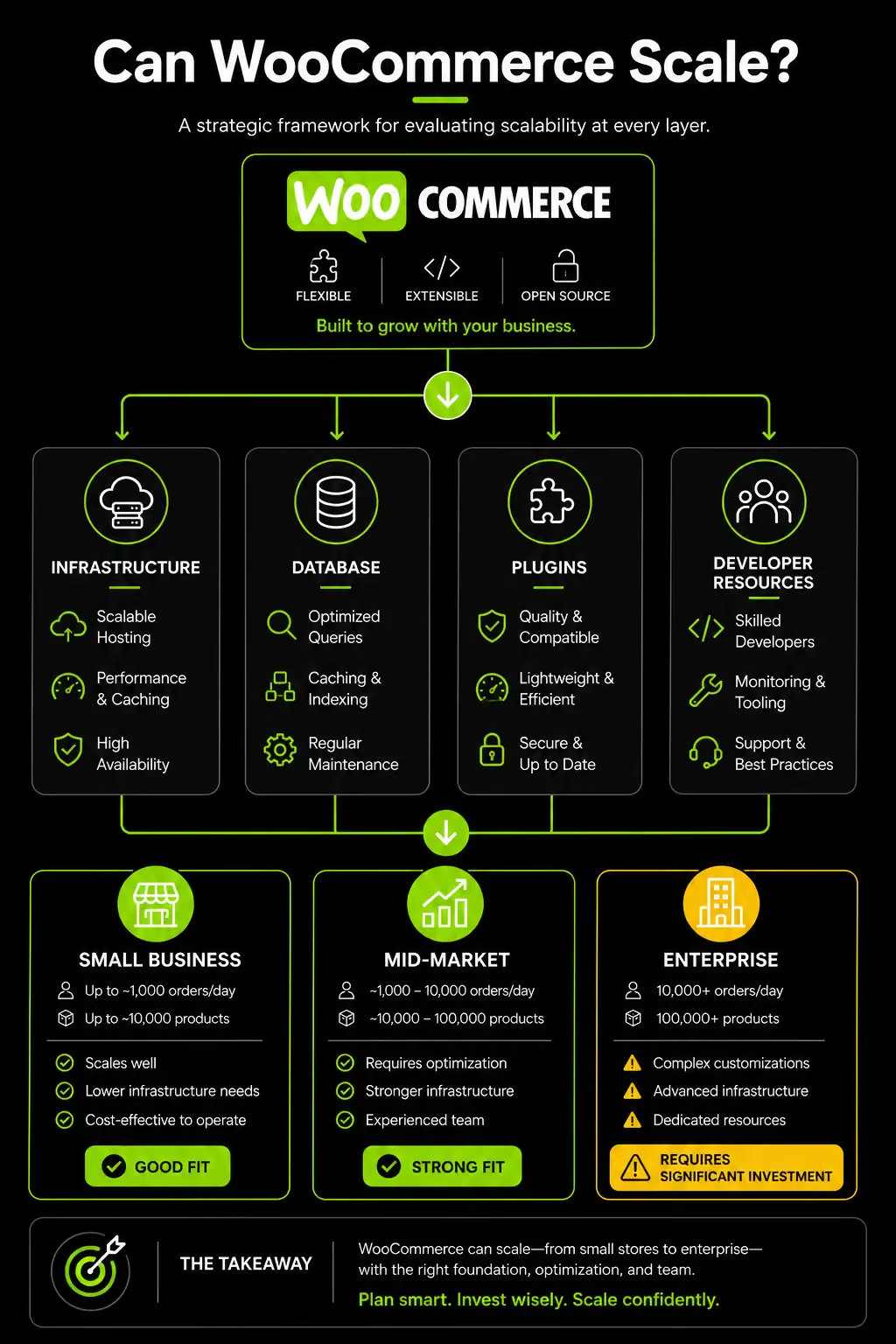
Scalability is not one problem. It is three distinct problems that require different solutions, and confusing them leads to misdiagnosed failures and wasted investment.
The WooCommerce Scale Triangle has three dimensions, and your business type determines which one is most likely to break first.
A B2B wholesale supplier might have 80,000 SKUs but consistent, predictable daily traffic. A D2C fashion brand might have 300 products but experience 20x normal traffic during a sale. A marketplace might have both.
Each of these is a different scaling challenge with a different solution. Grouping them together and applying one generic "optimize WooCommerce" playbook is why so many scaling projects fail to produce results.
A UAE-based D2C brand running a Ramadan campaign, for example, is facing a traffic spike problem not a catalog problem. The fixes are infrastructure-level.
Adding Elasticsearch to that store solves nothing when the actual problem is that the server cannot handle 2,000 simultaneous checkouts.
The Four Bottlenecks That Actually Break WooCommerce at Scale
Most guides hand you a list of tips without explaining the underlying mechanics. Business decision-makers do not need to know how to fix every technical problem but they do need to understand why these problems exist so they can brief developers and agencies correctly and evaluate whether proposed fixes are actually addressing the root cause.
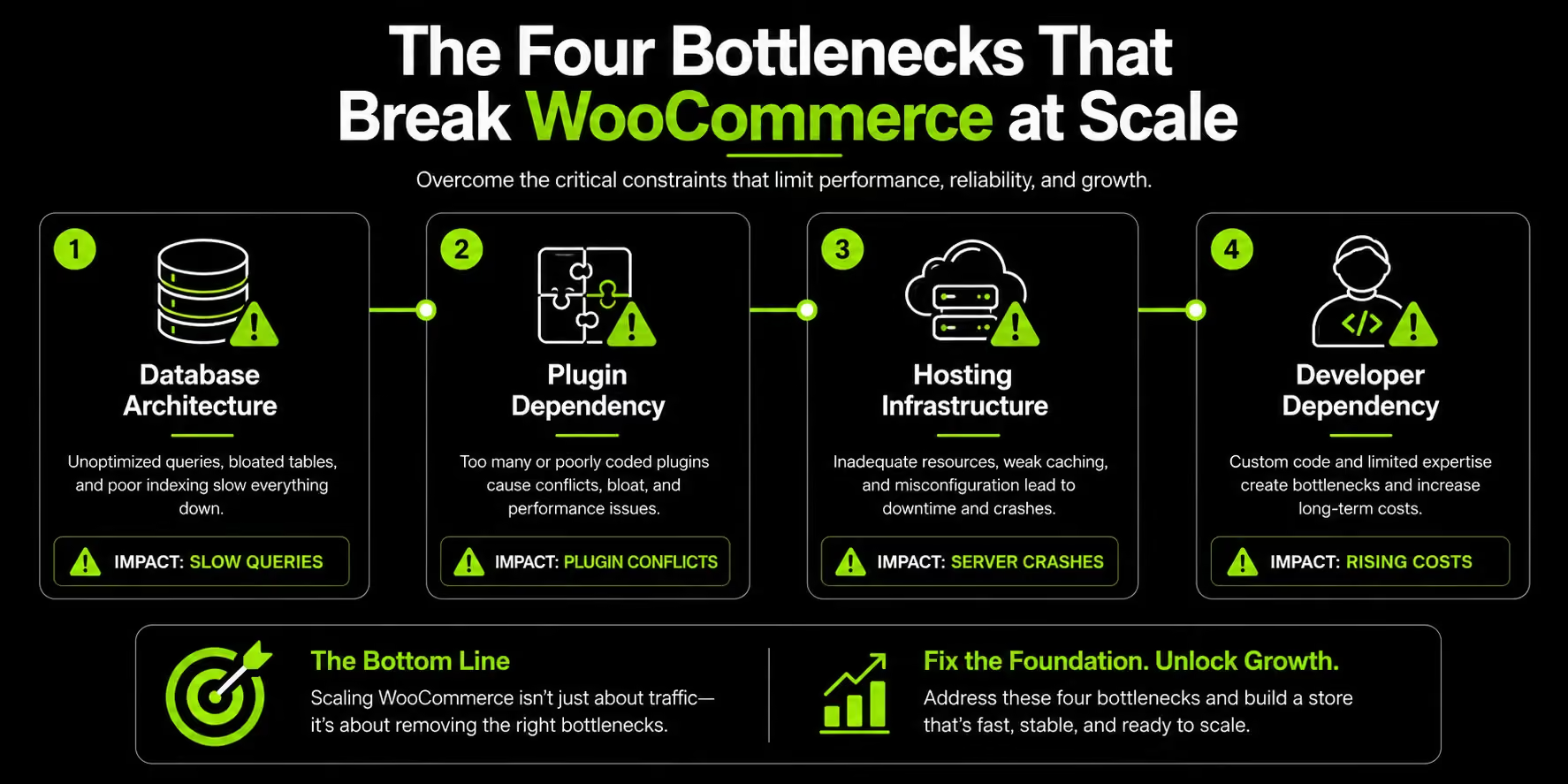
These are the four structural reasons WooCommerce struggles at scale.
1. The Database Architecture Problem (EAV)
WooCommerce stores product data using an Entity-Attribute-Value (EAV) structure inherited from WordPress.
Instead of keeping product information in a single row, attributes like price, dimensions, and custom fields are stored as separate entries in the wp_postmeta table.
This works well for smaller stores but becomes a bottleneck at scale. A catalog of 50,000 products can generate hundreds of thousands, or even millions, of metadata rows, increasing database queries and slowing both storefront and admin performance.
WooCommerce's High Performance Order Storage (HPOS) improves order processing by moving order data into dedicated tables.
However, it does not address the underlying product catalog architecture, meaning large product databases can still face performance challenges as they grow.
2. The Plugin Dependency Problem
WooCommerce's flexibility comes from plugins, but that flexibility creates risk as stores grow. Most WooCommerce sites rely on 20-30 active plugins, each adding its own code, database queries, and update requirements.
At scale, plugin conflicts can become business-critical. A single update can disrupt checkout, payments, or other core functionality during a high-traffic campaign.
Unlike tightly controlled app ecosystems, plugin quality and maintenance standards vary widely, increasing the likelihood of compatibility or security issues over time.
The challenge is often cumulative. Businesses continuously add plugins to extend functionality, but each addition increases complexity.
When performance problems or conflicts emerge, identifying the cause and safely removing dependencies requires careful testing and ongoing technical oversight.
3. The Hosting Infrastructure Gap
WooCommerce is theoretically limitless given enough infrastructure. The critical word is "given." That infrastructure is expensive, complex to configure, and requires active management.
Most articles that tell you WooCommerce scales well gloss over what "proper hosting" actually costs at enterprise traffic levels.
Shared hosting fails above roughly 500 concurrent visitors. That is not a generous threshold for a brand running paid campaigns or launching new products.
A properly scaled WooCommerce stack for a store handling 50,000+ daily visitors requires dedicated cloud servers (AWS, GCP, or Azure), Nginx or LiteSpeed web server, Redis object caching, Varnish full-page caching, a global CDN, database replication, and auto-scaling policies. All of it requires configuration. None of it maintains itself.
Here is what that infrastructure costs in practice:
Shopify Plus starts at $2,300 per month and handles all of this infrastructure natively, with zero technical management required from your team. That comparison becomes relevant when you reach the mid-to-upper range of that hosting cost table.
4. The Developer Dependency Trap
WooCommerce requires ongoing technical maintenance. Updates, plugin conflicts, security patches, and performance optimization all need developer oversight, especially as a store grows in complexity.
For larger stores with custom functionality and extensive plugin stacks, every update becomes a potential risk that should be tested before deployment. Without a reliable developer or agency managing these processes, issues can affect site performance, security, and revenue.
This makes developer support not just a technical requirement, but an operational cost that businesses must factor into the true cost of running WooCommerce at scale.
Read More: How to Choose an E-Commerce Development Partner
WooCommerce Scalability: Real Performance Thresholds
These are the specific numbers most people are searching for. The honest answer is direct: WooCommerce can handle large-scale operations, but performance is conditional on infrastructure not on the platform alone. Here is what the thresholds look like in practice.
Product Catalog Thresholds
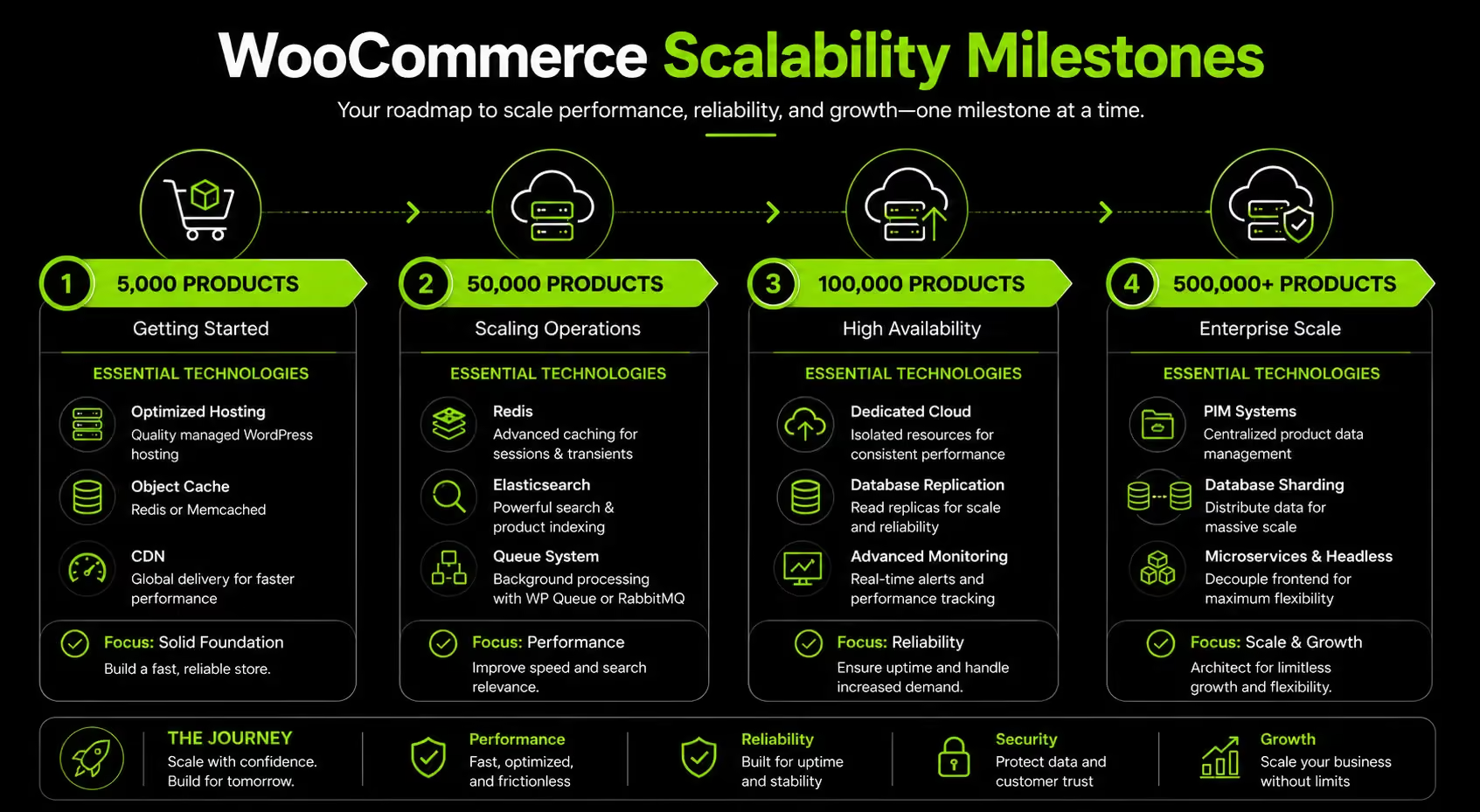
WooCommerce has no hard product limit. Performance limits are infrastructure limits. Here is how the relationship works across catalog sizes:
Up to 5,000 products: WooCommerce performs reliably on standard managed hosting with basic optimization. No special infrastructure is required, and most competent developers can manage performance at this scale.
5,000 to 50,000 products: Requires dedicated cloud hosting, Redis caching, database indexing, and ideally Elasticsearch or Algolia for site search. Performance is manageable with a properly configured setup. Default WooCommerce search becomes noticeably slow in this range, particularly for stores with complex attributes.
50,000 to 500,000 products: Achievable, but requires advanced infrastructure, a PIM (Product Information Management) system, custom database architecture, and continuous developer management. Developer-reported data confirms that WooCommerce starts showing admin slowdowns around 10,000+ products without database optimization, but with HPOS enabled and Elasticsearch configured, 100,000+ products are manageable.
500,000+ products: Technically possible but rarely practical. At this scale, most businesses find headless commerce or specialized enterprise platforms like Adobe Commerce more appropriate than standard WooCommerce.
Traffic and Concurrency Thresholds
Traffic handling is where WooCommerce is most vulnerable, particularly during unpredictable spikes.
- Standard WooCommerce on managed cloud handles roughly 200 to 500 concurrent users reliably
- With Redis, full-page caching, and a CDN: 2,000 to 5,000 concurrent users
- With full enterprise stack including load balancing and auto-scaling: 10,000+ concurrent users
Traffic spikes are WooCommerce's most commercially dangerous vulnerability. Unlike Shopify, there is no automatic elastic scaling.
If you have not pre-configured auto-scaling and tested it under load before a major campaign, you are running a meaningful risk of downtime at exactly the moment your marketing spend is highest.
A UAE-based D2C skincare brand ran a Ramadan campaign expecting 10x normal traffic. Their WooCommerce store crashed 45 minutes into the campaign.
The root cause: no Redis caching, shared hosting, and three checkout plugins each making separate database calls on every cart interaction. Each of those was a fixable problem. None of them were fixed because no one had audited the infrastructure against the expected traffic load.
Related: Shopify Speed Optimization
Order Volume Thresholds
Order data management in WooCommerce has improved significantly with HPOS, but the thresholds still matter.
- Legacy WooCommerce (pre-7.1) stores order data in wp_posts, causing significant slowdowns above 10,000 cumulative orders
- With HPOS enabled: dedicated order tables improve query performance substantially. 100,000+ orders are manageable with proper database maintenance
- Above 500,000 cumulative orders: regular database cleanup, archiving, and query optimization become essential maintenance tasks, not optional ones
- High daily order volumes of 1,000+ orders per day require automated fulfillment and inventory sync workflows. Plugins exist for this, but each one adds to dependency risk
WooCommerce's HPOS feature, set as default from WooCommerce 8.2 onward, has been shown to reduce order query times by up to 40% in developer-reported benchmarks.
If you are on WooCommerce 7.1 or later and have not enabled HPOS, that is the first database fix to apply.
How to Actually Scale a WooCommerce Store for Large Volume
Scaling WooCommerce is a layered process. The sequence matters as much as the individual fixes. Applying performance improvements out of order produces diminishing returns. Here is the correct priority order, and what each layer involves.
The WooCommerce Scale Stack: Infrastructure → Caching → Database → Search → Code and Plugins
Layer 1: Infrastructure and Hosting Architecture
Hosting is the foundation of WooCommerce performance. For stores with 1,000+ daily visitors, shared hosting should be replaced before investing in other optimizations.
The two practical options are managed WordPress hosting or self-managed cloud infrastructure.
For most businesses, managed hosting is the better choice, delivering most of the performance benefits without the complexity and ongoing DevOps overhead.
What the infrastructure setup must include:
- Autoscaling capability for traffic spikes (critical for sale events and campaigns)
- A staging environment for testing updates and plugin changes before they go live
- Daily automated backups with tested restoration procedures
- Built-in firewall and DDoS protection
- PHP 8.x with MariaDB or MySQL 8.x running on Nginx
Layer 2: Caching Strategy
Caching is the single highest-impact technical intervention for an already-deployed WooCommerce store. Without it, every page request hits PHP and the database from scratch. With a properly layered caching setup, most requests never reach the database at all.
The four caching layers and what each does:
Object caching (Redis or Memcached): Stores the results of database queries in memory. When the same query runs again, the result is returned from memory instead of the database. For large catalogs with repeat queries, this reduces database load by 60 to 80%. This is the most impactful individual caching fix for WooCommerce.
Full-page caching: Tools like WP Rocket, LiteSpeed Cache, or server-level Varnish pre-build HTML pages and serve them directly to visitors, bypassing PHP and database execution entirely. Visitors receive a static HTML response rather than a dynamically generated one.
Browser caching: Tells returning visitors' browsers to store static assets locally. On repeat visits, images, CSS, and JavaScript load from the visitor's device rather than your server.
CDN (Content Delivery Network): Distributes static assets globally across edge nodes. For UAE and GCC brands serving customers across multiple countries, a CDN reduces TTFB by routing each user's request to the nearest geographic server. Without a CDN, every request travels to the origin server regardless of the user's location.
Layer 3: Database Optimization
Database optimization is where most agencies underinvest. They address the visible symptoms of slow frontend, poor PageSpeed scores while the structural performance problem sits in the database. For growing WooCommerce stores, the database is the root cause more often than not.
Priority database actions:
- Enable HPOS immediately if on WooCommerce 7.1 or later. This is the most impactful database improvement available without custom development
- Run regular database cleanup to remove expired transients, post revisions, orphaned metadata, and spam. These accumulate silently and slow queries in ways that are easy to overlook
- Add custom indexes to wp_postmeta for frequently queried product attributes. Without indexes, large catalog queries perform full table scans
- Use the Query Monitor plugin during development and optimization work to identify which queries are slowest and which plugins are generating the most database load
- For stores above 50,000 products or 500,000 orders: consider database replication with a primary server handling writes and a read replica handling frontend queries
Layer 4: Search and Product Discovery
WooCommerce's default search function uses basic MySQL LIKE queries. On a catalog of 500 products, this is acceptable. On a catalog of 10,000 products, it is slow, inaccurate, and creates unnecessary database load.
Replacing native WooCommerce search with Elasticsearch (via the ElasticPress plugin) or Algolia changes the search experience fundamentally.
Faceted filtering where customers can simultaneously filter by size, color, price and multiple other attributes without page reloads requires Elasticsearch or an equivalent engine. Without it, complex filter combinations require expensive database joins that degrade performance at scale.
For any store above 10,000 products, native WooCommerce search is not fit for the purpose of driving product discovery. It is a conversion problem as much as a performance problem.
Related: Ecommerce Website Audit Checklist
Layer 5: Plugin Audit and Code Quality
Once the infrastructure, caching, and database layers are addressed, plugin debt is the most likely remaining source of performance drag. The audit should be thorough and quarterly.
How to approach the plugin audit:
- For every active plugin: Is it maintained by the developer? Was it updated in the last six months? Does it have documented security vulnerabilities? Is there a lighter alternative that covers the same function?
- Identify and remove any plugin that duplicates functionality covered by another plugin already installed
- Replace clusters of single-function plugins with consolidated alternatives where a single plugin covers multiple use cases
- Never deploy untested plugins directly to production. Every change goes through a staging environment first
- For business-critical functions like checkout, inventory sync, and custom pricing: custom code is more stable and performs better than plugins. It does not break unexpectedly during third-party plugin updates
The Real Cost of WooCommerce at Scale (Total Cost of Ownership)
WooCommerce is free to install and affordable for small stores. But as a business grows, hosting, maintenance, and development costs can significantly increase its total cost of ownership.
WooCommerce Annual Total Cost of Ownership:
For larger businesses, the cost gap between WooCommerce and Shopify Plus narrows considerably.
As stores scale, hosting, maintenance, development and infrastructure expenses can approach, or even exceed, the cost of a managed platform.
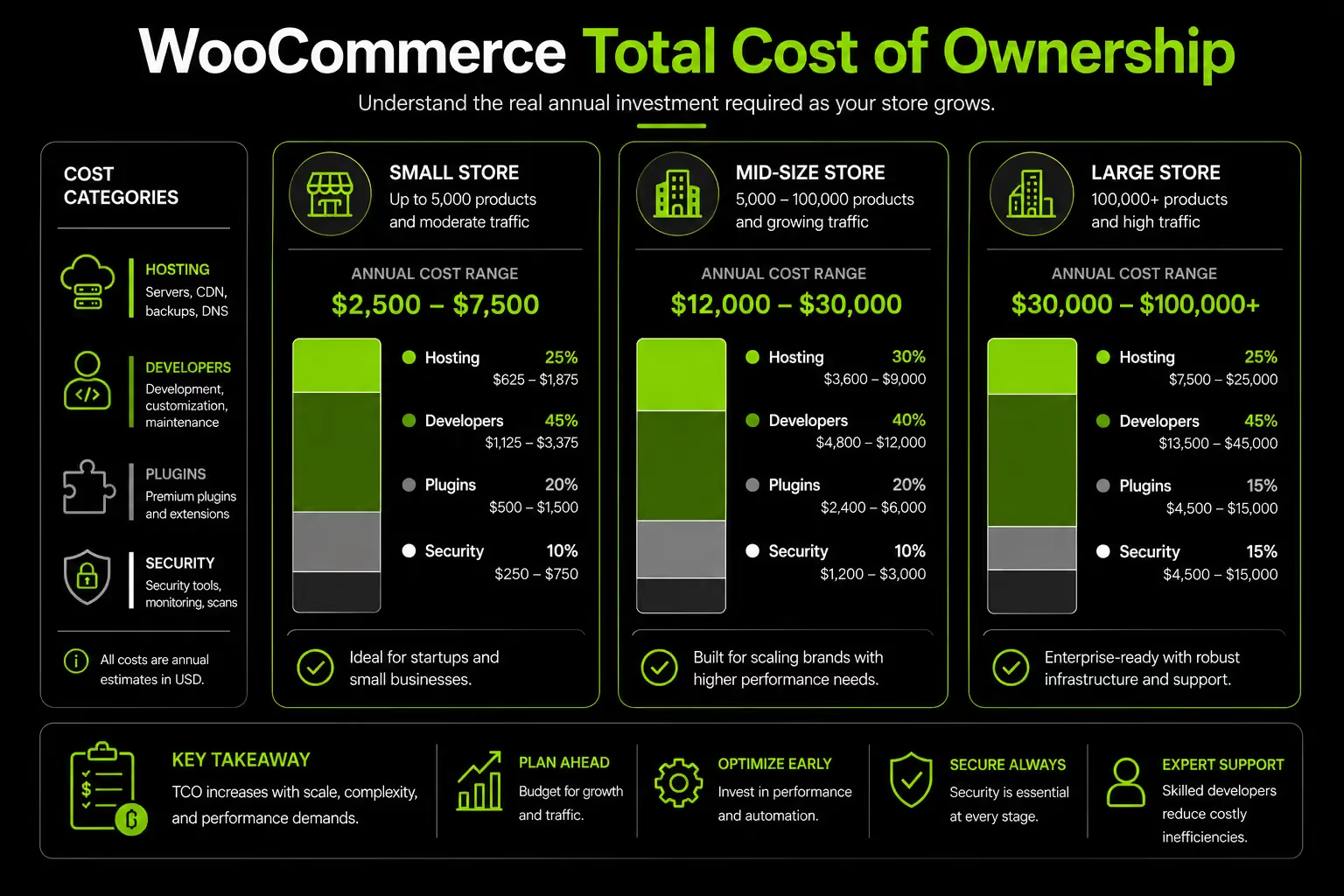
The biggest hidden expense is operational overhead: the time spent managing developers, testing updates, resolving conflicts, and maintaining infrastructure. Those costs rarely appear on invoices but have a real impact on the business.
Related: WooCommerce vs Magento | Shopify vs WordPress for Ecommerce
WooCommerce vs Shopify at Scale Where Each Platform Genuinely Wins
Many comparisons are biased. Hosting providers tend to favor WooCommerce, while Shopify-focused agencies often favor Shopify. In reality, the right choice depends on your business model, growth plans, technical resources, and operational priorities.
WooCommerce offers greater flexibility and customization, while Shopify offers simpler management and more predictable scaling.
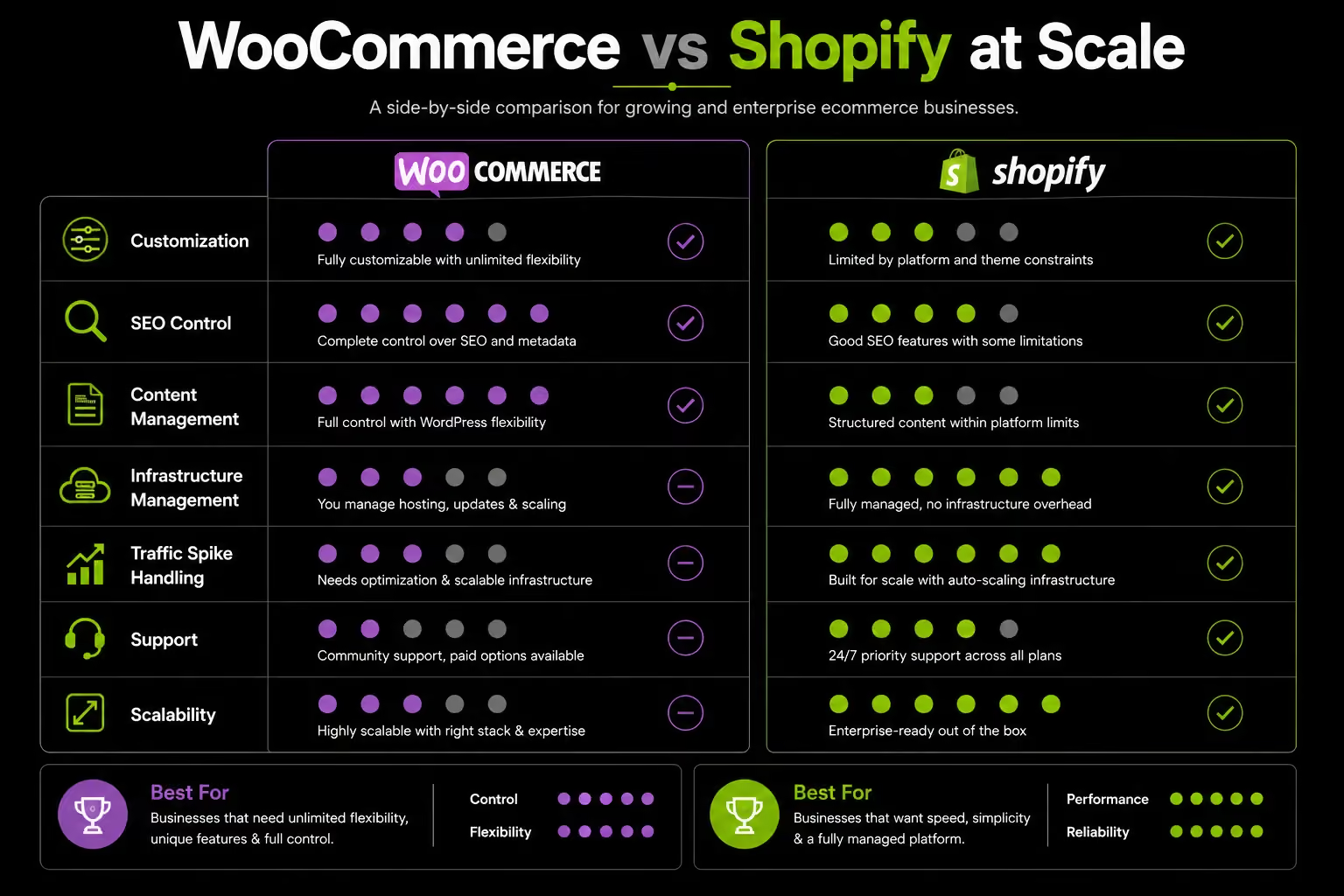
For complex requirements, WooCommerce often wins. For reliability and ease of growth, Shopify usually has the advantage.
When to Scale WooCommerce vs When to Migrate A Decision Framework
This is the question most brands reach eventually, and most guides avoid answering directly. The decision is not about platform loyalty. It is about commercial ROI. Here is a clear framework for making it.
Stay and Scale WooCommerce If:
- Your business model depends on deep WordPress content integration you run a significant editorial or SEO content operation alongside ecommerce, and the CMS capabilities of WordPress are a meaningful competitive asset
- Your products require complex configuration that Shopify cannot support natively: configurable bundles, custom product builders, complex B2B pricing tiers, or attribute combinations that exceed Shopify's 100-variant limit
- You have an existing reliable WooCommerce developer or agency that understands your codebase, your data architecture, and your business logic
- Your annual GMV is below $2 million and your growth trajectory suggests staying below $5 million in the medium term
- You need full data ownership and complete control over your platform architecture for compliance or business model reasons
Consider Migrating Away From WooCommerce If:
- Your site crashes or slows significantly during traffic spikes, and infrastructure upgrades have not solved the problem after a genuine attempt
- Developer costs consistently exceed 15 to 20% of monthly revenue just to maintain current functionality not to build new features, just to keep the existing store stable
- Checkout conversion is underperforming and the development capacity to diagnose and fix it quickly does not exist in your current setup
- Your plugin stack exceeds 20 active plugins and stability is becoming unpredictable. If every update cycle is a risk event, that is a structural problem, not an individual plugin problem
- You are expanding into new markets international, multicurrency, or multi-language and the WooCommerce customization required is becoming complex enough to slow growth
The Five Migration Triggers Signal Thresholds to Watch:
No single signal is automatically a migration trigger. Two or more signals occurring simultaneously is a strong indicator that the cost of staying on WooCommerce is outpacing the cost of switching.
Related: Signs Your Ecommerce Website Needs a Redesign
How We Approach WooCommerce Scalability for Growing Brands
We start with the business, not the platform. The right choice depends on growth plans, operational needs, and internal technical resources.
WooCommerce can be an excellent fit for businesses that need advanced customization, complex pricing structures, or deep content integration. But we only recommend it when those requirements justify the added complexity. Our Platform Consultation service helps brands evaluate these tradeoffs before costly platform decisions are made.
Our process focuses on identifying the real scalability bottleneck, whether that's infrastructure, plugin overload, technical debt, or platform fit. When we build on WooCommerce, we prioritize a lean plugin stack, solid infrastructure, and performance-focused architecture from day one. Scalability planned early is far less expensive than fixing it later.
FAQ WooCommerce Scalability for Large Businesses
Can WooCommerce handle 100,000 products?
Yes. WooCommerce can handle 100,000+ products, but only with the right infrastructure. Large catalogs typically require dedicated cloud hosting, database optimization, object caching, and advanced search tools such as Elasticsearch or Algolia. There is no hard product limit, but performance depends heavily on how the store is architected and maintained.
Can WooCommerce handle high traffic spikes?
WooCommerce can handle high traffic, but it does not scale automatically like Shopify. Traffic spikes require proper preparation, including auto-scaling infrastructure, caching, and a CDN. Without these measures in place beforehand, performance issues and downtime become much more likely during major campaigns or seasonal peaks.
What are the main disadvantages of WooCommerce for large businesses?
At scale, WooCommerce's biggest challenges are database performance, plugin-related complexity, ongoing developer dependency, and the lack of automatic infrastructure scaling. These limitations can all be addressed, but doing so increases both operational complexity and long-term costs as the business grows.
Is WooCommerce suitable for enterprise-level ecommerce?
WooCommerce can support enterprise-scale operations with the right infrastructure and technical oversight. However, as stores grow, infrastructure, maintenance, and developer costs can narrow or eliminate its cost advantage over managed platforms like Shopify Plus. The right choice ultimately depends on your customization needs and your team's ability to manage the platform long term.
At what point should a business migrate from WooCommerce to Shopify?
Consider migrating when WooCommerce's operational complexity starts outweighing its benefits. Common signs include recurring performance issues during traffic spikes, rising developer and maintenance costs, frequent plugin-related checkout problems, or a team that lacks the resources to manage a growing WordPress ecosystem. At that point, a platform migration can be more cost-effective than continuing to scale and maintain the existing setup.
Hi, I’m Rishabh Jain
I believe great digital experiences have the power to shape perception, build trust, and move businesses forward. That belief led me to found Suplex Design Studio, a global digital design and development studio helping FMCG and D2C brands build websites and digital experiences that are strategic, thoughtful, and commercially meaningful.
I started Suplex at 25 with a clear intent, to create digital experiences that look appealing, work seamlessly, and help D2C businesses grow. By 28, the studio had scaled globally, guided by a strong foundation in integrated design that I developed during my academic journey in London, where I was honoured with the Dean’s Award.
Over the years, I’ve had the opportunity to work with 100+ brands, from Fortune 500 organisations to family-run businesses, helping them build websites, e-commerce experiences, and digital products that create clarity, credibility, and long-term value.
Our work has been recognised internationally, including the Manifest Award (2024), the Clutch Global Award (2025), and features across platforms such as The Dieline, Packaging of the World, and the World Brand Design Society.
None of this would be possible without the people behind the work. I’m deeply grateful to the Suplex team, whose commitment, creativity, and attention to detail turn ideas into meaningful digital experiences every day.
At the heart of our work is a simple philosophy, digital design should be intentional, functional, and built to create real business value. That continues to guide everything we create at Suplex.






































Let’s Make It Happen
E-Commerce Success Stories

%201.avif)






.avif)

.avif)
Build Your D2C Business The Right Way
Build It With Suplex.


