Migrating From BigCommerce to Shopify: The Complete 2026 Guide
.avif)

Migrating From BigCommerce to Shopify: The Complete 2026 Guide
BigCommerce to Shopify migration requires more than moving data. You need to migrate products, customers, orders, URLs, integrations, and rebuild your theme.
Plan the project properly to protect your SEO, customer data, and business operations while gaining Shopify's advantages. Rush the migration and you risk traffic losses, broken integrations, and expensive post-launch fixes.
This guide shows you how to plan, execute, and launch a successful migration.

Should You Migrate? The Business Case Evaluation
This section is for brands still deciding. Here's what actually drives brands off BigCommerce, and where staying put is genuinely the smarter call.
The Most Common BigCommerce Migration Triggers
- Automatic plan upgrades: BigCommerce increases plan costs when your GMV passes revenue thresholds. Shopify lets you choose when to upgrade.
- Limited App Ecosystem: Shopify offers 8,000+ apps compared to BigCommerce's ~1,200, giving you more options for subscriptions, loyalty, analytics, and integrations.
- Complex Theme Management: Shopify Online Store 2.0 lets your team update content without relying on developers.
- Better Value at Scale: For high-growth brands, Shopify Plus often provides a lower total cost of ownership with enterprise features like Checkout Extensibility, Launchpad, and B2B.
- Higher-Converting Checkout: Shop Pay, Apple Pay, Google Pay, and Shopify's checkout experience can improve conversion rates.
When To Consider Staying On Bigcommerce
There are specific, legitimate cases where BigCommerce is still the right platform. Being honest about this builds more trust than pretending Shopify wins every time.
Variant-Complex Catalogues That Genuinely Exceed Shopify's Cap:
BigCommerce has no per-product variant limit. Shopify caps products at 100 variants and 3 options. A paint brand with 200 colour variants, or a fabric retailer running 50 widths by 50 lengths by 20 materials, hits a structural wall on Shopify that requires workarounds (product splits, Shopify Functions, third-party configurators).
If that architecture genuinely can't be resolved inside Shopify's model, BigCommerce stays the correct platform.
Wholesale-first B2B Operations:
BigCommerce's native B2B (company accounts, price lists, purchase orders, payment terms) has been around longer and is more mature at the mid-market than Shopify's, which requires Plus to unlock native B2B.
If B2B wholesale is your primary revenue model rather than a secondary channel, BigCommerce's infrastructure may fit better.
Transaction-Fee-Sensitive Brands Where Shopify Payments Isn't Available:
BigCommerce charges no transaction fees on any plan regardless of gateway. Shopify charges 0.5% to 2% on third-party gateways, waived only on Shopify Payments.
For UAE brands where Shopify Payments availability is limited and significant GMV runs through Telr, PayTabs, or Tap Payments, that fee differential is a real cost you need to build into the migration ROI math.
The Critical Data Mapping Decisions: What Bigcommerce And Shopify Do Differently
This is the section that separates a real migration guide from an "export CSV, import to Shopify" tutorial. Get these architecture differences settled before you touch any data.
The Variant Limit: The Most Important Pre-Migration Decision
Shopify hard-caps products at 100 variants and 3 options. BigCommerce has no such limit. Before any export begins, every BigCommerce product needs checking against this constraint, and here are your three resolution paths for anything that violates it:
- Product Split: A 150-variant product (15 colours by 10 sizes) becomes two or more Shopify products, "Product Name (Sizes S-L)" and "Product Name (Sizes XL-4XL)." Clean technically, but needs navigation and cross-linking work to account for the split.
- Shopify Functions For Custom Pricing Logic: Plus-only, this lets you implement variant logic beyond the standard 3-option model, but it needs real development investment and isn't available on standard plans.
- Third-Party Configurator App: Tools like Infinite Options or Bold Product Options extend variant logic past the native limit, at the cost of extra JavaScript and more product page complexity to manage.
The modifiers problem: BigCommerce supports "modifiers," customisation inputs like engraving text fields, file uploads, date pickers, checkboxes. These don't become Shopify variants. They need line item properties captured through an app or theme work instead.
Brands selling personalised products (engraved jewellery, custom clothing, dated items) must map every modifier to its Shopify equivalent before migration starts, not mid-build. Discovering this during theme rebuild extends timelines significantly.
Action Item: before any migration begins, audit every BigCommerce product with more than 100 variants and every product using modifiers. Document the resolution for each. This becomes the product architecture brief guiding both data migration and theme development.

BigCommerce Categories to Shopify Collections
BigCommerce organises products in hierarchical, nested categories. Shopify uses collections, a flat model where hierarchy comes from navigation structure, not the database itself.
- Navigation Gets Rebuilt By Design, Not Imported: You cannot dump a BigCommerce category tree into Shopify and expect navigation to replicate itself. Collection structure and the navigation menu are an information architecture decision, which is why theme rebuild runs alongside data migration, not after it.
- Automated vs Manual Collections: Shopify supports both automated collections (rule-based, tag or attribute matched) and manual ones. BigCommerce's rule-based category assignments often translate to automated collections, but only with careful rule mapping done ahead of time.
- SEO Implications: BigCommerce category URLs like /garden-tools/hand-tools/ become Shopify collection URLs like /collections/hand-tools/. Every one of these needs its own 301 redirect.

URL Structure: The Foundation Of SEO Migration
BigCommerce and Shopify use fundamentally different URL patterns, and none of Shopify's are configurable.
Every BigCommerce URL carrying organic traffic, backlinks, or internal links needs a 301 redirect to its Shopify equivalent.
This isn't optional, and it's not a post-launch task. Get it right and you keep your rankings. Get it wrong and organic traffic can drop 50% within weeks.
Migration Approach: DIY, Tool-Assisted or Agency?
Choosing how to run the migration matters as much as choosing to migrate at all. Here's the most common mistake brands make: picking DIY because it looks simple, then hitting complexity mid-migration they weren't prepared for.
The Three Approaches and When Each Fits
DIY Migration Tools (Matrixify, Cart2cart, Litextension):
Cost $79–$200 plus your time. These tools migrate products, customers, orders, images, and basic data, making them suitable for stores with fewer than 300 products and simple setups.
What They Don't Handle: Theme rebuilds, navigation, complex variants, ERP integrations, 301 redirects, or post-launch troubleshooting. If your store has a large catalogue or complex integrations, DIY migrations often lead to costly fixes after launch.
Mid-Tier Managed Migration ($5,000–$15,000):
An agency handles data migration, Shopify setup, integrations, and 301 redirects. Theme work may be included or priced separately. Best for stores with 300–2,000 products, standard variants, 3–5 integrations, and no complex custom functionality.
Full Agency Migration ($25,000–$250,000+):
A Shopify Partner agency manages discovery, data migration, custom theme development, integrations, SEO, QA, and post-launch support. Best for complex catalogues, ERP integrations, B2B, custom functionality, or SEO-critical stores.
For UAE brands, it's also the preferred option when you need Arabic localisation, local payment gateways, COD, and multi-market GCC setup.

The Bigcommerce To Shopify Migration Process, Phase By Phase
This is the operational core of the guide. Six phases, each with its own checklist, running from pre-migration audit through post-launch.
Here's a more balanced version with fewer bullet points. The introductory context and explanatory details are in paragraphs, while the actionable tasks remain as bullets.
Phase 0: Pre-Migration Audit And Planning (Weeks 1 To 3)
Everything that happens before data moves. This is the most commercially important phase, and the one most often compressed under timeline pressure. The goal is to fully understand your existing BigCommerce store, identify technical risks, and prepare the Shopify environment before any migration begins.
Document What Exists
Start by auditing every part of the current store. This creates a complete inventory of your data, integrations, and SEO assets, reducing the risk of lost traffic or functionality after launch.
- Export a full URL crawl of the live BigCommerce store (using Screaming Frog or a similar tool). Every URL with organic traffic becomes a redirect priority.
- Export Google Search Console data, including your top-performing URLs, highest-ranking keywords, and backlink profile.
- Audit products with more than 100 variant combinations and document how each will be handled in Shopify.
- Map every BigCommerce modifier to its Shopify equivalent.
- Review every app and integration to determine its Shopify replacement and identify where custom development is required.
- Document any custom code, including scripts, checkout modifications, and storefront customisations, as these will need rebuilding in Shopify.
Finally, confirm the target go-live date and work backwards. Most mid-market migrations require at least 12 weeks, while larger or more complex projects typically need 16–24 weeks.
Create The Shopify Environment
Once the audit is complete, set up the new Shopify store so design, development, and data migration can progress in parallel.
- Create a password-protected Shopify development store.
- Select the appropriate Shopify plan (Basic, Shopify, Advanced, or Plus) based on your feature requirements and expected ROI.
- Install Matrixify or your preferred migration tool.
- Begin theme selection or the custom theme discovery process while the data migration is underway, rather than waiting until it is complete.
Phase 1: Data Migration (Weeks 2 To 6)
This phase moves your catalogue, customers, orders, and content from BigCommerce to Shopify. While migration tools automate much of the process, every dataset should be tested and validated before the full import to avoid data loss or formatting issues.
Products
Product data typically requires the most preparation because BigCommerce and Shopify use different data structures. Before importing, reformat the CSV to match Shopify's column structure. Pay particular attention to handle formatting (lowercase with hyphens) and Shopify's limits of three product options and 100 variants per product.
- Export your product catalogue from the BigCommerce admin.
- Run a test import of 20–50 representative products into the password-protected Shopify store.
- Verify product titles, descriptions, variants, images, pricing, compare-at pricing, inventory, tags, and metafields.
- Resolve any variant mapping issues before proceeding with the full import.
- Complete the full import and manually check at least 50 products across different categories.
- Confirm all product images have transferred at the correct resolution and remain linked to the correct products and variants.
Customers
Customer records are relatively straightforward to migrate, but account passwords cannot be transferred for security reasons. Plan your customer communication in advance so shoppers can easily reactivate their accounts after launch.
- Export and reformat customer records for Shopify.
- Verify names, email addresses, customer tags, addresses, and other customer data.
- Check for duplicate email records before importing.
- Prepare a customer account activation email to send within 24–48 hours of go-live.
Orders
Migrating historical orders helps maintain customer service records and preserves reporting continuity.
- Export and import at least 12 months of order history.
- Verify that BigCommerce order statuses map correctly to Shopify's order status structure.
Other Content
Finally, migrate the remaining site content and verify that everything appears correctly on the new store.
- Migrate blog posts, including publication dates, authors, categories, tags, and featured images.
- Migrate static pages such as About, Contact, Shipping, Returns, and Policy pages, checking both content and formatting.
- Import existing redirects from BigCommerce so they continue working as Shopify 301 redirects.
Phase 2: Theme Rebuild And Store Configuration (Weeks 3 To 10)
This phase runs alongside data migration because BigCommerce themes cannot be transferred to Shopify. As soon as the theme brief is approved, development begins on the new storefront while data continues to migrate in the background.
Theme Selection and Build
The objective is to recreate the storefront while taking advantage of Shopify's theme architecture and improving the user experience where possible.
- Select a Shopify theme that suits the brand and catalogue, or commission a custom Liquid theme.
- Configure brand colours, typography, and visual assets.
- Rebuild navigation by mapping the BigCommerce category hierarchy to Shopify collections and menus.
- Configure collection pages with filters, sorting options, and SEO-friendly descriptions using Shopify Search & Discovery.
- Build product pages, ensuring variant selectors, image galleries, product descriptions, and add-to-cart functionality work correctly.
- Configure the homepage, landing pages, and any campaign-specific templates.
Platform Configuration
Once the storefront is in place, configure the operational settings that allow the store to process orders across your target markets. This includes shipping, taxes, payments, and international selling features.
- Configure shipping zones, shipping rates, and carrier integrations (such as Aramex, Fetchr, DHL, and FedEx).
- Set up tax rules, including UAE 5% VAT, KSA 15% VAT, and market-specific tax settings through Shopify Markets where required.
- Configure payment gateways (such as Telr, PayTabs, or Tap Payments) and enable Cash on Delivery if offered.
- Set up BNPL providers like Tabby and Tamara for UAE and GCC customers.
- Verify Shopify Markets settings for currencies, languages, local pricing, and payment methods.
Integration Reconfiguration
Every third-party integration used on the BigCommerce store must be reconnected or rebuilt for Shopify. This is also the stage to confirm that data flows correctly between Shopify and external systems.
- Connect your email marketing platform (such as Klaviyo) and verify event tracking and customer segmentation.
- Import product reviews and confirm they display correctly on product pages.
- Install GA4, Meta Pixel, TikTok Pixel, and verify all ecommerce events fire correctly.
- Rebuild ERP or OMS integrations using Shopify's APIs and test inventory synchronisation, order creation, and fulfilment updates.
- Configure your loyalty programme and import customer points or balances where supported.

Phase 3: SEO Migration (Weeks 5 To 11)
This is the most commercially important phase of the migration. Even a technically perfect Shopify store can lose significant organic traffic if redirects, metadata, and indexing are not handled correctly. Avoid compressing this phase to meet launch deadlines.
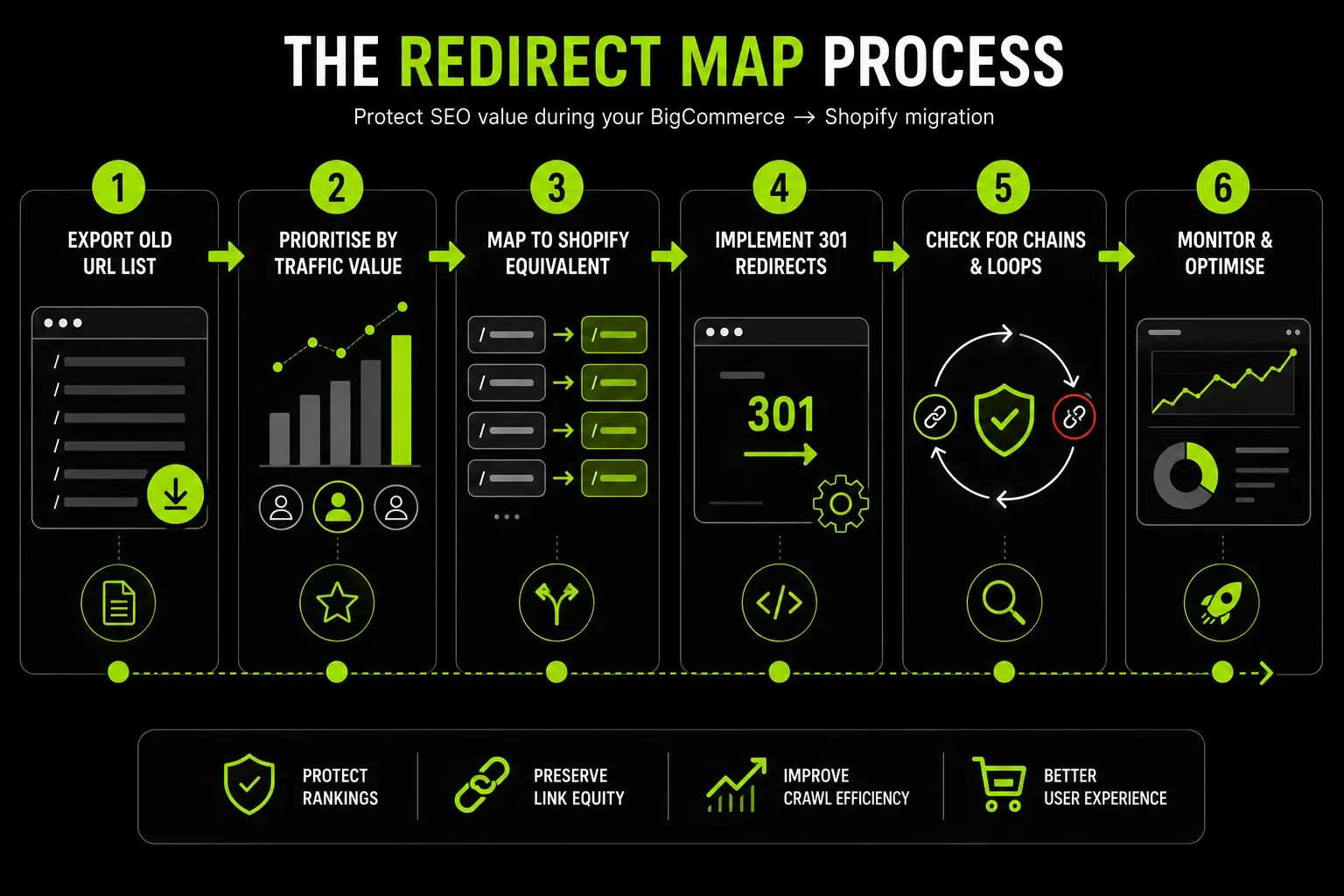
Build The 301 Redirect Map
Start by using the URL crawl and Google Search Console data collected during Phase 0 to create a complete redirect strategy. Every BigCommerce product, category, blog, and static page should redirect to its most relevant Shopify equivalent to preserve rankings and user experience.
- Prioritise redirects for URLs generating the most organic traffic.
- Redirect reorganised category URLs to the closest relevant Shopify collection rather than the homepage.
- Implement redirects using Shopify's native URL Redirects tool or a bulk CSV import.
- Crawl the staging site with Screaming Frog to identify and eliminate redirect chains so every redirect resolves in a single hop.
On-Page SEO Migration
Once redirects are in place, verify that every important SEO element has migrated correctly. Shopify handles many technical SEO features automatically, but metadata and structured data should still be checked page by page.
- Verify meta titles and meta descriptions on products, collections, blogs, and static pages.
- Confirm image alt text has transferred correctly, rebuilding it where necessary for high-traffic pages.
- Check that H1 tags accurately reflect the original page intent.
- Implement or validate structured data, including Product, BreadcrumbList, and OfferCatalog schema where applicable.
- Verify canonical tags, particularly for products assigned to multiple collections.
Sitemap and Search Console
Before launch, confirm Shopify generates a valid XML sitemap. After DNS cutover, submit the new sitemap to Google Search Console so Google can begin crawling the new site as quickly as possible.
Phase 4: QA And Testing (Weeks 10 To 13)
Before launch, every critical customer journey, integration, and business process should be tested. The goal is to identify issues while the store is still in the staging environment, where they can be fixed without affecting customers.
End-To-End Testing
Complete a full purchase journey from homepage to order confirmation, ensuring every feature performs as expected across devices and browsers.
- Test the complete buying journey: homepage → collection → product → cart → checkout → order confirmation.
- Verify every payment method, including card payments, Cash on Delivery, Tabby, and Tamara.
- Test both guest checkout and customer account checkout.
- Test on real mobile devices using iOS Safari and Android Chrome rather than browser emulators.
- Manually verify at least 50 redirects and crawl the full redirect map with Screaming Frog.
- Place a test order and confirm it reaches your ERP, email platform, analytics platform, and fulfilment system.
- Verify GA4 events, Meta Pixel, and any other tracking pixels fire correctly.
UAE-Specific QA
If you're selling in the UAE or GCC, validate all local market requirements before launch.
- Confirm VAT-inclusive pricing displays correctly throughout the storefront and checkout.
- Verify Cash on Delivery is available and correctly positioned during checkout.
- Test Tabby and Tamara payment options.
- Process a successful live payment in AED.
- Confirm UAE addresses can be entered without requiring a postal code.
- Verify Arabic RTL layouts, including navigation, filters, breadcrumbs, and carousels.
- Check Arabic product content for formatting and encoding issues.
Phase 5: Launch And DNS Cutover (Launch Day)
Launch day is primarily about switching traffic to the new Shopify store while minimising disruption. Complete the final data migration, verify every critical service is live, and closely monitor the site during the first 48 hours.
Pre-Launch
Before changing DNS, ensure all data is up to date and the BigCommerce store is no longer accepting new transactions.
- Run a final inventory synchronisation from your ERP or WMS.
- Freeze inventory updates in BigCommerce.
- Perform a delta migration for customers and orders created since the main migration.
- Remove Shopify password protection when you're ready to go live.
Go Live
Once the domain points to Shopify, verify that the storefront and all connected services are functioning correctly.
- Complete the DNS cutover after reducing the TTL to 300 seconds at least 24 hours beforehand.
- Confirm SSL is active on the live domain.
- Place a real test order using a live payment method.
- Verify the payment gateway is operating in live mode.
- Confirm analytics and tracking pixels are collecting data correctly.
- Submit the Shopify XML sitemap to Google Search Console.
Post-Launch Monitoring
The first 48 hours are critical. Monitor the new store closely so any issues can be resolved before they affect customers or search performance.
- Send the customer account reactivation campaign within 24–48 hours.
- Keep the BigCommerce store in maintenance mode as a fallback for the first 48 hours.
- Monitor Google Search Console for crawl errors, indexing issues, and redirect problems.

Post-Migration: The First 30/60/90 Days
The migration doesn't end at launch. The first three months determine whether your rankings, conversions and operational performance recover quickly or whether unresolved issues continue affecting the business.
A structured monitoring and optimisation plan helps ensure you realise the full value of the migration.
Days 1–14: Immediate Monitoring
The priority during the first two weeks is identifying and fixing issues before they have a lasting commercial impact.
SEO Monitoring
Check search performance daily, paying particular attention to crawl activity and traffic trends.
- Monitor Google Search Console for crawl errors, 404s, and indexing progress. Any high-traffic URL returning a 404 should be redirected immediately.
- Expect some keyword volatility for the first 2–4 weeks. Rankings that continue declining beyond three weeks usually indicate a technical issue.
- Compare organic traffic against your pre-migration baseline. A 10–20% decline during the first week is generally acceptable, while drops exceeding 30% warrant immediate investigation.
Conversion Monitoring
Customer behaviour often fluctuates immediately after launch, but significant declines should be investigated quickly.
- Compare daily conversion rates with the previous BigCommerce store.
- Monitor payment success rates and investigate if they consistently fall below 85%.
- Verify abandoned cart recovery flows are triggering correctly in Klaviyo or your email platform.
Customer Support
Pay close attention to early support requests, as recurring issues often highlight problems affecting many customers.
- Monitor account login issues and confirm password reactivation emails have been delivered successfully.
- Categorise support tickets by root cause to identify recurring problems that require platform fixes.
Days 15–60: Platform Optimisation
Once the store is stable, shift focus from fixing issues to improving performance and reducing unnecessary complexity.
Review your Shopify app stack and remove any apps that duplicate native Shopify functionality. This reduces monthly costs while improving site speed and maintainability.
Continue measuring Core Web Vitals on your homepage, key collection pages, and top product pages, comparing results against your BigCommerce benchmark.
At the same time, build custom GA4 reports that track metrics such as conversion rate by traffic source, add-to-cart rate by collection, and checkout completion by device.
If you're using Shopify Plus, this is also the ideal time to unlock platform-specific features:
- Configure your first Launchpad campaign for an upcoming retail event.
- Implement Checkout Extensibility features such as custom checkout fields, trust signals, or upsell blocks that weren't possible on BigCommerce.
Days 61–90: Growth Roadmap
By this stage, the migration should be complete and attention can turn to growth rather than recovery.
Organic traffic should have recovered to within approximately 10% of the pre-migration baseline. If it hasn't, perform a comprehensive redirect audit and investigate remaining indexing issues in Google Search Console.
With around two months of Shopify analytics data available, begin prioritising optimisation opportunities based on customer behaviour. Look for underperforming collection pages, products with high views but low add-to-cart rates, and stages of the mobile purchase journey where shoppers drop off. These insights should form the roadmap for your next round of CRO, merchandising, and UX improvements rather than allowing the data to go unused.
UAE And Gulf Market Migration Considerations
Migrating a Shopify store for the UAE or GCC involves more than moving data. Payment approvals, Arabic localisation, and regional tax settings all require additional planning and should be built into your migration timeline.
UAE Payment Configuration
A common cause of launch delays is waiting too long to apply for payment gateways. Providers such as Telr, PayTabs, Tap Payments, and Network International require a valid UAE trade licence, corporate bank account and supporting business documentation. Approval typically takes 3–15 business days.
Submit merchant account applications during Phase 0 rather than waiting until the store is ready to launch.
During Phase 2, configure:
- Card payment gateways
- Cash on Delivery (COD)
- Tabby and Tamara
Then verify each payment method during Phase 4 with live transactions.
Arabic RTL Migration
Arabic RTL cannot be transferred directly from BigCommerce because Shopify uses a different theme architecture. Treat Arabic as part of the theme rebuild in Phase 2, not as a translation added afterwards.
Also review Arabic product content, collection pages, and metadata manually. Automated migration tools often produce acceptable translations, but they rarely deliver commercially effective copy.
VAT And Tax Configuration
Use the migration to review your tax setup. Configure 5% VAT-inclusive pricing for UAE stores and set up 15% Saudi VAT separately through Shopify Markets if you're selling in KSA.
If you're expanding across multiple countries, configure each market individually for its own tax, currency, and pricing rules.
How Suplex Manages BigCommerce To Shopify Migrations
At Suplex, BigCommerce to Shopify migrations are managed as dedicated migration projects rather than standard Shopify builds. Every migration is planned around preserving SEO, maintaining customer experience, and ensuring business operations continue smoothly after launch.
Every project begins with a pre-migration audit to define the scope before any data is moved. We assess the existing store, identify technical risks, map integrations, and create a realistic migration timeline so there are no surprises later in the project.
Our migration process includes:
- Comprehensive SEO audit and 301 redirect strategy
- Product and variant mapping for Shopify compatibility
- Theme rebuild and store configuration
- Data migration and validation
- Integration reconfiguration and testing
- End-to-end QA before launch
- Post-launch monitoring and optimisation
For UAE and GCC brands, we also incorporate regional requirements from the start, including payment gateway approvals, Cash on Delivery (COD), Arabic RTL support, VAT configuration and Shopify Markets setup.
Addressing these during planning helps prevent the launch delays that often occur when localisation is treated as an afterthought.
If you're planning a BigCommerce to Shopify migration and want a scoped assessment, including variant architecture decisions, redirect strategy, and UAE-specific configuration, our platform consultation starts with the pre-migration audit, not a migration proposal.
Frequently Asked Questions
How long does a BigCommerce to Shopify migration take?
Most mid-market brands complete a migration in 12–16 weeks. Larger catalogues, B2B functionality, or Shopify Plus projects typically take 16–24 weeks. Smaller stores with simple catalogues may migrate faster.
Will I lose SEO rankings when migrating from BigCommerce to Shopify?
Not if the migration is planned correctly. A complete 301 redirect strategy preserves most organic traffic, although minor ranking fluctuations for 2–4 weeks are normal while Google re-crawls the new site.
Can I transfer my BigCommerce theme to Shopify?
No. BigCommerce themes use Stencil, while Shopify uses Liquid. Your storefront must be rebuilt using a Shopify theme or a custom Liquid build.
Do customer passwords transfer in a BigCommerce to Shopify migration?
No. Passwords cannot be migrated for security reasons. Customer accounts and order history transfer, but customers must create a new password when they first log in after launch.
How much does a BigCommerce to Shopify migration cost?
DIY migrations using tools such as Matrixify or LitExtension start from $79–$200. Managed migrations typically range from $5,000–$15,000, while complex agency-led projects can range from $25,000 to $250,000+, depending on catalogue size, integrations, and custom functionality.
What happens to my BigCommerce store during migration?
Your BigCommerce store remains live while the Shopify store is built in a private environment. The switch only happens during DNS cutover, minimising downtime. After launch, it's best to keep BigCommerce in maintenance mode for 48 hours as a fallback.
What are the BigCommerce to Shopify migration requirements for UAE stores?
Apply for UAE payment gateways during Phase 0, as approval can take 3–15 business days. Configure COD, Tabby, Tamara, VAT, and Shopify Markets during the build, and rebuild Arabic RTL as part of the new Shopify theme rather than treating it as a post-launch translation.
Hi, I’m Rishabh Jain
I believe great digital experiences have the power to shape perception, build trust, and move businesses forward. That belief led me to found Suplex Design Studio, a global digital design and development studio helping FMCG and D2C brands build websites and digital experiences that are strategic, thoughtful, and commercially meaningful.
I started Suplex at 25 with a clear intent, to create digital experiences that look appealing, work seamlessly, and help D2C businesses grow. By 28, the studio had scaled globally, guided by a strong foundation in integrated design that I developed during my academic journey in London, where I was honoured with the Dean’s Award.
Over the years, I’ve had the opportunity to work with 100+ brands, from Fortune 500 organisations to family-run businesses, helping them build websites, e-commerce experiences, and digital products that create clarity, credibility, and long-term value.
Our work has been recognised internationally, including the Manifest Award (2024), the Clutch Global Award (2025), and features across platforms such as The Dieline, Packaging of the World, and the World Brand Design Society.
None of this would be possible without the people behind the work. I’m deeply grateful to the Suplex team, whose commitment, creativity, and attention to detail turn ideas into meaningful digital experiences every day.
At the heart of our work is a simple philosophy, digital design should be intentional, functional, and built to create real business value. That continues to guide everything we create at Suplex.






































Let’s Make It Happen
E-Commerce Success Stories

%201.avif)






.avif)

.avif)
Build Your D2C Business The Right Way
Build It With Suplex.


