Ecommerce Website Development for Accessories Brands: What to Build for Jewellery, Bags, Watches and Eyewear
.avif)

Ecommerce Website Development for Accessories Brands: What to Build for Jewellery, Bags, Watches and Eyewear
Accessories are tricky to sell online. Customers can’t touch the material, try on a pair of glasses, or judge the size of a bag from a photo.
Yet jewellery, watches, bags and eyewear can command high prices, making the buying experience just as important as the product itself.
If you’re planning an ecommerce website for an accessories brand in the UAE, you need to consider sizing, product variations, personalisation, gifting and returns before choosing a platform or comparing development quotes.
What Makes Accessories Ecommerce Different
Jewellery, bags, watches and eyewear have different requirements when sold online. Customers need specific details to judge size, materials, fit and everyday use before placing an order.
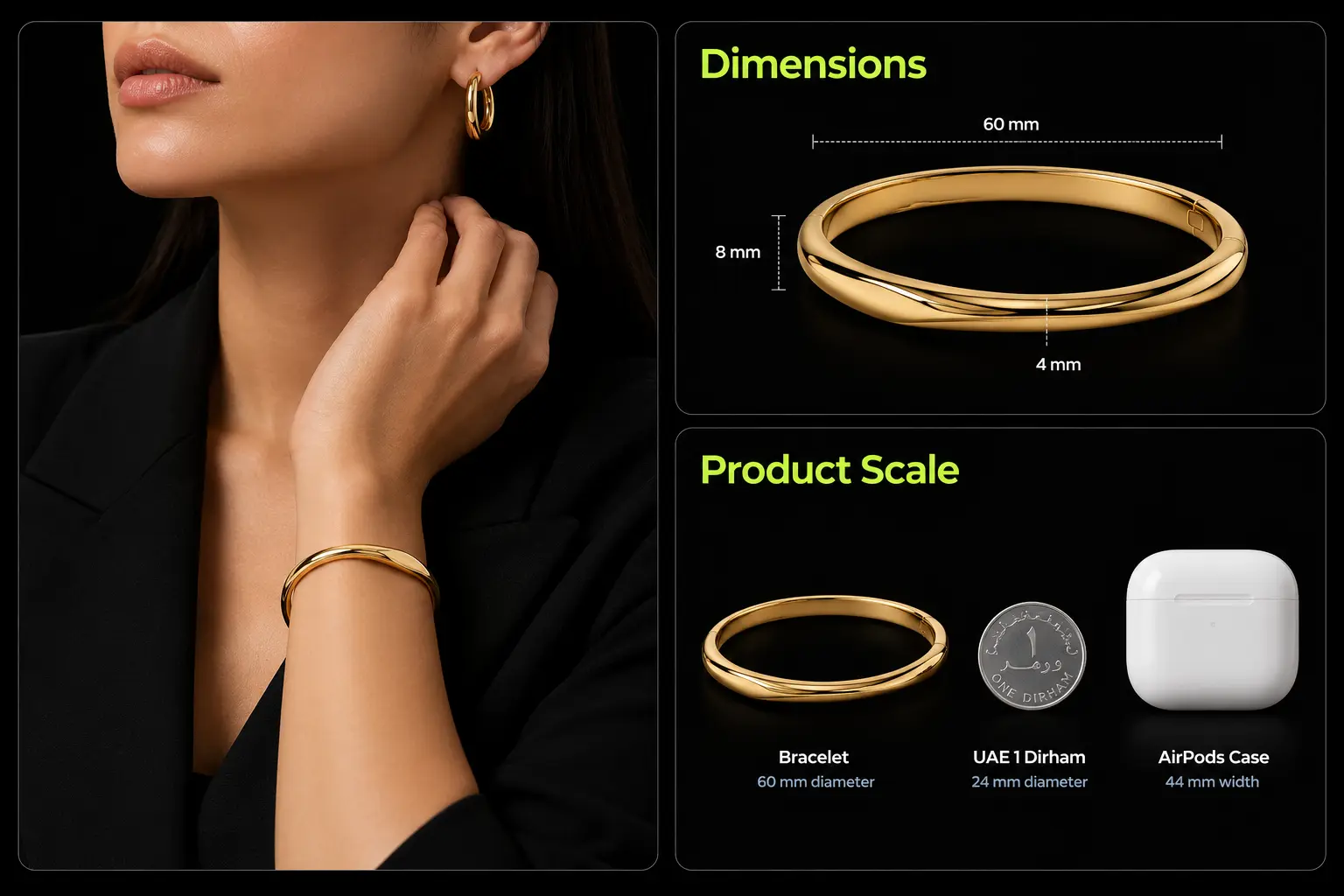
These details matter at the product level. For bags, show dimensions alongside everyday items to help customers judge scale.
For rings, provide a clear sizing guide. For watches, list compatible straps and explain water-resistance ratings. Good photography helps, but it cannot replace accurate specifications.
Store product details as structured attributes rather than relying on descriptions alone. This allows customers to filter products by relevant features and makes it easier to compare similar items.
Set photography requirements for each category, too: close-ups for jewellery, bags shown at different angles, watches photographed on wrists and eyewear shown on a face.
Personalisation and Gifting
If your products can be customised, build those options into the product page. Customers may need to select engraving, add a gift message, choose gift wrapping or check whether an item will arrive before a particular date.
State personalisation charges and lead times clearly. Your returns policy should also explain how customised items are handled.
Jewellery brands that price gold by weight may need an integration that accounts for changing gold rates and product-specific costs.
When A Standard Build Is Enough
A standard Shopify theme can suit a small catalogue with straightforward products and complete product information.
Custom development is worth considering when you need complex variants, compatibility rules, multiple product categories or more advanced personalisation. For a more tailored storefront, custom Shopify theme development.
The right setup depends on what you sell and the information customers need to make a purchase. Getting these details right from the start can also prevent sizing mistakes, compatibility issues and unnecessary returns.
The Scale Problem: How to Show Size Online
A pendant can look larger in a photograph than it is in real life. A bag may look spacious but fail to fit a laptop, while a watch strap may not fit the buyer’s watch. Product pages need clear measurements and images that help customers judge actual size.
Baymard found that 42% of users try to judge product size from images, while 28% of sites in its benchmark lacked an in-scale image. The research dates from 2017, but the problem remains relevant to accessories sold online.
Keep measurements in structured product attributes so they can appear on product pages and support filters or compatibility tools.
A shopper should be able to filter watch straps by lug width or compare eyewear using frame measurements.
Build a Consistent Image Set
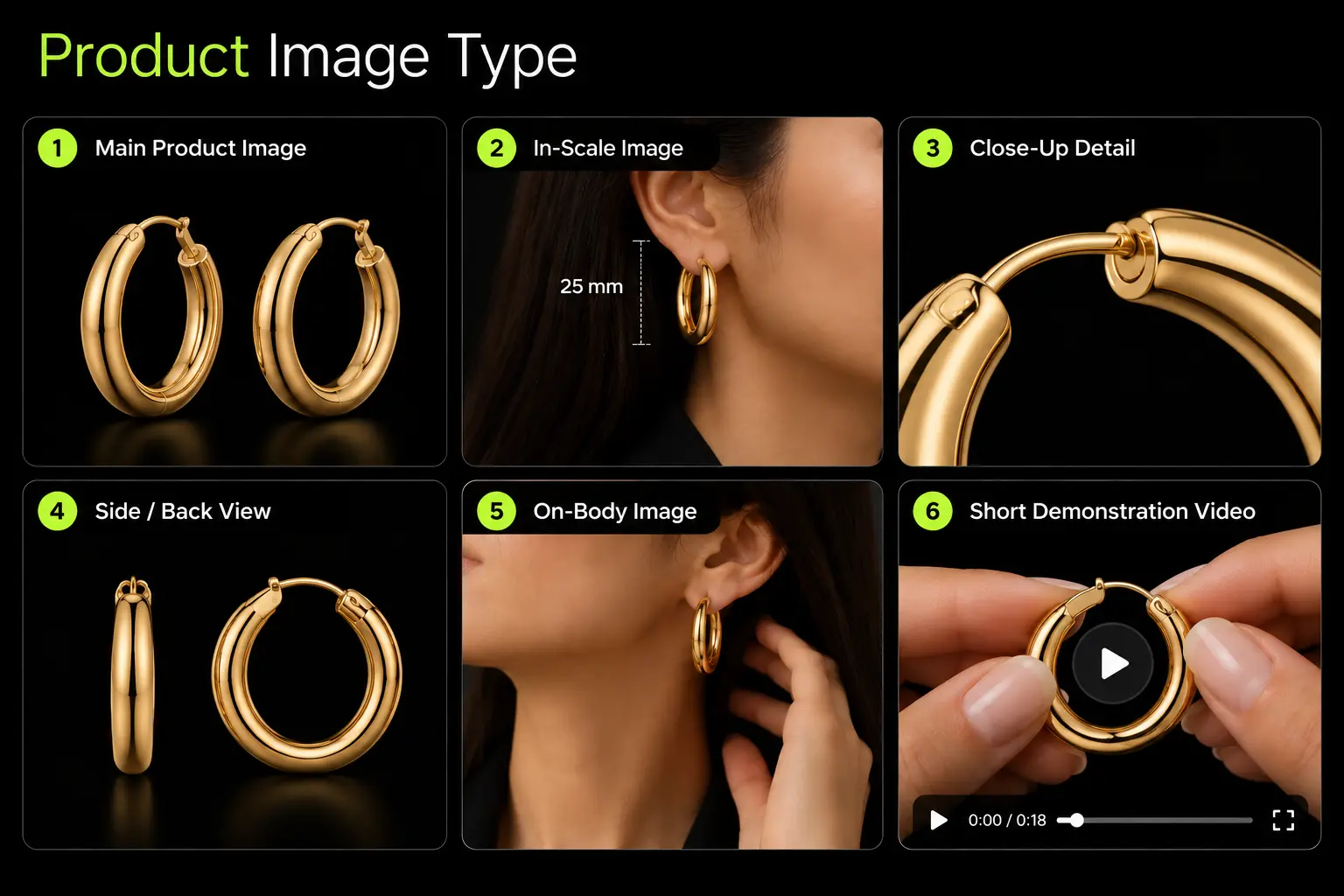
Each product gallery should include a main image, a view showing scale, close-up details and side or back views where needed. Short videos can demonstrate how a bag opens, how a clasp fastens or how a watch looks when worn.
Show everything included with the purchase, including gift packaging, certificates, spare links and additional straps. Add dimensions to images when they help, and use specific captions such as “Model wears the 45 cm chain” or “Shown on a 15 cm wrist.”
Customer photos in reviews can help shoppers judge size on different body types. Virtual try-on can also help with eyewear and some jewellery, but customers still need accurate measurements to check fit.

Plan Imagery Before Development
Developers can build the galleries, measurement fields and filters, but they cannot supply missing product information. Your team needs to provide accurate measurements and consistent photographs for every SKU.
Prepare the image checklist before development begins. This gives your photography team clear requirements and helps prevent product pages from launching with missing views, inconsistent images or incomplete dimensions.
Build a Product Data Model by Accessory Type
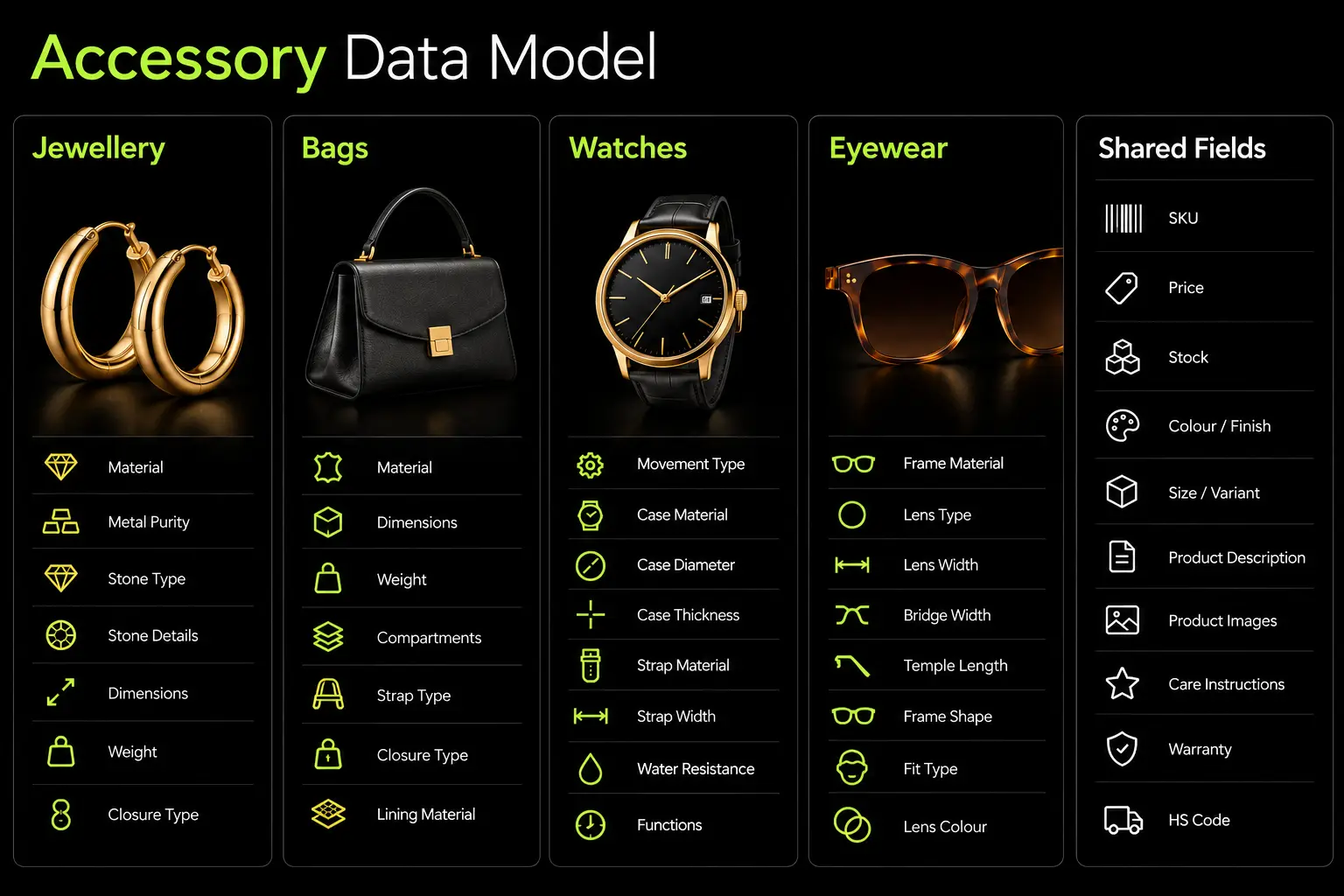
An accessories store needs different product fields for different categories. A ring needs a size guide, a bag needs dimensions and compartment details and a watch needs case measurements and strap compatibility. These details also determine which filters and product comparisons your store can offer.
Set up the product fields before designing the product pages. If measurements and specifications exist only in descriptions, shoppers cannot easily filter by them and your team has to maintain the same information in several places.
Use the same units and naming conventions throughout the catalogue. Record dimensions consistently in centimetres or millimetres, and distinguish solid gold from gold-plated finishes. These details matter when customers compare products or use filters.
What to Do With the Data
- Filters: Let shoppers narrow results by material, size, price, metal tone or personalisation.
- Size Guides: Show ring sizes, bracelet lengths or eyewear measurements relevant to the product.
- Product Pages: Group specifications into readable sections instead of placing everything in the description.
- Merchandising: Build gift collections, recommend compatible watch straps and group products by shared attributes.
- Search: Provide organised product information that search engines and shopping tools can interpret.
Shopify supports product metafields for storing additional attributes beyond its standard product fields. Compatible themes, apps and integrations can use these fields to display specifications, power filters and support other storefront features. Still defining the catalogue and store foundations, checkout Shopify store setup service.
Assign Ownership Before Launch
Decide who will enter product specifications, check measurements, update stock and maintain the data when new products arrive.
A small catalogue may need only a simple checklist. Larger ranges benefit from validation rules, consistent naming conventions and an admin guide for the merchandising team.
Define the fields for each category before building the templates. This gives your developer a clear specification and saves your team from reorganising product data when you add new filters, collections or product ranges.
Variants and Sizing for Rings, Bracelets, Watch Straps and Eyewear
Accessories can have dozens of product combinations once sizes, metals, finishes and stones are involved. Decide which options affect inventory and which are for personalisation before setting up the catalogue.
Structure Variants Around Stock
Shopify supports up to 2,048 variants and three options per product. A ring with five metals, ten stone choices and 15 sizes creates 750 variants. Adding engraving as a fourth option requires a different setup. See Shopify's variant documentation.
Use variants for choices that affect stock, price or SKU, such as ring size and metal. Collect engraving text, monograms and gift messages through compatible product-options tools or line-item properties. Display additional charges and production lead times before checkout.
Build Size Guides for Each Product Type
For UAE shoppers, include relevant international size conversions and clear measurement units. Place size guides beside product options so customers can check measurements without leaving the page.
Use Reviews to Explain Fit
Ask customers whether an item fits as expected and display feedback alongside reviews. Baymard reports that 33% of apparel and accessories sites fail to aggregate fit feedback from reviews.
For jewellery, state whether resizing is available, what it costs and how long it takes. Explain exchange conditions for incorrectly sized and personalised items.
Keep the Catalogue Manageable
Your developer can build variant selectors, size guides and validation rules, but your team must supply accurate measurements and update product information when designs change.
Separate stock-related options from personalisation fields, and provide a size guide for each product category. This makes the catalogue easier to maintain as new designs and sizes are added.
Personalisation and Engraving
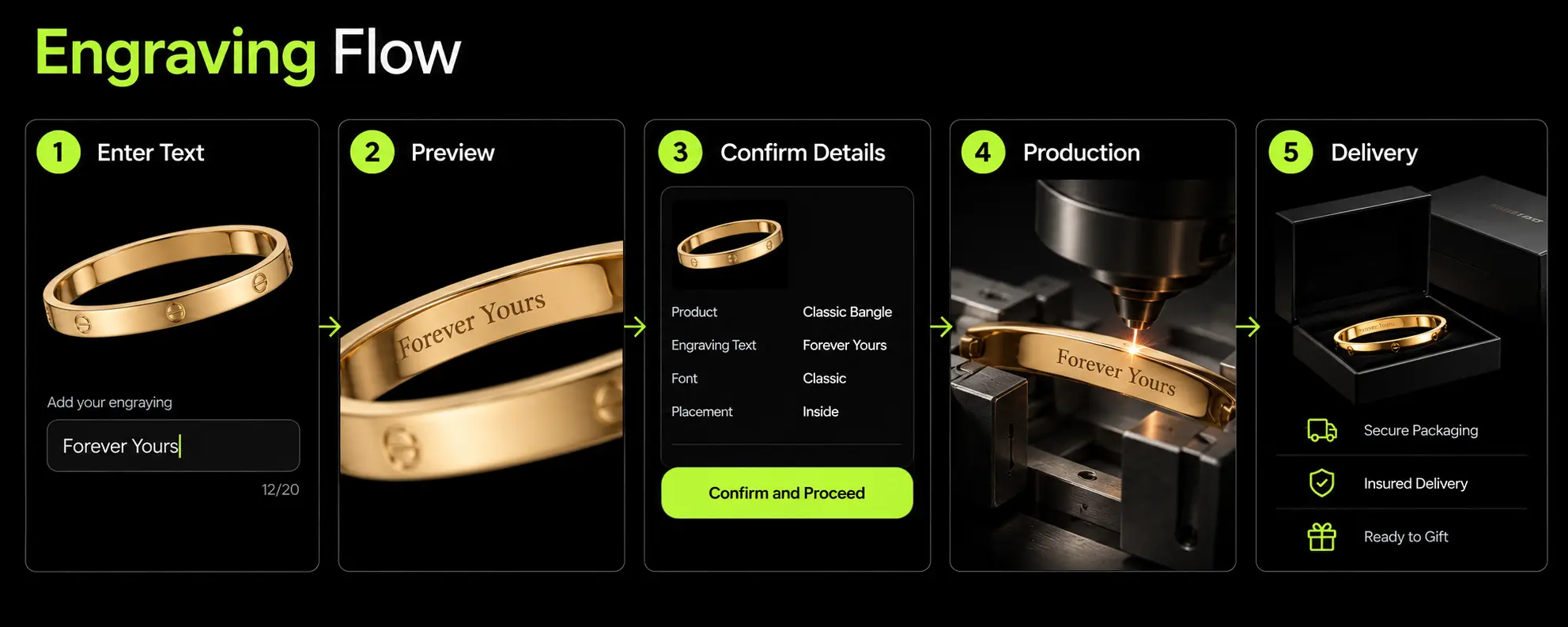
Engraving names, initials or messages makes accessories popular gifts, but each customised order needs accurate production instructions. A spelling error or incorrect engraving position can mean remaking an item that cannot be resold.
What the Product Page Should Include
- Personalisation Options: List eligible products, engraving positions, fonts and character limits.
- Arabic and English Input: Support both scripts, including right-to-left Arabic text and connected letters.
- Live Preview: Show an approximate preview and explain that the finished engraving may differ slightly.
- Pricing: Display the engraving charge in AED before the item is added to the cart.
- Lead Times: Explain how customisation affects dispatch and delivery.
Connect Personalisation to Fulfilment
Save the exact text, font and engraving position against each order item. Pass these details directly to production sheets so staff don't have to retype them.
For expensive pieces or complex Arabic engraving, send the customer a confirmation of the submitted text before production begins. Keep the details in the order record for reference.
Make Return Terms Clear
Display cancellation, return and exchange terms beside the personalisation options. Don't assume customised items are automatically exempt from returns.
Check applicable UAE consumer protection requirements, including rules covering defective or incorrectly supplied products.
Choose Features Based on Order Volume
A validated text field and manual production check may be enough for a small catalogue. Higher order volumes may justify live previews, automated pricing and production-ready instructions.
Plan these features before busy gifting periods such as Ramadan and Eid, when delivery deadlines become particularly important. Accurate order details help prevent engraving errors, remakes and dispatch delays.
Gifting: Design for It From Day One
Accessories are bought for birthdays, anniversaries, weddings and seasonal celebrations throughout the year.
Buyers may not know the recipient’s size or preferences, so your store needs to make choosing, personalising and delivering a gift straightforward.
Features Your Gifting Experience Needs
At checkout, let customers add a message, use a separate delivery address and hide prices from the recipient’s packing slip. Gift receipts can also simplify exchanges.
For buyers unsure about sizing, adjustable bracelets, necklaces with extender chains and gift cards may be safer choices than rings.
In its independent audit of Nicobar, Suplex highlighted the brand’s Gifting Concierge, which connects shoppers to WhatsApp support, and its gift collections organised by price. Both give customers alternatives to browsing the full catalogue alone.
The audit also noted a visual inconsistency between the gifting experience and the main website. Keep seasonal landing pages and gifting tools within the same design system.
Plan Around the UAE Gifting Calendar
Prepare landing pages, product bundles, stock and delivery cut-offs ahead of Ramadan, Eid, Valentine’s Day, Mother’s Day, UAE National Day and year-end celebrations. Include engraving time in delivery estimates.
Corporate orders may also need bulk pricing, custom packaging and separate fulfilment arrangements.
Gift wrapping, message cards and digital gift cards may be enough for a smaller store. Add scheduled delivery, gift finders and corporate ordering when customer demand justifies them.
Sets, Stacks and Cross-Sell to Raise Order Value
A necklace and matching earrings, a bag and wallet, or a watch with an extra strap make natural combinations.
Your store can help customers discover these pairings instead of leaving them to search the catalogue for matching products.
Ways to Sell Complementary Products
- Matching Sets: Offer coordinated jewellery, bags and wallets at a clearly displayed combined price.
- Build-your-Own Stacks: Let shoppers combine rings, bracelets or necklaces and see the total update as they select pieces.
- Complete the Look: Suggest matching wallets, jewellery or compatible watch straps on the product page.
- Practical Add-Ons: Offer relevant extras such as care kits, gift boxes, travel pouches and bag charms.
- Free-Shipping Thresholds: Show how much more a customer needs to spend to qualify, alongside suitable products that bridge the gap.
Recommendations should account for compatibility as well as appearance. Use product attributes such as metal finish, colour, ring size and watch lug width to avoid unsuitable pairings.
For example, recommend watch straps that fit the selected case and jewellery pieces that complement the chosen finish. A few relevant suggestions are more useful than a generic list of bestsellers.
Check Inventory and Margins
Shopify bundles need to account for the stock of each component. When a set sells, inventory for its individual products must update correctly.
Plan how to handle returns, partial refunds, discounts and personalised items before launching bundles.
Discounts aren't always necessary. Coordinated designs, gift packaging or a useful care kit can make a set more appealing without cutting margins.
Keep Product Pages Focused
Start with two recommendation sections, such as “Complete the Look” and “You May Also Like.” Keep suggestions relevant to the selected product and avoid adding so many blocks that customers struggle to find its specifications or purchase options.
Useful pairings can increase order value, but only when customers see a clear reason to buy the additional item.
Material Trust, Authenticity and Care
Customers buying accessories online cannot inspect the materials or construction before ordering. Product pages need to state what each item is made of, what supports its authenticity and how to care for it.
Replace vague descriptions such as “premium leather” with the specific material and relevant construction details.
For jewellery, consult the UAE legislation on precious metals and hallmarking to check the marking requirements and applicable exemptions.
Authenticity and Warranty
State whether you are an authorised retailer, who provides the warranty and how customers can make a claim.
Include available certificates and manufacturer verification details. Genuine reviews, clear product photographs and accessible customer support details also help buyers assess the product and seller.
Care and Returns
Care instructions should reflect the material. Plated jewellery can wear over time, leather can mark, and some stones can be damaged by perfume or cleaning products. Include relevant precautions on the product page.
Explain return and exchange conditions for engraved items, resized rings and watches before checkout. Check that your policy complies with applicable UAE consumer protection requirements, including those covering defective products.
What Accessories Brands in the UAE Need From Their E-commerce Website
Accessories stores in the UAE need to account for bilingual shopping, local payment preferences, delivery expectations and gifting habits. Jewellery brands may also need pricing systems that respond to daily gold rates.
1. Arabic and English Support: Provide Arabic and English across navigation, product pages, checkout and size guides.
Arabic pages need proper right-to-left layouts. Engraving tools should also handle Arabic text correctly and display the submitted details clearly.
2. Payments and Checkout: Offer card payments and supported mobile wallets such as Apple Pay and Google Pay. Buy-now-pay-later services like Tabby and Tamara may suit higher-value purchases.
If you accept cash on delivery, consider verifying expensive orders to reduce failed deliveries. Configure VAT-inclusive pricing and compliant invoices.
3. Daily Gold Pricing: Jewellers selling gold by weight may need pricing based on the daily gold rate, product weight, making charges and applicable VAT.
The system should update rates from a reliable source, show the price breakdown and explain which rate applies when an order is placed. Keep fixed-price designs separate from weight-based calculations.
Al Fanan's gold-rate page provides an example of displaying rates online. Confirm VAT treatment with a UAE tax adviser.
4. Delivery, Returns and Gifting: Show realistic delivery estimates by emirate, including production time for personalised items.
Explain return, exchange, resizing and cancellation terms before checkout, including applicable rules for defective products.
Prepare gift collections, stock and delivery cut-offs for Ramadan, Eid, Mother's Day and other major occasions. Gift wrapping, message cards and scheduled delivery can make ordering easier for customers buying presents.
Platform and Performance
Choose your platform after defining the catalogue, sizing and personalisation requirements. Shopify suits many accessories brands, while complex integrations or product configurators may require custom development.
Basic builds typically use a premium theme and standard variants. Growth projects may include Arabic RTL, custom design, size guides and BNPL. Advanced builds add complex integrations, wholesale or multi-store functionality.
What Affects Cost and Timelines?
- Complex variants for ring sizes, watch straps and eyewear.
- Arabic translation and RTL testing.
- Personalisation previews and production instructions.
- Gift options, delivery scheduling and size guides.
- Missing product data or delayed photography.
Define sizing rules, material specifications and personalisation requirements before development begins. Late decisions often lead to rework.
Test Mobile Performance
Large image galleries and third-party apps can slow accessories stores on mobile. Set performance targets before development and test product pages on real phones, including mid-range devices.
Check image loading, variant selectors, size guides and cart interactions rather than relying only on desktop Lighthouse scores. If image-heavy pages or third-party apps are slowing the store down, explore our website performance optimisation service.
Questions to Ask a Developer Before Building Your Accessories Store
Many agencies can build a Shopify store, but accessories bring specific challenges, including ring sizing, watch strap compatibility, Arabic engraving and gift orders. Ask developers how they would handle these before comparing proposals.
Questions to Ask
- Variants: How would you manage a ring with five metals, twelve sizes and three finishes?
- Product Imagery: How would you show bag dimensions and capacity on mobile?
- Personalisation: How would engraving details reach the production team?
- Gifting: Can customers enter a separate recipient address and select a delivery date?
- Product Data: Who enters, checks and maintains product specifications?
- Post-Launch Support: Who handles maintenance and conversion optimisation?
Red Flags to Watch For
🚩Quotes based only on page count, ignoring product complexity.
🚩One generic product structure for every accessory category.
🚩Arabic and right-to-left support was postponed to a later phase.
🚩No clear policy for personalised-item returns.
🚩No assigned owner for product data migration.
🚩No examples involving complex sizing or personalisation.
Ask the developer to review one of your product pages and identify three specific improvements. Look for practical suggestions about product information, sizing, usability or checkout not just visual changes. Their reasoning will help you judge whether they understand your catalogue's requirements.
How Suplex Builds Ecommerce Websites for Accessories Brands
Accessories stores need more than attractive design. Ring sizing, product variants, watch strap compatibility and engraving all affect how the catalogue and checkout should work.
Our Approach
- Catalogue Audit: Map product attributes, sizing and personalisation options.
- Variant Setup: Separate inventory choices from customisation fields and production instructions.
- Product Page Design: Plan measurements, size guides, photography and return information.
- Gifting and Bundles: Define gift options, delivery dates and complementary product recommendations.
- UAE Checkout: Configure AED pricing, VAT, supported payments, Arabic RTL and delivery options.
- Post-Launch Optimisation: Track size-guide usage, personalisation errors and bundle performance.
Where Suplex Fits
Suplex is a Dubai-based Shopify Partner and Google Partner serving D2C, fashion, luxury and consumer brands across the UAE and Gulf.
Its services include Shopify development, custom ecommerce builds, UX/UI design and conversion rate optimisation.
For accessories brands, this means addressing product data, sizing and personalisation alongside storefront design.
Does Your Store Need a Rebuild?
Not necessarily. Better photography, clearer size guides or simpler personalisation may solve existing problems without replacing the entire store.
A rebuild makes more sense when the current platform or variant structure cannot support the catalogue.
Start with your SKU list, product categories and main business challenge conversion, returns or average order value. These details help determine whether you need a data cleanup, conversion improvements or a new build.
Frequently Asked Questions
What does an accessories brand need from an ecommerce website?
Clear product photography, structured specifications, accurate size guides and visible material details are essential. Depending on the catalogue, you may also need engraving, gift options, bundles and compatibility filters. Optimised images help product pages load faster on mobile.
How should jewellery sizes be handled online?
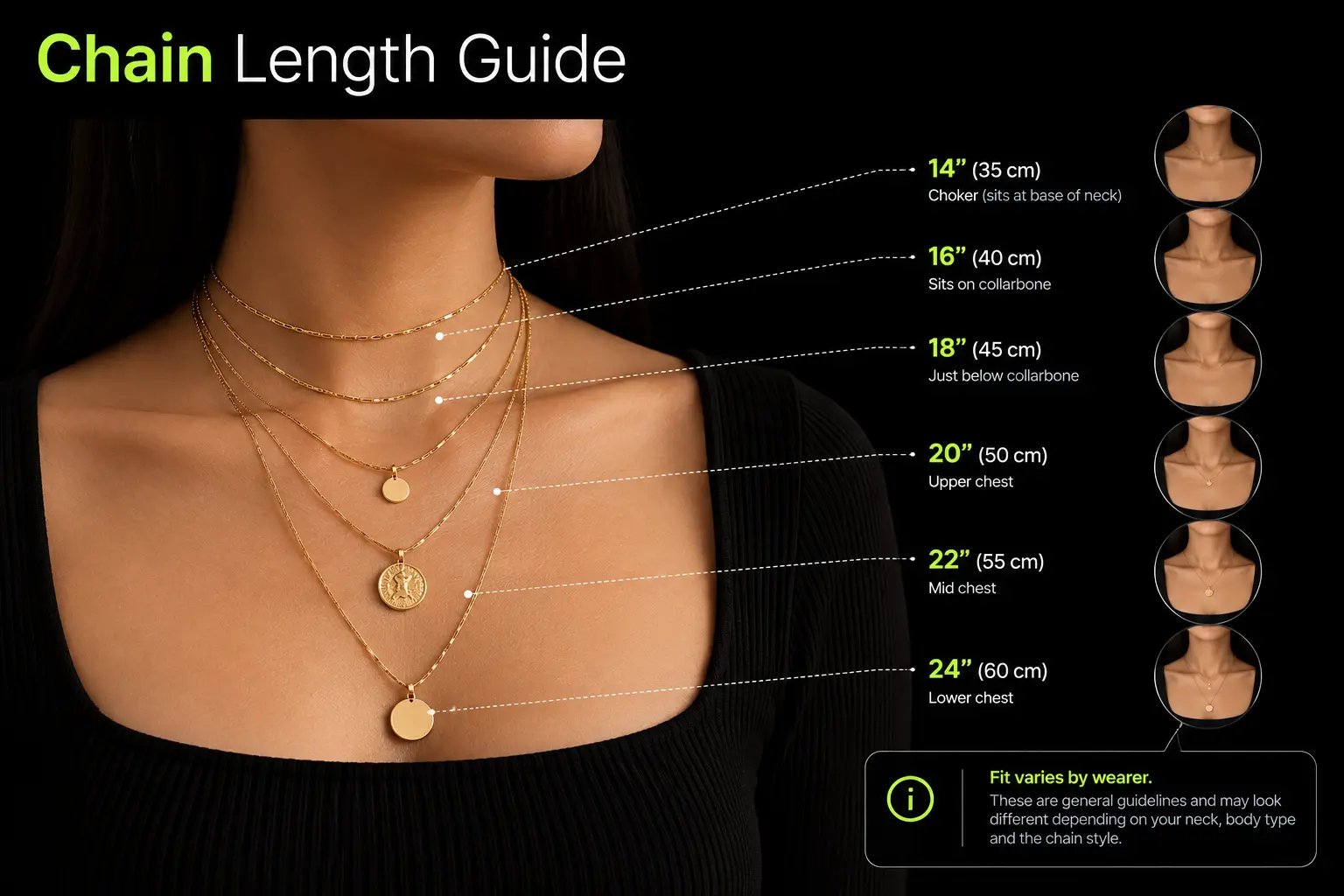
Provide ring sizers with international conversions, bracelet measurement guides and diagrams showing necklace lengths. State the model's size where relevant, display customer fit feedback and explain resizing and exchange terms before checkout.
Can Shopify handle engraving and personalisation?
Yes. Shopify can collect engraving text through product options or line-item properties. Live previews, character limits, additional charges and production instructions may require compatible apps or custom development. Explain production times and applicable return conditions before purchase.
How do you show product size and scale online?
Use on-body images, wrist shots or photographs beside familiar objects. Add dimension diagrams and notes such as “Model wears the 45 cm chain.” Customer photos can provide further context. Baymard's research found that 42% of users try to judge product size from images.
Is Shopify good for jewellery and accessories brands?
For most brands, yes. Shopify supports product variants, metafields and integrations for personalisation, bundles and gifting. Complex catalogues may need additional development. UAE jewellers selling gold by weight may also require dynamic pricing integrations.
Hi, I’m Rishabh Jain
I believe great digital experiences have the power to shape perception, build trust, and move businesses forward. That belief led me to found Suplex Design Studio, a global digital design and development studio helping FMCG and D2C brands build websites and digital experiences that are strategic, thoughtful, and commercially meaningful.
I started Suplex at 25 with a clear intent, to create digital experiences that look appealing, work seamlessly, and help D2C businesses grow. By 28, the studio had scaled globally, guided by a strong foundation in integrated design that I developed during my academic journey in London, where I was honoured with the Dean’s Award.
Over the years, I’ve had the opportunity to work with 100+ brands, from Fortune 500 organisations to family-run businesses, helping them build websites, e-commerce experiences, and digital products that create clarity, credibility, and long-term value.
Our work has been recognised internationally, including the Manifest Award (2024), the Clutch Global Award (2025), and features across platforms such as The Dieline, Packaging of the World, and the World Brand Design Society.
None of this would be possible without the people behind the work. I’m deeply grateful to the Suplex team, whose commitment, creativity, and attention to detail turn ideas into meaningful digital experiences every day.
At the heart of our work is a simple philosophy, digital design should be intentional, functional, and built to create real business value. That continues to guide everything we create at Suplex.


























Let’s Make It Happen
E-Commerce Success Stories

%201.avif)






.avif)
.avif)
Build Your D2C Business The Right Way
Build It With Suplex.


