Questions to Ask Before a Shopify Migration That Prevent Costly Problems
.avif)
Questions to Ask Before a Shopify Migration That Prevent Costly Problems
A Shopify migration can look simple on paper, move your products, customers, orders and content, then launch.
In reality, the biggest migration failures rarely come from Shopify itself. They come from questions nobody asked early enough.
What happens to your URLs? Which pages need redirects? Will your SEO rankings, customer data, product variants, and integrations migrate correctly? What breaks at launch and what happens if you need to roll back?
Whether you’re moving from WordPress, Magento, BigCommerce, or a custom ecommerce stack, these questions matter. The platforms may differ, but the planning principles remain largely the same.
Asking the right questions early helps uncover hidden risks, protect organic traffic and customer data, preserve critical functionality, and make your Shopify migration far more predictable.
Part 1: Questions to Answer About Your Own Business First
Most migration guides start by telling you what to ask an agency. That is the wrong order. You cannot evaluate an agency's answers until you know what your own requirements are.
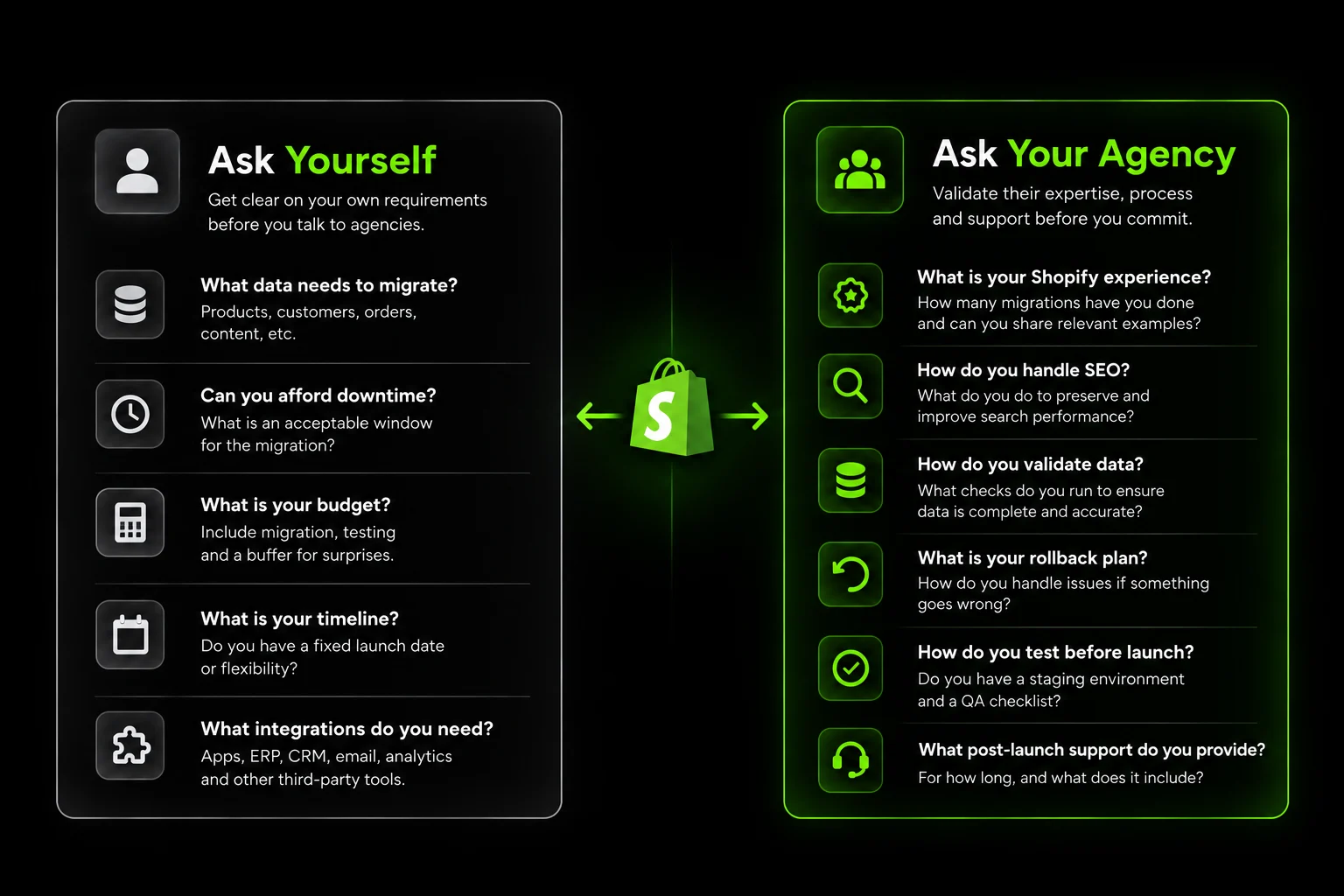
Answer these five questions before you shortlist anyone. Write the answers down. They become your migration scope document.
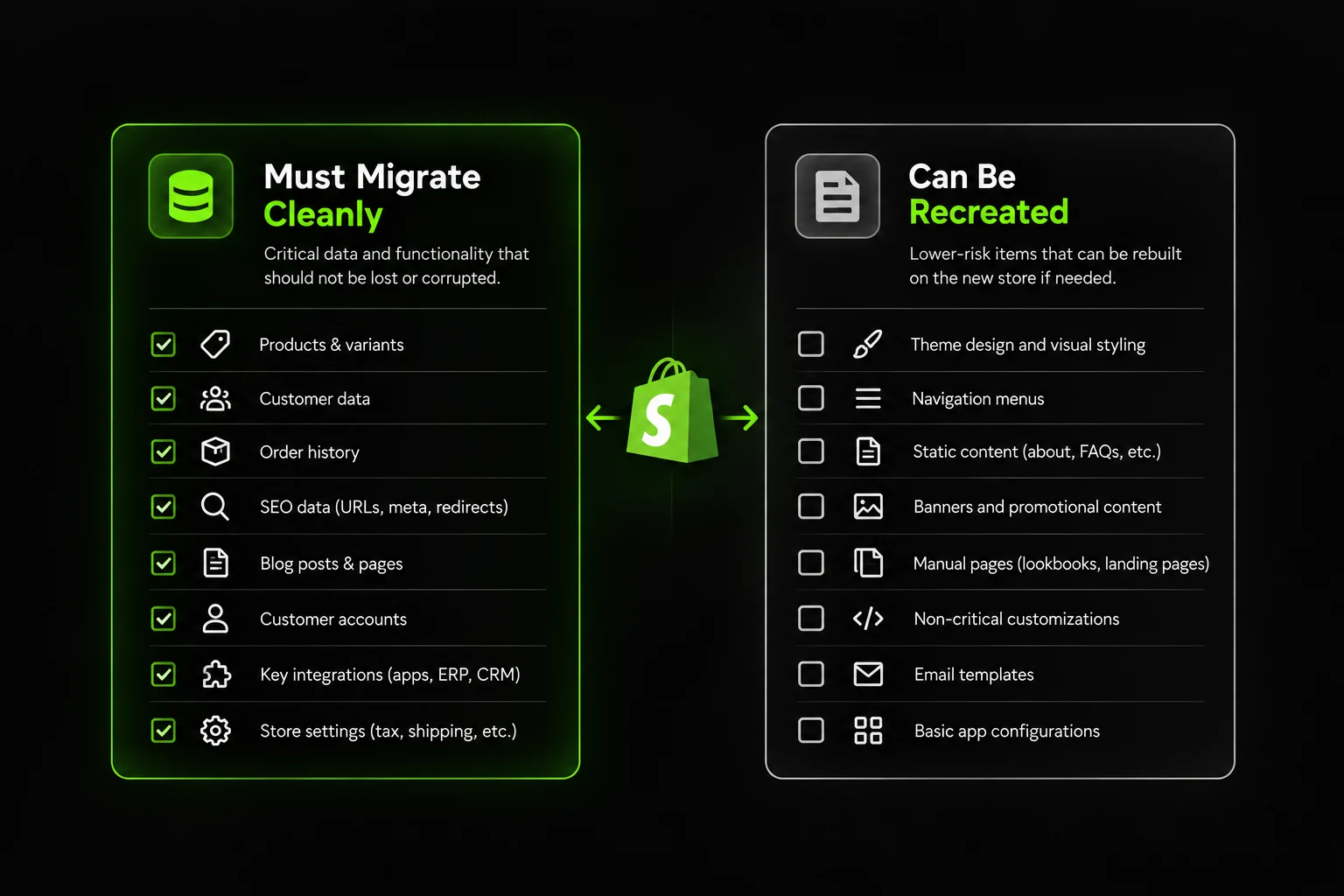
What Data Absolutely Cannot Be Lost or Corrupted?
Not all data matters equally. Prioritize by business impact, not by volume.
Orders and order history. Historical orders are needed for returns, warranty claims, and repeat customer recognition.
For a brand with three years of order history, this is often the single largest data set in the migration.
Losing order history means losing the ability to process returns against original purchases, identify repeat customers, and calculate accurate lifetime value.
Customer accounts and login credentials. Shopify does not migrate customer passwords. This is a platform limitation, not an agency failure.
Customers must reset passwords after migration. Plan for this. Build it into your launch communications. Expect a 15% to 25% drop in account logins in the first month as customers reset credentials.
Product data. Titles, descriptions, images, variants, pricing, SKUs, and inventory levels. For a 1,000-SKU store, this is a significant data mapping exercise. Variants add complexity. A product with 40 shades and 3 sizes has 120 variant combinations. Each needs to migrate with the correct SKU, price, and inventory.
Reviews and user-generated content. Third-party review platforms may or may not migrate. If you use Yotpo, Judge.me, or Okendo on your current platform, confirm the migration path before you commit. Some platforms export reviews in a format that Shopify apps can import. Others do not.
Loyalty points and rewards. If you run a loyalty program on your current platform, loyalty data is often the most difficult to transfer.
Points balances, tier status, and redemption history all need to migrate or be recreated. Confirm the migration path before you sign. A loyalty program that resets to zero on launch day generates support tickets and customer frustration.
Write down which of these are non-negotiable. This list becomes the first page of your migration scope.
How Much Downtime or Disruption Can the Business Tolerate?
Some migrations require a short period of read-only mode or downtime. Others run with no visible interruption.
Ask yourself:
- Can the store be in read-only mode for 24 to 48 hours?
- Can we redirect traffic to a holding page during the cutover?
- What is our highest-revenue period, and how do we avoid launching near it?
- What is the cost of one day of lost sales?
For most ecommerce brands, the answer to the last question determines how much you should invest in a smoother migration.
A brand doing AED 100,000 monthly revenue loses roughly AED 3,300 per day of downtime. A 48-hour read-only period costs AED 6,600 in deferred orders, assuming none are lost. For a larger brand doing AED 1M monthly, the same window costs AED 66,000.
The math changes the conversation. A migration that costs AED 40,000 and includes a seamless cutover is cheaper than a AED 20,000 migration that requires 48 hours of downtime.
What Is the Real Budget?
The migration cost is not just the agency fee. Factor in:
- Migration service cost
- New theme or design work
- App subscriptions that change with the new platform
- Shopify subscription (and Shopify Plus if applicable)
- Testing and QA time
- Potential revenue loss during the transition
- Contingency for post-launch fixes
A migration that looks affordable on the agency quote can double in total cost when post-launch issues are included. Budget the contingency. A 20% to 30% buffer above the agency quote is realistic for a mid-size migration.
What Is the Realistic Timeline?
Around 70% of replatforming projects exceed their planned timeline. Common causes: delayed data mapping, incomplete scope, and content migration that takes longer than expected.
A realistic timeline:
- Simple catalog (under 500 SKUs, no complex integrations): 4 to 8 weeks
- Mid-size catalog (500 to 2,000 SKUs, moderate integrations): 8 to 16 weeks
- Large catalog (2,000+ SKUs, custom features, ERP integration): 16 to 26 weeks
Build in a dedicated testing and validation phase before launch. It is not optional. A two-week QA phase at the end of a 12-week project is standard. Budget it as its own line item.
Which Integrations and Apps Are Non-Negotiable?
List every integration your current store depends on:
- Payment gateways
- ERP and inventory management
- CRM and marketing automation
- Email and SMS platforms
- Shipping and fulfillment
- Reviews and UGC
- Subscription management
- Accounting and tax
For each one, confirm whether the Shopify equivalent exists, whether it requires a different vendor, and whether data can be migrated. Any integration without a clear migration path is a project risk.
A common pattern: brands discover mid-migration that their ERP does not have a Shopify connector. The workaround is custom API development.
That adds 4 to 6 weeks and AED 15,000 to AED 40,000 in development cost. Find this out before you start, not in week eight.
If you’re moving from a specific platform, the migration requirements can vary significantly. Our guides on WordPress to Shopify migration and ecommerce platform migration cover the platform-specific considerations you should evaluate before committing to a migration plan.
Part 2: Questions to Ask a Shopify Migration Agency or Developer
Once you know your own requirements, the agency questions become filters. Ask these six questions on the first call.
Have You Migrated From Our Current Platform Specifically?
This is the first question. An agency with deep Shopify experience but no experience migrating from Magento will learn on your project. An agency that has completed ten migrations from the same platform has already encountered the problems you will encounter.
Ask for:
- Number of migrations from your specific platform
- Two or three examples of migrations similar in catalog size
- The name of the person who will lead the migration on their side
If the agency has never migrated from your platform, ask how they plan to handle the platform-specific data structures and edge cases.
Magento's EAV database model, for example, stores product attributes differently from Shopify's variant architecture. Migrating a Magento store with 50 custom attributes requires a data transformation step, not just a direct import.
A credible agency knows this and plans for it. An agency that treats all migrations as equivalent will discover the complexity mid-project.
What Is Your Process for Preserving SEO?
This is the most important question. SEO loss is the most common and most expensive migration failure.
A good answer includes:
- A URL mapping document that lists every old URL and its new destination
- 301 redirects configured for every URL that changes
- Preservation of title tags, meta descriptions, and H1s for high-value pages
- Structured data migration (Product, Review, Breadcrumb, Organization schema)
- Internal linking preservation for top-ranking pages
- An XML sitemap submitted to Google immediately after launch
- Post-launch ranking and traffic monitoring
A vague answer like "we always handle SEO" is a red flag. Ask for the specific documentation they provide. A credible agency will show you a sample URL mapping document from a previous project. It will have columns for old URL, new URL, redirect type, and notes.
For a 1,000-SKU store, the URL mapping document alone is 40 to 80 hours of work. If the agency has not budgeted that time, they are not planning the SEO layer properly.
How Do You Validate That Migrated Data Is Complete and Accurate?
Record counts are not valid. An order that moved but lost line items is a broken order. A customer account that moved but lost the order history linked to it is a broken account.
Ask specifically:
- How do you verify order data, including line items, totals, and customer details?
- How do you validate customer accounts, addresses, and order history?
- What happens if a discrepancy is found after go-live?
- Is validation done before or after launch?
A credible agency has a written validation checklist and runs it before launch, not after. The validation process typically includes:
- Record count comparison (source vs. destination)
- Field-level spot checks on a sample of records
- Order total verification against source
- Customer account login testing
- Product variant mapping verification
- Integration sync testing
If the agency cannot describe this process, they are not validating. They are hoping.
What Is the Rollback Plan if Something Goes Wrong?
This is the question most agencies gloss over. It is also the one that matters most when something breaks.
A real rollback plan includes:
- A pre-launch staging environment that mirrors production
- A documented rollback procedure if the new site fails post-launch
- A defined rollback window (typically 24 to 72 hours) during which the old site can be restored
- A decision tree for who calls the rollback and when
An agency that cannot describe a rollback plan has not planned for failure. Avoid them.
The conversation should cover: What triggers a rollback? Who makes the call? How long does the rollback take? What data is lost if you roll back? A rollback that takes six hours and loses two days of orders is different from one that takes 30 minutes and loses nothing.
Who Owns Testing Before Go-Live, and What Does It Cover?
Testing is where migrations succeed or fail. Ask:
- Which test cases will be run before launch?
- Who is responsible for QA on the client side?
- Will testing cover mobile, checkout, payment processing, and integrations?
- What happens if a critical bug is found in testing?
Testing must include:
- Navigation and menu behavior
- Product pages and variant selection
- Add-to-cart and cart behavior
- Checkout flow and payment processing
- Order confirmation emails
- Account creation and login
- Post-purchase flows (order tracking, returns)
- Integration sync with ERP, CRM, and email platforms
- Mobile rendering on iOS Safari and Android Chrome
Testing is not one person clicking through the site. It is a written test plan with pass or fail criteria for each case.
What Happens in the Weeks After Launch?
Launch is not the finish line. Post-migration support is where issues surface.
Ask:
- Is post-launch support included in the migration fee?
- For how long?
- What is the response time for critical issues (like checkout breaking)?
- Is there a separate maintenance retainer for ongoing work?
Agencies that treat launch as project completion are not set up to handle post-launch surprises. Agencies that build in 30 to 90 days of post-launch support are.
The first 14 days after launch are the highest-risk window. Rankings can fluctuate. Index coverage can drop. Payment gateway issues can surface under real traffic.
An agency that is not available during this window is leaving you to handle problems alone. Read our guide on questions to ask an ecommerce agency before you sign.
SEO-Specific Questions That Are Easy to Miss
SEO preservation deserves its own question set. Even agencies that handle migrations well sometimes underplan the SEO layer.
Will Existing URLs Redirect Properly?
Every URL with organic traffic or backlinks needs a 301 redirect to its new destination. Never use 302. Never chain redirects (A to B to C). Every redirect should point directly from the old URL to the final destination.
Ask the agency to show you a sample of their URL mapping documentation for a previous project. If they do not have one, that is the answer.
A common mistake: migrating a product to a new URL structure and redirecting the old URL to the new one, but then changing the new URL again two weeks later. This creates redirect chains that dilute link equity and waste crawl budget. The redirect map should be final before launch.
How Is Structured Data and Metadata Handled?
Structured data is how Google and AI search systems understand your products. Losing Product schema during a migration causes rich results to disappear.
Confirm that the migration preserves:
- Product schema (price, availability, SKU, reviews)
- Breadcrumb schema on category and product pages
- Organization and Website schema on the homepage
- Review and AggregateRating schema where applicable
Also confirm that title tags, meta descriptions, and H1s are preserved for high-value pages.
A product page with 4.8 stars and 120 reviews in Google Search results loses that rich snippet if Review schema is dropped. The click-through rate difference between a rich result and a plain result is 20% to 30%. That is measurable revenue.
Is There a Plan for Monitoring Rankings and Traffic After Launch?
The first two weeks after launch are the highest-risk window. Ask:
- Will the agency monitor rankings daily for the first two weeks?
- Who is responsible for responding to ranking drops?
- Is there a defined process for diagnosing traffic loss?
If the answer is "we will keep an eye on it," ask for specifics. Monitoring is a process, not an intention.
A monitoring plan should include:
- Daily ranking checks on top 50 keywords
- Daily organic traffic and conversion rate in Google Analytics
- Google Search Console coverage report weekly
- Server error logs for 404s and 500s
- Revenue comparison to the previous year, same period
The first two weeks after launch reveal whether the migration succeeded. If rankings drop more than 10% to 15% on core keywords, investigate immediately. Do not wait. Our full guide on how to migrate an ecommerce platform safely.
Red Flags in the Answers You Get
Listen for these patterns when agencies respond to your questions.
Vague answers about SEO. If the agency says "we always preserve SEO" without describing a URL mapping process or a structured data plan, they are not planning the SEO layer properly. Push for specifics. Ask to see a sample redirect map. Ask how they handle canonical tags during the transition.
No mention of a rollback or contingency plan. Migrations fail. Agencies that have not planned for failure will improvise when it happens. Improvisation during a broken migration is expensive. A rollback plan is a sign that the agency has done this before and knows where the risks are.
Downplaying the need for a testing phase. Any agency that suggests skipping testing to save time is telling you their priorities. Testing is not optional. A two-week QA phase is standard for a mid-size migration. An agency that proposes launching without it is cutting corners you will pay for later.
No named team. If you cannot find out who will actually work on your migration, you may be hiring a project manager who subcontracts the work. Confirm the team before signing. Ask who will write the redirect map. Ask who will run the data validation. Ask who will be available on launch day.
Pressure to launch on a specific date without flexibility. A launch date set before scoping is complete usually causes shortcuts in testing and QA. Timelines should follow the scope, not the other way around. If the agency commits to a date before understanding your data, they are guessing.
No post-launch support terms. If the agency considers the project complete at launch, who fixes the issues that surface in week one? Ask for the support terms in writing. Read our guide on Shopify agency portfolio red flags, which covers how to evaluate the work behind a proposal.
How We Approach Shopify Migrations at Suplex
At Suplex, we scope every migration before we quote it. We start by mapping your current data structures, integrations, SEO dependencies, and platform-specific requirements.
If we cannot access the source platform, we request admin access or a read-only export. We do not estimate migration costs from a basic project description.
We Scope the Migration Before Development
Our discovery process covers the areas that can affect migration complexity:
- Product, customer, and order data
- Third-party integrations and dependencies
- SEO-critical URLs and internal linking
- Structured data and existing functionality
This upfront work also gives you the information needed to compare agencies properly. If you are evaluating different partners, our guide on how to compare Shopify agency proposals covers the questions worth asking before you make a decision.
We Treat SEO Preservation as a Core Requirement
SEO preservation happens throughout the migration, not as a final checklist before launch. We create a complete URL map, configure 301 redirects for changing URLs, preserve title tags and internal linking for high-value pages, and migrate relevant structured data.
Redirects are tested in staging before launch. For a 1,000-SKU store, the URL mapping document is typically 40–60 pages. It is a project deliverable, not something we create as an afterthought.
We Validate Data Before Launch
We validate migrated data against the source system before the store goes live. The process focuses on:
- Order history and customer accounts
- Product and catalog data
- Integration and system sync
- Key migration-related discrepancies
The validation checklist is shared with the client before launch, so both teams know what has been tested. If something is wrong, we want to find it in staging—not after customers are already using the new store.
We Plan the Rollback Before Launch Day
Every migration includes a documented rollback plan. We define the rollback window, the procedure, and the decision-making process before launch day.
If an unexpected issue appears, everyone already knows what happens next. There is no need to create a recovery plan while the store is live.
We Continue Monitoring After Launch
Launch is not the end of the migration. For the first 30 days, we monitor rankings, traffic, error logs, redirects, and other migration-related issues.
Problems covered by the migration scope are fixed at no additional cost during this period. After 30 days, clients can continue with a maintenance retainer if they need ongoing Shopify support.
We Work Across Different Platforms
We have migrated brands from WordPress, Magento, BigCommerce, and custom platforms. While the discovery questions remain similar, the technical requirements can vary significantly between platforms.
That is why we do not treat every migration as a standard checklist. We first understand the existing setup, identify what needs to move, and then define the Shopify implementation around it.
If you want to understand the broader range of work we handle, you can also explore our Shopify and ecommerce development services.
The question set covered throughout this article is the same framework we use when scoping migration projects. It helps identify dependencies early, establish a realistic scope, and reduce surprises before launch.
Shopify Migration Pre-Flight Checklist
Use this checklist before starting any migration.
Part 1: Internal Readiness
☐ Data priority list written (orders, customers, products, reviews, loyalty)
☐ Downtime tolerance defined
☐ Real budget calculated, including 20% to 30% contingency
☐ Realistic timeline built with a two-week testing phase
☐ Non-negotiable integrations listed and mapped
☐ Loyalty program migration path confirmed
Part 2: Agency Questions
☐ Agency has migrated from your specific platform before
☐ SEO preservation process documented
☐ URL mapping sample reviewed
☐ Data validation process documented
☐ Rollback plan defined with a rollback window
☐ Testing scope and ownership confirmed
☐ Post-launch support terms confirmed
SEO-Specific
☐ URL mapping documentation reviewed
☐ 301 redirect plan confirmed for every changing URL
☐ Structured data migration confirmed
☐ Metadata preservation confirmed
☐ Post-launch monitoring plan confirmed
Red Flags to Check
☐ Vague SEO answers
☐ No rollback plan
☐ Testing phase downplayed
☐ No named team
☐ Launch date pressure before scoping is complete
☐ No post-launch support terms
Frequently Asked Questions
What Are the Biggest Risks in a Shopify Migration?
The most common risks are losing SEO rankings due to broken redirects or changed URL structure, incomplete or corrupted customer and order data, and extended downtime that disrupts sales. Nearly all of these are preventable with the right pre-migration questions answered and a clear testing and validation phase before launch.
How Long Does a Typical Shopify Migration Take?
It depends heavily on catalog size, integration complexity, and how much custom functionality exists on the current platform. Timelines range from a few weeks for a simple store to a few months for a large, highly customized catalog with many integrations. Rushing the timeline is one of the most common causes of post-launch issues.
Will I Lose My SEO Rankings When Migrating to Shopify?
Not if it is planned properly. Rankings are typically lost when URL structures change without proper 301 redirects, or when metadata and structured data are not carried over correctly. A migration plan should explicitly address URL mapping and redirect strategy before any data moves.
Should I Migrate to Shopify Myself or Hire Someone?
For a small, simple catalog with few integrations, a DIY migration using Shopify's own tools is realistic. For larger catalogs, custom functionality, or anything with SEO history worth protecting, hiring someone experienced with your specific source platform significantly reduces risk. The cost of getting it wrong usually exceeds the cost of doing it right the first time.
What Should I Ask About Data Validation During a Migration?
Ask specifically how the team confirms migrated data is complete and accurate. Not just that records moved, but that order histories, customer accounts, and product data match the source system. Ask whether this validation happens before or after go-live, and what happens if discrepancies are found.
What Happens If Something Goes Wrong During a Shopify Migration?
This is exactly why a rollback plan matters. Ask upfront what happens if an issue is discovered mid-migration or shortly after launch. A team with a real process will have a clear answer: a staging and testing environment before go-live, a defined rollback window, and post-launch monitoring rather than treating launch as the finish line.
How Much Does a Shopify Migration Cost?
Costs range from AED 15,000 to AED 40,000 for a simple store to AED 80,000 to AED 200,000+ for a large catalog with complex integrations. The migration fee is only part of the total cost. Budget for a new theme, app changes, testing time, and a 20% to 30% contingency for post-launch fixes.
Can I Migrate Customer Passwords to Shopify?
No. Shopify does not support importing customer passwords from other platforms. Customers must reset their passwords after migration. Plan for this in your launch communications. Expect a short-term drop in account logins as customers reset credentials.
Final Thoughts
The questions matter more than the platform. A well-planned migration with the right questions asked upfront rarely has surprises. A rushed migration with unanswered questions always does.
Answer the internal readiness questions first. Then use the agency questions to filter. Listen for specific answers, not confident ones.
The agencies worth hiring describe their process in detail, including what they do when something breaks.
Hi, I’m Rishabh Jain
I believe great design has the power to shape perception, build trust, and move businesses forward. That belief is what led me to found Suplex Design Studio, a global branding and packaging studio working with FMCG and D2C brands across markets.I started suplex at 25 with a clear intent, to create design that is strategic, thoughtful, and commercially meaningful. By 28, the studio had scaled globally, guided by a strong foundation in Integrated Design that I developed during my academic journey in London, where I was honoured with the Dean’s Award.
Over the years, I’ve had the opportunity to work with 100+ brands, from Fortune 500 organizations to family-run businesses, helping them build packaging and brand systems that create recall, relevance, and long-term value.
Suplex’s work has been recognized internationally, including the Manifest Award (2024), the Clutch Global Award (2025), and features on platforms such as Packaging of the World, The Dieline, and the World Brand Design Society.
None of this would be possible without the people behind the work. I’m deeply grateful to the suplex team, whose commitment, creativity, and attention to detail turn ideas into meaningful brand experiences every day.
At the heart of my work is a simple philosophy, design should be intentional, honest, and built to last, and that continues to guide everything we create at suplex.






































Let’s Make It Happen
E-Commerce Success Stories

%201.avif)






.avif)

.avif)
Build Your D2C Business The Right Way
Build It With Suplex.


