Shopify Conversion Rate Optimization: A Diagnose-First Playbook (Plus CRO Tips That Hold Up in 2027)
.avif)
Shopify Conversion Rate Optimization: A Diagnose-First Playbook (Plus CRO Tips That Hold Up in 2027)
Shopify conversion rate optimization starts with finding where shoppers drop off, not with a list of tweaks.
At a fixed traffic level, moving from 1.4% to 2.8% doubles orders without more ad spend.
This Suplex guide is for D2C and FMCG brands on Shopify in the UAE, GCC, US and Europe that already buy traffic and want a clear order of work.
What Shopify Conversion Rate Optimization Actually Means (and the Metric Most Stores Get Wrong)
Shopify conversion rate optimization (CRO) is about getting more value from the traffic your store already receives.
That usually means increasing the percentage of sessions that turn into orders, without sacrificing order value, margin or customer quality along the way.
How Shopify Calculates Conversion Rate
Shopify calculates conversion rate using sessions that result in an order. It does not use unique visitors. GA4 and Meta may show different numbers because they track sessions and attribute purchases differently.
Choose one platform as your reporting source and stick with it.
For stores with a large cash-on-delivery (COD) business, especially in the GCC, placed orders can also give a misleading picture.
If a meaningful percentage of COD orders are cancelled or returned to origin (RTO), track delivered orders separately from placed orders.
Look Beyond Conversion Rate
Conversion rate alone can hide what is happening commercially.
A useful companion metric is revenue per session:
Revenue per session = Conversion rate × Average order value (AOV)
Say a store converts at 2% with an AOV of AED 300. That works out to AED 6 per session. After introducing a discount, conversion rises to 2.4%, but AOV drops to AED 230. Revenue per session is now AED 5.52.
The conversion rate improved. The economics did not.
That is why CRO decisions should also consider AOV, contribution margin, refunds and fulfilment costs.
What Shopify CRO Should Focus On
Good CRO work looks for friction across the shopping journey: unclear product information, weak merchandising, unexpected shipping costs, poor mobile UX, payment issues or unnecessary checkout steps.
Changing button colours or adding fake countdown timers is not a CRO strategy. The useful work is finding out why qualified shoppers hesitate, fixing those problems, and measuring whether the changes produce more profitable orders.
What Is a Good Shopify Conversion Rate? Benchmarks by Category and Device
A good Shopify conversion rate depends on what you sell, where your traffic comes from, and which devices your customers use. A 2.5% conversion rate can be strong for one store and leave room for improvement in another.
Shopify Conversion Rate Benchmarks
Littledata's Shopify conversion rate benchmark, based on approximately 2,800 Shopify stores, puts the average conversion rate at around 1.4%. Stores above 3.2% rank among the top 20%, while those above 4.7% rank among the top 10%. Mobile averages around 1.2%, compared with 1.9% on desktop.
Category makes a difference, too. Dynamic Yield benchmarks cited by Shopify report the following averages:
These figures come from different datasets and methodologies, so treat them as directional benchmarks rather than fixed targets.
A 2.5% conversion rate is above Littledata's overall Shopify average. It could be a solid result for a jewellery store, while a beauty brand may have more room to improve.
Always compare your store with businesses selling similar products and attracting similar traffic.
Why Your Own Baseline Matters More
Industry averages provide context, but your store's historical performance gives you a more useful benchmark. Start with your trailing 90-day conversion rate and break it down by:
- Traffic Source: Email, organic search, direct, paid social and other channels.
- Device: Mobile versus desktop.
- Visitor Type: New versus returning customers.
- Market: UAE, Saudi Arabia and international customers.
These segments matter because traffic quality varies. If you increase spending on cold Meta or TikTok campaigns, your overall conversion rate may fall even when the shopping experience improves. The change could reflect a different traffic mix rather than a problem with the store.
When a High Conversion Rate Needs Investigation
A conversion rate of 10% or more is worth checking before treating it as a success. It may reflect a loyal audience, email-heavy traffic or a single-product store with little purchase friction. It can also indicate a tracking issue, such as duplicate purchase events.
Check your analytics setup first, then review traffic sources and order quality. Judge improvements using revenue per session, average order value and contribution margin alongside conversion rate.
The aim is to establish a realistic target for your store, not chase an industry average that may have little relevance to your business.
Diagnose Before You Optimize: How to Find Where Your Shopify Store Leaks
Most CRO advice starts with tactics to improve speed, add reviews, test urgency or redesign checkout. These changes can help, but the right fix depends on where shoppers are dropping off. Start by diagnosing the funnel before making changes.
The Four-Step Shopify Funnel Check
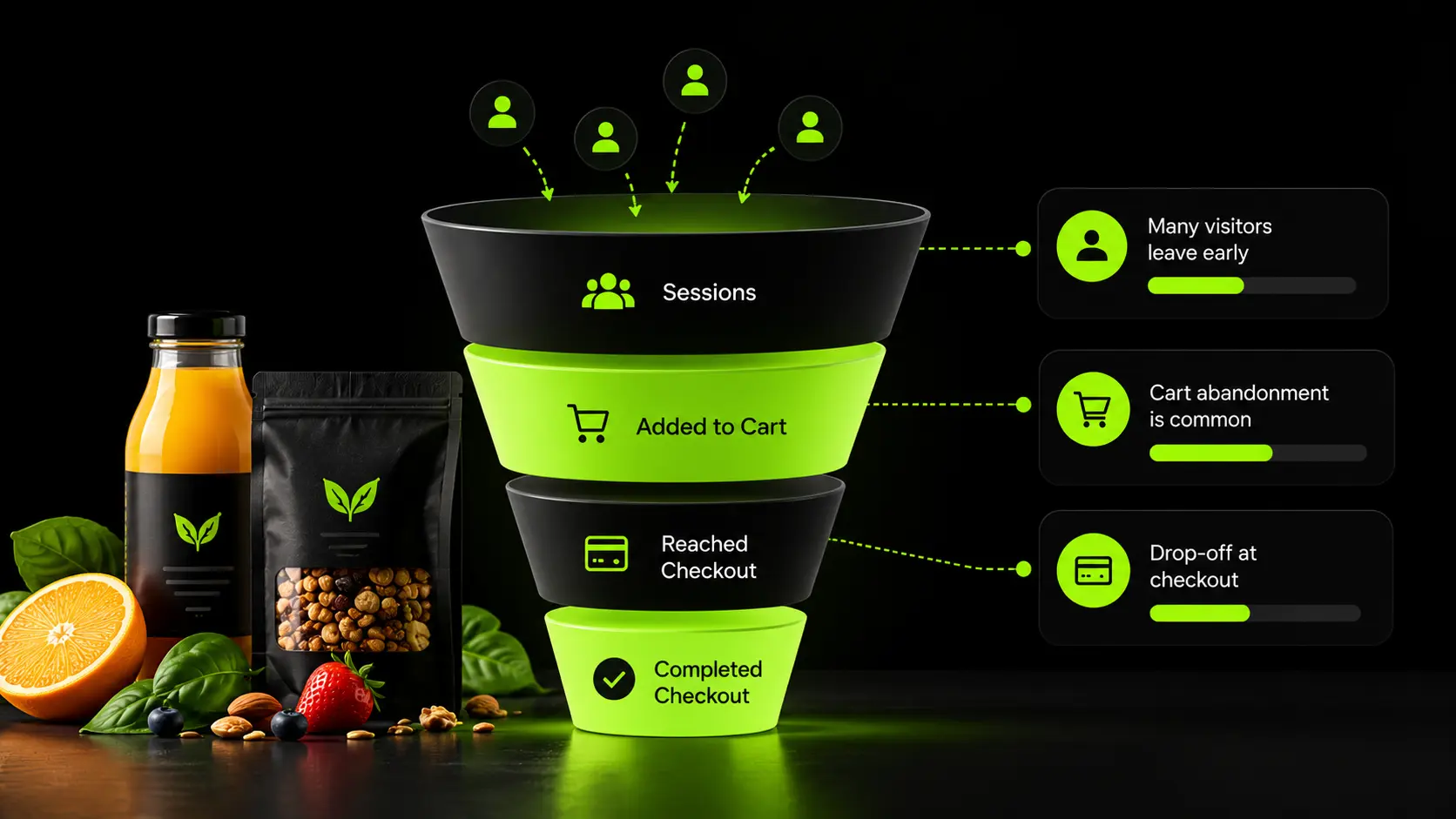
Shopify Analytics provides a conversion funnel covering four stages: Sessions, Added to Cart, Reached Checkout and Completed Checkout.
Look at the conversion rate between each stage, not just the total numbers.
- Low Add-to-Cart Rate: The product page, offer or traffic match may be the problem. If an ad promises a discount but the landing page shows full-price products, shoppers may leave without adding anything to their cart.
- Low Cart-to-Checkout Rate: Unexpected shipping costs, VAT added late or a confusing cart experience may be putting shoppers off.
- Low Checkout Completion Rate: Missing payment methods, forced account creation, complicated forms or unclear delivery information may be preventing purchases.
Symptom, Likely Cause and First Fix
Add the Qualitative Layer
Analytics shows where shoppers leave. Customer feedback helps explain why.
Use session recordings and heatmaps to identify hesitation, repeated clicks and confusing page elements. Microsoft Clarity offers free tools, while Hotjar and Lucky Orange provide paid alternatives.
A simple post-purchase survey can reveal useful insights: "What almost stopped you from buying?" Review customer support tickets and WhatsApp conversations as well.
For GCC stores, questions about COD availability, delivery times and returns can reveal information shoppers cannot easily find on product pages.
Shopify's search reports are another useful source. Zero-result and no-click queries can expose gaps in product discovery.
Baymard Institute's cart abandonment research reports an average abandonment rate of around 70% across its studies. Its research also suggests that checkout design improvements offer substantial opportunities to increase conversions. Treat these figures as context, not a forecast for your store.
The goal is to identify the biggest leak, understand what causes it and fix that problem before moving to the next one.
Shopify CRO Tips by Funnel Stage
Once you know where shoppers are dropping off, focus on fixing that part of the buying journey. Improving page speed will not solve a checkout problem, and changing checkout will not help much if shoppers never add products to their carts. Start with the biggest issue your data reveals.
Speed and Core Web Vitals: Check Apps Before Changing Themes
Slow mobile pages can hurt the shopping experience, and third-party app scripts are one possible cause. Google's recommended Core Web Vitals targets are:
- Largest Contentful Paint (LCP): 2.5 seconds or less
- Interaction to Next Paint (INP): under 200 milliseconds
- Cumulative Layout Shift (CLS): below 0.1
Use Shopify's Web Performance report to review real-user data. PageSpeed Insights can help identify specific problems, but lab results do not always reflect how customers experience your store.
Removing an app does not always remove its scripts from your theme. Check for leftover code before installing more speed apps. Shopify's CDN also supports modern image formats such as WebP and AVIF, so start with good-quality source images.
If your store is still slow after removing unnecessary apps, look at theme code, image loading and third-party scripts. Our guide to why your Shopify website is slow covers the common causes and how to investigate them.
Navigation, Collection Pages and Search
Shoppers should be able to find relevant products without digging through several menus. Put bestsellers and important categories where customers can find them quickly, and use collections such as "Best Sellers" and "Back in Stock" to simplify browsing.
Review Shopify's search reports for zero-result queries and searches that produce no clicks. Configure synonyms and filters in the Search & Discovery app so shoppers can find products even when they use different terms from your catalogue. For example, someone searching for "trainers" should still find relevant products listed as "sneakers."
Product Page CRO Tips
Product pages are often the first stop for paid traffic, so make the important information easy to find on mobile.
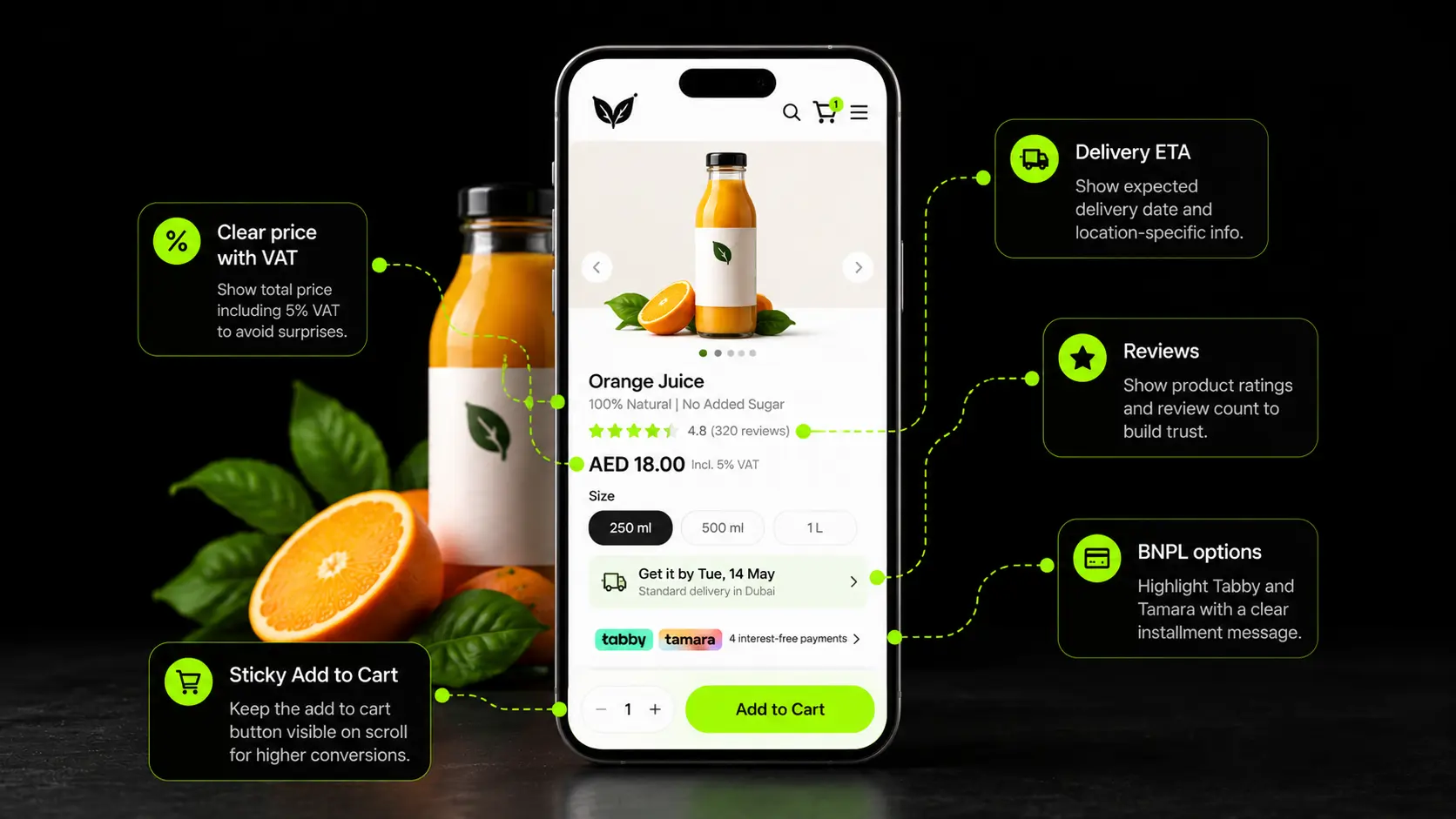
Prioritise the product price, delivery estimate, review count and main selling point near the top of the page. Add a sticky add-to-cart button where it improves usability. Arrange product images to show the item in use, its size, its texture and its packaging.
Use customer support questions to build useful FAQ sections. If shoppers regularly ask about delivery areas, sizing or returns, answer those questions before they reach checkout.
Where buy now, pay later (BNPL) is available, show the instalment amount on the product page. This helps shoppers understand the payment option before deciding whether to add the item to their cart.
Cart and Cart Drawer
The cart should make it easy to proceed, not introduce new surprises.
Show shipping costs and delivery estimates early, and use a progress indicator to explain how much more a shopper needs to spend to qualify for free shipping. Offer one or two relevant add-ons rather than overwhelming customers with recommendations.
Place return information and brief trust messages near the checkout button. Shopify has cited a Live Bearded test in which a cart drawer with additional trust icons increased conversions by 18% over the baseline. That result came from one store, so test the approach with your own customers before adopting it.
Checkout: What You Can Change on Shopify
Shopify's checkout customisation options depend on your plan and the features available to your store. Standard plans support checkout branding and certain post-purchase page customisations, while more advanced checkout customisations may require Shopify Plus. Check Shopify's current documentation before planning changes, as available features can evolve.
Shop Pay and other accelerated checkout options can reduce the effort required to complete an order. Shopify has reported conversion improvements for Shop Pay compared with guest checkout, although the results depend on the study and comparison used.
Before upgrading, check whether checkout limitations are actually causing your conversion problem. If shoppers are abandoning product pages or carts, fixing those issues may deliver more value than paying for advanced checkout customisation.
If your store needs capabilities beyond the standard checkout, this guide on when to upgrade to Shopify Plus explains what to consider before making the move. For stores that do need more advanced functionality, Shopify Plus development can help tailor the experience to their requirements.
Post-Purchase and Returning Visitors
Follow up with shoppers who abandon carts or browse products without buying. Shopify Messaging and Klaviyo can help automate these emails, with timing and frequency adjusted to the customer journey.
Use the thank-you page for relevant reorder reminders, complementary products or referral prompts. For returning visitors who repeatedly browse without purchasing, look for unanswered questions about price, delivery, sizing or returns.
If these problems persist despite changes to the product page and checkout, a closer review of the buying journey may help identify what is holding customers back.
A structured conversion rate optimization process can help pinpoint those barriers and prioritise improvements based on their likely business impact.
The aim is to address the reason a shopper hesitates rather than repeatedly sending discounts. Measure the results through completed orders, revenue per session and profitability.
Shopify CRO for UAE and GCC Shoppers
A Shopify store selling in the UAE faces a different set of conversion challenges from one targeting US customers.
Payment preferences, cash on delivery (COD), Arabic shopping experiences and delivery expectations all influence whether someone completes an order. These details deserve attention alongside the usual CRO work on product pages, carts and checkout.
Get the Payment Mix Right First
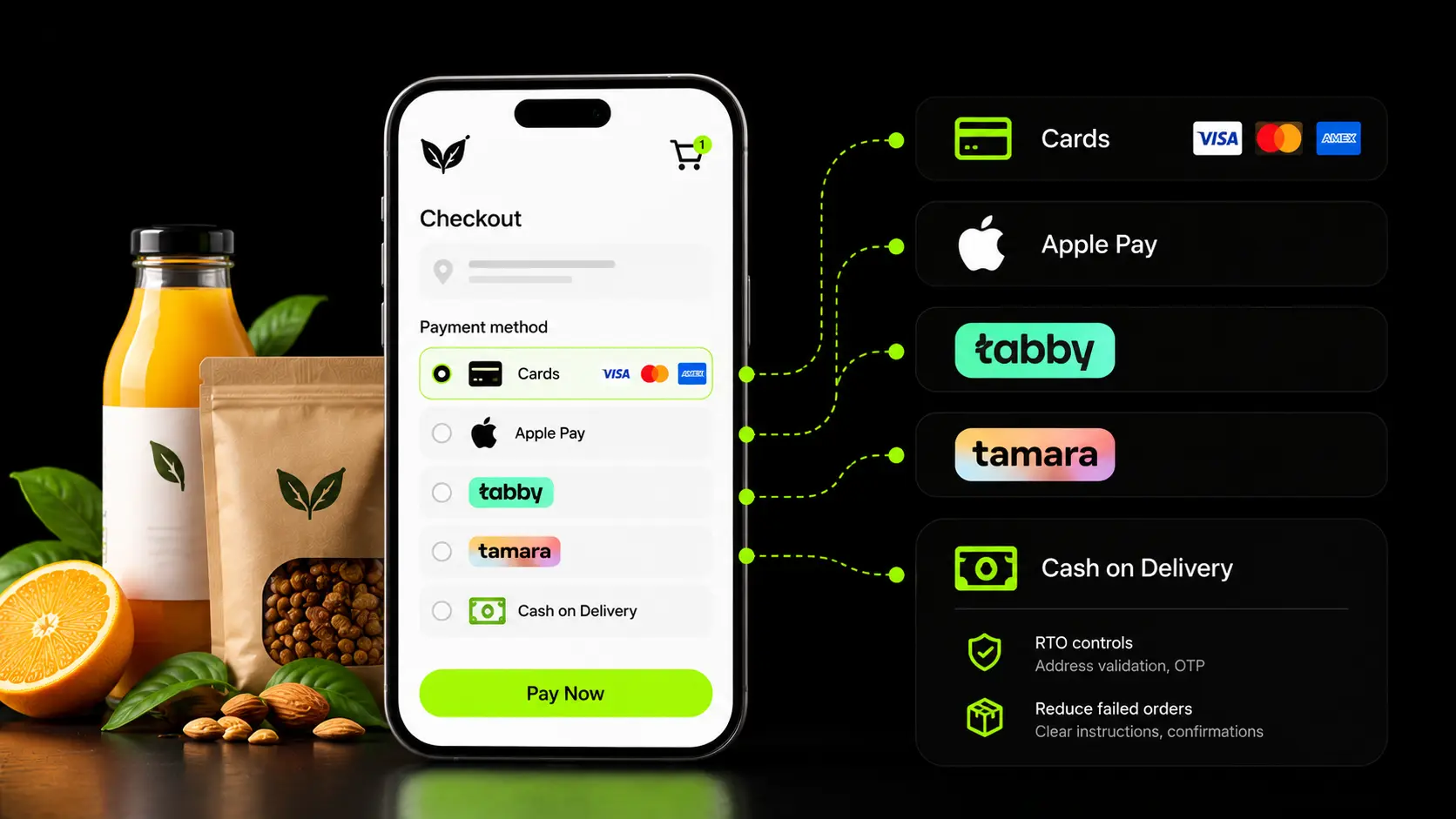
Payment options can make a real difference to checkout completion. UAE shoppers use bank cards and digital wallets, while buying now, pay later (BNPL) services such as Tabby and Tamara give customers another way to pay.
Shop Pay Installments is not a standard GCC BNPL solution, so merchants should investigate local providers and confirm current eligibility, integration requirements and fees before choosing one. Some stores offer both Tabby and Tamara to give customers more flexibility.
Tabby advertises an 18% conversion lift and a 33% increase in average order value. These are vendor-reported claims, not guaranteed outcomes.
Measure the effect on your own store by comparing checkout completion, average order value and contribution margin before and after introducing BNPL.
COD still matters for some customer groups, particularly first-time buyers and shoppers outside major urban centres.
Do not remove it simply because prepaid payments are easier to manage. Instead, review how much revenue it generates against the cost of refused deliveries and returns.
Keep COD Without the RTO Cost
Cash on delivery can help customers feel more comfortable placing an order, but it becomes expensive when parcels are returned to origin (RTO). Failed deliveries can mean additional courier charges, return shipping costs and lost sales.
A few measures can help reduce these losses:
- Confirm Orders Before Dispatch: Use OTP verification or WhatsApp confirmation to check that the customer intends to receive the parcel.
- Test Partial Prepayment: A deposit of 10% to 20%, with the balance due on delivery, may reduce low-intent orders. Test customer response before making it standard.
- Make BNPL Visible Earlier: Display eligible payment options on product pages so customers can consider them before reaching checkout.
Track BNPL adoption, COD RTO rate and checkout completion together. For COD-heavy stores, delivered orders divided by sessions can provide a more realistic measure of sales performance than placed orders alone. Keep placed-order conversion as a separate metric so you can identify where orders are being lost.
Localize the Shopping Experience
Localization affects customer confidence as well as usability. Arabic storefronts need a properly implemented right-to-left (RTL) layout, including mirrored interface elements, sensible form-field order and readable product descriptions. Poorly translated content can make an otherwise professional store feel unreliable.
Show prices in AED and make the applicable 5% VAT clear. UAE consumer-facing prices should include VAT where required; adding an unexpected tax charge at checkout can damage trust and create compliance issues.
Delivery estimates should be specific to the customer's location. If you offer same-day or next-day delivery in Dubai or Abu Dhabi, state the relevant conditions and cut-off times on the product page rather than leaving customers to discover them at checkout.
For higher-priced products, a visible WhatsApp support option can help shoppers resolve questions about specifications, delivery or returns before committing to a purchase.
These details also need to work across markets, currencies and languages. If you are expanding beyond the UAE, our guide to international ecommerce setup explains the considerations involved in preparing a store for international customers.
Two issues are worth checking first during a GCC store audit: whether COD is difficult to find at checkout, and whether BNPL options appear only after shoppers have already added a product to their cart. Making payment choices clearer earlier in the journey can help customers decide with fewer surprises.

How to Prioritize and Test Shopify CRO Changes
Most Shopify stores have more potential improvements than they have time or traffic to test. The challenge is deciding what to fix first and how to tell whether the change actually helped.
Score Ideas Before Building Them
The PIE framework helps you compare ideas using three factors: Potential, Importance and Ease. Score each from 1 to 10, then calculate the average to rank your options. The examples below are illustrative; use your own funnel data to decide what deserves attention.
A high score does not guarantee a result. It helps you prioritise ideas based on the size of the problem, its likely business impact and the effort required to address it. If your data shows that product pages are losing shoppers, start there rather than redesigning the homepage.
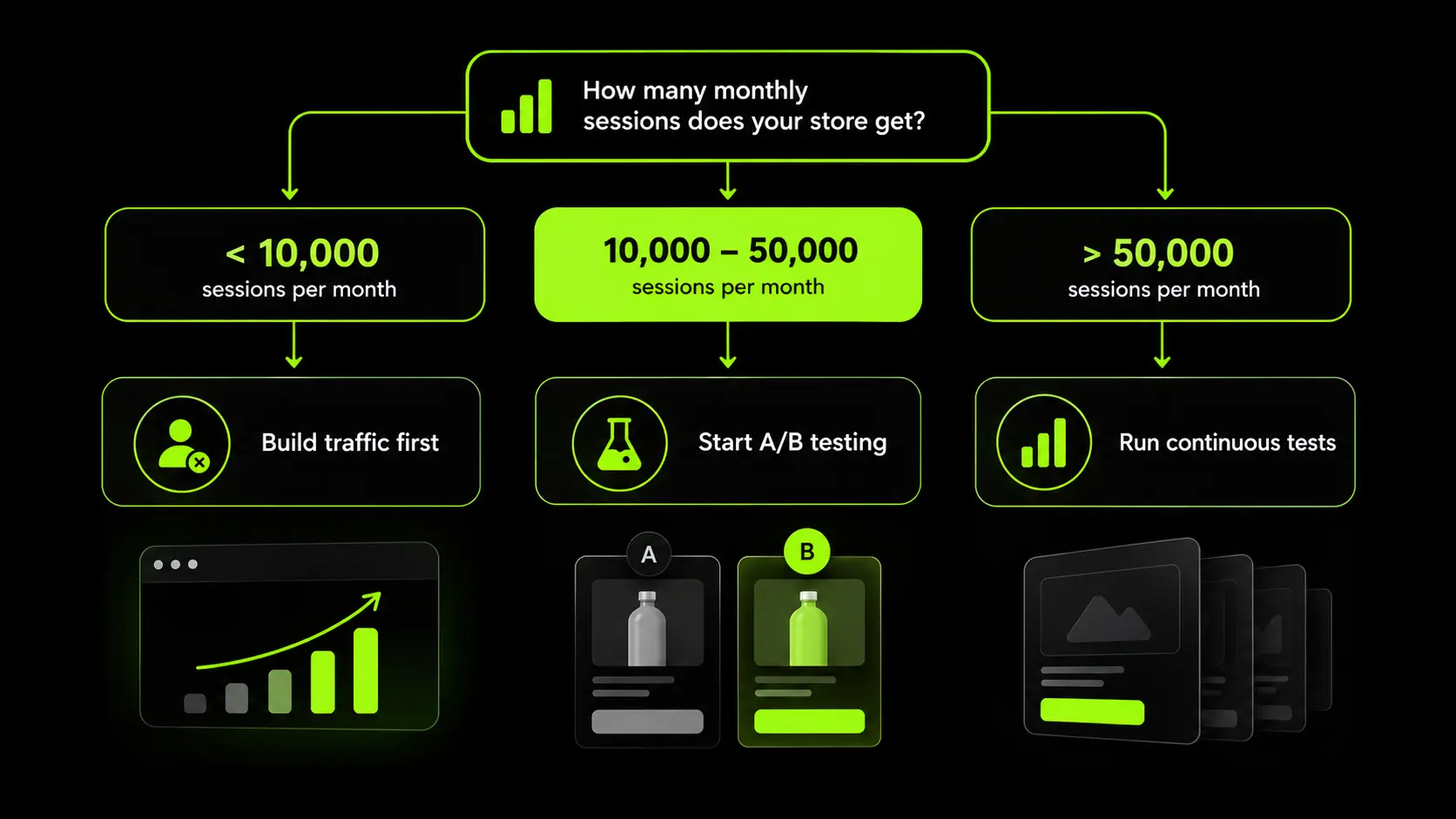
Make Sure You Have Enough Traffic to Test
Small conversion improvements can require substantial traffic to measure reliably.
For example, detecting a relative lift from 2.0% to 2.2%, with a 95% confidence level and 80% statistical power, typically requires around 78,000 sessions per variant under standard assumptions. The exact requirement depends on the statistical method and test setup.
If your store cannot support a properly powered test, focus on clear problems such as missing payment options, unexpected delivery costs or a difficult mobile checkout. Minor copy and button-colour tests are unlikely to provide a reliable answer quickly.
Choose a Testing Tool That Fits the Job
- Shopify Rollouts: Designed for controlled storefront and checkout experiments, subject to current availability and feature support.
- Shopify SimGym: Uses simulated AI shoppers to evaluate storefront changes without relying on live experiment traffic. Simulation results do not replace real customer data.
- Intelligems: Supports experiments involving pricing, shipping and offers.
- Shoplift: Focuses on testing storefront themes and page layouts.
Check each tool's current Shopify compatibility, plan requirements and features before committing to it.
What to Do When You Do Not Have Enough Traffic
You can still improve your store without running a formal A/B test. Use analytics, customer feedback and usability observations to identify clear problems, then release changes in a controlled way.
Record the release date and compare performance over at least four weeks, ideally against a comparable period with a similar traffic mix.
Account for seasonality, promotions and changes in advertising spend, and annotate important releases in GA4.
Track revenue per session alongside conversion rate, average order value and contribution margin. A higher conversion rate is useful only if the change also makes commercial sense.
The goal is to identify the biggest leak, prioritise the fix, measure its impact and use what you learn to choose the next improvement.
Shopify CRO Mistakes That Quietly Cost Revenue
Many conversion problems come from fixing the wrong things or making changes without understanding why shoppers leave. These are some common mistakes worth checking during a Shopify CRO audit.
- Installing Too Many Apps: Extra apps can add scripts and slow down your store, particularly on mobile. Check whether an existing feature or a small theme adjustment can solve the problem before adding another app.
- Showing Pop-Ups Too Early: An immediate pop-up can interrupt shoppers before they have seen the product or understood the offer. Give visitors time to browse, and test triggers that make sense for the page and device.
- Running Discounts Too Frequently: Regular sitewide sales can encourage customers to delay purchases until the next promotion. Test bundles, product benefits and value-based offers before relying on another discount.
- Copying US CRO Tactics into GCC Stores: Payment preferences and delivery expectations vary by market. Make sure your payment options suit local shoppers, including relevant BNPL providers such as Tabby and Tamara, and assess COD based on its effect on delivered orders and return-to-origin costs.
- Ending A/B Tests Too early: A test that appears to be winning after a few days may simply be showing normal variation. Decide the sample size and test duration in advance, and avoid declaring a winner before you have enough reliable data.
- Prioritising the Homepage Over Product Pages: If 60% to 70% of your paid traffic lands on product pages, improvements to those pages may have a greater impact than a homepage redesign. Check your landing-page reports before deciding where to spend development time.
- Using Fake Scarcity Timers: Countdown timers that reset or imply stock is running out when it is not can damage customer trust and create consumer-protection risks. Use genuine stock information and real promotion deadlines instead.
The common thread is simple: understand what is stopping shoppers from buying before introducing another app, discount or redesign. Focus your time on the changes that address a demonstrated problem, then measure their effect on revenue and profitability.
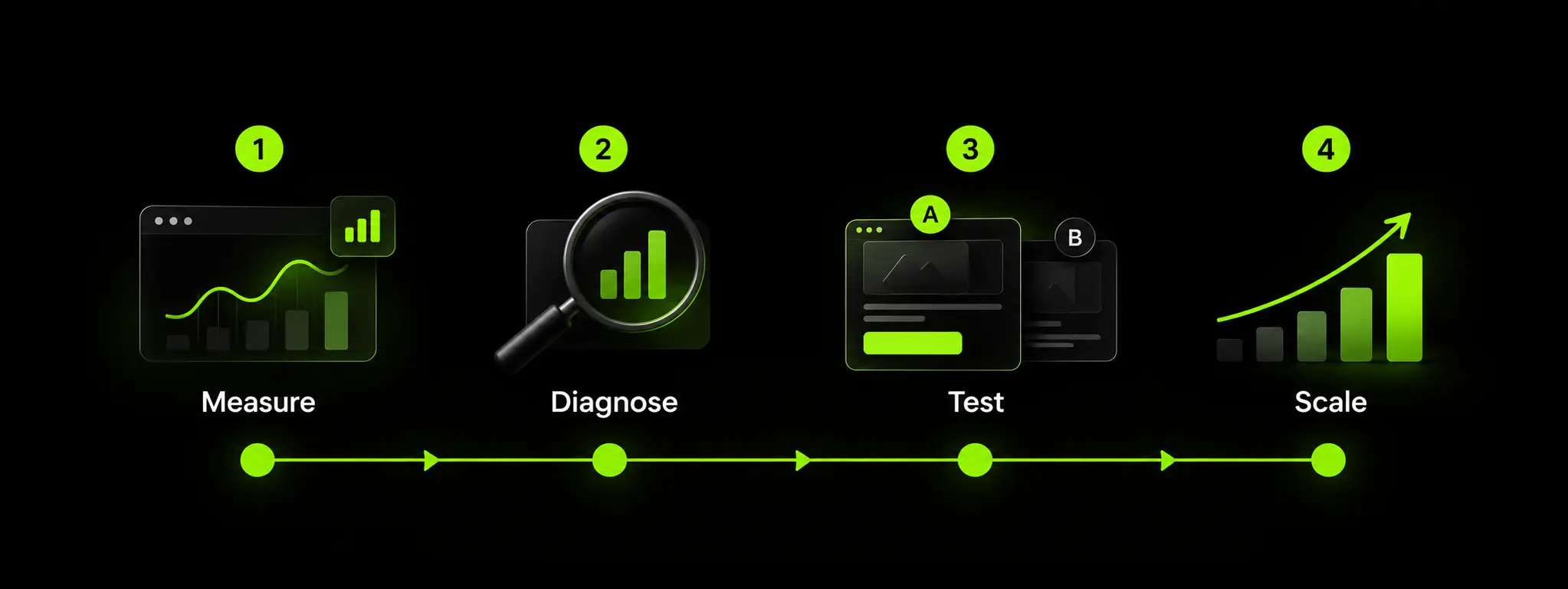
A 90-Day Shopify Conversion Rate Optimization Roadmap
Shopify CRO works best when improvements follow a clear sequence. Start by making sure your data is reliable, identify where shoppers drop off, fix the biggest problems, and then measure the results before increasing traffic.
Avoid increasing ad spend simply because the calendar says it is time to scale. First, check whether the main conversion issues have been addressed and whether revenue per session and contribution margin support further investment.
By the end of 90 days, you should have a reliable performance baseline, a record of changes made, evidence of what worked, and a prioritised list of improvements for the next quarter.
How Suplex Approaches Shopify Conversion Rate Optimization
Our CRO process starts by identifying where a Shopify store loses potential customers. We review the conversion funnel, analyse shopper behaviour and prioritise improvements based on their likely impact on revenue and profitability.
We begin with a Shopify audit to identify issues affecting conversions, from slow mobile pages and confusing product information to cart abandonment and checkout friction. Our UX design, Shopify development and D2C data analytics teams work together to implement changes and measure their results.
Based in Dubai, we help brands selling across the UAE, Saudi Arabia and international markets address regional shopping requirements. This includes:
- Setting up local payment options such as Tabby and Tamara.
- Improving cash-on-delivery flows and order confirmation.
- Designing Arabic right-to-left (RTL) storefronts.
- Configuring Shopify Markets for international selling.
- Improving mobile usability and site performance.
Not every store needs an agency. In-house teams can often manage routine updates, merchandising and simple landing pages. Specialist support becomes more valuable when a project involves a major redesign, platform migration, complex multi-market setup or technical improvements.
We also recommend fixing the underlying problem before investing in larger projects. If shoppers rarely add products to their carts, the issue may be your offer or product positioning rather than the design. Similarly, upgrading to Shopify Plus may not be worthwhile while product page and cart problems remain unresolved.
Our conversion rate optimization service covers the process from diagnosis and implementation to performance measurement.
The goal is simple: identify the problem, make the right changes and measure whether they improve your store's commercial performance.
Frequently Asked Questions About Shopify Conversion Rate Optimization
What Is a Good Conversion Rate for a Shopify Store?
The average Shopify store converts at about 1.4%. Above 3.2% is the top 20%, and above 4.7% is the top 10%. Beauty and food brands often reach 4% to 5%, while luxury and jewelry can sit below 1%. Compare against your own category and trailing 90-day baseline, split by traffic source and device.
How Do I Increase My Shopify Conversion Rate?
Check the Shopify conversion funnel to see whether shoppers leave before add-to-cart, in the cart or at checkout. Fix the largest drop-off first. Usual causes are unclear product pages, surprise shipping or VAT costs, missing payment methods and slow mobile pages from app scripts. Validate changes with tests or controlled before-and-after comparisons.
How Long Does Shopify CRO Take to Show Results?
Speed fixes, payment additions and checkout friction fixes often show impact within 2 to 4 weeks. A/B tests usually need 4 to 12 weeks, depending on traffic and lift size. A structured program takes about 90 days to go from measurement to validated improvements.
Do I Need Shopify Plus for Conversion Rate Optimization?
No. Most high-impact work happens on product pages, collection pages, the cart and site speed, which are available on every plan. Plus matters when the remaining problem sits inside checkout, such as reordering payment methods. Fix the storefront first.
Can I Run A/B Tests on a Low-Traffic Shopify Store?
Only for large changes. Detecting a 10% relative lift at a 2% baseline needs roughly 80,000 sessions per variant. Lower-traffic stores should test bold changes, use SimGym for simulated feedback and rely on research-led releases measured over matched periods.
What Is the Difference Between CRO and SEO?
SEO brings qualified visitors through search visibility. CRO raises the share of those visitors who buy. They overlap on speed, mobile usability and search intent. SEO is measured in rankings and traffic. CRO is measured in conversion rate and revenue per session.
Hi, I’m Rishabh Jain
I believe great digital experiences have the power to shape perception, build trust, and move businesses forward. That belief led me to found Suplex Design Studio, a global digital design and development studio helping FMCG and D2C brands build websites and digital experiences that are strategic, thoughtful, and commercially meaningful.
I started Suplex at 25 with a clear intent, to create digital experiences that look appealing, work seamlessly, and help D2C businesses grow. By 28, the studio had scaled globally, guided by a strong foundation in integrated design that I developed during my academic journey in London, where I was honoured with the Dean’s Award.
Over the years, I’ve had the opportunity to work with 100+ brands, from Fortune 500 organisations to family-run businesses, helping them build websites, e-commerce experiences, and digital products that create clarity, credibility, and long-term value.
Our work has been recognised internationally, including the Manifest Award (2024), the Clutch Global Award (2025), and features across platforms such as The Dieline, Packaging of the World, and the World Brand Design Society.
None of this would be possible without the people behind the work. I’m deeply grateful to the Suplex team, whose commitment, creativity, and attention to detail turn ideas into meaningful digital experiences every day.
At the heart of our work is a simple philosophy, digital design should be intentional, functional, and built to create real business value. That continues to guide everything we create at Suplex.






























Let’s Make It Happen
E-Commerce Success Stories

%201.avif)






.avif)
.avif)
Build Your D2C Business The Right Way
Build It With Suplex.


