Shopify Development for Abaya Brands in the UAE: How to Build a Store That Fits
.avif)
Shopify Development for Abaya Brands in the UAE: How to Build a Store That Fits
Building a Shopify store for an abaya brand involves more than standard fashion features. Customers need accurate garment lengths, made-to-measure options and clear product details, especially during Ramadan and Eid.
The opportunity is substantial: global Muslim spending on modest fashion reached approximately USD 347 billion in 2024, according to the State of the Global Islamic Economy Report 2025/26.
From our experience designing high-end ecommerce stores, here is our guide covering product setup, custom sizing, seasonal planning and GCC expansion.
Why Abaya Stores Need More Than a Standard Fashion Setup
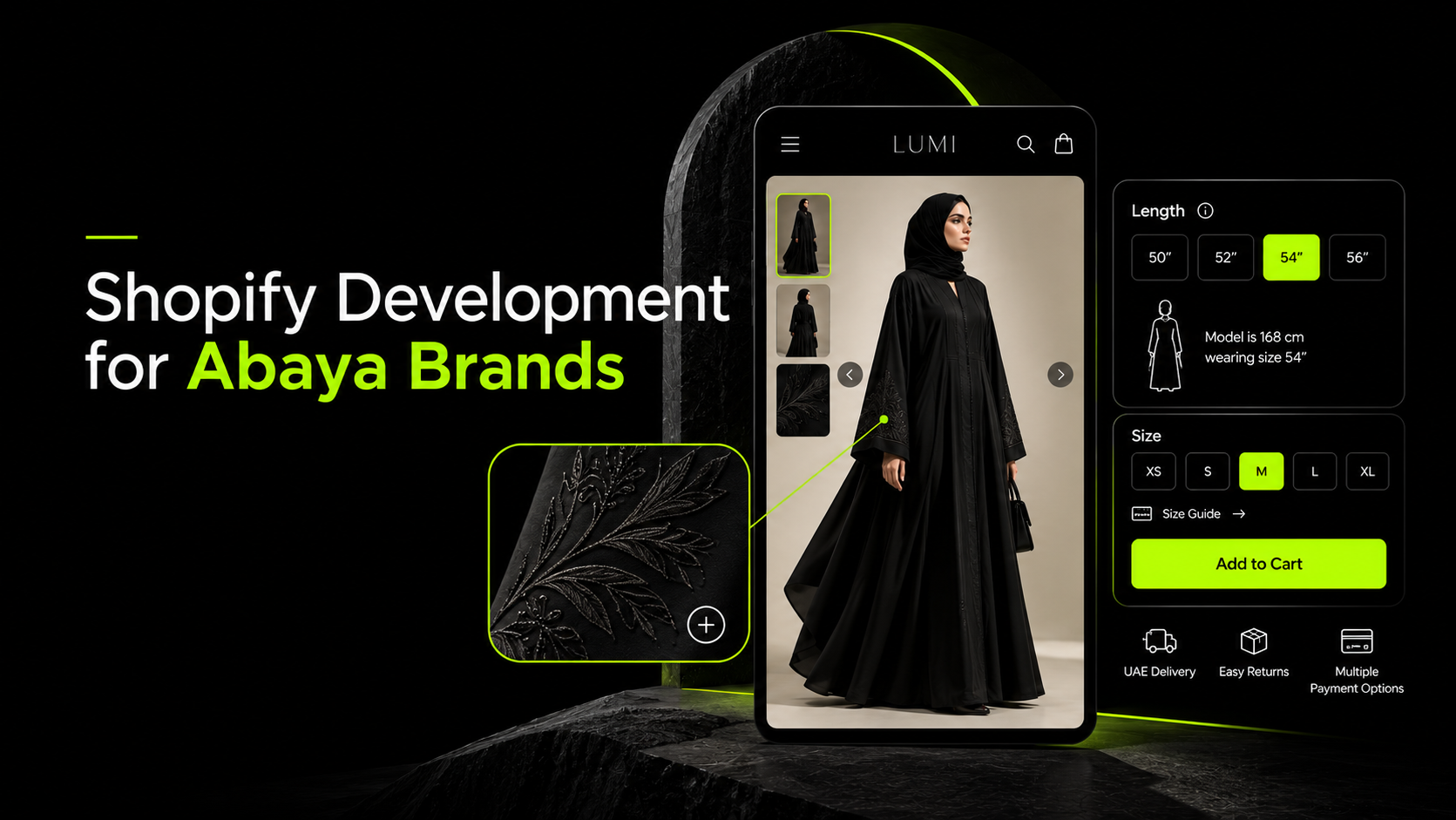
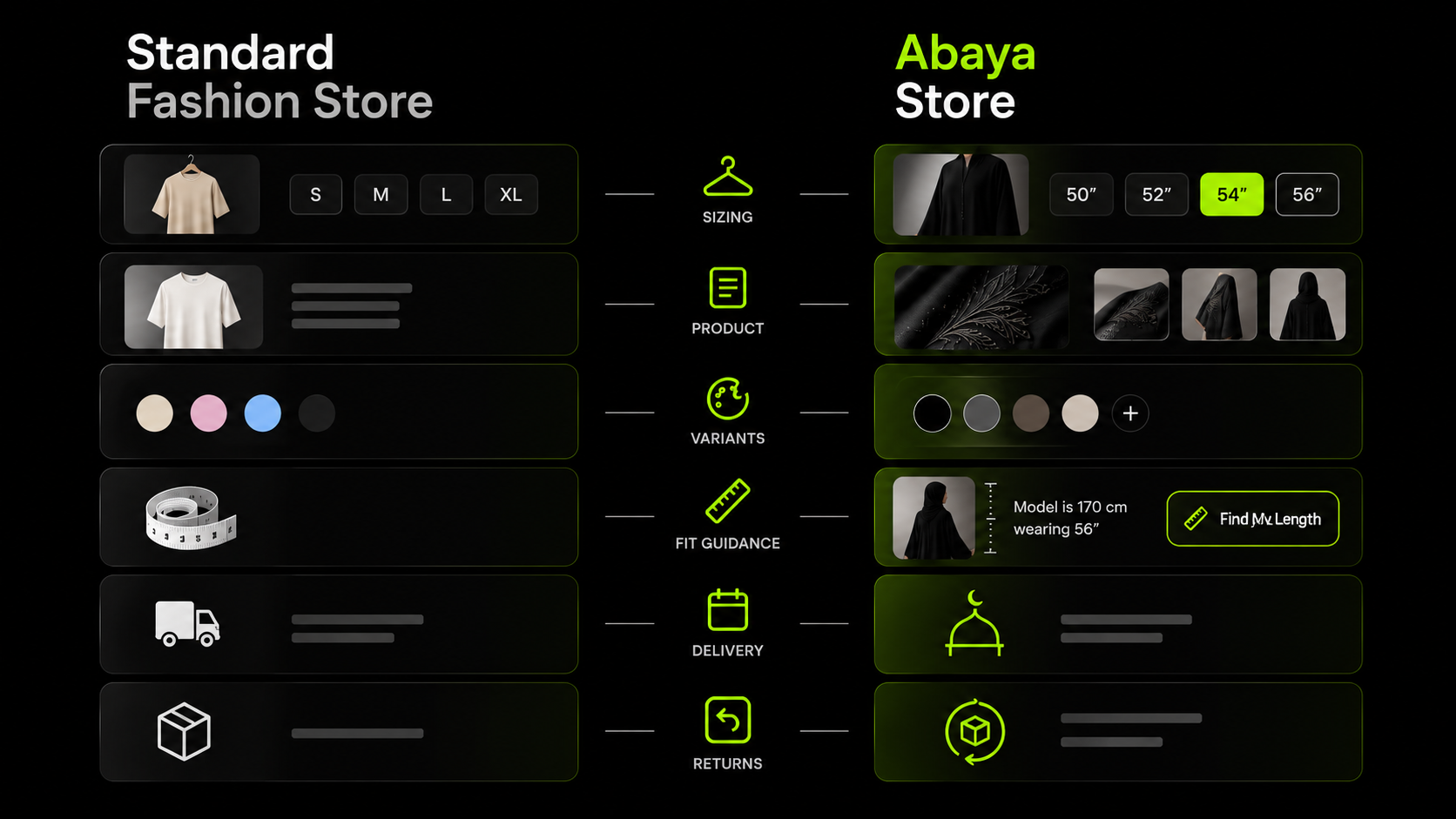
Abayas have specific sizing, styling and fulfilment requirements that many standard fashion templates do not address. A customer choosing between 54-inch and 56-inch lengths needs more than an S/M/L selector.
Similarly, two black abayas may look alike in a thumbnail but differ in their cut, embroidery, sleeves or trim.
These differences affect how the Shopify catalogue, product pages, inventory and checkout should be configured.
If garment length is treated like an ordinary size variant, or similar designs lack clear identifiers, customers may order the wrong item or struggle to compare products.
Seasonal demand adds another layer of complexity. Brands need to coordinate stock, production capacity and delivery cut-offs before Ramadan and Eid campaigns begin.
The store’s structure should reflect how customers choose and order abayas, rather than forcing these products into a generic fashion setup.
The same principle applies to broader fashion ecommerce, where navigation, product information and fit-focused design shape the shopping experience.
The Length Problem: Why Abaya Sizing Breaks Generic Shopify Setups
Wrong-length orders are a common challenge for abaya brands. A standard size chart may not be enough because garment lengths and height recommendations vary between retailers.
Height-to-Length Charts Differ Between Brands
A 56-inch abaya does not guarantee the same fit everywhere. Amsons associates this length with a height of approximately 167–173 cm, while Aab Collection’s chart places it around 163–168 cm.
That difference can affect where the hem falls. It also means shoppers cannot reliably transfer their usual length from one brand to another.
Differences in measurement methods, garment cuts and footwear recommendations can all influence the result.
What Your Product Pages Should Include
Give shoppers product-specific information rather than relying on one chart for the entire catalogue.
- Garment Measurements: Display length, bust or width, sleeve and shoulder measurements where relevant. Clearly distinguish garment measurements from body measurements.
- Model Details: Show the model’s height and the length she wears.
- Length Recommendations: Let shoppers enter their height and footwear preference to receive a suggested length for that design.
- Fit Descriptions: Explain whether the cut is loose, tailored, butterfly-style or features wing sleeves.
- Sleeve Adjustments: If alterations are available, state the options on the product page.
A length recommendation should account for the individual design. Two abayas with the same stated length may hang differently because of their cut and construction.
How to Structure Abaya Sizing in Shopify
Variants: Use length, size or width, and colour for selectable options with their own inventory requirements. Plan the structure before adding products, especially when designs have many combinations.
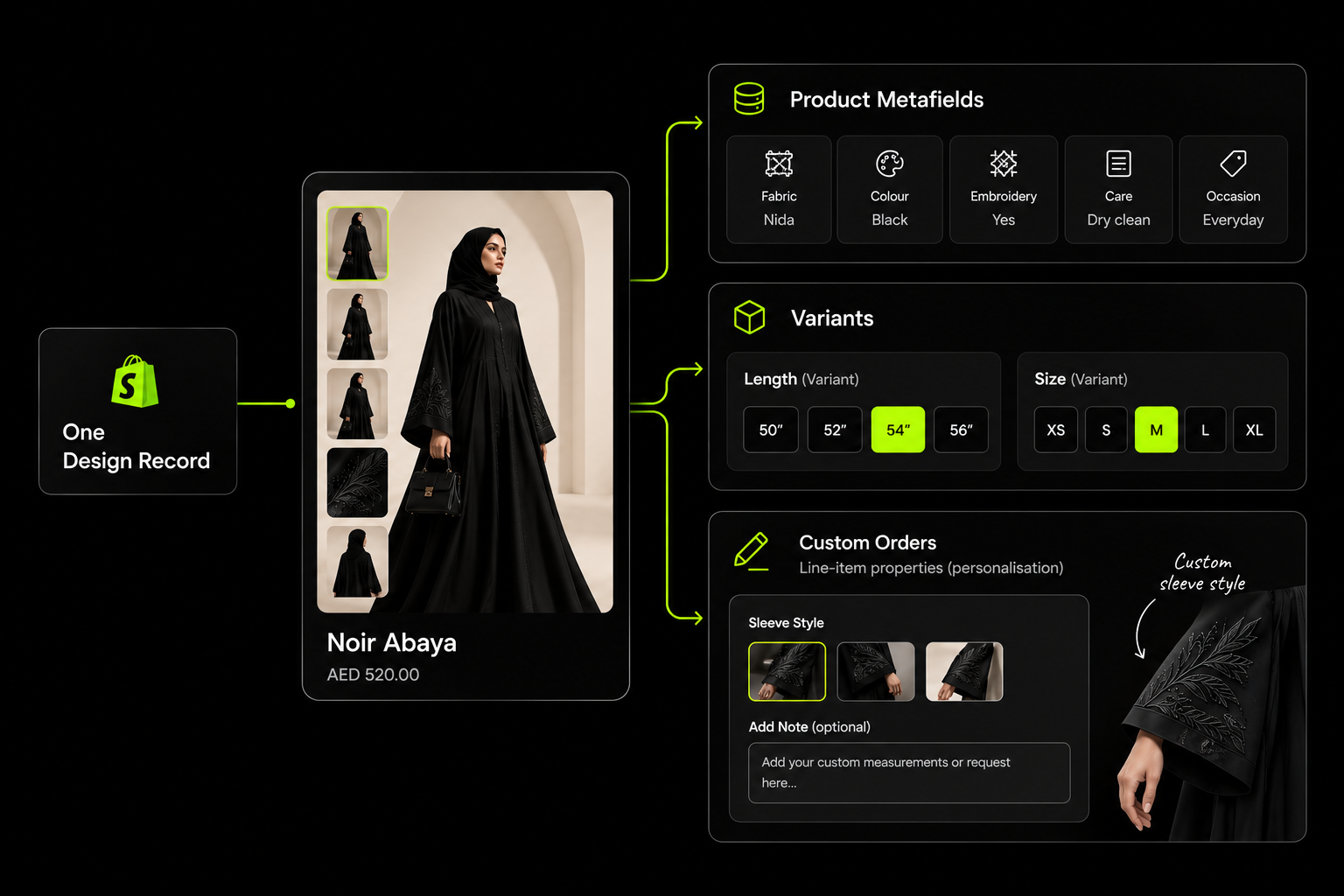
Metafields: Store each product’s measurements, model information and fit notes separately. This allows the correct details to appear on each product page instead of applying a generic chart to every design.
Customer reviews: Where your review app supports it, collect the shopper’s height, purchased length and fit feedback. These details help future customers compare their experience with someone of a similar height.
Variant limits: Check Shopify’s current variant and option limits before building the catalogue. Products with multiple lengths, widths and colours may require a different setup or a compatible product-options solution.
The aim is to make each abaya’s sizing clear enough for shoppers to choose based on your measurements, rather than relying on assumptions from another retailer.

Product Structure: One Design, One Record
When several abayas share the same colour, clear catalogue organisation helps customers distinguish one design from another. Each design needs its own product record, consistent identification and detailed product information.
Give Every Design Its Own Listing
Use separate product listings for distinct designs, with front, back and close-up images showing embroidery, cuffs, fabric and other defining details.
Avoid reusing images across similar pieces, as shoppers need to see exactly what differentiates each style.
Keep Design References Consistent
Assign every design a unique name or reference code and use it across the English and Arabic storefronts, invoices and customer conversations.
For example, a design named “Layla” in English and “ليلى” in Arabic should retain the same reference code in both versions.
This makes it easier to identify the correct item when handling orders, exchanges or WhatsApp enquiries.
Use Metafields for Product Details
Store key attributes in dedicated Shopify metafields instead of burying them in product descriptions.
- Fabric type and commercial name
- Embellishments and trim
- Sleeve style and closure
- Included items, such as a matching sheila or inner dress
- Occasion and care instructions
- Ready-stock or made-to-order status
- Estimated production or dispatch time
Structured information can then support product-page details, collection organisation and filters.
Separate Stocked Variants from Custom Requests
How you configure product options affects inventory accuracy.
- Variants: Use these for stocked combinations such as length, size and colour. Each combination can have its own inventory level.
- Line-item properties: Use these to collect order-specific details, such as custom garment length or sleeve measurements. These properties record the customer’s request but do not create inventory-tracked variants automatically.
If made-to-measure orders require additional production tracking, connect the collected details to a suitable fulfilment workflow.
Build Collections Around Shopping Intent
Organise collections around categories customers recognise, such as everyday wear, workwear, occasionwear, bridal, Ramadan and Eid.
Add relevant filters for length, sleeve style, fit, fabric, colour and embellishment. Someone shopping for a particular length can narrow the catalogue directly, while someone looking for an Eid outfit can begin with the occasion collection.
This structure gives customers different ways to browse without creating unnecessary duplicate listings. The same principles of fashion ecommerce navigation and filtering apply, but the product attributes should reflect how abaya shoppers compare designs.
Made-to-Measure and Custom Orders on Shopify
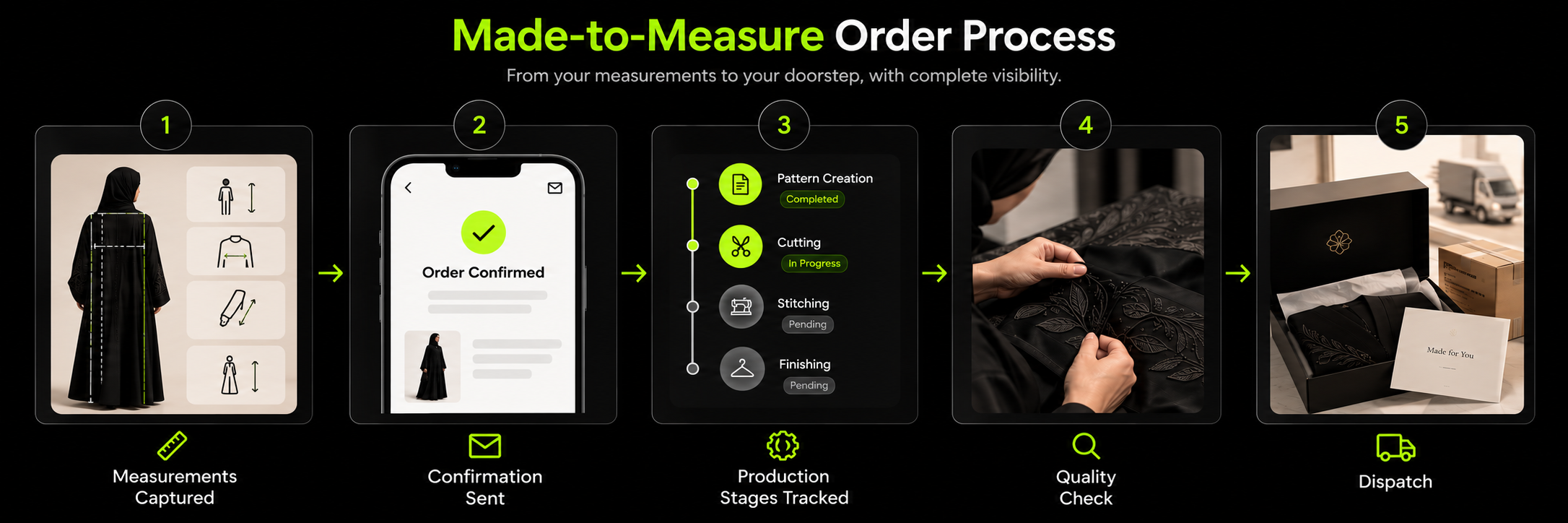
Custom abaya orders need a clear process from measurement submission to production and delivery. Shopify can collect customer details, but brands also need a reliable way to confirm measurements, manage production stages and communicate custom-order terms.
1. Collect Measurements Clearly : Use a product options app or custom form to capture the details required by your tailoring process, such as:
- Desired garment length
- Bust or body measurements, as required
- Sleeve length
- Additional fit or design instructions
Keep the form focused on measurements your team actually uses. Add a short measuring guide or video beside it to help customers enter consistent information.
2. Confirm Details Before Production: Send customers a summary of their submitted measurements by email or WhatsApp. Ask them to verify the details before the order moves into production.
This gives customers an opportunity to correct entry errors before fabric is cut. Make the confirmation step part of your order workflow, rather than relying on staff to remember it for each order.
3. Display Lead Times and Order Status: Show estimated production and dispatch times on the product page, close to the purchase button, and repeat the relevant information during checkout.
Use order tags or a connected production tool to track stages such as:
- Measurements confirmed
- Cutting
- Stitching
- Quality check
- Dispatched
Send updates at meaningful stages so customers know what is happening without having to contact the store for progress reports.
4. Set Payment and Returns Terms :Custom garments may be difficult to resell if a customer refuses delivery or cancels after production begins. Consider requiring full prepayment or a deposit, with clear terms explaining when production starts and whether deposits are refundable.
Explain the returns, cancellation and alteration policies before checkout. Make sure these terms comply with applicable UAE consumer protection requirements; do not assume every made-to-measure item is automatically exempt from consumer rights.
5. Price Custom Options Properly : If customers can request extra length, sleeve adjustments or additional embroidery, show the extra charge before they add the item to their cart.
A compatible product options app may support additional fields and price adjustments, but check its current features and compatibility before choosing one.
Finally, distinguish ready-to-wear products from made-to-measure items. Their fulfillment times are different, so product pages and checkout messaging should set realistic expectations for each type.
Photographing and Presenting Black-on-Black Designs
When several abayas share a similar silhouette and colour, product photography needs to reveal the details that set each design apart.
Poor lighting or missing close-ups can make different fabrics and embellishments difficult to distinguish.
Show the Details That Matter
Include close-up images of embroidery, cuffs, stitching, trims and fabric texture. Use high-resolution images that let shoppers inspect these features before ordering.
Keep Fabric Colours Accurate
Use consistent lighting and colour correction across the catalogue. Crepe, chiffon and nida can look almost identical in poorly lit photographs, even though their texture and drape differ. Accurate imagery helps customers understand what they are buying.
Show How the Abaya Moves
Add short videos showing the garment while walking or moving. These clips can communicate how the fabric falls, how wide sleeves behave and how the silhouette looks in motion—details that static images may not fully convey.
Choose a Consistent Presentation Style
Depending on the brand and audience, products can be shown on models with hijab styling, through faceless crops, or on mannequins and ghost forms.
Whichever approach you choose, apply it consistently so customers can compare products easily.
Clarify What Comes with Each Abaya
State whether the price includes a matching sheila, inner dress or belt. If these items are sold separately, show that clearly on the product page and offer related products where appropriate.
This helps customers understand the complete outfit before reaching checkout.
Protect Page Speed
High-resolution imagery and video can make product pages heavy, particularly when several assets appear together. Compress images without sacrificing important detail, lazy-load images below the fold and optimise video delivery.
Set performance targets during development and test pages on mobile devices before launch. Shopify performance optimisation service covers ways to improve loading speed without compromising the shopping experience.
Ramadan and Eid: Preparing Your Abaya Store for Peak Demand
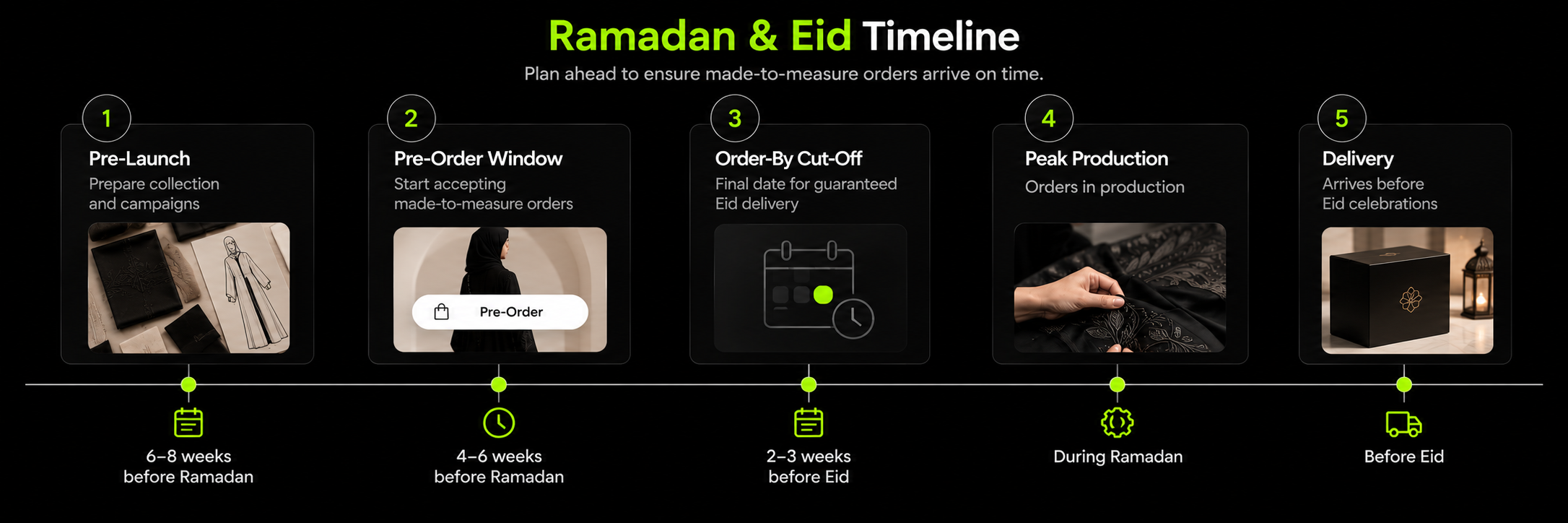
Ramadan and Eid can bring a sharp increase in orders, making stock availability, production capacity and delivery planning especially important.
Preparing the store early helps prevent missed delivery promises and gives customers time to shop with confidence.
Prepare Collections Before the Season
- Publish dedicated Ramadan and Eid landing pages ahead of the shopping period.
- Build interest with pre-launch collections and waitlists.
- Offer pre-orders with specific estimated dispatch dates.
- Set stock limits for designs with limited production capacity.
Set Clear Eid Delivery Deadlines
Display order cut-off dates for Eid delivery, taking into account each emirate and GCC destination. Where available, offer express shipping for customers ordering closer to the occasion.
Work backwards from the expected delivery date, allowing time for production, quality checks, dispatch and courier transit. Confirm seasonal dates when planning campaigns, as Ramadan and Eid move each year.
Match Orders to Production Capacity
Made-to-measure pieces often require more time than ready-to-wear products. If your team cannot fulfil custom orders before Eid, reduce availability or close orders early.
Update product pages with realistic production timelines instead of accepting orders you may not deliver on time.
Adjust Customer Support Hours
Shopping activity may extend into the evening during Ramadan. Consider adjusting WhatsApp support hours and displaying response times clearly so customers know when to expect assistance.
Avoid Risky Changes Near the Peak
Complete major theme updates, app changes and checkout testing well before the busiest period. Freeze non-essential changes in the final two to three weeks unless a critical fix is needed. Monitor site performance, stock levels and checkout errors throughout the campaign.
Seasonal planning should cover the entire shopping journey, from campaign pages and product availability to fulfilment and customer support. For more on seasonal conversion planning, see our conversion rate optimisation service.
Selling Across the GCC From a UAE Shopify Store
Expanding from the UAE into Saudi Arabia, Qatar and Kuwait requires more than enabling international shipping. Each market brings its own currency, payment preferences, delivery expectations and customs requirements.
Configure Shopify Markets
Set up each target country with its supported currency, pricing rules and relevant tax and duties settings. For example, shoppers may expect prices in AED in the UAE, SAR in Saudi Arabia, QAR in Qatar and KWD in Kuwait.
Review delivery estimates and shipping charges for each destination. A single delivery promise across the GCC may not reflect differences in transit times or customs processing.
Offer Locally Relevant Payments
Payment preferences vary by market. Saudi customers may expect Mada, while buy-now-pay-later services such as Tabby and Tamara may be available in selected GCC countries.
Check each provider’s current country coverage, eligibility requirements and Shopify integration before displaying these methods at checkout. Availability should be confirmed for your business and target market, not assumed from the provider’s regional presence.
Plan Cross-Border Fulfilment and Returns
Before opening a new market, confirm:
- Which courier services cover the destination
- How customs documentation and applicable duties will be handled
- Whether customers pay import charges at checkout or on delivery
- How returns, exchanges and refunds will work across borders
- What international delivery and return costs mean for your margins
Clear sizing information is especially valuable when customers face the additional cost and delay of returning an abaya internationally.
Payments, Language and Trust
For abaya brands selling in the UAE and wider GCC, checkout options, language quality and clear policies can influence whether customers feel comfortable placing an order.
Choose payment methods based on your customers, order types and provider eligibility.
- Apple Pay: Supports a convenient checkout experience on compatible devices.
- Tabby and Tamara: Consider these BNPL options if your business and products meet the providers’ requirements.
- Cash on delivery (COD): If offered for ready-to-wear items, use order confirmation to help reduce refused deliveries.
- Custom orders: Consider requiring prepayment or a deposit, with the terms explained before purchase.
Confirm payment availability and conditions with each provider before adding its logo or option to your store.
Make the Arabic Experience Complete
Translate more than the homepage and navigation. Product descriptions, garment measurements, size guides, custom-order forms, checkout messages and customer notifications should all support the languages you offer.
Keep product names and reference codes consistent across Arabic and English. Test right-to-left layouts, form fields and number entry on mobile devices to ensure customers can complete an order without confusion.
If you are planning a bilingual store, Suplex’s article on Arabic-English ecommerce website development in the UAE covers relevant localisation considerations.
Make essential information easy to find:
- Business Details: Display accurate UAE contact information and relevant business credentials.
- Product Accuracy: Describe fabrics, lining, care requirements and included accessories honestly.
- Useful Reviews: Where available, include customer photos and feedback about height, purchased length and fit.
- Clear Exchange Terms: Explain whether customers can exchange an abaya for another length, including any conditions, costs and time limits.
For shoppers uncertain about sizing, a clear exchange policy can reduce hesitation. Make sure the policy matches your actual fulfilment process and applicable consumer protection requirements.
Moving From Instagram and WhatsApp to Shopify
For abaya brands that sell through Instagram and WhatsApp, moving to Shopify changes how products are presented, orders are managed and payments are collected. The goal is to organise routine transactions without losing the personal service customers value.
Keep Social Channels Connected
Shopify can handle product listings, checkout and inventory, while social channels continue to support product discovery and customer conversations.
- Connect Instagram and Facebook for product tagging, where eligible.
- Add WhatsApp for styling advice and questions that need personal assistance.
- Send order confirmations and production updates through suitable email or WhatsApp integrations.
A detailed product page should answer common questions about garment length, fabric, fit and included accessories.
This gives customers the information to choose confidently while leaving your team more time for personalised styling advice.
Prepare Before Migration
Use this checklist to get the store ready:
- Product Catalogue: Assign every design a consistent reference code.
- Product Information: Add garment measurements, fabric details and fit notes.
- Photography: Identify designs that need clearer images or close-up shots.
- Customer Data: Import customer information only where you have the appropriate consent and permissions.
- Store Policies: Prepare shipping, exchange, returns, privacy and custom-order terms.
- Payments and Fulfilment: Set up payment providers, courier accounts and delivery rules.
- Order Handling: Define how ready-to-wear, made-to-order and custom orders will be processed.
Before launch, test the complete journey from selecting an abaya and entering custom measurements to payment, order confirmation and fulfilment.
A well-organised Shopify store can reduce repetitive manual work and make inventory easier to manage, while Instagram and WhatsApp remain valuable customer channels. For the broader launch process, see how to launch a Shopify store.
How Suplex Approaches Shopify Development for Abaya Brands
Suplex is a Dubai-based Shopify and ecommerce agency with experience in fashion ecommerce. While we do not have a published abaya client project, our work with fashion brands informs how we approach the category’s specific requirements.
For Miho, a contemporary clothing brand on Shopify, our work included customer personas, information architecture, product filters, wireframes and a visual system.
We also conduct independent reviews of fashion websites, including SKIMS and Alo Yoga. These audits examine aspects such as navigation, product information, fit guidance and reviews. Neither brand is a Suplex client.
Our proposed approach would address the requirements discussed throughout this article:
- Product organisation: Give each design a unique reference that stays consistent across Arabic and English.
- Length and Fit: Display garment-specific measurements and, where appropriate, provide a length recommendation tool.
- Custom Orders: Collect measurements, confirm customer details before production and communicate lead times.
- Ramadan and Eid Preparation: Plan seasonal collections, order cut-offs and stock availability around production capacity.
- GCC Selling: Configure relevant currencies, payment methods and delivery options for each target market.
- Arabic Localisation: Plan right-to-left layouts and translated product details across the complete shopping journey.
The final scope would depend on the brand’s catalogue, production process, customer base and expansion plans. These requirements should be assessed before selecting a theme, apps or custom development work.
Our fashion experience provides a starting point for that planning, while the specific abaya workflow needs to be defined around each brand’s operations.
Frequently Asked Questions
Is Shopify Suitable for Abaya Brands in the UAE?
Shopify can support abaya stores selling ready-to-wear and made-to-measure designs. It offers product variants, metafields, custom product options and international selling features. Your setup should also account for UAE payment methods, cash-on-delivery rules, Arabic content, inventory and local delivery requirements.
How Should I Set Up Abaya Sizes and Lengths on Shopify?
Create variants for stocked options such as garment length, size and colour. Use product metafields to display each design’s measurements, fit notes and model details. A length recommendation tool can help shoppers choose, but it should reflect your brand’s measurement method rather than rely on a universal size chart.
Can Shopify Support Made-to-Measure Abayas?
Yes. A product form or compatible app can collect measurements such as desired length, bust and sleeve dimensions. Send the details to the customer for confirmation before production, display realistic lead times and define payment, cancellation, returns and alteration terms clearly.
How Can I Prepare My Abaya Store for Ramadan and Eid?
Publish seasonal collections early, build interest through waitlists or pre-orders, and set stock limits based on production capacity. Display delivery cut-off dates for each destination and restrict custom orders when there is insufficient time to fulfil them before Eid. Prepare customer support and test checkout well before the busy period.
Can I Sell Abayas to Saudi Arabia and Other GCC Markets Through Shopify?
Yes. Shopify Markets can help configure international selling, including market-specific pricing and currencies. You will also need suitable payment providers, cross-border couriers, customs arrangements and a workable returns process. Check local payment requirements, such as Mada in Saudi Arabia, and confirm each provider’s current availability for your business.
Hi, I’m Rishabh Jain
I believe great digital experiences have the power to shape perception, build trust, and move businesses forward. That belief led me to found Suplex Design Studio, a global digital design and development studio helping FMCG and D2C brands build websites and digital experiences that are strategic, thoughtful, and commercially meaningful.
I started Suplex at 25 with a clear intent, to create digital experiences that look appealing, work seamlessly, and help D2C businesses grow. By 28, the studio had scaled globally, guided by a strong foundation in integrated design that I developed during my academic journey in London, where I was honoured with the Dean’s Award.
Over the years, I’ve had the opportunity to work with 100+ brands, from Fortune 500 organisations to family-run businesses, helping them build websites, e-commerce experiences, and digital products that create clarity, credibility, and long-term value.
Our work has been recognised internationally, including the Manifest Award (2024), the Clutch Global Award (2025), and features across platforms such as The Dieline, Packaging of the World, and the World Brand Design Society.
None of this would be possible without the people behind the work. I’m deeply grateful to the Suplex team, whose commitment, creativity, and attention to detail turn ideas into meaningful digital experiences every day.
At the heart of our work is a simple philosophy, digital design should be intentional, functional, and built to create real business value. That continues to guide everything we create at Suplex.



























Let’s Make It Happen
E-Commerce Success Stories

%201.avif)






.avif)
.avif)
Build Your D2C Business The Right Way
Build It With Suplex.


