How to Launch a Shopify Store in the UAE: A Step-by-Step Plan for Brands (2027)
.avif)

How to Launch a Shopify Store in the UAE: A Step-by-Step Plan for Brands (2027)
Your Shopify store can go live in a day, but a single payment issue, incorrect tax setting or broken checkout can cost you sales from day one.
Launching successfully in the UAE requires more than a great-looking storefront. You need the right business setup, approved payment gateways, reliable delivery options and accurate conversion tracking.
As an experienced ecommerce agency working with brands on custom ecommerce solutions, Suplex has put together this guide to help D2C and FMCG brands launch or relaunch their Shopify stores in the UAE in 2027, avoid common mistakes and prepare for a smoother launch.
What Launching a Shopify Store Actually Involves
Building a Shopify store covers the theme, products and pages. Launching goes further, requiring business readiness, payment setup, tracking, testing, go-live and post-launch monitoring. Teams that treat these as the same task risk costly mistakes.
Before getting started, it helps to understand how to build a Shopify store and define the design and development scope.
Before going live, Shopify requires three things: a paid subscription plan, a store address under Settings → General → Business details, and a payment method configured with test mode turned off. During the free trial, the store remains behind a password page.
Once these prerequisites are met, you can launch through the Home page launch card, the Online Store access menu, or Online Store → Preferences → Store access. For UAE brands, payment setup can take the longest because it depends on business licensing and gateway approval. That is why launch planning should start with business readiness, not design.
The password page can also serve as an early demand-capture opportunity, allowing you to build interest before the store goes live.
Phase 0: Business and Legal Readiness (Do This Before You Build)
Business and legal readiness should come before development because licensing, banking and payment approvals can determine your launch timeline.
UAE: Licensing Comes First
Online businesses in the UAE need the appropriate commercial licence and permissions for their activities. Common routes include:
- Mainland Licence: A commercial licence with ecommerce activity from the relevant emirate's economic department.
- Free zone Licence: Check whether the chosen free zone permits your intended sales model, particularly sales to mainland customers.
- Dubai e-Trader Licence: Confirm current eligibility, permitted activities and fees with Dubai's Department of Economy and Tourism (DET) before applying.
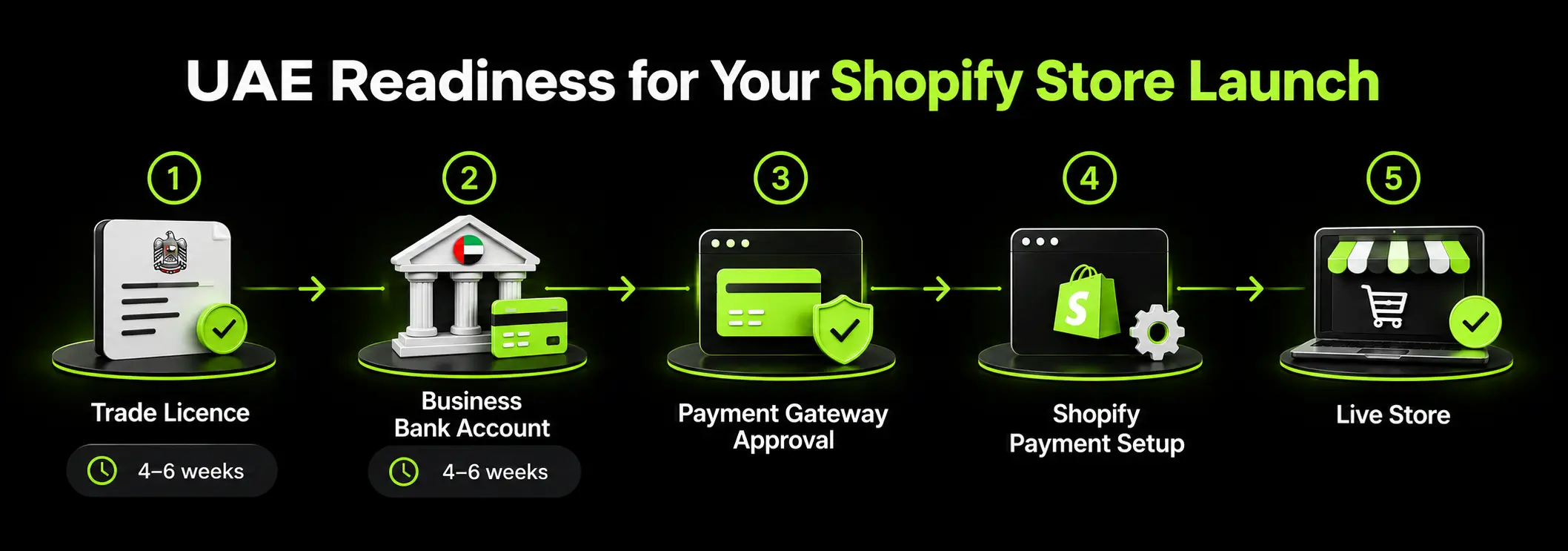
Once your licensing requirements are clear, the next steps typically involve opening a business bank account, securing payment gateway approval and configuring payments in Shopify. Requirements vary by provider and business structure, so confirm them before development begins.
This sequence matters for your launch timeline. If store development takes four weeks but licensing and banking take six, the project could take six weeks or longer, even if the store is ready earlier.
VAT and Pricing Rules
The UAE applies 5% VAT. Consumer-facing prices should include VAT where required. Mandatory VAT registration generally applies when taxable supplies and imports exceed AED 375,000, with voluntary registration available above AED 187,500, subject to the applicable rules. Verify the current requirements with the Federal Tax Authority.
Configure Shopify's tax settings before adding product prices. Setting up taxes later can create inconsistencies in displayed prices and require product or checkout adjustments.
Selling Outside the UAE
If you plan to sell internationally, check:
- Business registration requirements in your operating country.
- Sales tax or VAT registration obligations in each target market.
- Privacy and cookie consent requirements, including GDPR and UK GDPR where applicable.
- Product-category restrictions in each market.
These requirements vary by location and business model, so consult official resources or a qualified adviser before expanding internationally.
Legal readiness is part of launch planning, not an afterthought. If you need help evaluating your platform requirements, integrations and payment setup before development begins, discuss your project through our platform consultation service.
Phase 1: Choose Your Plan and Set the Foundations
Your Shopify plan affects more than your monthly subscription. If you use a third-party payment gateway, Shopify's additional transaction fee can also affect your operating costs. Compare both before choosing a plan.
Which Shopify Plan to Launch On
The right plan depends on your sales volume, reporting needs and payment setup.
Shopify charges an additional transaction fee when you use a third-party payment provider. The applicable fee depends on your plan, and payment processing charges are separate. Check Shopify's current pricing and payment provider requirements before committing, as availability and fees can change.
Example: A store generating AED 50,000 in monthly sales would incur AED 1,000 in additional transaction fees at 2%, compared with AED 500 at 1%. If the higher plan costs AED 250 more per month, the AED 500 fee saving would outweigh the subscription increase.
This is an illustrative calculation, not a complete cost comparison. Include payment processing charges, subscription pricing and other applicable fees when estimating your actual costs.
Domain, Store Settings and Markets
Configure your store's core settings before adding products and connecting external systems. This helps prevent unnecessary rework closer to launch.
- Custom Domain: Register the domain in your business's name and retain control of its ownership and renewal.
- Store Currency: Set AED as your store's default currency if that suits your primary UAE market and pricing strategy.
- International Selling: Configure Shopify Markets for the countries you plan to serve, including relevant currencies, pricing and market-specific settings.
- Staff Permissions: Create individual staff accounts with role-based permissions instead of sharing a single login.

Phase 2: Build the Store Experience
Your store's design, navigation and product content influence how easily customers find products and complete purchases. Focus on the decisions that matter most for launch, then refine the experience using customer feedback and performance data.
Theme: Template or Custom?
A template theme works well when your catalogue is small, your budget is limited and speed to market matters most.
A custom theme is worth considering when brand differentiation is important, the catalogue is complex, or you need a tailored Arabic and English experience with right-to-left (RTL) support.
A tailored theme offers a middle ground: customize an existing theme to match your brand without the cost of building everything from scratch.
If you're weighing these options, understanding the differences between custom and template ecommerce websites can help you choose the right approach. For brands that need greater design flexibility, custom Shopify themes offer more control over the shopping experience.
Navigation and Product Content
Plan your collections, menus and search before uploading products. Clear navigation helps shoppers find relevant products without having to work through unnecessary categories.
Each product page should include:
- Four to six clear product images, where appropriate.
- A benefit-led description that explains what the product offers.
- Essential size, material or specification details.
- Accurate delivery information.
- Metafields and filters where they improve product discovery.
For larger catalogues, a logical category structure becomes particularly important. For example, organizing 200 products into a few clear collections can make browsing easier than spreading them across too many categories. The key is to structure products around how customers actually shop.
Pages and Policies You Cannot Launch Without
Before launch, prepare your About, Contact, Shipping, Returns and Refund, Privacy Policy, Terms of Service and FAQ pages, as applicable to your business and legal obligations.
For UAE stores, make your contact details easy to find and consider adding a WhatsApp number for customer enquiries. If you offer an Arabic storefront, review the corresponding policies and support content in Arabic as well.
Avoid publishing generic template text without reviewing it. Your policies should reflect your actual delivery timelines, return conditions, business details and customer support process. Payment providers may also review your website and policies during onboarding.
Mobile-First Experience
Test every key template on a real phone before launch, including product pages, collection pages, search, cart and checkout. Check the experience on iOS Safari and Android Chrome, ideally using a mobile data connection as well as Wi-Fi.
Look for slow-loading images, difficult-to-tap buttons, overflowing text, confusing navigation and forms that are frustrating to complete on smaller screens.
Even a well-designed desktop store can lose customers if the mobile experience makes browsing or checkout difficult. Review these issues against practical ecommerce mobile optimization best practices before going live.
Phase 3: Payments, Shipping and Taxes
Payments, delivery and taxes need to work together before your Shopify store goes live. Delays in gateway approval or mistakes in shipping rates and tax settings can push back your launch or create problems for customers at checkout.
Payment Gateways: The UAE Reality
Shopify Payments availability in the UAE depends on eligibility requirements and plan restrictions. Check the latest requirements in the Shopify Help Center before choosing your payment setup.
If your store needs a third-party gateway, options used by regional merchants include Tap, Telr, PayTabs, Checkout.com and Ziina.
Approval can take one to three weeks, depending on the provider and your documentation. You may need a valid trade licence, a business bank account and a website with published policies.
To avoid delaying your launch, prepare your store and publish the required policies while your gateway application is under review. Keep the password page enabled until payment approval and testing are complete.
Beyond card payments, consider adding Apple Pay and Google Pay where supported, and buy now, pay later options such as Tabby and Tamara if your business qualifies.
If your customers expect cash on delivery (COD), consider confirmation through OTP or WhatsApp to reduce refused deliveries and return-to-origin (RTO) costs.
Your gateway choice affects transaction fees, supported payment methods and the checkout experience. Compare these factors before committing, especially if you're deciding which payment gateway to choose for UAE ecommerce.
Shipping Zones and Delivery Promise
Delivery expectations vary across the UAE, so configure shipping rates and estimated delivery times by emirate. Offer same-day or next-day delivery only where your courier can reliably meet that promise.
Connect your courier service before launch and test the complete order-to-fulfilment process. Decide on a free-shipping threshold, define any COD fee and communicate delivery costs clearly on product pages or in the cart rather than revealing unexpected charges only at checkout.
Taxes
Configure Shopify's tax settings for the UAE's 5% VAT and confirm that consumer-facing prices display VAT correctly. If you sell internationally, review the tax and pricing requirements for each market rather than applying the UAE setup everywhere.
Test product prices, discounts, shipping charges and checkout totals to ensure the displayed amounts match what customers are expected to pay.
Phase 4: Tracking, SEO and Performance Before Go-Live
Set up analytics, search visibility and performance checks before launch. Without tracking in place, you lose the opportunity to establish a reliable baseline for traffic, conversions and payment behaviour from day one.
Analytics and Consent
Configure GA4 through Shopify Customer Events or Web Pixels, install your Meta and TikTok pixels, and set up cookie consent for your target markets.
Before going live, complete a test order and confirm that the purchase event appears correctly in GA4, Meta Events Manager and TikTok Events Manager.
A pixel that tracks page views but misses purchases can distort your reporting and lead to poor marketing decisions.
SEO Basics
Prepare page titles, meta descriptions, clean URL handles and image alt text. Ensure your product and organization structured data are configured correctly, then submit your sitemap to Google Search Console after launch.
If you're moving from another ecommerce platform, URL redirects deserve extra attention. Map existing URLs to their relevant new pages using 301 redirects to help preserve search visibility and direct visitors to the right products. This is one of the key details to plan when preparing for a Shopify migration.
Speed Check
Keep your initial app stack lean. Every additional app can introduce scripts and affect loading speed, so install only what your store needs at launch.
After going live, monitor Core Web Vitals through Shopify's Web Performance report, which uses real-user data.
Check important landing pages, collection pages and product pages on mobile, and address performance issues that could interrupt the shopping experience.
Phase 5: Pre-Launch QA and the Test-Order Matrix
Before opening your Shopify store, test the complete customer journey, from product selection and payment to order confirmation, fulfilment and refunds.
Shopify recommends placing at least one test order during setup and repeating the test after changing payment settings.
Use Shopify Payments test mode, the Bogus Gateway where supported, or a real transaction that you refund afterward. Work through the scenarios below on mobile and desktop wherever applicable.
Beyond payment testing, check every important page and template for broken links, verify that contact forms reach the right inbox and confirm that your custom 404 page and favicon are in place.
Review social sharing images and ensure order notifications reflect your brand rather than using untouched default templates.
Finally, ask two or three people outside your team to test the store on their own devices. They may uncover confusing navigation, checkout errors or usability issues that your internal team has overlooked.
Use this Shopify store launch checklist to keep the final checks organized and ensure nothing important is missed.
Launch Day: Soft Launch vs Hard Launch
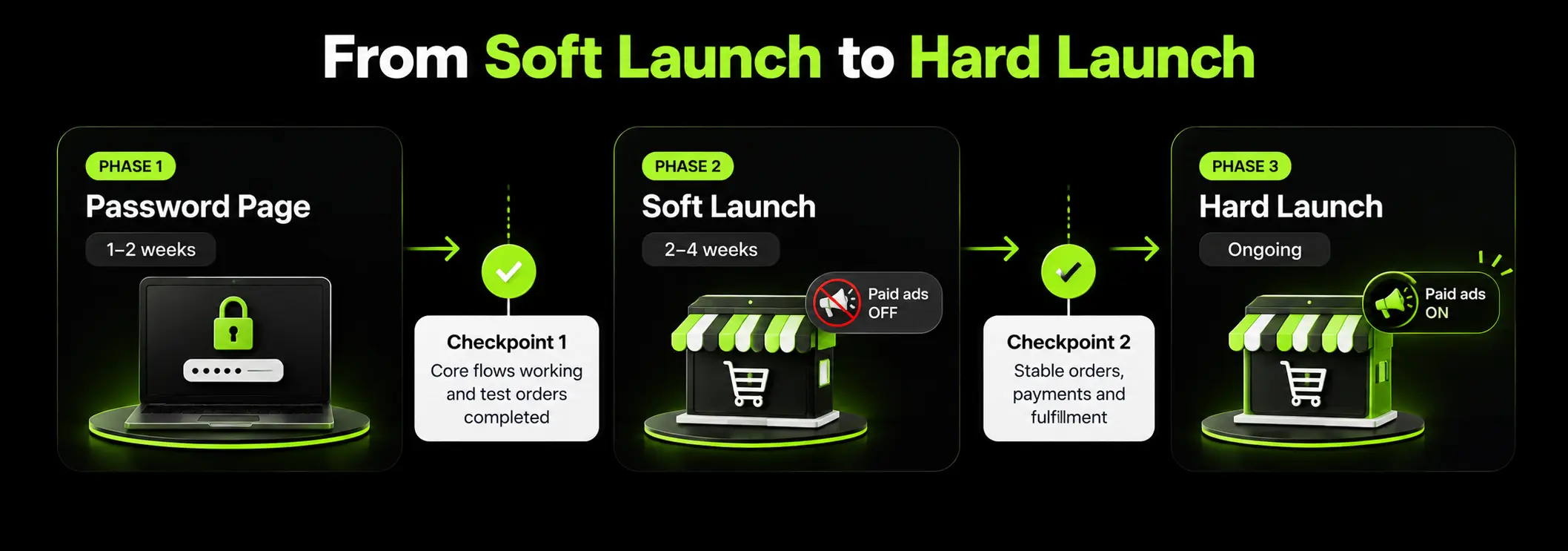
Launching your Shopify store is not a single event. A staged approach lets you identify problems with real orders before investing heavily in paid traffic.
Before You Open: Capture Demand on the Password Page
Use your Shopify password page to build interest while the store is still being prepared. Add an email or SMS signup form and your expected launch date so visitors have a reason to return.
If you're wondering how to create a coming-soon page on Shopify, the password page works well when the entire store is still private.
For individual products on an otherwise live store, use a notify-me option to collect interest before those products become available.
Soft Launch First
Open the store to your existing email list, friends and community for one to two weeks before spending heavily on paid ads.
During this period, monitor real orders, fulfilment and customer questions. Actual purchases can reveal payment failures, confusing shipping information and notification issues that controlled test orders may not uncover.
Paid traffic can amplify these problems before you have time to fix them. A checkout issue affecting even a small percentage of customers becomes more costly as order volume increases.
Launch-Day Monitoring Checklist
Check these areas every few hours on launch day:
- Live Orders: Confirm that orders appear correctly and move through the expected workflow.
- Payment Failures: Investigate failed transactions and recurring checkout errors.
- Checkout Abandonment: Look for unexpected drop-offs during checkout.
- Mobile Performance: Check loading speed and usability on mobile devices.
- Customer Support: Monitor your inbox and WhatsApp response times.
- Inventory: Keep an eye on stock levels, especially for bestsellers.
- COD Confirmation: Verify that confirmation messages are sent and orders are handled correctly.
The goal is to resolve issues quickly while keeping the customer experience smooth, then increase marketing spend once the store is operating reliably.
The First 30 Days After Launch
The first month helps you identify what is working, fix problems that slipped through testing and establish a baseline for future growth.
Rather than making changes at random, review performance each week and prioritize issues that affect customer experience and completed orders.
KPIs to Track From Week One
Record these metrics so you can compare performance over time:
- Sessions
- Conversion rate
- Average order value
- Add-to-cart rate
- Checkout completion rate
- Payment method mix, including COD share for UAE stores
- Return-to-origin (RTO) rate
For UAE stores that rely heavily on cash on delivery, track delivered orders alongside placed orders. A store with a 3% placed-order conversion rate and a 25% RTO rate may deliver fewer successful orders than a store with a 2.5% placed-order conversion rate and a 5% RTO rate.
Once you have enough data to identify where customers drop off, prioritize changes based on their likely impact. For example, if shoppers add products to their carts but leave after seeing delivery charges, clarify shipping costs earlier in the journey.
Your first month should give you a clearer picture of which improvements deserve attention next. When you're ready to prioritize those changes, Shopify conversion rate optimization can help you identify opportunities to improve the shopping experience and turn more visits into completed orders.
How Long Does It Take to Launch a Shopify Store in the UAE?
The time needed to launch a Shopify store depends on its complexity, catalogue size, integrations and business readiness. Licensing and payment gateway approval can extend the timeline, even when development finishes on schedule.
If licensing and payment gateway approval have not started, allow an additional two to six weeks, depending on the requirements and approval process.
This is why UAE brands should begin checking licensing and payment requirements before development gets underway, rather than waiting until the store is ready to launch.
Your project budget also depends on the scope of the build, design requirements and integrations. If you're comparing options, understanding the cost of responsive web design in Abu Dhabi can provide useful regional pricing context.
It's also worth accounting for hidden costs in Shopify projects, including apps, payment fees and ongoing maintenance, when planning your budget.
DIY, Freelancer or Agency: Who Should Launch Your Store?
The right approach depends on your budget, available time and the complexity of your Shopify store. Each option can work well, provided you understand what it covers and where the risks lie.
DIY: is a reasonable option for a first store with a small catalogue and straightforward requirements. The challenge is not necessarily building the storefront; it is completing the less visible launch tasks, including tax configuration, gateway approval, tracking and test orders.
Freelancer: can be a good fit when the requirements are clear and you need specialist support without the cost of a larger team. However, establish ownership, documentation, testing responsibilities and handover arrangements before work begins.
An Agency: is worth considering when the store plays a significant role in your business, requires a tailored brand experience, supports multiple markets or needs several integrations. A structured process, broader expertise and dedicated quality assurance can help manage that complexity.
Before choosing a partner, compare how they approach scope, testing, communication and ongoing support. If you're weighing individual developers against a team, this comparison of freelance Shopify developers and agencies can help you decide which approach fits your project.
How Suplex Launches Shopify Stores
Suplex is a Dubai-based Shopify agency helping brands launch stores that are ready to sell, accept payments and scale.
We follow a structured process from planning to post-launch optimization. It begins with discovery and UX planning, followed by theme design and development.
We then configure payments and store operations, set up analytics, test the customer journey, and support a soft launch before moving into 30 days of optimization.
UAE and GCC Ecommerce Expertise
For UAE brands, we handle the technical requirements that can complicate a launch, including:
- Payment gateway setup, Tabby and Tamara integration.
- Cash-on-delivery workflows with order confirmation.
- VAT-inclusive pricing and shipping configuration.
- Arabic storefronts with right-to-left (RTL) support.
- Shopify Markets for GCC and international expansion.
Shopify Projects We've Worked On
Our projects include Tea Culture of the World, Miduty and Great Lakes.
Not every store needs a custom build. A template may be sufficient for a simple catalogue, while complex integrations, bilingual storefronts and multi-market requirements may call for a tailored solution.
Frequently Asked Questions About Launching a Shopify Store in the UAE
How Do I Launch My Shopify Store?
Choose a paid Shopify plan, add your store address under Settings → General → Business details, and configure a payment method with test mode turned off. Place test orders to verify checkout, then remove the storefront password when everything is ready to go live.
How Long Does It Take to Launch a Shopify Store?
A simple store with a template theme and a small catalogue can take one to three weeks. A custom store with hundreds of products and integrations typically takes six to twelve weeks. In the UAE, licensing and payment gateway approval can extend the timeline if they haven't been started early.
Can I Launch a Shopify Store in the UAE Without a Trade Licence?
You can build your store before obtaining a licence, but legally operating an ecommerce business requires the appropriate permissions for your activities and location. Payment gateways may also require a valid trade licence and business bank account. Confirm the requirements with the relevant UAE authority before accepting orders.
Is Shopify Payments Available in the UAE?
Availability depends on Shopify's current eligibility requirements and your plan. Shopify announced UAE availability for eligible Shopify Plus merchants in its Spring 2026 Editions. Other merchants commonly use third-party gateways such as Tap, Telr, PayTabs and Checkout.com. Check current eligibility and transaction fees before choosing your payment setup.
Which Shopify Plan Should I Launch On?
Basic is often sufficient for a new brand with straightforward requirements. Grow may suit stores that need additional reporting or staff access, while Advanced supports more complex reporting needs. Compare subscription costs and third-party transaction fees against your expected sales before upgrading. Shopify Plus is designed for more demanding enterprise requirements.
Hi, I’m Rishabh Jain
I believe great digital experiences have the power to shape perception, build trust, and move businesses forward. That belief led me to found Suplex Design Studio, a global digital design and development studio helping FMCG and D2C brands build websites and digital experiences that are strategic, thoughtful, and commercially meaningful.
I started Suplex at 25 with a clear intent, to create digital experiences that look appealing, work seamlessly, and help D2C businesses grow. By 28, the studio had scaled globally, guided by a strong foundation in integrated design that I developed during my academic journey in London, where I was honoured with the Dean’s Award.
Over the years, I’ve had the opportunity to work with 100+ brands, from Fortune 500 organisations to family-run businesses, helping them build websites, e-commerce experiences, and digital products that create clarity, credibility, and long-term value.
Our work has been recognised internationally, including the Manifest Award (2024), the Clutch Global Award (2025), and features across platforms such as The Dieline, Packaging of the World, and the World Brand Design Society.
None of this would be possible without the people behind the work. I’m deeply grateful to the Suplex team, whose commitment, creativity, and attention to detail turn ideas into meaningful digital experiences every day.
At the heart of our work is a simple philosophy, digital design should be intentional, functional, and built to create real business value. That continues to guide everything we create at Suplex.






































Let’s Make It Happen
E-Commerce Success Stories

%201.avif)






.avif)
.avif)
Build Your D2C Business The Right Way
Build It With Suplex.


