How to Set Up Shopify Markets for International Selling
.avif)
How to Set Up Shopify Markets for International Selling
How to set up Shopify markets for International selling starts with structuring each market around its domain, catalog, currency, language and duties.
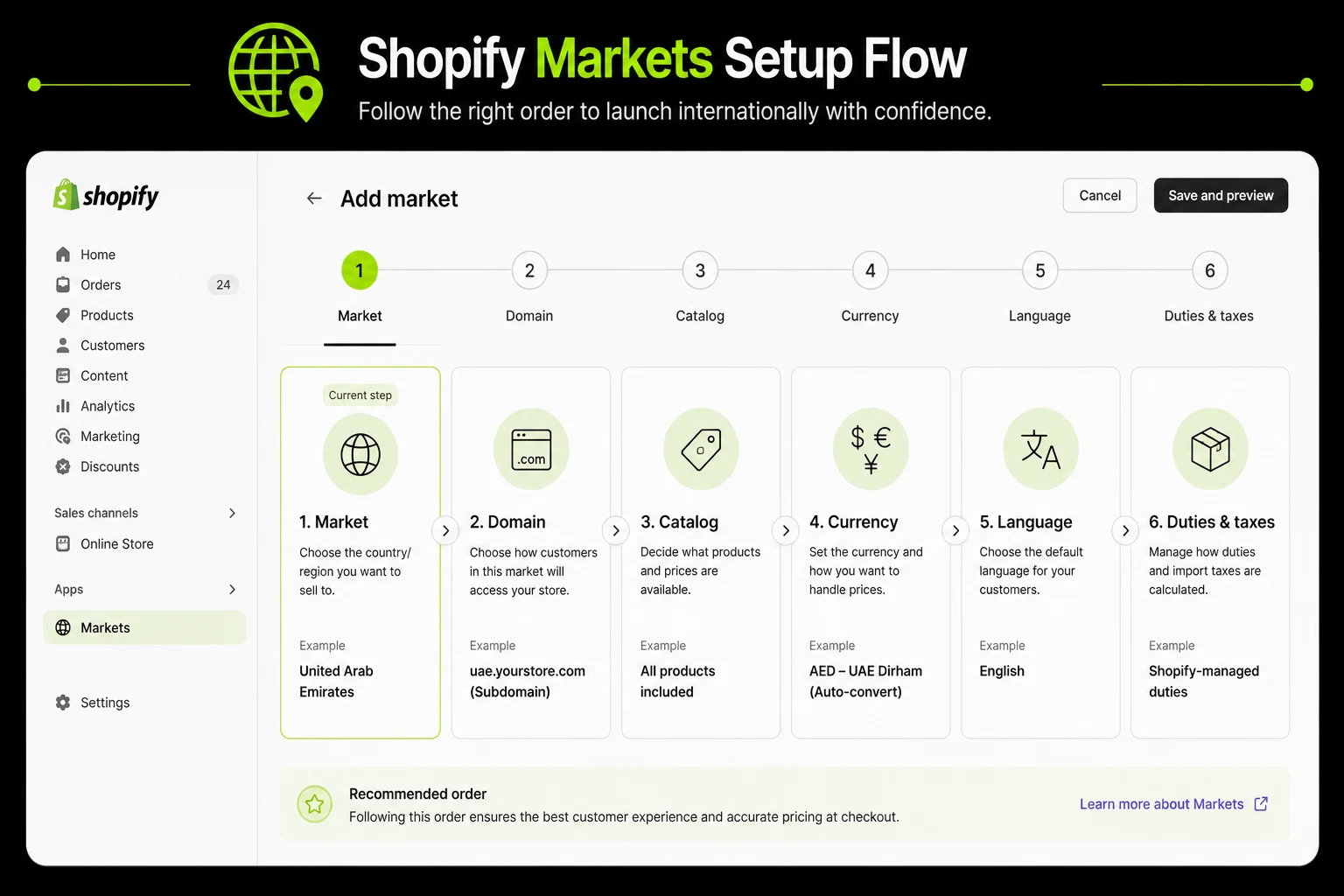
Follow the setup in this order: market, domain, catalog, currency, language, then duties.
For UAE and GCC merchants, use standard Shopify markets because managed markets are not available in these regions.
What Shopify Markets Actually Is (and What It Isn't)
Markets, Managed Markets, and a separate expansion store all get folded into the same "international selling" conversation and treating them as one continuum instead of three distinct tools is where a lot of setup planning goes wrong before it even starts.
How Markets Groups Countries by Currency, Catalog, Language, and Tax Treatment
A market is a defined group of one or more countries that share settings: which currency they see, which product catalog and pricing they're shown, which language content displays in and how duties and taxes are handled for that group.
You can create a single-country market for a high-priority country you want granular control over, or a multi-country market for a group of countries that share similar enough conditions to be managed together.
Markets vs. Managed Markets vs. a Separate Expansion Store: Three Different Tools, Not Tiers of the Same Thing
Standard Shopify Markets is free, included on every plan, and handles currency display, domain structure, catalog and pricing, language, and duty estimation.
You remain the merchant of record, responsible for actually handling duties, tax remittance, and compliance yourself, or through your own logistics and compliance partners.
Managed Markets, formerly Markets Pro, is a paid upgrade on top of Markets, powered by Global-e, that automates duty and tax collection, remittance, and much of the cross-border compliance burden, but only for merchants who meet its eligibility requirements.
A separate expansion store, available on Shopify Plus, is a fully distinct store instance with its own catalog, branding, and operations, used when a market's needs diverge so much from your primary store that sharing infrastructure no longer makes sense.
Which Tool Fits Your Situation:
Before You Start: the Eligibility Reality for GCC Merchants
This is the section most competing guides skip entirely, and it's the one that determines how you should actually plan your setup, not just how you configure it.
Managed Markets Is Only Available in Limited Regions
Managed Markets eligibility currently centers on merchants based in the continental United States, and it also requires Shopify Payments to be your active payment processor, along with being on at least the Basic plan.
Shopify has expanded eligibility for other features before, and could do the same here, so confirm current eligibility directly against Shopify's own documentation at the time you're reading this, rather than treating any single guide, including this one, as the final word on a detail this operationally important.
What This Means: Standard Markets Is the Real Path for UAE and GCC Stores
For a UAE or wider GCC-based merchant, this eligibility gap means Managed Markets is not a future upgrade waiting at the end of a growth curve.
It is simply not reachable under current eligibility rules, regardless of how much the store scales. A brand that plans around "start with standard Markets, upgrade to Managed Markets once we're bigger" is planning around a step that doesn't exist for them.
The corrected plan is to build solid, deliberate duty and tax handling into the standard Markets setup from day one, since there is no automated safety net to eventually fall back on.
This distinction connects directly to two other structural gaps already covered elsewhere in this content: Shopify Payments itself has only entered early access for a limited set of UAE Shopify Plus merchants, and native multi-currency checkout depends on that same Shopify Payments requirement, covered in full in how to set up Shopify multi-currency.
Managed Markets ineligibility is the third piece of the same underlying pattern: several of Shopify's most automated international features assume a Shopify Payments foundation that most GCC merchants don't currently have.
You Remain the Merchant of Record: What That Actually Means
Being the merchant of record means your business, not Shopify or a third party, is legally and financially responsible for duties, import tax collection or disclosure and regulatory compliance in every market you sell into.
Without Managed Markets, Shopify Markets can estimate and display duties at checkout, but it does not automatically collect, remit, or guarantee compliance on your behalf the way Managed Markets does for eligible merchants. That responsibility sits with you, your logistics partner, or a customs broker you work with directly.
A Practical Example: Planning Around the Gap vs. Planning Correctly
Consider two versions of the same UAE-based skincare brand at launch. In the first version, the team sets up a single "International" market with basic currency conversion, assumes duty handling and compliance will "get sorted out once we're bigger and can move to Managed Markets," and treats the current setup as temporary scaffolding.
Eighteen months later, at real scale, they discover Managed Markets were never going to be available to them, and the compliance and duty-handling gaps they deferred are now embedded in live operations processing real order volume, materially harder to fix than they would have been at launch.
In the second version, the team accepts from day one that standard Markets is permanent, builds deliberate duty estimation into checkout, sets up a working relationship with a customs broker or logistics partner for actual duty remittance and treats regulatory research per market as a standing task owned by someone specific, not a someday item.
The second version costs more attention upfront and meaningfully less pain at scale, because it was never built on an assumption that turned out to be false.
Setting Up Your First Market: Step by Step
This order matters. Configuring currency before catalog, or domain structure after language, creates rework that a correctly sequenced setup avoids entirely.
Step 1: Check Prerequisites
Before creating a market, confirm your product catalog is clean and accurately categorized, your shipping zones are defined for the countries you plan to sell into, and your domain situation is decided in principle, even if not yet implemented. Markets built on top of a messy catalog or undefined shipping logic inherit those problems into every new market you create.
Step 2: Create a Market and Assign Countries or Regions
In Settings, then Markets, create your first market and assign the countries or regions it should cover. Decide at this stage whether a country deserves its own single-country market for granular control, or fits naturally into a grouped, multi-country market, a decision covered in more depth in the GCC-specific section below.
Step 3: Choose Your Domain Structure
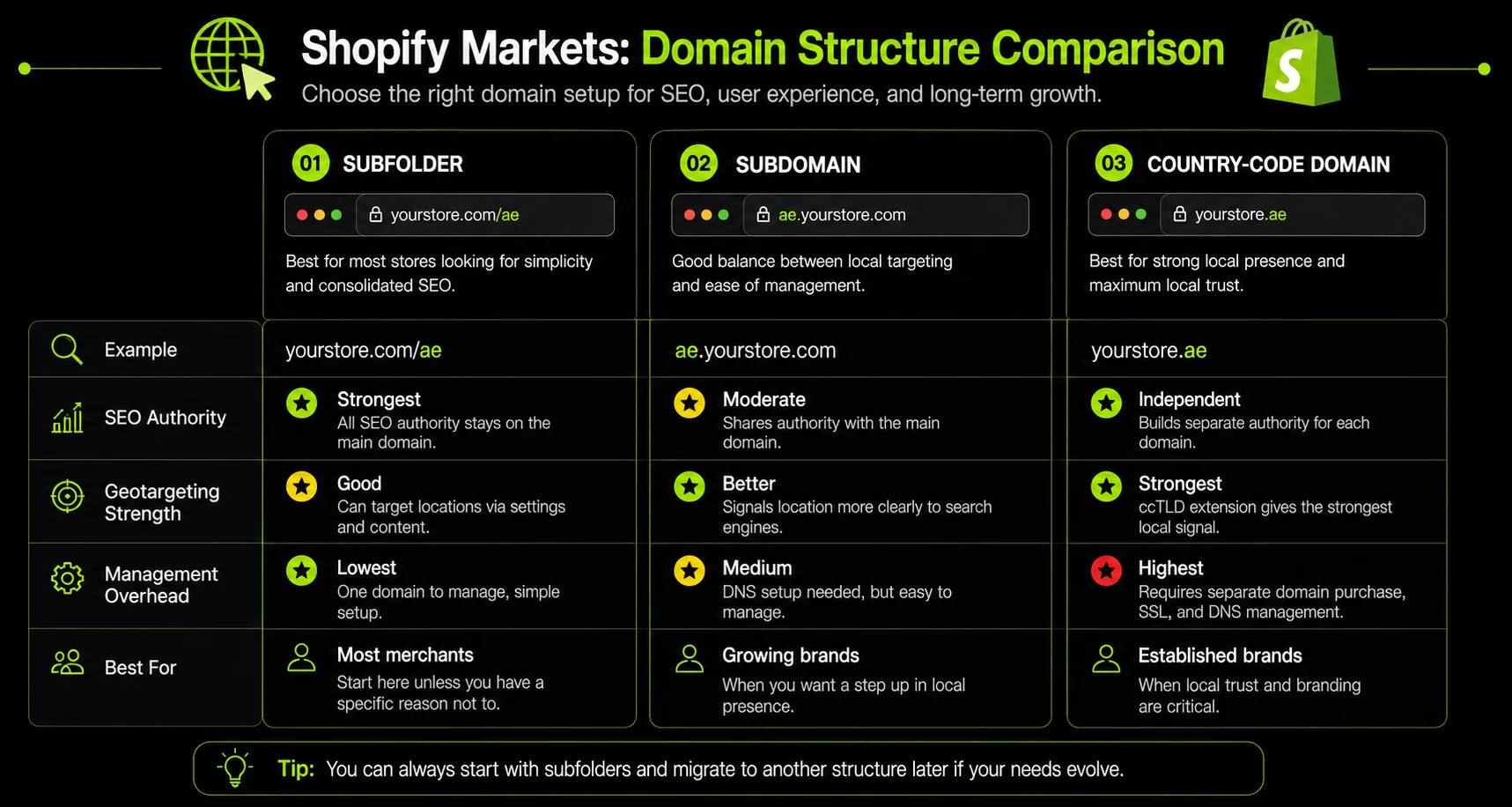
Shopify Markets supports three domain approaches for a given market: a subfolder on your existing domain (yourstore.com/ae/), a subdomain (ae.yourstore.com), or a fully separate country-code domain (yourstore.ae). Each carries different SEO and management implications, covered in detail in its own section below, and this decision is meaningfully harder to change later than most of the other setup steps, so treat it as a deliberate choice rather than a default.
Step 4: Set Up a Catalog and Price List for the Market
A market's catalog controls which products are visible and how they're priced for that market specifically. This is where you can restrict certain products from certain markets for regulatory reasons, and where you can set market-specific pricing rather than relying purely on automatic currency conversion, useful when local market conditions justify a different price point than a straight conversion would produce.
Step 5: Configure Currency Display and Rounding
Add the currency for the market and configure rounding rules so converted prices land on clean, familiar price points rather than raw exchange-rate output.
This step is covered in full detail, including the specific mechanics of automatic versus manual exchange rates, in the Shopify multi-currency setup guide, since currency configuration is substantial enough to deserve its own dedicated walkthrough rather than a repeat here.
Step 6: Add Languages and Translation
Shopify's native Translate & Adapt app supports automatic translation into up to two languages for free, using Shopify's built-in AI, with content manageable directly from the Shopify admin.
Additional languages beyond that free limit require manual translation or a third-party translation app, since the automatic tier is specifically capped at two languages regardless of your Shopify plan. For a GCC-focused store, Arabic is very likely one of your two free automatic languages.
Plan which second language earns the other free slot deliberately, based on your actual traffic data, rather than defaulting to whichever language seems obvious.
Step 7: Set Duties and Import Tax Display
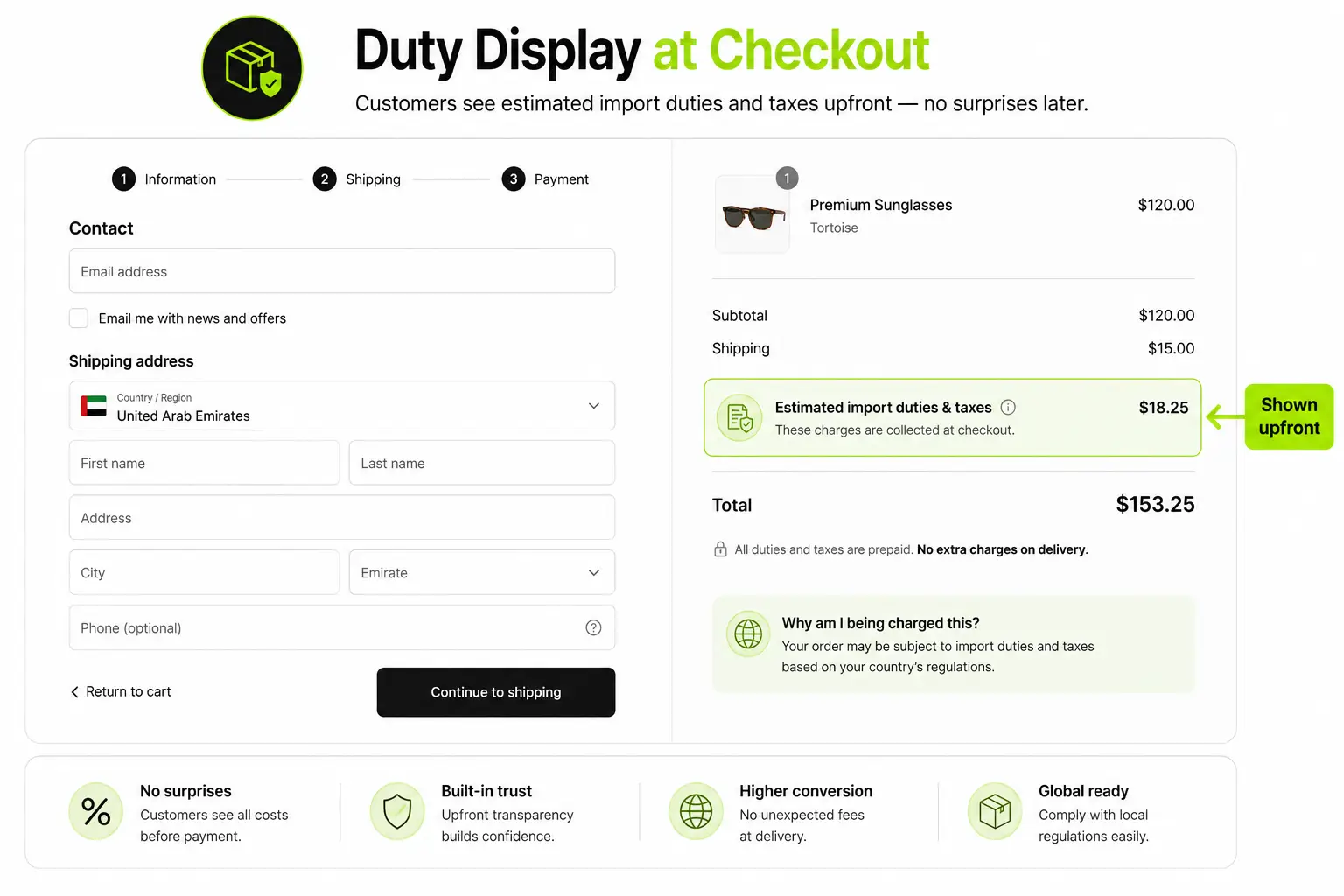
Without Managed Markets, duty and import tax display at checkout is estimated, not automated or guaranteed.
Shopify Markets can show customers an estimated import cost based on the product, destination, and shipping method, which meaningfully improves transparency even without full automation.
Configure this deliberately rather than leaving it off, since the alternative, no duty visibility at all, is what creates the delivery-refusal problem covered in the responsibility section below.
Step 8: Preview, Test, and Launch the Market
Use Shopify's market preview tools to view your storefront exactly as a customer in that market would see it, checking currency display, language, domain routing, and duty estimates together before the market goes live.
This step gets skipped more often than any other in this sequence, typically because it feels redundant after each individual setting was already checked in isolation, but checking settings individually does not confirm they work correctly together.
Testing Duty Estimates Across Different Product Categories
Duty rates are rarely flat across an entire catalog. A skincare product, a piece of apparel, and an electronics accessory can carry meaningfully different duty rates and regulatory treatment even within the same destination market.
Test your duty display across a representative sample of your actual catalog, not just a single product, since a duty estimate that looks correct on one item can be quietly wrong on another category entirely, and that gap only surfaces once a real order in that category ships.
Structuring Markets for GCC Expansion Specifically
This is the section with the least existing competing content anywhere in this space, and it's also where a UAE-based brand's setup decisions diverge most from a generic international Markets guide.
Should UAE, Saudi Arabia, and Wider GCC Be One Market or Separate Markets?
There's no universal answer, but there is a clear framework. Countries with meaningfully different currencies, tax treatment, or high enough individual order volume to justify dedicated attention are stronger candidates for their own single-country market.
UAE and Saudi Arabia, given their different currencies (AED and SAR), different VAT structures, and generally higher combined order volume than the rest of the GCC, are commonly set up as their own individual markets.
The remaining Gulf countries, Kuwait, Qatar, Bahrain, and Oman, are often grouped into a single "Wider GCC" market, since combining lower-volume countries with broadly similar characteristics reduces setup and maintenance overhead without meaningfully sacrificing customer experience.
A Common GCC Market Structure
Currency and Catalog Considerations When Grouping Gulf Countries
Grouping countries into one market means they share a single currency setting, which creates a real problem if you group countries that don't actually share a currency.
A "Wider GCC" market needs a single currency decision, commonly AED as a shared reference currency across the group, or separate currency handling per country if your gateway and Markets configuration support it.
Also revisit the decimal-place handling covered in the multi-currency guide: KWD and BHD use three decimal places, a detail that needs explicit configuration regardless of how you group your markets.
Where This Connects to Payment Gateway Choice
A Markets setup is only as good as the payment gateway processing the transactions behind it. Grouping Saudi Arabia into a market assumes your gateway actually supports Mada, Saudi Arabia's national card scheme, and not every UAE-focused gateway does.
This is covered in full in how to choose a payment gateway for UAE ecommerce, and it's worth confirming gateway-level country support before finalizing your market grouping, since discovering a gap after launch means unwinding a market structure that customers, search engines, and your own catalog have already been built around.
International SEO Implications of Your Markets Setup
Your Shopify Markets structure affects URLs, hreflang, duplicate content, and SEO authority. Get the SEO structure right before launching new markets.
How Shopify Markets Handles hreflang
Shopify automatically generates hreflang tags for markets using subfolders or subdomains. This helps search engines understand which country or language version of a page to show users.
However, automatic hreflang has limits:
- Product URL slugs are not automatically translated in every configuration.
- Separate country-code domains must be discovered and evaluated independently by search engines. Hreflang connects the versions but does not transfer SEO authority between domains.
Avoid Duplicate Content Across Markets
Launching multiple markets with substantially identical, untranslated English content can create duplicate or near-duplicate pages. This is especially common when markets are created mainly for currency and duties without adding meaningful localization.
To give each market stronger SEO value, localize elements such as:
- Language,
- Pricing,
- Shipping information,
- Duties,
- Product availability and
- Market-specific content.
You do not need completely different content for every market, but each market should provide a clear reason for its dedicated URL to exist.
Why Subfolders Are Usually the Safer SEO Default for GCC Brands
For most growing GCC brands, subfolders are the safest starting point:
yourstore.com/ae/
yourstore.com/sa/
Subfolders keep your SEO authority consolidated under one domain and require less technical maintenance than subdomains or separate country-code domains.
Country-code domains can provide a stronger local signal, but they also require each domain to build and maintain its own SEO presence. For a new market, that additional overhead is rarely necessary.
Start with subfolders, prove market demand, and move to country-code domains when a market has enough traffic, revenue, or strategic importance to justify the added SEO investment.
Plan Your URL Structure Before Launch
Your domain strategy belongs in your information architecture planning before a market goes live. Changing it later can mean restructuring URLs, implementing redirects, reconfiguring hreflang, and putting accumulated SEO equity at risk.
For most GCC brands, subfolders offer the best balance of SEO authority, scalability, and technical simplicity.
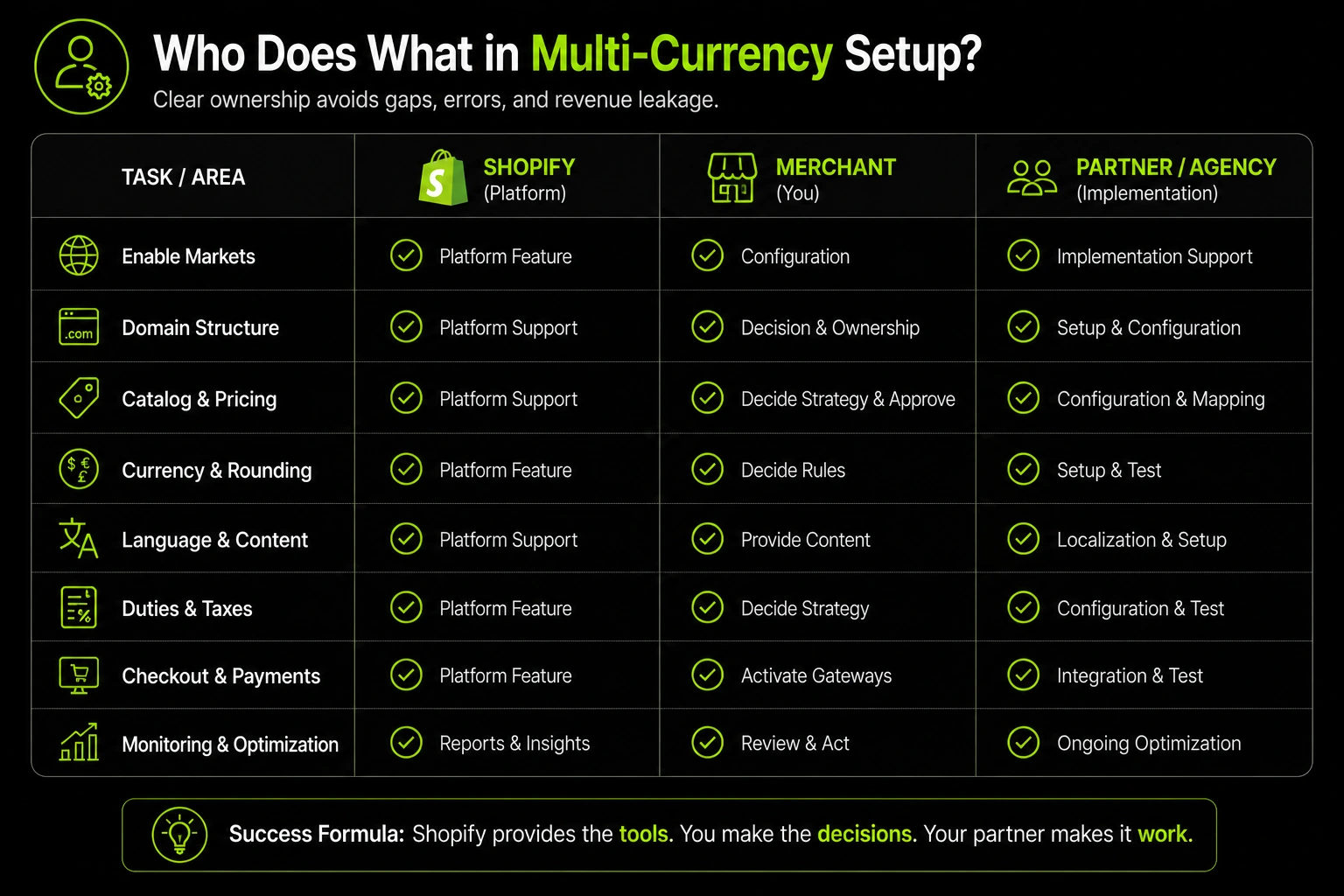
What You're Responsible for Without Managed Markets
This is the section worth screenshotting and keeping open in another tab while you plan your setup, since it lays out, line by line, exactly what shifts from automated to manual when Managed Markets aren't available to you.
Duties and Import Tax: Estimating vs. Collecting vs. Remitting
Standard Markets can estimate and display duties at checkout, giving customers a clearer expectation of total landed cost.
It does not collect those duties on your behalf at the point of sale, and it does not remit them to the relevant customs authority.
That collection and remittance process runs through your shipping carrier or a customs broker you work with directly and it needs to be set up and tested as its own workflow, not assumed to be handled automatically because duty estimates are displayed correctly on the storefront.
Regulatory Compliance and Restricted Products by Market
Every market can have different rules about what products can legally be sold or imported, and standard Markets does not automatically screen your catalog against those rules the way Managed Markets does for eligible merchants.
Reviewing your catalog against each market's specific restricted or regulated product categories is a manual research task you or a compliance partner need to own directly.
Fraud and Chargeback Exposure You're Carrying as Merchant of Record
As a merchant of record, cross-border fraud and chargeback risk sits with your business, not with Shopify or an automated compliance layer.
This makes fraud monitoring and your chargeback response process a more direct operational responsibility for GCC merchants selling internationally than it would be for a merchant using Managed Markets, where Global-e absorbs a meaningful share of that risk as part of the managed service.
Responsibility Comparison
How Suplex Approaches International Market Setup
GCC brands need a properly structured Shopify Markets setup from day one. Without Managed Markets, there is less room for setup gaps that can later create issues with pricing, duties, delivery, or customer experience.
Suplex plans the core market structure before launch, rather than fixing problems after they appear.
What We Plan Before Launch
- Domain and URL structure: Planned through information architecture to avoid costly URL changes after indexing.
- Market and catalog structure: Organized around your target countries, products, currencies, and languages.
- Duties and pricing: Configured so customers see the right costs before checkout and delivery issues are minimized.
The broader configuration is covered through international ecommerce setup. If you're unsure whether your current Shopify plan can support your international structure, start with a platform consultation before configuring Markets.
Common Mistakes When Setting Up Shopify Markets
A few Shopify Markets mistakes can create SEO issues, unexpected costs, payment failures, or compliance problems after launch. Review these common errors before you finalize your market structure.
Frequently Asked Questions
What's the difference between Shopify Markets and Managed Markets?
Standard Markets is free and lets you configure currency, domains, language, and duty display, but you remain the merchant of record. Managed Markets, powered by Global-e, automates duties, tax remittance, and compliance for an added fee, but only in eligible regions.
Is Shopify Managed Markets available in the UAE?
No. Managed Markets eligibility currently centers on merchants based in the continental United States, with Shopify Payments as an additional requirement. UAE and wider GCC merchants use standard Shopify Markets and remain responsible for duties and compliance themselves. Confirm current eligibility directly against Shopify's documentation, since this criteria can change.
Should I use subfolders or a separate domain for each market?
Subfolders (like yourstore.com/ae/) are usually the easier default. They keep SEO authority on one domain and cost nothing extra. Subdomains or country-code domains give stronger local signals but require more ongoing management.
Does Shopify Markets automatically translate my store?
Not fully automatically without setup. Shopify's Translate and Adapt app supports automatic machine translation for up to two languages for free, with manual editing available. Additional languages require manual translation or a third-party app.
Do I need a different market for each GCC country?
Not necessarily. You can group countries with shared currency and tax treatment into one market, but payment gateway support and duty requirements can still differ by country, so check those before combining Saudi Arabia and the UAE into a single market.
What happens if I don't display duties at checkout?
Customers may be billed unexpected import charges by the carrier at delivery. This is a common cause of refused deliveries and chargebacks on cross-border orders, especially without Managed Markets handling it automatically.
Can I switch from Shopify Markets to Managed Markets later?
Only if your business becomes eligible by region. For UAE and GCC merchants, there currently isn't an eligibility path to Managed Markets, so setup decisions should be made assuming standard Markets is the permanent solution, not a temporary one.
Hi, I’m Rishabh Jain
I believe great design has the power to shape perception, build trust, and move businesses forward. That belief is what led me to found Suplex Design Studio, a global branding and packaging studio working with FMCG and D2C brands across markets.I started suplex at 25 with a clear intent, to create design that is strategic, thoughtful, and commercially meaningful. By 28, the studio had scaled globally, guided by a strong foundation in Integrated Design that I developed during my academic journey in London, where I was honoured with the Dean’s Award.
Over the years, I’ve had the opportunity to work with 100+ brands, from Fortune 500 organizations to family-run businesses, helping them build packaging and brand systems that create recall, relevance, and long-term value.
Suplex’s work has been recognized internationally, including the Manifest Award (2024), the Clutch Global Award (2025), and features on platforms such as Packaging of the World, The Dieline, and the World Brand Design Society.
None of this would be possible without the people behind the work. I’m deeply grateful to the suplex team, whose commitment, creativity, and attention to detail turn ideas into meaningful brand experiences every day.
At the heart of my work is a simple philosophy, design should be intentional, honest, and built to last, and that continues to guide everything we create at suplex.





































Let’s Make It Happen
E-Commerce Success Stories

%201.avif)






.avif)

.avif)
Build Your D2C Business The Right Way
Build It With Suplex.


