Common Ecommerce Website Mistakes: What's Actually Costing You Sales
.avif)
Common Ecommerce Website Mistakes: What's Actually Costing You Sales
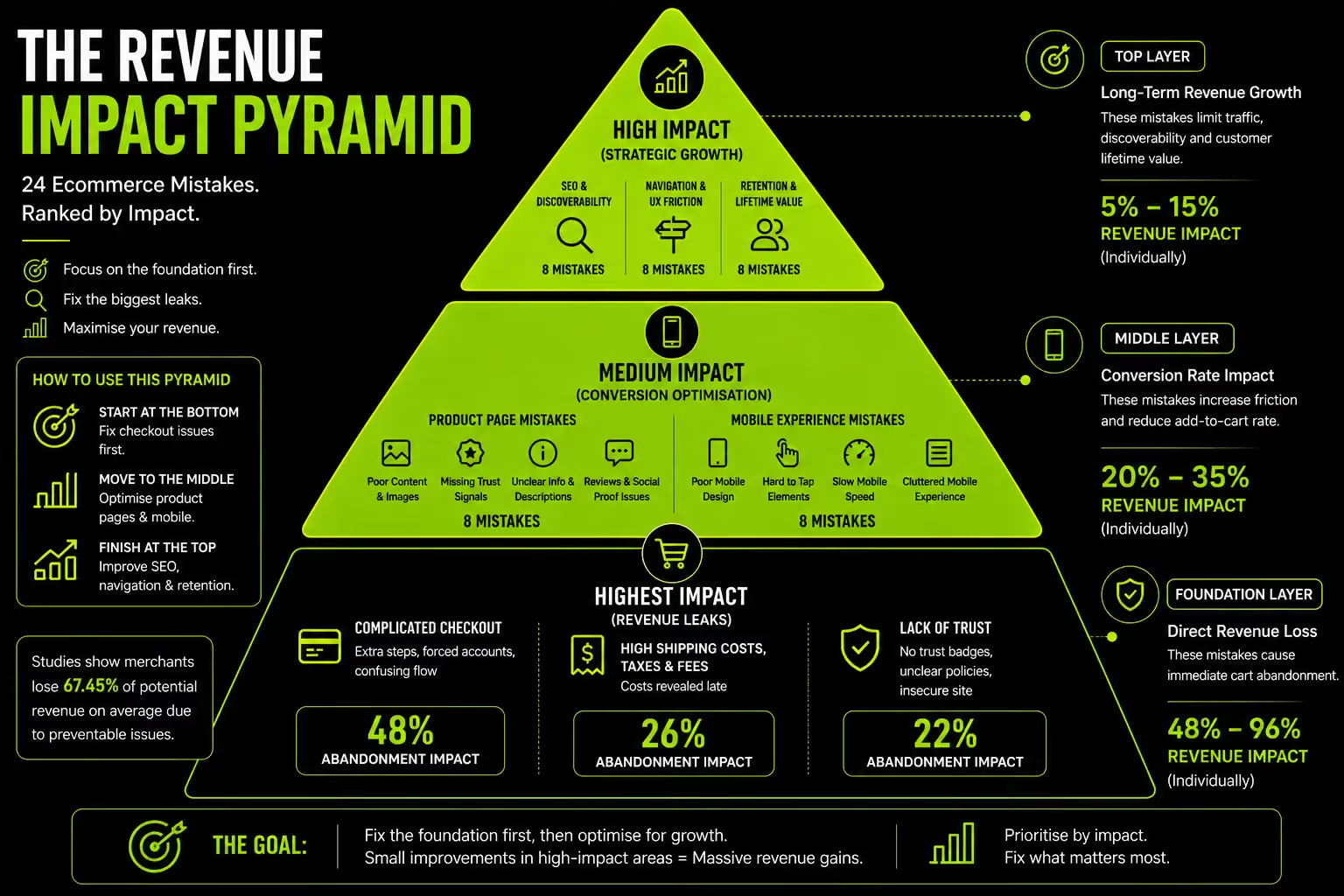
The most common ecommerce website mistakes are not equal. Hiding shipping costs at checkout causes 48% of cart abandonments.
Choosing a slightly wrong font causes zero measurable abandonment. A guide that treats both in the same numbered list without distinguishing their commercial weight is built for SEO padding, not for fixing your store.
This blog is organised by revenue impact. Fix the mistakes at the top first.
Baymard Institute's research across 200,000+ hours of UX testing across 327 leading ecommerce sites identifies checkout, mobile UX and product page failures as the three areas where ecommerce sites consistently lose the most revenue to fixable mistakes.
The $260 billion in recoverable cart abandonment revenue in the US and EU alone is not theoretical.
It is the result of specific, identifiable, fixable mistakes. This guide names them in priority order.
The Framework: Why Mistake Priority Matters More Than Mistake Count
Before reviewing any specific mistake, the commercial prioritisation framework determines how to act on what follows. Without it, every mistake looks equally urgent and nothing gets fixed.
The Four Layers of Ecommerce Mistakes
Ecommerce website mistakes operate across four layers, each affecting a different part of the customer journey and producing a different type of revenue loss.
Layer 1- Acquisition Mistakes:
Mistakes that prevent traffic arriving or bring the wrong traffic. Primarily SEO, ad targeting, and channel selection errors.
No visitors means no potential conversions but if other layers are broken, fixing acquisition wastes money on traffic that cannot convert.
Layer 2- Conversion Mistakes:
Mistakes that prevent arriving visitors from buying. Navigation failures, product page gaps, trust deficits, checkout friction. This is where the largest recoverable revenue lives.
Baymard's $260 billion figure is entirely Layer 2 revenue visitors who arrived with purchase intent and left without buying due to fixable friction.
Layer 3- Experience Mistakes:
Mistakes that produce a bad experience even when visitors do buy. Post-purchase communication failures, poor delivery experience, absent return process.
Revenue impact: returns spike, reviews damage future conversion, LTV collapses.
Layer 4 - Retention Mistakes:
Mistakes that prevent repeat purchase. No email capture, no post-purchase email sequence, no loyalty infrastructure.
Revenue impact: brands spend to acquire a customer once and capture no LTV from the relationship.
The compounding problem: Most underperforming stores do not have one catastrophic mistake. They have 4–6 moderate mistakes across Layers 1–3 that compound.
A store with adequate traffic arriving on a slow product page with missing trust signals and a surprise shipping cost at checkout is losing visitors at every step simultaneously.
The aggregate conversion rate of compounding friction is significantly worse than the sum of individual effects.
Fix Layer 2 first. It is where the most visitors are lost, where the most data is available for diagnosis, and where the fixes are usually not expensive.
Layer 2 mistakes on a $1M annual revenue store may represent $200K–$400K in recoverable annual revenue.
For context on what conversion rates at each level actually look like, see Suplex's average ecommerce conversion rate by industry guide.
The Self-Audit Tool : Find Your Store's Biggest Mistakes Before Reading Further
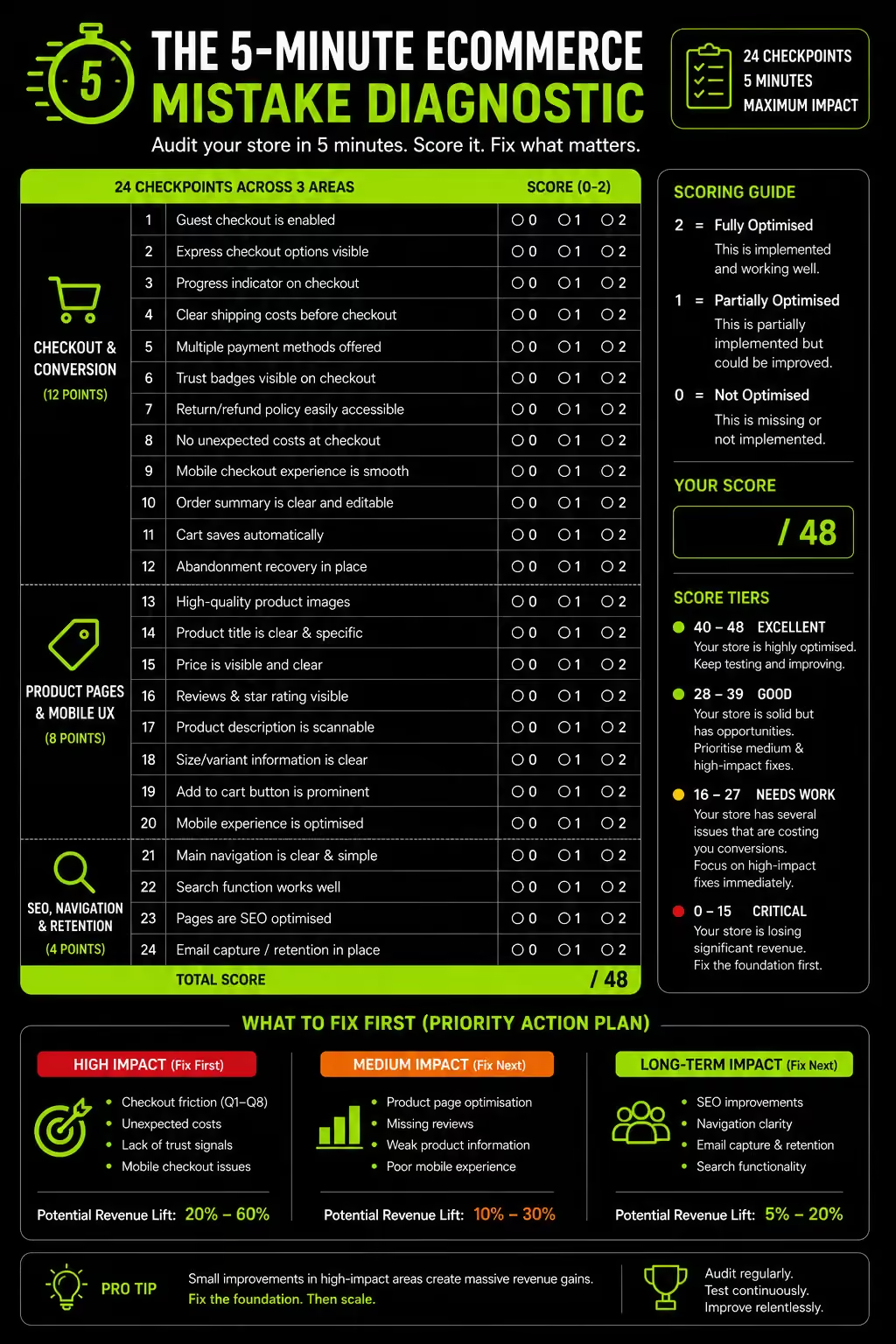
Run through this diagnostic on your own store first. The items where your answer is "no" or "unsure" are your priority areas. Score each item: 0 = no, 1 = partially, 2 = yes.
Checkout
Product Pages
Mobile
Trust
Post-Purchase
Scoring interpretation:
- 34–40: Strong foundation focus on Layer 4 (retention) optimisation
- 24–33: Average performing store 2–4 specific fixes will produce meaningful improvement
- 14–23: Significant revenue leakage fix checkout and product page items first
- Below 14: Multiple compounding mistakes follow this guide section by section, starting from the checkout mistakes
Layer 2 Mistakes Checkout Friction (The Highest Revenue Impact)
The three checkout mistakes below account for the majority of fixable abandonment across every category of ecommerce.
They are widely known. They are consistently unfixed. The commercial case for prioritising them above all other optimisation work is unambiguous.
Mistake 1: Surprise Shipping Costs at Checkout
Revenue Impact: CRITICAL causes 48% of cart abandonment
Hidden shipping costs drive approximately 48% of cart abandonments because shoppers perceive unexpected fees as a penalty rather than part of the total price.
The solution is transparent shipping information on the product page—not necessarily free shipping. Display messages like "Free shipping over AED 150 – this order qualifies" or "Standard delivery AED 15, arrives Thursday" before customers add items to their cart.
Shopify stores can implement this using a shipping calculator or custom Liquid section with the Shopify AJAX Cart API. For UAE stores, any COD service fee should also be disclosed on the product page to avoid last-minute surprises.
Mistake 2: Forced Account Creation
Revenue Impact: HIGH causes 26% of cart abandonment
Around 37% of shoppers abandon checkout when forced to create an account. The problem isn't account creation itself, it's requiring it before purchase.
Let customers check out as guests, then invite them to create an account after the order is confirmed, when they're far more likely to accept.
Guest checkout should be the primary, most prominent option at checkout, not a hidden text link, because reducing friction is more valuable than collecting account registrations from first-time buyers.
Mistake 3: Complex Checkout Flow
Revenue Impact: HIGH causes 22% of cart abandonment
The average Shopify checkout has 11.3 form fields. Baymard's research recommends 8 as the functional maximum.
Each additional field is a friction point a moment where the customer must decide, type, validate or correct before proceeding.
Fields to Audit For Removal: title/salutation prefix (zero commercial necessity for most stores), company name unless B2B, separate address line 2 (make it optional and hidden), redundant address confirmation field, phone number unless required for delivery notification.
Beyond Field Count: checkout progress uncertainty increases abandonment. A customer who does not know how many steps remain is experiencing more anxiety than one who sees a clear "Step 2 of 3" indicator. This single addition of a progress bar or step labels is documented to reduce checkout drop-off meaningfully.
Uae/Gulf-Specific Checkout Mistakes:
- VAT appearing as a separate surprise line item at checkout UAE Consumer Protection regulations require VAT-inclusive pricing; surface it at product page level
- No COD option at checkout 20–25% of UAE transactions; its absence loses this segment before checkout completes
- Checkout address form built for US postal code logic UAE addresses have no postal code; forcing a "ZIP code" field creates confusion and form errors
- No BNPL option visible at checkout 37% of UAE consumers use Tabby or Tamara; hiding these in a payment method dropdown reduces their trust impact
For the full UX context on checkout design, see Suplex's guides on ecommerce website UX best practices and features of a high-converting ecommerce website.
Layer 2 Mistakes: Product Pages (The Purchase Decision Surface)
Product page mistakes are where purchase hesitation crystallises into abandonment. The visitor has found the product; something on the page is preventing them from committing.
Mistake 4: Reviews Missing or Below the Fold
Revenue Impact: HIGH products with zero reviews lose 270% of purchase likelihood vs products with 5+ reviews
Only 48% of leading desktop ecommerce sites and 38% of mobile sites have good product page UX.
One of the biggest mistakes is placing star ratings and review counts below the fold, where most mobile shoppers never see them.
Display reviews immediately below the product title so social proof appears at the moment customers are evaluating the product.
Brands should also start collecting reviews from launch through automated post-purchase emails, photo review incentives, and approved review imports, aiming for at least 10 reviews per product to build meaningful trust.
Mistake 5: Weak or Supplier-Copied Product Descriptions
Revenue Impact: MEDIUM-HIGH both a conversion and SEO mistake
Two distinct problems compound here. For conversion: supplier copy describes product features, not customer benefits.
A moisturiser described as "contains hyaluronic acid, glycerin, and niacinamide" is a chemistry lesson.
"Visibly plumps dry skin in 30 minutes tested on sensitive skin, fragrance-free" answers the customer's actual questions.
For SEO: duplicate supplier descriptions mean your product pages compete with every other store using the same supplier.
Google indexes one version. Google's September 2025 Spam Update specifically targeted repetitive, scaled content stores relying on manufacturer copy face increasing organic invisibility risk.
A well-written benefit-led description is both more unique for search and more converting for visitors than a copied specification sheet.
Mistake 6: No Delivery Expectation on the Product Page
Revenue Impact: MEDIUM-HIGH directly linked to checkout surprise costs
"Shipping calculated at checkout" removes the customer's ability to factor shipping time and cost into their purchase decision at the moment they are making it.
Customers who would have accepted a 5-day delivery add to cart and proceed to checkout then abandon when the delivery date is later than assumed.
"Order before 3pm, arrive Thursday" or "Standard delivery: 3–5 business days, AED 15" on the product page allows the customer to make an informed decision before investing in the checkout process.
Customers who accept the delivery timeline at product page level are significantly less likely to abandon at checkout for delivery-related reasons.
For the full trust signal architecture that supports these product page elements, see Suplex's guide on ecommerce trust building design elements.
Layer 2 Mistakes: Mobile UX (The Primary Device)
Most stores know mobile matters. Most still have specific, fixable mobile mistakes costing them significant revenue because knowing and testing are different activities.
Mistake 7: Slow Mobile Page Load
Revenue Impact: HIGH 53% of mobile users abandon sites loading over 3 seconds
Even a 1-second delay reduces conversions by approximately 7%. When page load time goes from 1 second to 3 seconds, bounce rate increases by 32%.
The most common cause of slow Shopify mobile performance is not the theme, it is app accumulation.
Each app that injects JavaScript adds render-blocking scripts. A store with 18 apps may have 400–600KB of additional JavaScript loading on every page.
An audit of a typical underperforming Shopify store almost always reveals 3–6 apps that either duplicate functionality, have been superseded by a built-in feature, or provide zero measurable commercial benefit.
The Fix Sequence: app stack audit first (remove anything not commercially justified), then image optimisation (WebP format, correct sizing, lazy loading), then script deferral. Check Google PageSpeed Insights with the mobile tab selected anything below 50 on mobile has significant speed room.
See Suplex's Shopify speed optimisation guide for the full diagnostic and fix sequence.
Mistake: Add to Cart Button Not Visible on Mobile Without Scrolling
Revenue Impact: MEDIUM-HIGH documented 10–20% mobile CVR improvement from sticky CTA
On a mobile device with a long product page images, variant selector, description, reviews the Add to Cart button scrolls out of view within 2–3 swipes.
A customer who has read the description and decided to buy must scroll back to the top to find the button. Some do. Many do not.
A sticky Add to Cart bar fixed to the bottom of the mobile viewport throughout the product page scroll is the most impactful single-element change for mobile product pages. Most premium Shopify themes include this as a built-in feature.
For themes that do not, it is a small CSS and JavaScript addition requiring no redesign.
Mistake 9: Mobile Filters Invisible or Inaccessible
Revenue Impact: MEDIUM kills browse-to-product conversion for filter-dependent shoppers
Baymard found that 58% of desktop and 78% of mobile ecommerce sites have poor to mediocre product listing UX.
A common issue is mobile filters that are hidden behind an unlabeled icon, require multiple taps or reset after use. Instead, use a clearly labeled "Filter" button with an active filter count (e.g., Filter (2)), open filters in a full-screen panel with clear Apply and Done actions, and preserve selected filters when shoppers return from a product page.
Layer 2 Mistakes: Navigation and Information Architecture
Navigation mistakes prevent finding products. These are a different category from checkout friction they operate earlier in the funnel, producing exit before any purchase intent is expressed.
Mistake 10: Too Many Top-Level Navigation Items
Revenue Impact: MEDIUM increases cognitive load and reduces category click-through
The research consensus from Baymard and Nielsen Norman Group: 5–7 top-level navigation items is the optimal range for most ecommerce stores.
Stores with 12–15 items force visitors to scan a complex menu before identifying where their product lives. Each scan that fails to identify a relevant category increases bounce probability.
The symptom: high navigation interaction rate but low category page click-through. Visitors are clicking on the menu but not finding what they expected.
The Fix: consolidate categories using customer language, move secondary pages (About, Blog, FAQ) to the footer, and use dropdowns or mega menus to surface subcategory depth without inflating the top-level count.
Mistake 11: No Breadcrumbs (or Non-Clickable Breadcrumbs)
Revenue Impact: LOW-MEDIUM increases bounce from product pages; SEO PageRank benefit.
Breadcrumbs help shoppers return to the parent category with a single click, making product comparisons easier without relying on the browser's back button.
They also strengthen SEO by creating internal links from product pages to collection pages, while BreadcrumbList schema can display clean breadcrumb trails in search results.
Mistake 12: Site Search With No Typo Tolerance
Revenue Impact: MEDIUM affects the 30% of shoppers who use search as primary navigation
Site search users convert 2–4× better than browsers because they have high purchase intent.
If search can't handle typos, synonyms, or partial terms, those shoppers are likely to leave.
Shopify's Search & Discovery app supports typo tolerance and synonym mapping, but these features must be configured to capture high-intent searches effectively.
See Suplex's guide on Shopify navigation design best practices for the full navigation architecture covering all three mistakes above.
Layer 2 Mistakes: Trust Architecture
Trust mistakes prevent first-time visitors from converting. The cost is invisible in analytics they show as exit events with no abandonment reason recorded.
Mistake 13: Trust Signals in the Wrong Place
Revenue Impact: HIGH when compounded with other trust gaps
The most common trust architecture mistake is not absent trust signals, it is correctly present trust signals in the wrong location.
A return policy in the footer. A security badge in the header. Reviews at the bottom of a long product page. Each signal is present in the store but invisible at the moment the customer needs it.
The Fix: is placement, not creation. Moving the return policy adjacent to the Add to Cart button, moving the security badge to the payment form area, moving the review count above the fold on product pages these are configuration and layout changes that produce measurable conversion improvement without adding any new trust content to the store.
Mistake 14: No Visible Contact Method
Revenue Impact: MEDIUM trust failure for first-time visitors
Visible contact details are one of ecommerce's most overlooked trust signals. Displaying a phone number, WhatsApp, or email in the header reassures first-time visitors that a real business is behind the store.
For UAE and Gulf brands, a WhatsApp Business button is especially important, as its absence can reduce trust for high-consideration purchases.
For the complete trust placement framework, see Suplex's guide on ecommerce trust building design elements.
Layer 1 Mistakes: Acquisition and SEO
Acquisition mistakes are positioned correctly as lower priority than conversion mistakes because fixing them on a broken store accelerates losses rather than improving outcomes.
Mistake 15: Collection Pages With No Content
Revenue Impact: MEDIUM collection pages are the highest-value organic pages in any store
Collection pages generate around 50% of ecommerce organic traffic and often outperform product pages in SEO.
Yet many Shopify stores only display a product grid and category title. Add a keyword-optimized H1 and 100–150 words of unique category content to help search engines understand and rank the page.
This can be done directly in Shopify's collection description field with no development required. For the full collection page SEO approach, see Suplex's guide on product listing page best practices.
Mistake 16: Running Paid Ads Before Fixing Conversion
Revenue Impact: HIGH the most expensive mistake by absolute spend
The most financially destructive mistake for early-stage and growth-stage ecommerce brands: spending on paid acquisition before the store's conversion rate is validated.
A store converting at 0.8% spending AED 50,000/month on Meta ads is acquiring customers at 3× the cost of a store converting at 2.4% on the same spend.
The correct sequence which most brands invert: fix checkout friction → fix mobile UX → fix trust signals → verify conversion rate above 1.5% → begin paid acquisition.
Paid ads on a broken store accelerate losses faster than organic-only because the volume of paid traffic amplifies each conversion failure.
Mistake 17: Manufacturer Product Descriptions Used As-Is
Revenue Impact: MEDIUM SEO invisibility compounds with conversion cost
Addressed in the product page section from a conversion angle; the SEO dimension deserves separate treatment.
Stores using manufacturer copy share identical descriptions with hundreds of competitors. Google indexes one version of duplicate content; the rest lose organic visibility.
Google's September 2025 Spam Update specifically targeted repetitive, scaled content stores relying on manufacturer copy face increasing organic invisibility.
A unique, useful product description is both more visible in search and more converting for visitors. See also: product catalog structure for ecommerce.
Layer 3 and 4 Mistakes: Post-Purchase and Retention
The mistakes most competing guides do not cover at all despite costing brands significantly more in LTV terms than most conversion mistakes.
Mistake 18: No Abandoned Cart Email Flow
Revenue Impact: HIGH relative to implementation cost recovers 5–9% of abandoned carts
Global average cart abandonment is 70.19%. A 3-email abandoned cart sequence recovers 5–9% of those carts on average.
For a store doing AED 500,000 monthly with 70% abandonment, recovering even 5% represents AED 17,500 in monthly recovered revenue from a single automation that most stores have not configured.
The most common version of this mistake on Shopify: Klaviyo or an email app installed, but no flow built. The integration is present. Automation is not.
The Fix: is a 3-email sequence: first email 30–60 minutes after abandonment (highest recovery rate), second email 24 hours later with a direct link to the cart, third email 48–72 hours later with an optional small incentive for hesitant buyers.
Mistake 19: No Post-Purchase Email Beyond Order Confirmation
Revenue Impact: HIGH determines repeat purchase behaviour and LTV
Repeat customers spend 67% more than first-time buyers, making post-purchase communication critical for long-term growth.
Instead of stopping at order and shipping updates, build an automated sequence: order confirmation, shipping update, delivery confirmation with product tips, review request 5 days after delivery and a replenishment or complementary product recommendation 20–60 days later, depending on the product.
Mistake 20: Ignoring Out-of-Stock Product Pages
Revenue Impact: MEDIUM both SEO and conversion loss
A common mistake on growing Shopify stores: removing or 404-ing out-of-stock product pages. Google has built authority and indexed these pages over months. Removing them loses accumulated PageRank, backlinks and organic rankings.
The Correct Handling: keep the page live, show "Currently out of stock" clearly, add a "Notify me when available" email capture and surface related products as alternatives.
When stock returns, the page immediately inherits its full ranking authority with no recovery period required.
Suplex's D2C data analytics service tracks post-purchase metrics (repeat purchase rate, LTV by cohort, email sequence performance) as standard, making the Layer 3 and 4 mistakes measurable before and after fixes.
UAE and Gulf Market Mistakes; What Global Guides Miss
The regionally specific mistakes that are entirely absent from every competing guide and directly responsible for conversion underperformance in UAE and Gulf market stores.
Mistake 21: Arabic "Translation" Instead of Arabic Localisation
A common UAE ecommerce mistake is treating Arabic localisation as simply enabling RTL and machine translation.
A truly localised store also needs RTL-native navigation, correctly aligned filters and carousels, Arabic-optimised typography, natural Arabic copy and Arabic trust signals such as return policies, reviews, and contact details.
When the language is Arabic but the interface behaves like English, shoppers often lose trust and leave without purchasing.
Mistake 22: No COD at Checkout
For UAE and Gulf market stores, the absence of cash on delivery is a direct revenue loss from a segment representing 20–25% of transactions, not a minor omission.
A UAE consumer who expects COD as a payment option and finds it absent at checkout interprets the absence as either a technical oversight or a trust failure. The path of least resistance is a competitor who offers it.
COD is not declining in the UAE as fast as Western market predictions suggested. Consumer behaviour in the Gulf continues to show strong COD preference for first-time purchases with new brands and for high-AOV items where payment-on-receipt provides risk comfort.
Mistake 23: VAT Displayed as a Checkout Surprise
UAE Consumer Protection regulations require VAT-inclusive pricing for consumer-facing stores.
A store that displays AED 100 on the product page and shows AED 105 at checkout (adding 5% VAT) is creating the same surprise cost effect as hidden shipping with the additional problem of potential non-compliance.
VAT-inclusive pricing must be displayed from the product page. For brands selling across UAE (5% VAT) and non-VAT markets, Shopify Markets' per-market tax display settings handle this correctly when configured.
Mistake 24: No WhatsApp Business Contact
The UAE has an 85% daily messaging app usage rate. WhatsApp is the primary customer service channel, pre-purchase consultation channel, and trust-building touchpoint for a significant proportion of UAE consumers.
A store without a WhatsApp Business button particularly for high-consideration or high-AOV purchases is missing the communication channel that a meaningful segment of its target audience expects as a baseline.
WhatsApp contact also serves a trust function specific to the UAE market: its presence signals that the brand is locally accountable and reachable via the channel UAE consumers use for their most trusted communications.
For the full UAE ecommerce setup covering all four regional mistakes, see Suplex's international ecommerce setup service.
How We Audit and Fix These Mistakes at Suplex
Our Shopify audits typically uncover 4–8 high-impact issues that quietly reduce conversions and revenue. The biggest problems are rarely visual.
They're usually checkout friction, misplaced trust signals, slow mobile performance from app bloat, and poorly optimized collection pages.
For UAE brands, we also identify regional issues such as incomplete Arabic localisation, missing Cash on Delivery (COD), VAT surprises at checkout, and the absence of a WhatsApp contact option.
Every audit begins with checkout funnel analysis, followed by real-device mobile testing, then a review of product pages, navigation, trust signals, and SEO.
The result is a prioritized action plan ranked by estimated revenue impact, so you know exactly which fixes will deliver the biggest return first.
If you ran the self-audit and scored below 24, or want a professional assessment of which mistakes are costing your store the most revenue, Suplex's Shopify audit starts with the data, not with a list of generic recommendations.
Frequently Asked Questions
What Are The Most Common Ecommerce Website Mistakes?
The biggest conversion killers are surprise shipping costs, forced account creation, slow mobile pages, hidden product reviews, and missing delivery estimates on product pages. Together, these issues create significant checkout friction, and stores with all five often convert at less than a third of their potential.
What Is The Number One Reason Ecommerce Websites Fail To Convert?
Checkout friction is the biggest conversion killer, with hidden shipping costs responsible for 48% of cart abandonments. The solution isn't necessarily free shipping, it's showing shipping costs and delivery estimates on the product page before customers reach checkout, eliminating last-minute surprises.
How do I know if my ecommerce store has conversion problems?
Monitor three key Shopify metrics: add-to-cart rate (below 3.5% suggests a product page issue), cart-to-checkout rate (below 65% points to cart or shipping friction), and checkout completion rate (below 45% indicates checkout or payment problems). If any metric falls below these benchmarks, it usually signals a specific issue that can be identified and fixed.
What Ecommerce Mistakes Are Most Expensive To Leave Unfixed?
Ranked by revenue impact: surprise shipping costs at checkout addresses 48% of abandonment; forced account creation addresses 26%; slow mobile pages affects 53% of mobile visitors; running paid ads before fixing checkout amplifies losses; no abandoned cart email flow wastes 70% of cart traffic. A store fixing only these five mistakes could plausibly double its conversion rate without a redesign, because together they account for the majority of fixable abandonment.
Is A Redesign The Solution To Most Ecommerce Mistakes?
Rarely. Most ecommerce conversion issues stem from configuration and content not design. Shipping transparency, guest checkout, mobile Add to Cart visibility, and review placement can usually be fixed through theme settings or minor development. In most Shopify audits, fewer than 20% of conversion issues require a full redesign.
Hi, I’m Rishabh Jain
I believe great design has the power to shape perception, build trust, and move businesses forward. That belief is what led me to found Suplex Design Studio, a global branding and packaging studio working with FMCG and D2C brands across markets.I started suplex at 25 with a clear intent, to create design that is strategic, thoughtful, and commercially meaningful. By 28, the studio had scaled globally, guided by a strong foundation in Integrated Design that I developed during my academic journey in London, where I was honoured with the Dean’s Award.
Over the years, I’ve had the opportunity to work with 100+ brands, from Fortune 500 organizations to family-run businesses, helping them build packaging and brand systems that create recall, relevance, and long-term value.
Suplex’s work has been recognized internationally, including the Manifest Award (2024), the Clutch Global Award (2025), and features on platforms such as Packaging of the World, The Dieline, and the World Brand Design Society.
None of this would be possible without the people behind the work. I’m deeply grateful to the suplex team, whose commitment, creativity, and attention to detail turn ideas into meaningful brand experiences every day.
At the heart of my work is a simple philosophy, design should be intentional, honest, and built to last, and that continues to guide everything we create at suplex.



































Let’s Make It Happen
E-Commerce Success Stories
%201.avif)






.avif)

.avif)
Build Your D2C Business The Right Way
Build It With Suplex.


