How To Plan An Ecommerce Website Redesign Without Losing Revenue Or Rankings
.avif)
How To Plan An Ecommerce Website Redesign Without Losing Revenue Or Rankings
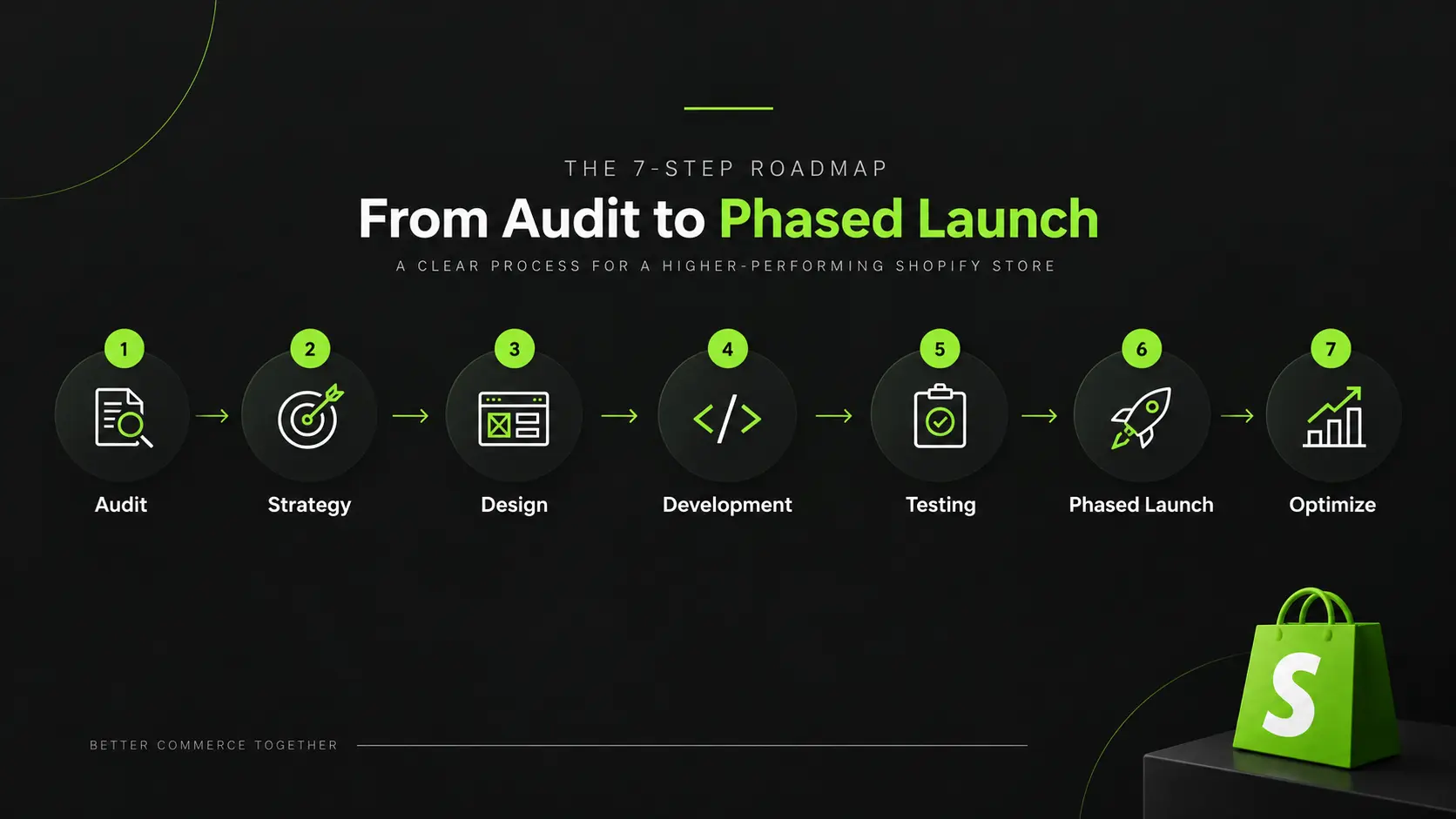
How to plan an ecommerce website redesign comes down to five phases.
Audit current performance to find the real problem, set goals tied to business outcomes, decide whether to redesign on your current platform or replatform, build an SEO migration plan before any design work starts and roll out in phases to protect live revenue.
Skipping the SEO migration step is the single most common cause of post-launch traffic and revenue loss.
Why Most Ecommerce Redesigns Underperform
Most ecommerce redesigns do not fail because the new website looks bad. They fail because the project is treated as a design refresh instead of a business and SEO migration project.
Treating It as a Design Refresh Instead of a Business Risk Project
A redesign can change URLs, navigation, internal links, content, structured data, and even the ecommerce platform. Each change can affect organic rankings, traffic, conversions, and revenue.
Before redesigning, identify the pages, products, categories, keywords, and traffic sources that currently drive revenue. The new site should protect these assets while improving usability and conversion.
The Most Common Causes of Post Launch Traffic and Revenue Drops
Traffic and revenue declines after a redesign often result from migration errors, including:
- Missing or incorrect redirects that create 404 errors
- Changed URL structures without a complete redirect map
- Loss of internal links to important pages
- Removed, duplicated, or weakened SEO content
- Broken canonical tags, structured data, XML sitemaps, or indexation settings
- Insufficient pre launch testing and post launch monitoring
The key takeaway is simple: the migration is part of the redesign, not a technical task to handle afterward. SEO, analytics, redirects, content, and technical QA should be planned from the start.
Step 1: Audit Before You Touch Anything
Most brands know they want a redesign before they know exactly what needs fixing. A thorough pre redesign audit helps identify the real problems, protect what is already working, and establish a baseline for measuring the new website.
Start with a complete ecommerce website audit checklist to make sure important technical, SEO, performance, and conversion areas are not overlooked.
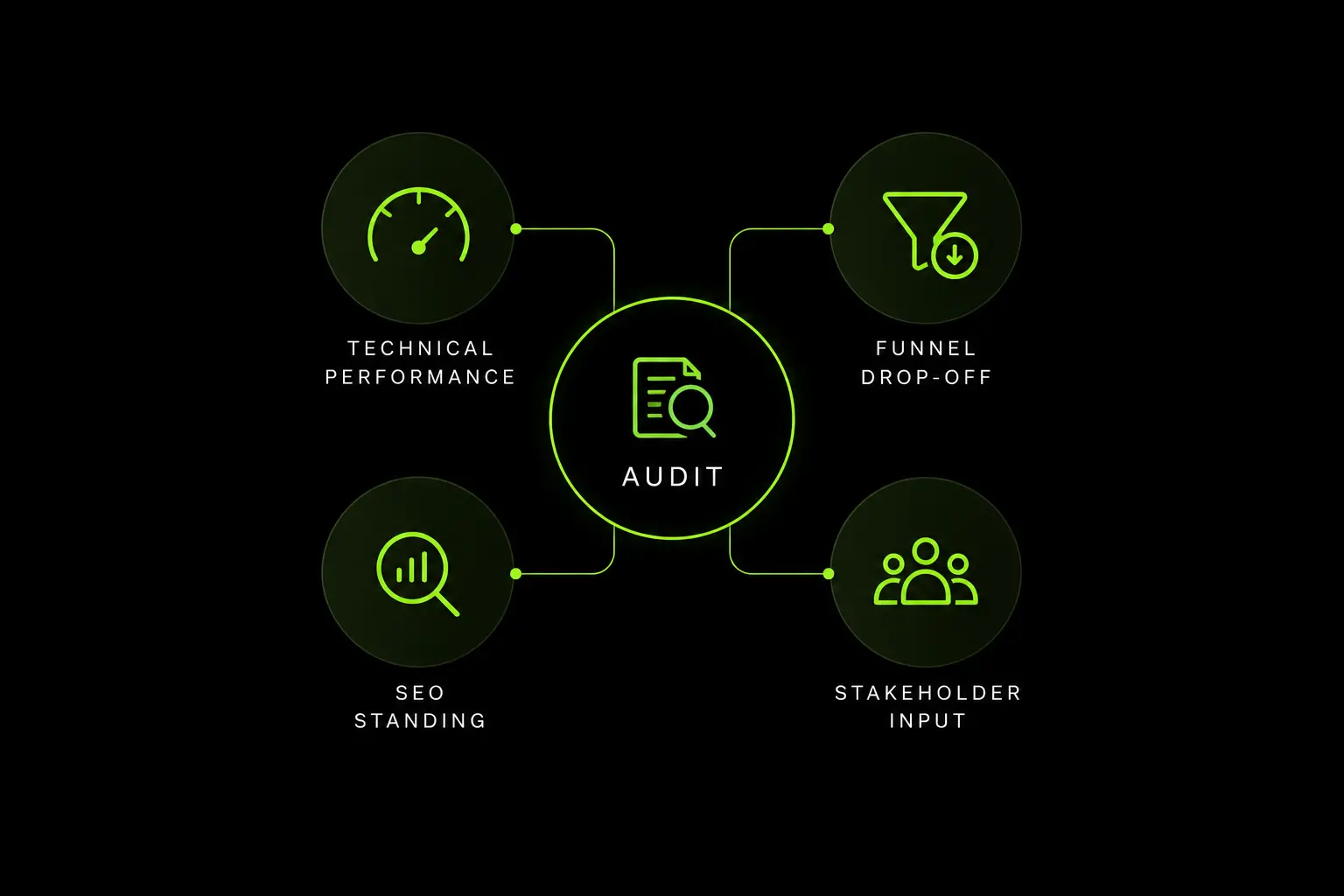
Technical, Performance and SEO Audit
Measure the current website before making changes. Review Core Web Vitals, crawlability, indexation, page speed, server response times, broken links, redirect chains and orphaned pages across key templates such as the homepage, category pages, product pages, cart, and checkout.
From an SEO perspective, identify your highest performing organic landing pages, keywords, backlinks, structured data, and internal linking patterns.
If a category page generates significant organic revenue, its URL, content, and internal links need to be protected during the redesign.
Conversion Funnel Audit
Use actual analytics data to identify where customers are dropping off. Reviews add to cart rates, cart to checkout completion, checkout abandonment, mobile versus desktop conversion rates, zero result searches, and high traffic exit pages.
Do not redesign the entire funnel based on assumptions. Focus on the stages creating the biggest customer and revenue impact.
Customer and Stakeholder Interviews
Analytics tells you what is happening, but not always why. Speak with customers, customer support, sales, marketing, and operations teams to uncover usability issues, recurring objections, and operational constraints.
The audit should ultimately answer one question, what needs to change, and what must be protected?
Step 2: Set Goals Tied to Business Outcomes, Not Aesthetics
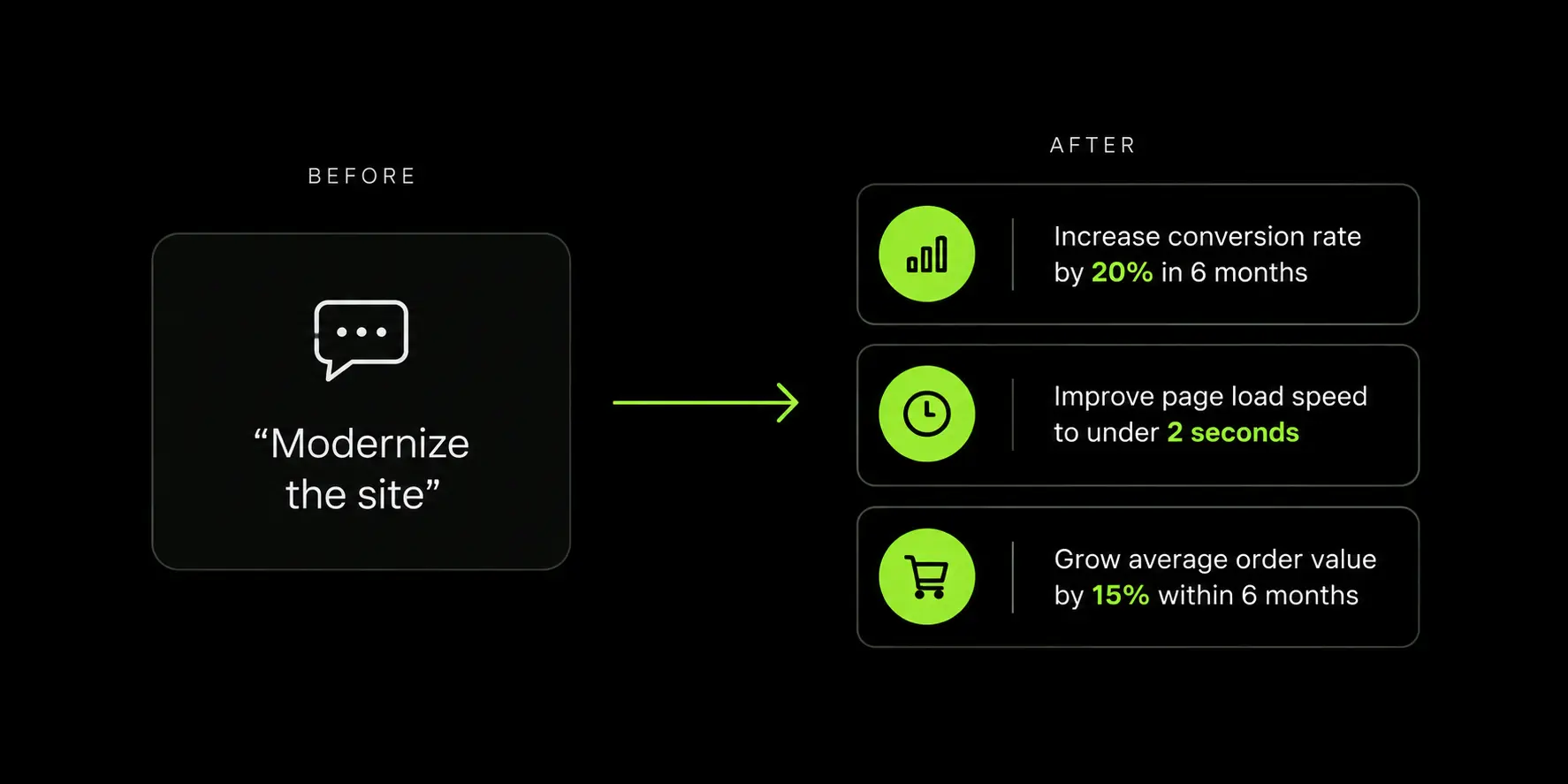
“The site looks dated” is not a business goal. It is a symptom. A successful ecommerce redesign should be tied to measurable outcomes that show whether the investment is improving the business.
Translate “The Site Looks Dated” Into Measurable Objectives
Turn subjective feedback into specific targets that can be measured before and after launch. Depending on the problems identified in your audit, objectives might include:
- Increase mobile conversion rate from 1.2% to 1.8% within 90 days
- Reduce checkout abandonment from 72% to 65%
- Increase category page to product page click through rate
- Improve organic revenue per session by 15%
- Reduce PDP load time from 4.2 seconds to under 2 seconds
The right targets will depend on your existing performance and business model. The important point is to establish a baseline before development begins.
Align Stakeholders Before Scoping Begins
Marketing, operations, product, and leadership may have very different expectations from the redesign. Marketing may want greater landing page flexibility, operations may need easier product management, while leadership may be focused on revenue and profitability.
Bring these stakeholders together before creating the project scope. Agree on three to five primary business objectives and define how each will be measured.
Everything else should be treated as secondary. Without clear priorities, an ecommerce redesign can quickly turn into a long list of departmental requests, increasing scope, cost, and timelines without creating a clear business impact.
The goal is not simply to launch a better looking website. It is to build a website that delivers measurable improvements for customers and the business.
Step 3: Redesign Versus Replatform, The Decision Most Guides Skip
This is the decision point with almost no competing content frames as a decision at all.
When A Visual Or UX Redesign On Your Current Platform Is Enough
If your platform handles your catalogue size, your checkout flow, and your integrations without constant workarounds and the actual complaints are about navigation, visual design, or page speed, a redesign on your current platform is usually the right call.
Replatforming without a platform-level problem adds cost and risk without solving anything.
When Platform Limitations Mean You Actually Need To Replatform
If your team is routinely working around hard platform limits, such as a product catalogue structure the platform cannot represent properly, a checkout flow it cannot customise, or integrations it cannot support without heavy custom development.
The underlying problem is the platform, not the design sitting on top of it. A redesign in that situation just repaints the same constraints.
Signs Your Current Platform Is The Real Bottleneck, Not The Design
Recurring app conflicts, a development team that says "we can't do that on this platform" more than once a quarter, or a catalogue structure held together with manual workarounds are all signs pointing toward replatforming rather than a visual refresh.
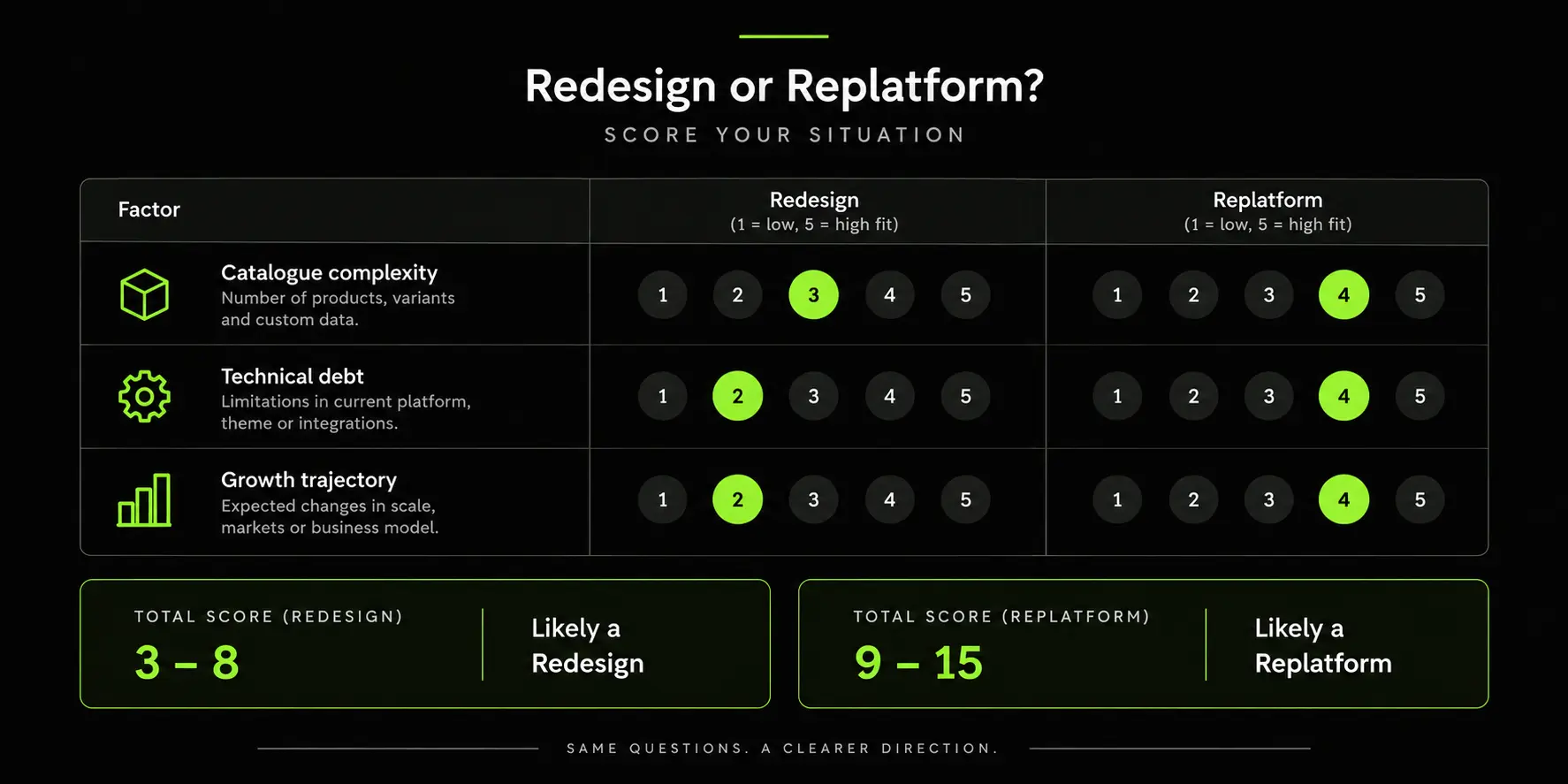
Score your business honestly against all three rows before committing to a scope. A business that lands mostly in the redesign column but is genuinely uncertain about growth trajectory over the next 12 to 18 months should weigh that uncertainty toward the more conservative, cheaper option first, since a redesign that later needs replatforming is a smaller sunk cost than a replatform that turns out to have been unnecessary.
Step 4: Build the SEO Migration Plan Before Design Work Starts
An ecommerce redesign can put years of SEO value at risk if URL changes, redirects, content, and internal linking are handled as an afterthought.
The SEO migration plan should therefore be created before development and design are finalised.
URL Mapping and Redirects at Catalog Scale
Every changed URL needs a clear destination. For a 1,000+ SKU catalog, build a redirect matrix using a full crawl of the existing site.
Include product pages, category pages, blog posts, content pages, and any parameterised URLs receiving organic traffic.
Use 301 redirects for permanent URL changes, avoid redirect chains, and never redirect unrelated pages to the homepage simply to eliminate 404s.
Protect High Value Pages
Use your audit data to identify the product and category pages generating the most organic traffic and revenue. Where possible, preserve their URLs, content, metadata, structured data, and internal links.
If a URL must change, test its direct redirect before launch and monitor rankings and organic traffic afterwards.
Preserve SEO Signals
Check that title tags, meta descriptions, canonical tags, XML sitemaps, Product and Breadcrumb structured data, and important internal links are carried over correctly.
These elements help search engines understand and discover your ecommerce pages.
Manage Large Catalogs Carefully
Large catalogs require additional attention to crawlability. Review low value filter URLs, internal search pages, duplicate product or variant URLs, orphaned pages, redirects and soft 404s. Keep the XML sitemap focused on canonical, indexable URLs and submit the updated sitemap after launch.
A successful migration protects existing SEO equity while creating a stronger foundation for future organic growth.
Step 5: Design and Build With Conversion in Mind
Once the audit, business goals, and SEO migration plan are in place, design can begin with a clear purpose. Every design decision should support usability, conversion, and the objectives defined in the earlier steps.
Information Architecture and Navigation Restructuring
Navigation should reflect how customers actually search for and evaluate products, rather than simply mirroring how the internal team organises its inventory.
For large catalogs, a clear hierarchy can make hundreds or thousands of products easier to discover. Review category structures, menus, filters, breadcrumbs, and internal links to reduce unnecessary clicks and help shoppers reach relevant products quickly.
Our guide to information architecture covers how to structure these elements effectively.
Mobile First Design and Checkout Flow
Mobile users should be considered from the beginning, not after the desktop design is complete. Focus on clear product information, prominent calls to action, easy navigation, simple forms, fast loading pages, and a checkout process with minimal friction.
Depending on your target market, payment methods should also match customer expectations. For example, GCC stores may need options such as Tabby or Tamara, while other markets may have different preferred payment methods.
Testing the mobile experience throughout the design process can help identify usability issues before development is complete. See our guide to mobile first design for more practical considerations.
Design System and Component Consistency
Create reusable components for product pages, category pages, navigation, forms, buttons, and checkout.
A consistent design system makes the site easier to develop, test, maintain, and scale across a large catalog while preventing visual inconsistencies after launch.
Step 6: QA, Staging, and Pre Launch Testing
A redesign is not finished when the design is approved. It is finished when the new website has been tested across devices, browsers, templates, redirects, SEO elements, and expected traffic conditions.
Staging Environment Testing Across Devices and Browsers
Use a staging environment to test the complete customer journey before making the site live. Prioritise the devices and browsers shown in your existing analytics rather than relying on assumptions.
Test key templates including the homepage, category pages, product detail pages, cart, checkout, and account pages across mobile, desktop, and tablet breakpoints.
Check navigation, forms, product interactions, responsive layouts, and checkout functionality.
Redirect and Broken Link Testing Before Go Live
Crawl the staging site and compare it with the current website. Tools such as Screaming Frog or Sitebulb can help identify technical issues at scale.
Check for:
- Missing or incorrect redirects
- 404 errors and broken internal links
- Redirect chains and loops
- Missing canonical tags
- Missing or invalid structured data
- Orphaned or unintentionally indexable pages
Every important URL from the existing site should have a clear destination on the new site where applicable.
Load Testing for Traffic Spikes
Do not test only under normal traffic conditions. If the launch coincides with a sale, marketing campaign, influencer promotion, or seasonal peak, test the website against the expected traffic volume beforehand.
The goal is to identify performance bottlenecks, server capacity issues, checkout failures, or other problems before real customers encounter them.
A structured QA process gives your team an opportunity to find and fix migration, usability, SEO, and performance issues while they are still relatively easy to correct.
Step 7: Launch in Phases to Protect Live Revenue
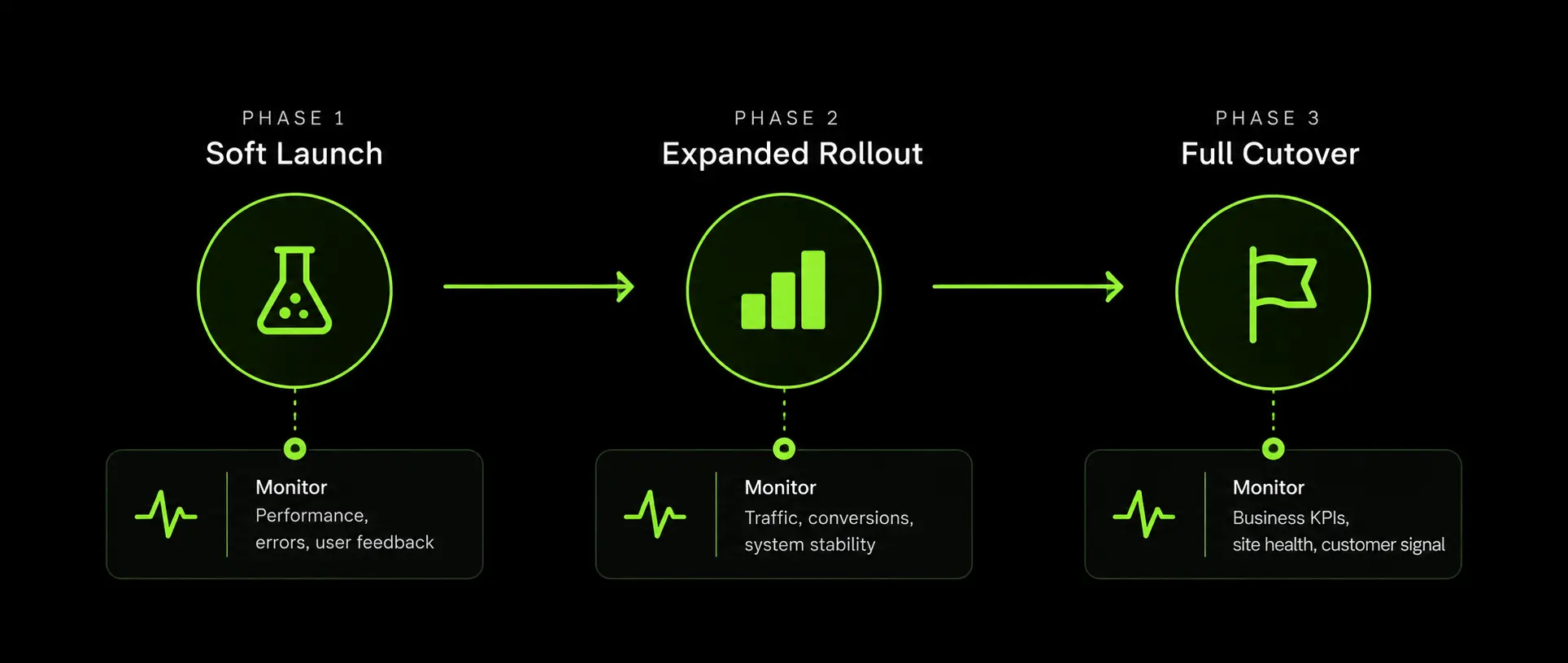
A redesign should not put your entire ecommerce operation at risk on a single launch day. A phased rollout lets you identify technical, SEO, and conversion issues before they affect the entire site.
Soft Launch and Phased Rollout Strategies
Choose a rollout approach that limits exposure while you validate the new site:
- Launch the new experience to a small percentage of users
- Roll out the redesign category by category
- Introduce new templates on lower traffic pages first
- Migrate lower risk sections before high revenue categories
The right approach depends on your platform, traffic volume, SEO setup, and ability to control the rollout.
Monitor Performance After Launch
Set up monitoring before the new site goes live. Track:
- Organic traffic and keyword rankings
- Conversion rate and revenue
- 404s, 500 errors, and redirect issues
- Indexation and crawl errors
- Canonical tags and structured data
- Performance of high value product and category pages
Compare these numbers with your pre launch baseline. Review performance closely during the first few weeks, then at 30, 60, and 90 days.
What to Do If Traffic or Sales Dip
If performance drops, investigate before making major changes.
1. Check redirects: Make sure important old URLs point directly to the correct new pages.
2. Check technical SEO: Review 404s, canonical tags, XML sitemaps, indexation, and structured data.
3. Check internal linking: Confirm that important product and category pages remain easy to discover.
4. Check content: Compare pages that lost traffic against their previous content, search intent, and page structure.
For more context, see our guides on signs your ecommerce website needs a redesign and ecommerce platform migration.
Realistic Timeline and Budget Expectations
There is no single timeline or budget for an ecommerce redesign. The scope, catalog size, platform, integrations, and migration requirements can significantly change both.
Typical Redesign Timeline by Project Complexity
As a planning guide, projects often fall into these ranges
These are indicative ranges, not fixed market rates. A full replatform with complex integrations and a large SEO migration will generally require more time than a visual redesign on an existing platform.
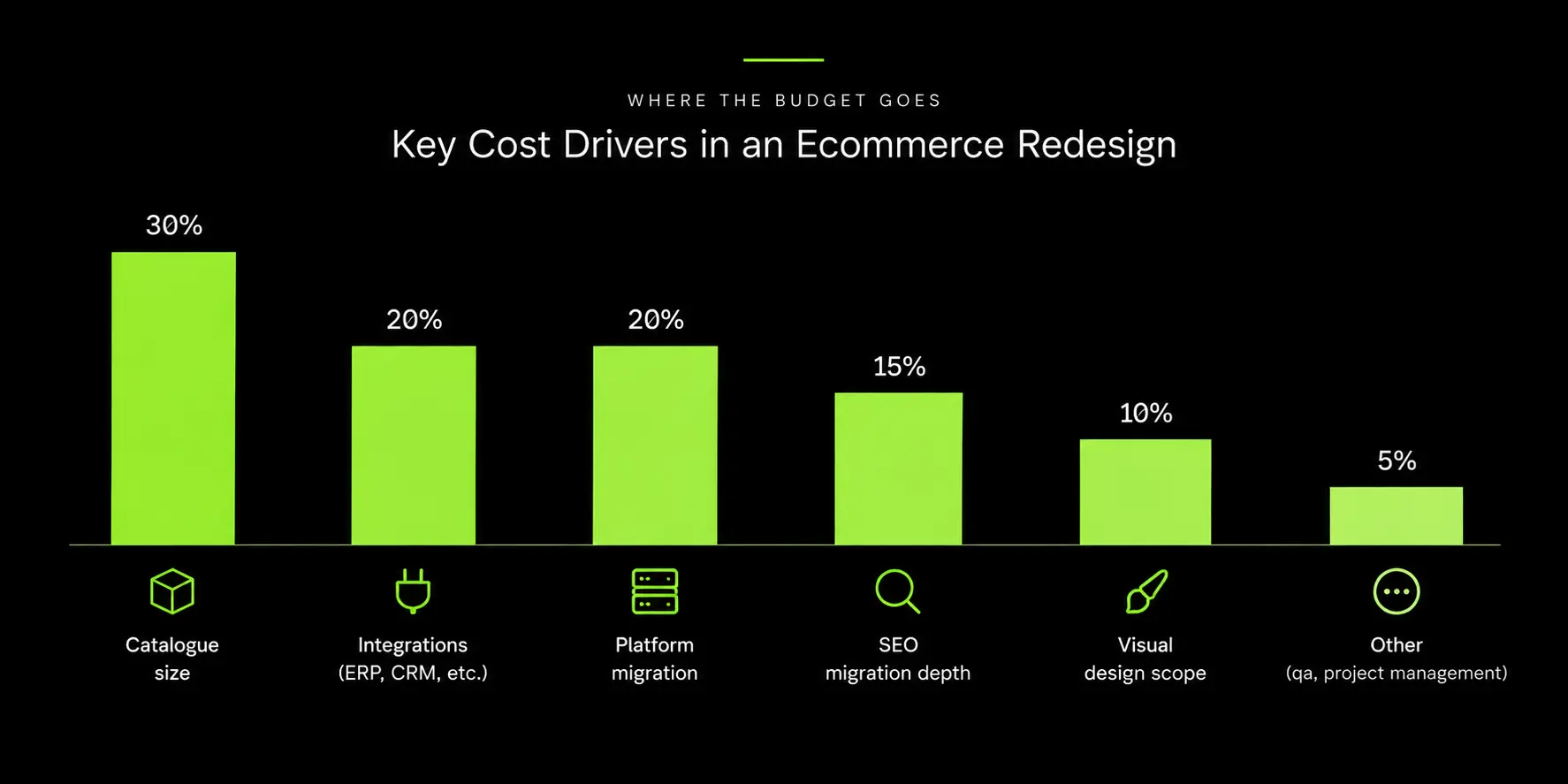
What Drives Ecommerce Redesign Costs?
The biggest cost drivers are usually:
- Platform and hosting requirements
- Catalog size, variants, bundles, and product complexity
- ERP, CRM, PIM, payment, and other integrations
- Custom features and functionality
- Data migration from legacy systems
- SEO migration, redirect mapping, and technical QA
SEO migration is particularly easy to underestimate. A large catalog may require substantial effort to crawl existing URLs, create redirect mappings, test them, and validate the new site before and after launch.
When comparing proposals, look beyond the design fee. Make sure the budget accounts for strategy, UX, development, integrations, data migration, SEO, QA, and post launch support. Our guide on choosing an ecommerce development partner can also help you evaluate project scope and costs.
How We Plan and Execute Ecommerce Redesigns
At Suplex, our ecommerce redesign process starts with an audit, not a design brief. We assess your platform, catalog structure, SEO dependencies, technical performance, and conversion funnel before recommending whether you need a redesign or a replatform.
For large catalogs, we build the SEO migration plan before design begins. This includes URL mapping, redirects, canonical tags, structured data, and internal linking for high value pages. Our ecommerce website audit checklist explains what we assess.
For revenue dependent stores, we consider a phased rollout to identify technical and conversion issues before they affect the full catalog. For Shopify projects, the store remains under the client's account, including the theme and app subscriptions. Explore our ecommerce redesign and development services to see our full scope.
Frequently Asked Questions
How much should an ecommerce website redesign cost?
Cost depends primarily on catalogue size, integration complexity, and whether the project includes a platform migration, more than on visual design scope. Request a quote based on your specific catalogue and technical requirements rather than a generic industry average, since the range between a simple redesign and a full replatform is substantial.
How long does an ecommerce website redesign take?
A visual/UX redesign on an existing platform typically takes a small number of months from audit to launch. A full replatform with a large catalogue and a proper SEO migration plan generally takes longer, since redirect mapping and phased testing need real time to do correctly.
How do I redesign my ecommerce website without losing SEO rankings?
Build a complete URL redirect map before any design work starts, preserve or improve metadata and structured data during the transition, and launch in phases rather than a single cutover so you can catch redirect errors before they affect your full traffic.
Should I redesign my site or switch to a new ecommerce platform entirely?
If your current platform handles your catalogue, checkout, and integrations without constant workarounds, a redesign on the same platform is usually sufficient. If your team is regularly blocked by hard platform limits, the underlying problem is the platform, and a redesign alone will not fix it.
What causes traffic or sales to drop after a website redesign?
The most common causes are missing or incorrect redirects, thin or duplicated content on restructured pages, broken internal linking after a navigation change, and a single full cutover with no way to isolate problems. Visual design choices are rarely the actual cause.
Do I need to redirect every old URL when I redesign my ecommerce site?
Every URL that changes and previously received meaningful traffic or held search rankings needs a mapped redirect to its closest equivalent on the new site. Redirecting everything to the homepage as a shortcut is a common mistake that causes unnecessary ranking loss.
How do I know if my ecommerce website actually needs a redesign?
Start with the audit in Step 1 rather than a visual judgment call. If conversion funnel data, technical performance, and customer feedback all point to specific, measurable problems, a redesign is justified. If the main complaint is that the site "looks old" with no measurable performance issue behind it, a more targeted update may be enough.
Hi, I’m Rishabh Jain
I believe great digital experiences have the power to shape perception, build trust, and move businesses forward. That belief led me to found Suplex Design Studio, a global digital design and development studio helping FMCG and D2C brands build websites and digital experiences that are strategic, thoughtful, and commercially meaningful.
I started Suplex at 25 with a clear intent, to create digital experiences that look appealing, work seamlessly, and help D2C businesses grow. By 28, the studio had scaled globally, guided by a strong foundation in integrated design that I developed during my academic journey in London, where I was honoured with the Dean’s Award.
Over the years, I’ve had the opportunity to work with 100+ brands, from Fortune 500 organisations to family-run businesses, helping them build websites, e-commerce experiences, and digital products that create clarity, credibility, and long-term value.
Our work has been recognised internationally, including the Manifest Award (2024), the Clutch Global Award (2025), and features across platforms such as The Dieline, Packaging of the World, and the World Brand Design Society.
None of this would be possible without the people behind the work. I’m deeply grateful to the Suplex team, whose commitment, creativity, and attention to detail turn ideas into meaningful digital experiences every day.
At the heart of our work is a simple philosophy, digital design should be intentional, functional, and built to create real business value. That continues to guide everything we create at Suplex.






































Let’s Make It Happen
E-Commerce Success Stories

%201.avif)






.avif)

.avif)
Build Your D2C Business The Right Way
Build It With Suplex.


