Shopify Development for Specialty Coffee Brands in UAE: What to Build Beyond a Template
.avif)
Shopify Development for Specialty Coffee Brands in UAE: What to Build Beyond a Template
Shopify development for specialty coffee brands in the UAE goes beyond premium design. It requires structured coffee data, intuitive grind-size selection, roast-to-order inventory, seamless subscriptions and a dedicated wholesale journey.
From showcasing origin and processing methods to managing roast dates and repeat orders, every feature should improve freshness, simplify purchasing, and drive customer retention.
Based on our experience working with luxury ecommerce brands in UAE, here's our guide exploring what to build for a high-performing specialty coffee store, beyond standard Shopify templates.
Why Specialty Coffee Stores Outgrow Standard Shopify Setups
Standard Shopify templates work well for straightforward product catalogues, but specialty coffee brands need more than product images, descriptions, and checkout buttons.
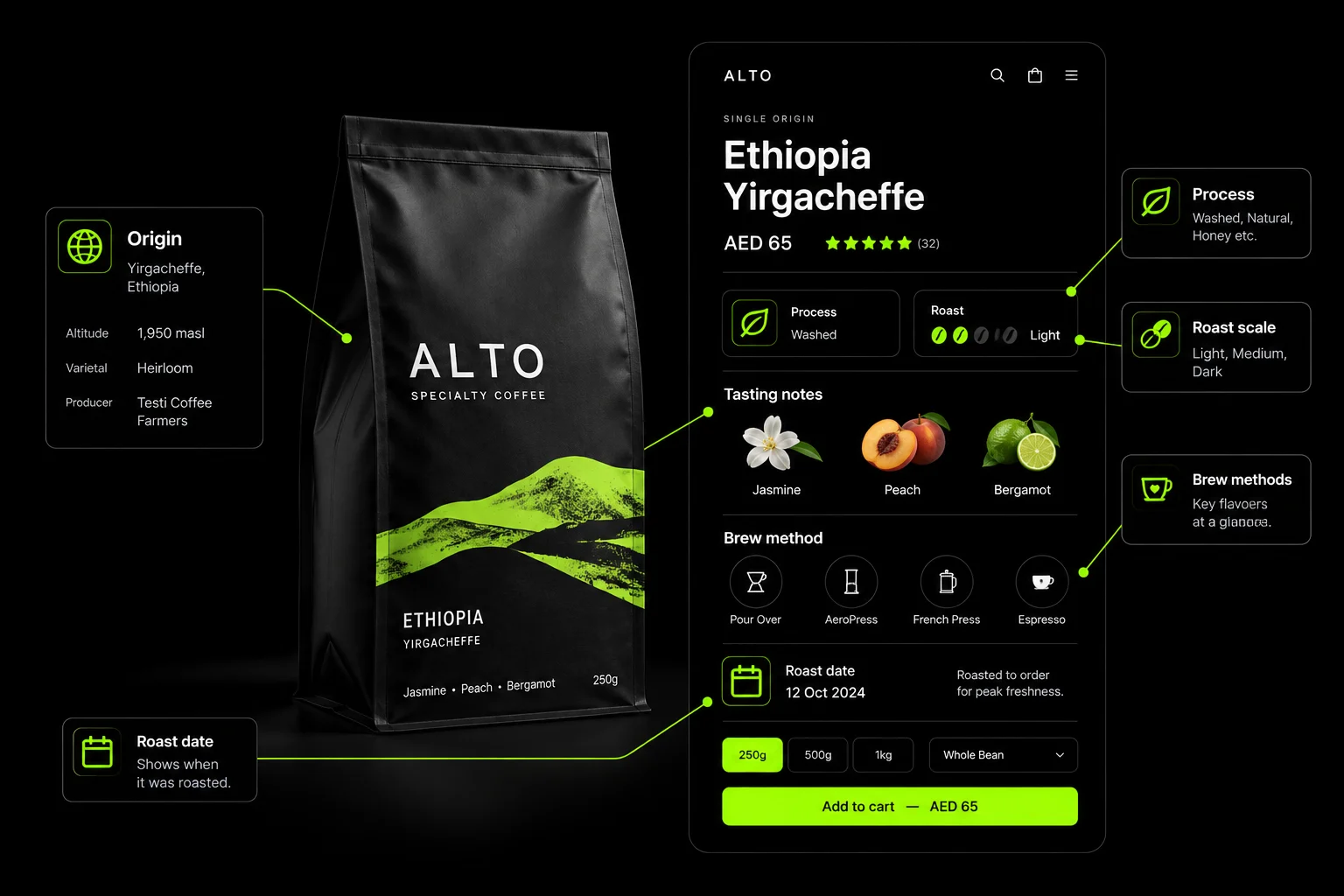
Customers want to understand where their coffee comes from, how it was processed, when it was roasted, and which grind suits their brewing method. Managing these details through generic product fields quickly becomes limiting.
The difference becomes clearer as the business grows.
These gaps affect more than the shopping experience. Poor product data makes coffee harder to discover, incorrect variant logic creates inventory problems and generic shipping workflows can undermine freshness expectations.
Meanwhile, limited subscription flexibility makes repeat purchasing less convenient, even for customers who already love the coffee.
For UAE-based roasters, the setup should also accommodate local delivery expectations, clear AED pricing, suitable payment methods, and Arabic-English support where required.
The solution isn't necessarily a fully custom platform. Most specialty coffee brands can build on Shopify with the right combination of structured product data, carefully selected apps, inventory rules, subscription workflows, and wholesale functionality.
The key is to plan the operational logic before choosing the theme. A premium design attracts customers, but a well-structured Shopify store helps convert first-time buyers into loyal subscribers and long-term wholesale partners.
Build a Coffee Data Model First
A structured coffee data model is the foundation of a scalable Shopify store. It powers product filters, coffee finders, personalised recommendations, origin pages, and AI-readable product information.
Capture consistent details for every coffee, including:
- Origin: Country, region, producer or farm, and altitude.
- Coffee Profile: Varietal, processing method, roast level, and tasting notes.
- Brewing Guidance: Recommended brew methods and grind options.
- Harvest Details: Harvest season and relevant freshness information.
- Certifications: Organic or direct-trade claims, where properly documented.
Standardising these fields makes product discovery easier and helps customers compare coffees confidently.
Use Metaobjects for Reusable Entities
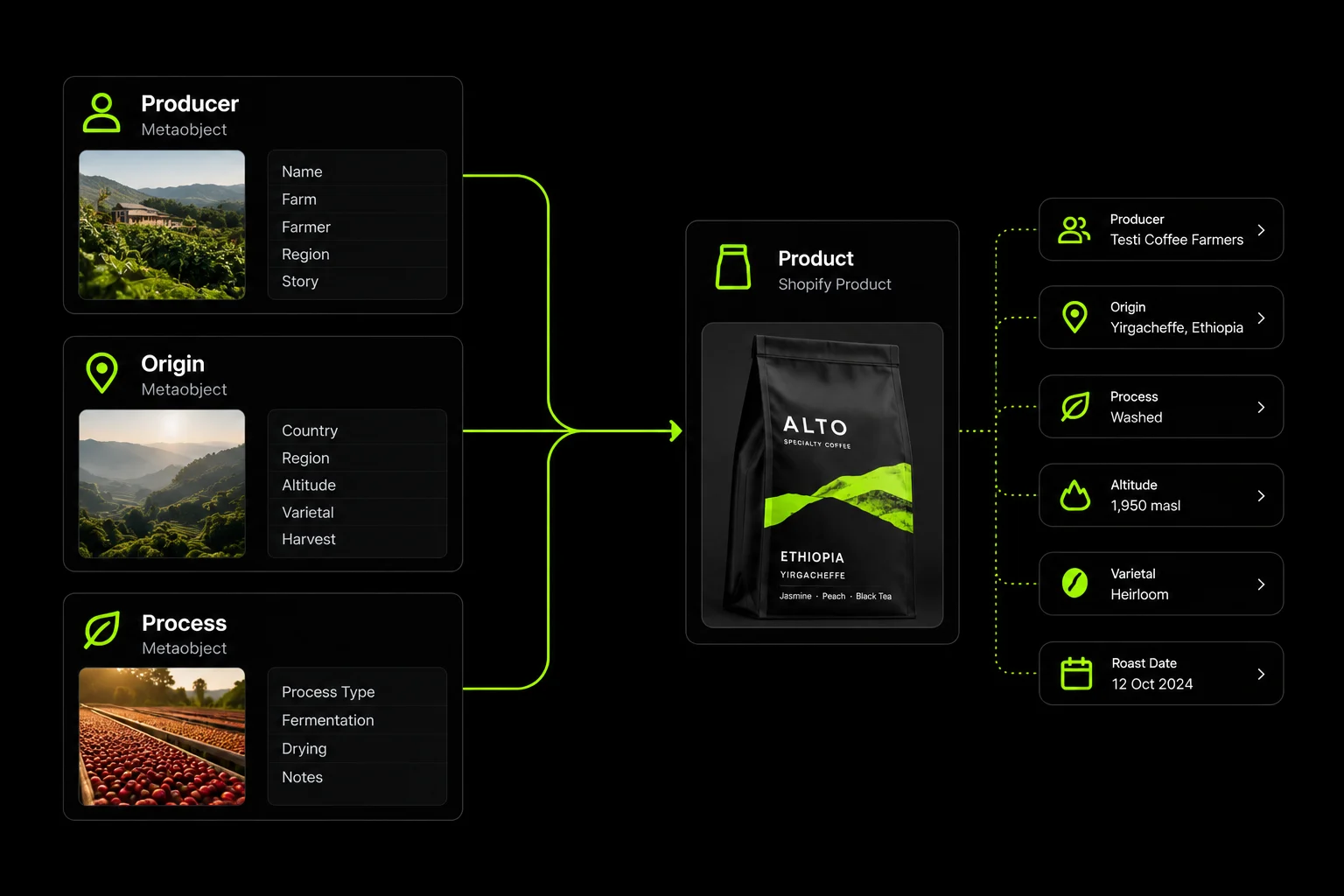
Shopify metaobjects allow you to create reusable records for producers, origins, and processing methods, then link them to multiple products. This keeps information consistent across the catalogue and simplifies updates as your range expands.
For example, updating a producer's profile can update every linked coffee. The same data can power dedicated origin pages, producer profiles, and product filters without duplicating content.
What the Data Enables
A well-structured catalogue unlocks four key capabilities:
- Smarter Filters: Let shoppers browse by origin, roast level, processing method, or brew style.
- Coffee Finders: Match preferences such as fruity, floral, or chocolatey flavours with relevant coffees.
- Personalised Recommendations: Suggest similar coffees based on shared attributes and tasting profiles.
- SEO-Friendly Origin Pages: Build useful landing pages around coffee-growing regions, producers, and varieties.
Structured product data can also help search engines and AI systems interpret your catalogue more accurately.
Build the data model before the storefront. A consistent foundation makes every subsequent feature easier to develop, maintain, and scale.
What We Learned Building a 120-Blend Beverage Catalogue
Tea Culture Of The World is a Shopify build by Suplex, published in 2026. Its catalogue features 120 blends sourced from estates across Japan, Vietnam, China, India, South Africa, and Morocco.
The store serves premium D2C customers and hospitality buyers, including Hyatt, Air India, and Four Seasons. Although the category is tea, four lessons apply directly to specialty coffee ecommerce.
Lead With The Drinker's Need, Not The Category
Tea Culture's navigation lets visitors explore how they want to feel: Energise, Relax, Glow, Cleanse, or Focus. Shoppers can discover products without knowing specific tea varieties.
For coffee, offer browsing by brew method, flavour preferences such as fruity and bright or chocolatey and smooth, and time of day, alongside origin. This helps customers find suitable coffees without requiring specialist knowledge.
Show Origin Details On The Product Page
Tea Culture gives each sourcing territory its own visual identity, turning product discovery into an exploration of origins.
For coffee, use Shopify metaobjects to create dedicated origin and producer pages. This makes sourcing information a meaningful part of the shopping experience rather than a detail buried in product descriptions.
Design The Product Page For Confidence
Tea Culture highlights aroma, taste, mouthfeel, caffeine, and recommended drinking times, alongside ingredient visuals and brewing guidance.
For coffee, showcase tasting notes, roast levels, brew recipes, and roast dates. Customers paying specialty prices need clear information about flavour, freshness, and preparation.
Give Wholesale Its Own Conversion Surface
Tea Culture's corporate gifting and hospitality section provides distinct audience paths, brochure downloads, and enquiry forms. B2B logos also reinforce trust on the D2C homepage.
For coffee, create a dedicated café and office wholesale journey with its own landing page, enquiry form, and pricing structure. A Wholesale Buyer Should Never Have To Navigate A D2C Checkout Designed For A Single Bag.
The published case study provides directional insights; specific performance figures are not included because permission to publish them has not been granted.

Grind Options Without Inventory Headaches
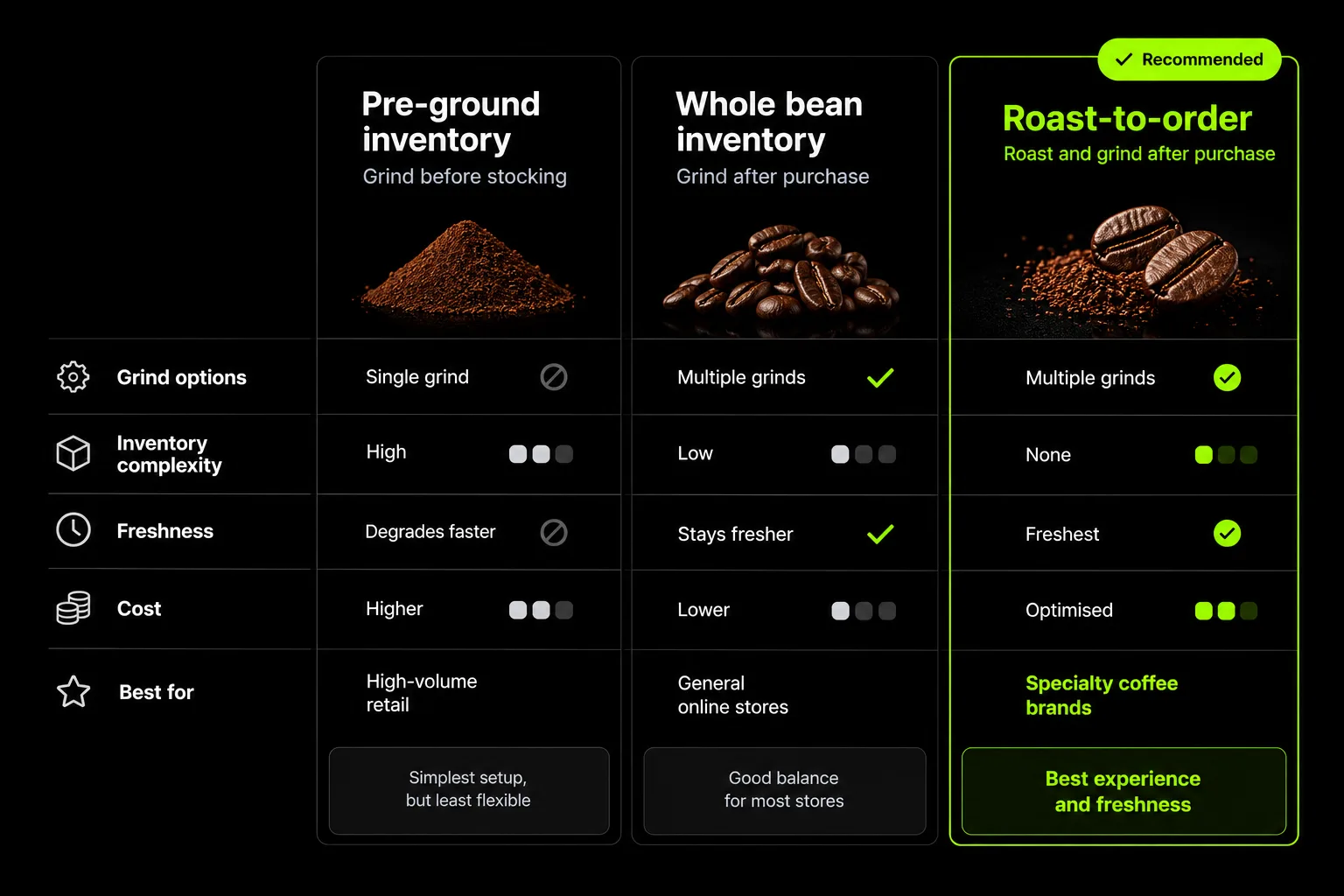
Offering different grind sizes can complicate Shopify inventory. If you sell a 250g bag in whole bean, espresso, filter and French press options, Shopify may treat each as a separate variant with its own stock count.
If all four use the same supply of beans, those counts can quickly become inaccurate.
Grind As A Variant is straightforward if you keep separate stock for each grind. But if you grind beans only after an order comes in, separate stock counts can misrepresent what you have available.
Grind As A Line-Item Property avoids that problem. Customers choose their grind, but inventory is tracked against the coffee and bag size rather than each grind option. Your fulfillment team can see the customer's choice on the order.
Shared Inventory may be a better fit for larger catalogues that need more detailed reporting. However, the setup depends on the Shopify features or apps you use. Check how each option handles stock deductions before committing to it.
Decide how grind selection will work before importing products or setting up subscriptions. Changing variant structures later can affect subscription products, inventory reports, and connected apps. It's much easier to get this right before launch.
Freshness and Roast-to-Order Logic
Specialty coffee customers want to know the roast date before they place an order. Your Shopify store should make that information clear and help your team manage roasting and dispatch without relying on manual calculations.
Store Features
- Roast Schedule: Tell customers which days you roast, such as Monday and Thursday.
- Order Cut-Offs: Show when an order must be placed to make the next roast.
- Roast Date: Display the roast date on the product page and packing slip when available.
- Expected Dispatch: Show the estimated dispatch date before checkout is complete.
Avoid promising fresh roasting without explaining when it happens. A clear schedule and dispatch estimate give customers a better idea of what to expect.
Operations Features
The backend needs to support the same process. Generate a production list from open orders, showing how many kilograms of each coffee need to be roasted for each scheduled batch. Track roast dates and batch details to help with quality checks and customer complaints.
If you already use roast management or production software, check whether it can integrate with Shopify and confirm what data can be shared before choosing an integration.
The production list is particularly useful on busy roast days. Instead of manually checking orders and calculating quantities, your team can work from a single list of what needs roasting.
Subscriptions That Keep Coffee Subscribers
Coffee subscriptions give roasters a reliable source of repeat orders. The setup needs to match how much coffee customers drink, give them control over deliveries, and fit the roastery's production schedule.
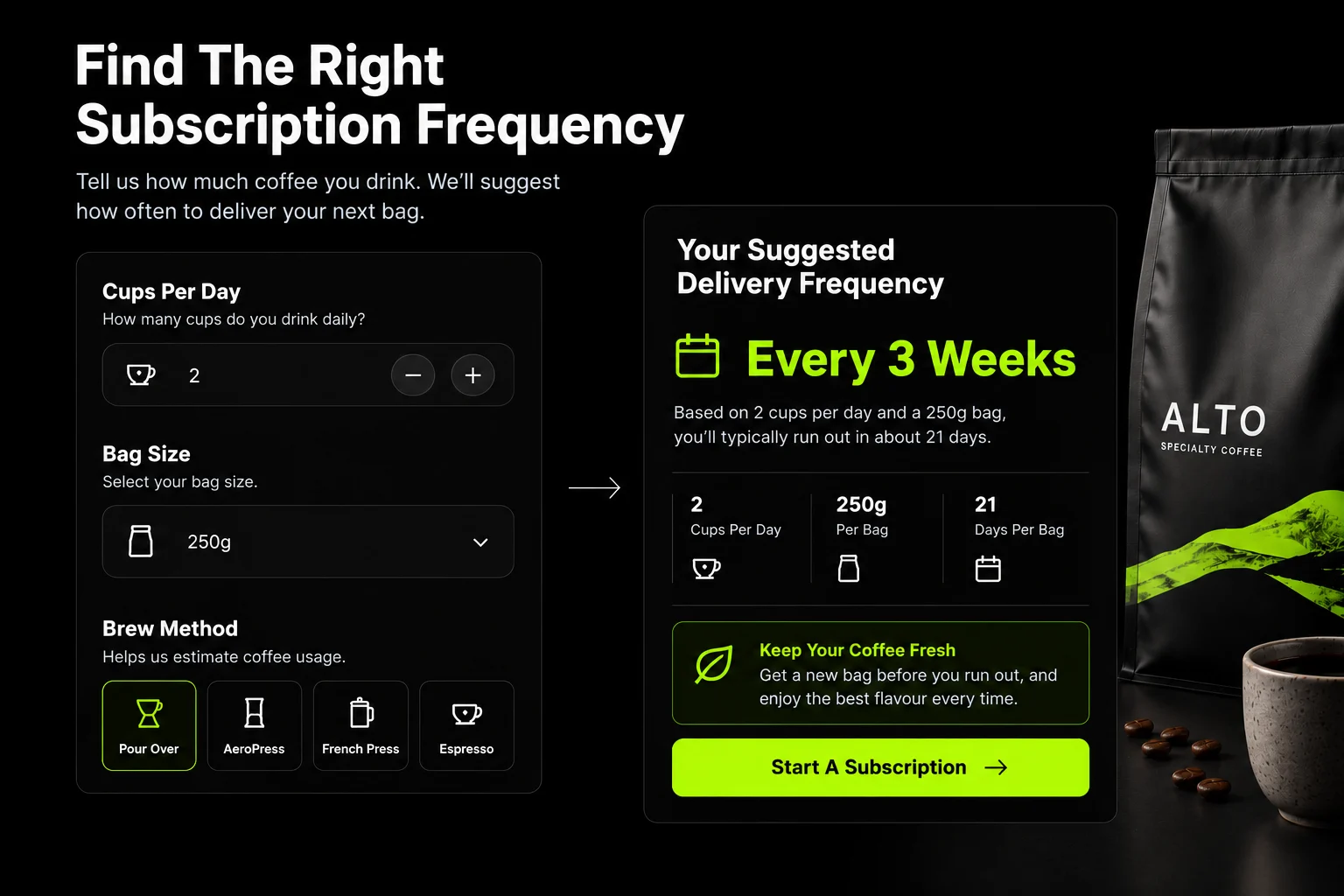
Set Delivery Frequency By Consumption
Let customers enter how many cups they drink each day and choose their bag size. Use those details to suggest a delivery frequency.
For example, someone drinking two cups a day at 15 grams per cup uses 30 grams daily. A 250g bag lasts roughly eight days. A 500g bag lasts around 17 days.
This helps customers order enough coffee without accumulating unopened bags between deliveries.
Offer Different Subscription Types
Give customers a few clear options:
- Fixed Coffee: The Same Coffee With Every Delivery.
- Roaster's Choice: A Rotating Selection Of Origins.
- Espresso And Filter Plans: Coffees Selected For Each Brewing Method.
- Prepaid Gift Subscriptions: Three, Six, Or Twelve Months Paid Upfront.
The roaster's choice needs extra planning. Check that the subscription app can handle coffee rotations, product availability, and scheduled roast days.
Let Subscribers Manage Their Orders
Allow subscribers to skip a delivery, swap coffees, change grind size, pause, or cancel through their account portal. They should not need to contact support for routine changes.
Email and WhatsApp reminders can link directly to subscription management, making it easier to change an upcoming order.
Match Billing To Roast Days
Set billing and dispatch dates around your roasting schedule. This helps the team prepare the right quantities and gives subscribers a clear idea of when their coffee will be roasted and shipped.
Choose The Right Subscription App
Shopify Subscriptions, Recharge, and Loop are options worth evaluating. Compare their current support for prepaid gifts, product swaps, rotating selections, and customer self-service before choosing one.
Grips Intelligence reported a 4.0%–4.5% conversion rate for its tracked specialty coffee and subscriptions segment in June 2026. Treat this as a segment-specific benchmark, not an industry-wide target.
For more on subscription design, read D2C food and beverage website design guide and Shopify conversion rate optimisation guide.
Discovery: Finders, Filters and Limited Releases
A coffee finder helps customers choose from your range, while filters make it easier to compare coffees. Limited releases give regular customers a reason to return and try something new.
Coffee Finder Quiz
Ask four to six questions about brew method, flavour preferences, milk or black coffee, and preferred intensity. Use Shopify metafields to match answers with suitable coffees.
For example, someone who prefers black filter coffee with fruity flavours should see coffees that match those preferences. Keep recommendations tied to your product data so the results remain consistent.
Product Filters
Let shoppers narrow the catalogue by:
- Processing Method: Washed, Natural, Honey, Or Anaerobic.
- Roast Level: Light, Medium, Or Dark.
- Origin: Country, Region, Or Producer.
- Tasting Notes: Fruity, Floral, Chocolatey, Or Nutty.
- Brew Method: Espresso, Pour-Over, French Press, Or Filter.
Limited Microlots
Small-batch coffees need a different approach from regular stock. Show release dates, display accurate stock levels, offer back-in-stock notifications, and let customers join a waitlist when a coffee sells out.
Give subscribers early access to selected releases if your stock and fulfilment process can support it. This adds a practical benefit to the subscription without relying on discounts.
Equipment And Accessories
Recommend equipment based on the coffee or brewing method a customer chooses. A pour-over customer might need a dripper, filters, and a suitable grinder, while an espresso customer may need different equipment.
You can also create landing pages for individual brewing methods, combining suitable coffees, equipment, and brewing guides in one place. This helps customers find what they need without searching across separate categories.
Wholesale And Café Accounts On The Same Store
Roasters that supply cafés and offices need a wholesale setup alongside their regular online store. A separate website adds cost and makes it harder to manage products, inventory, and orders in one place.
What Wholesale Buyers Need
- Company Accounts: Let business customers access their own accounts and order history.
- Custom Price Lists: Set prices based on each café's agreement.
- Minimum Order Quantities: Set minimum quantities for wholesale orders.
- Recurring Orders: Make it easier for cafés to reorder their regular coffee supply.
- Payment Terms: Support agreed payment periods where available.
- VAT Invoices: Provide invoices that meet applicable UAE tax requirements.
Choose The Right Shopify Setup
Shopify Plus includes native B2B features such as company profiles, customer-specific pricing, and payment terms. Wholesale apps offer alternative setups for stores on other plans, although the available features vary.
Check current plan requirements and app capabilities before deciding how to handle account pricing, minimum orders, and payment terms.
Give Wholesale Its Own Landing Page
Create a dedicated page for cafés, restaurants, hotels, and offices. Explain your wholesale offering, available formats, ordering process, and how to enquire. Include a form that collects business details and estimated order volumes.
You can also display café and hospitality partners in your main store to show prospective buyers who already work with your brand. For your guidance B2B ecommerce website features guide and Shopify Plus upgrade guide.
Content That Sells Coffee (And Gets Cited)
Useful coffee content helps customers choose products, learn brewing techniques, and understand what makes each coffee different. It also gives search engines and AI assistants clear information to reference.
Publish Brew Guides For Each Method: Create practical guides for V60, espresso, French press, and other brewing methods.
Include the coffee dose, water quantity, grind size, brewing time and step-by-step instructions. Link suitable coffees from each guide so readers can move from learning to shopping.
Build Origin And Producer Pages: Use Shopify metaobjects to create pages for coffee-growing regions, farms, and producers.
Link these pages to the relevant products so customers can explore the source of each coffee without relying on product descriptions alone.
Explain Roast Levels And Processing Methods: Explain terms such as light roast, dark roast, washed, natural, and anaerobic processing.
Link these explanations from product pages where the terms appear. Customers can learn about unfamiliar methods without leaving the store to search elsewhere.
Design For Desktop And Mobile: Grips data has been cited as showing that specialty coffee roaster revenue comes 63% from desktop and 37% from mobile. Verify these figures against the original, current source before using them as a benchmark for your store.
Regardless of the split, make long-form guides comfortable to read on desktop and ensure product pages, checkout, and subscription management work smoothly on mobile. Use your own analytics to decide where to prioritise improvements.
For Coffee Brands In The UAE
A Shopify store for the UAE needs to account for local coffee preferences, gifting seasons, delivery expectations, and Arabic-speaking customers. These requirements should shape the store from the start.
What To Include In Your UAE Shopify Build
- Arabic Coffee And Gifting: Give qahwa and cardamom blends their own product pages, with gift sets for Ramadan and Eid. Plan seasonal stock and order cut-off dates in advance.
- Local Delivery: Show same-day or next-day delivery estimates for eligible Dubai locations, based on your actual roasting and fulfilment schedule.
- Payment Options: Support Apple Pay, subscriptions, and cash on delivery for first orders if these suit your customers and fulfilment process.
- Arabic Content: Provide clear Arabic product descriptions and navigation for Emirati and wider GCC customers. Have a fluent Arabic writer review the content rather than relying on machine translation.
- Food Registration And Labelling: Check the applicable UAE requirements for product registration and Arabic labelling before launching.
Market-size figures also need careful sourcing. Arabian Business has reported the UAE coffee market at more than AED 12 billion, while Ken Research has estimated the Middle East specialty coffee market at USD 2.3 billion in 2025.
Verify both figures against their original reports before publication, as they cover different market definitions.
Timeline and Cost
The time required to build a Shopify store depends on the product range, design, and features.
These are Suplex estimates based on our project timelines. Actual timelines depend on the scope and integration requirements.
The main cost drivers are:
- Product Range: Larger catalogues require more product data and setup.
- Theme Development: Custom themes need more design and development work.
- Subscriptions: Coffee swaps, delivery schedules, and gift plans affect complexity.
- Wholesale: Custom pricing, company accounts, and payment terms add development time.
- Integrations: Connecting Shopify to roasting or inventory software depends on the systems involved.
- Photography And Arabic Content: Product photography and professionally written Arabic content add to the budget.
Ask your agency to break down these costs in the proposal. This makes quotes easier to compare and helps you decide which features to include at launch.
If you need a custom storefront or a more advanced B2B setup, Suplex offers custom Shopify theme development and Shopify Plus development. Choose the level of development based on your requirements rather than paying for features you don't need.
Questions To Ask A Shopify Developer Before Building Your Coffee Store
Ask these questions during your first call to understand whether the developer can handle the specific needs of a specialty coffee business.
- How will you structure origin, processing, and tasting data?
- How will grind options affect inventory and subscriptions?
- How will order cut-offs and dispatch dates follow our roast schedule?
- Which subscription app would you recommend for a roaster's choice and gift subscriptions, and why?
- How will wholesale buyers place orders, and which Shopify plan will we need?
- Have you built a multi-origin or high-SKU beverage store? Can we see it live?
Look for specific answers, not general assurances. The developer should explain how they would structure your coffee data, prevent inventory issues, and coordinate subscriptions with roast days.
If they cannot explain these decisions clearly, ask for examples of similar projects before moving forward.
When comparing agencies, questions to ask an ecommerce agency can help you assess their experience, process, and technical approach.
How Suplex Builds Shopify Stores For Coffee And Tea Brands
Based in Dubai, Suplex builds ecommerce experiences for brands in local and international markets. Tea Culture Of The World project features 120 blends, mood-led navigation, origin-focused pages, detailed product information, and a dedicated hospitality section for B2B buyers.
For specialty coffee brands, we focus on the features that shape daily operations:
- Coffee Data: Metaobjects For Origins, Producers, And Processing Methods.
- Inventory: Grind Options And Stock Tracking That Match Your Fulfilment Process.
- Freshness: Roast Schedules, Order Cut-Offs, And Production Lists.
- Subscriptions: Delivery Frequencies Based On Coffee Consumption.
- Product Discovery: Coffee Finders And Filters Linked To Structured Product Data.
- Wholesale: Dedicated Buying Journeys For Cafés, Hotels, And Offices.
We plan the product data, inventory rules, and roast schedule before finalising the theme. This gives the store a solid foundation and reduces the need for expensive changes after launch. If you're planning a new coffee store or improving an existing one, explore Shopify Store Setup Service.
Frequently Asked Questions
Is Shopify Good For Specialty Coffee Roasters?
Yes. Shopify supports product variants, metafields for coffee details, and subscriptions through apps. Wholesale features are available through Shopify Plus or third-party apps. Most roasters can use Shopify without building a custom platform, provided the store handles coffee data, grind options, inventory, roast schedules, and subscriptions correctly.
How Should Grind Options Be Set Up On Shopify?
If you stock pre-ground coffee, grind can be a product variant. If you grind after receiving an order, use a line-item property to record the customer's choice and track stock against the coffee and bag size. This avoids maintaining separate stock counts for every grind option.
What's The Best Way To Run Coffee Subscriptions On Shopify?
Choose a subscription app that lets customers skip deliveries, swap coffees, change grind size, pause, and cancel through a self-service portal. Offer flexible delivery frequencies based on consumption, along with roaster's choice and gift subscriptions. Align billing and dispatch with your roasting schedule.
How Should A Coffee Store Show Freshness?
Display roast days, order cut-off times, and expected dispatch dates. Include the roast date on the bag and packing slip when available. For roast-to-order operations, generate production lists from open orders so the team knows how much of each coffee to roast.
Can Shopify Handle Wholesale Coffee Orders For Cafés?
Yes. Shopify Plus offers native B2B features, including company accounts, custom pricing, minimum quantities, and payment terms. Wholesale apps provide alternatives on other plans. A dedicated wholesale page and enquiry form help cafés find the right products and ordering terms.
Hi, I’m Rishabh Jain
I believe great digital experiences have the power to shape perception, build trust, and move businesses forward. That belief led me to found Suplex Design Studio, a global digital design and development studio helping FMCG and D2C brands build websites and digital experiences that are strategic, thoughtful, and commercially meaningful.
I started Suplex at 25 with a clear intent, to create digital experiences that look appealing, work seamlessly, and help D2C businesses grow. By 28, the studio had scaled globally, guided by a strong foundation in integrated design that I developed during my academic journey in London, where I was honoured with the Dean’s Award.
Over the years, I’ve had the opportunity to work with 100+ brands, from Fortune 500 organisations to family-run businesses, helping them build websites, e-commerce experiences, and digital products that create clarity, credibility, and long-term value.
Our work has been recognised internationally, including the Manifest Award (2024), the Clutch Global Award (2025), and features across platforms such as The Dieline, Packaging of the World, and the World Brand Design Society.
None of this would be possible without the people behind the work. I’m deeply grateful to the Suplex team, whose commitment, creativity, and attention to detail turn ideas into meaningful digital experiences every day.
At the heart of our work is a simple philosophy, digital design should be intentional, functional, and built to create real business value. That continues to guide everything we create at Suplex.































Let’s Make It Happen
E-Commerce Success Stories

%201.avif)






.avif)
.avif)
Build Your D2C Business The Right Way
Build It With Suplex.


