How To Choose A Shopify Theme For Your Brand (Beyond The Checklist)
.avif)

How To Choose A Shopify Theme For Your Brand (Beyond The Checklist)
How to choose a Shopify theme starts with evaluating the foundation behind the design.
The right theme should support your catalogue, content strategy, performance goals and future growth without creating unnecessary technical limitations.
This Suplex guide explains the factors that matter most, so you can choose a theme that performs well today and continues to support your business as it grows.
Why Most "How To Choose A Theme" Advice Misses The Point
Most existing guides reduce this decision to budget, image style, and a generic feature checklist. That's the structure of much of the top-ranking content on this topic.
What those guides rarely address is whether a theme will continue to perform as your business grows. A theme that looks perfect in a demo store with 12 curated products can behave very differently once it's managing 400 real SKUs, multiple installed apps, and a year of accumulated content.
If your business eventually outgrows an off-the-shelf theme, a custom Shopify theme can remove the technical limitations that begin to affect performance, flexibility, and scalability.
Understanding where those limits appear helps you choose a theme that matches both your current requirements and your long-term growth plans.
The checklist approach optimises for how a theme looks on day one. This guide focuses on how well it performs on day 500.
The Technical Criterion That Actually Matters: Online Store 2.0 Architecture
This is the single most consequential factor in theme choice, and almost no competing guide explains it clearly. Here's what it actually means and how to check for it yourself.
Sections Everywhere and Metafields
Online Store 2.0 architecture means every page in the theme, not just the homepage, supports flexible sections that can be added, removed, and rearranged directly in the theme editor.
It also means metafields, structured product and brand data, can drive layout decisions dynamically rather than requiring a developer to hard-code every variation.
A theme without this architecture is a much harder foundation to build on later, regardless of how polished it looks in the initial demo.
You'll hit a wall the first time you want to add a custom content block to a product page or restructure a collection page layout, and the fix will require developer time that a properly architected theme wouldn't have needed.
A simple test any non-technical founder can run before buying: open the theme editor and check whether sections can be added or rearranged on product pages and collection pages, not just the homepage. If the answer is no, treat that as a genuine limitation, not a minor gap you'll work around later.

Free (Dawn-Family) Vs Paid Themes
Be honest here rather than defaulting to "paid is always better," because that's not actually true. Shopify's free Dawn-family themes are genuinely capable and built natively on Online Store 2.0 architecture.
They're a legitimate, fully functional starting point, not a stripped-down placeholder waiting to be upgraded.
Paid themes earn their cost differently: through pre-built advanced features, mega menus, sophisticated filtering systems, industry-specific layouts, that would otherwise require stacking multiple separate apps to replicate.
The value isn't "paid equals better architecture." It's "paid equals more built-in functionality for specific, complex needs."

Theme Choice Is A Page Speed Decision
This connects theme selection to something measurable and commercially real, not just a design preference. A "pretty" theme choice can quietly cost you revenue if nobody checks what's happening underneath the visuals.
A theme loaded with unused carousel, countdown, and animation features is a documented driver of slower Core Web Vitals scores, and this holds true even when those features aren't actively being used on a given page.
Many themes still load the underlying code for every built-in feature regardless of whether it's switched on, which means a feature-heavy theme can carry real performance weight the moment it's installed, before you've even configured anything.
This ties directly back into cart abandonment research already worth knowing: mobile cart abandonment consistently runs several percentage points higher than desktop, and page speed is a documented contributor to that gap.
A slow, feature-bloated theme doesn't just look fine and load slowly, it actively contributes to the mobile drop-off that a properly optimised theme choice could have avoided from the start.

Matching Theme Structure To Your Brand's Actual Needs
Theme structure isn't one-size-fits-all across categories, and choosing a theme built for a different vertical's needs creates friction you'll feel constantly.
Fashion And Apparel: Imagery-First Layouts
Large, flexible imagery sections and lookbook-style presentation matter more here than dense filtering. Fashion shoppers browse visually first and a theme that constrains image sizing or forces a rigid grid undercuts the storytelling a fashion brand depends on to sell the product.
Premium And Luxury: Editorial, Full-Bleed Sections
This is the theme-level expression of a pattern worth understanding fully in our best ecommerce platform for luxury brands guide: editorial storytelling over template-based merchandising.
At this tier, a theme needs full-bleed image sections, rich content blocks, and enough layout flexibility to support genuine editorial pacing, not a product grid dressed up with a premium colour palette.
Supplements And Subscription Brands: Variant And Subscription-Widget Compatibility
Covered in more depth in our best ecommerce platform for supplement brands guide, a theme in this category needs to support subscription app widgets and complex variant structures, dosage, format, frequency, cleanly within the product page layout, not as a bolted-on afterthought that looks visually disconnected from the rest of the page.
Large Catalogues: Filtering And Collection Page Depth
Filtering sophistication becomes a functional requirement, not a nice-to-have, once a catalogue crosses a few hundred SKUs.
A theme without genuine multi-attribute filtering forces shoppers to scroll through pages of irrelevant products, and that friction compounds directly into lost conversions on a large-catalogue store.

Check specifically whether the theme's filtering supports combining multiple attributes at once, price plus size plus colour simultaneously, rather than filtering by only one attribute at a time, which becomes a real usability problem once a collection page holds more than a few dozen products.
Beauty and Home Goods: Attribute-Heavy Product Pages
Beauty and home goods brands need product pages that present large amounts of structured information. Shoppers compare products using attributes such as skin type, ingredients, dimensions, materials and care instructions before making a purchase.
A theme designed primarily for simple fashion catalogues often struggles to display this information clearly, leaving important details buried below the fold or scattered across the page.
Strong information architecture becomes essential, ensuring product attributes are organised in a way that's easy to scan, compare, and understand.
Look for themes that include structured comparison tables, attribute badges, or well-designed tabbed content sections instead of layouts that assume every product only needs a title, price, and short description.
How To Actually Test A Theme Before You Buy It
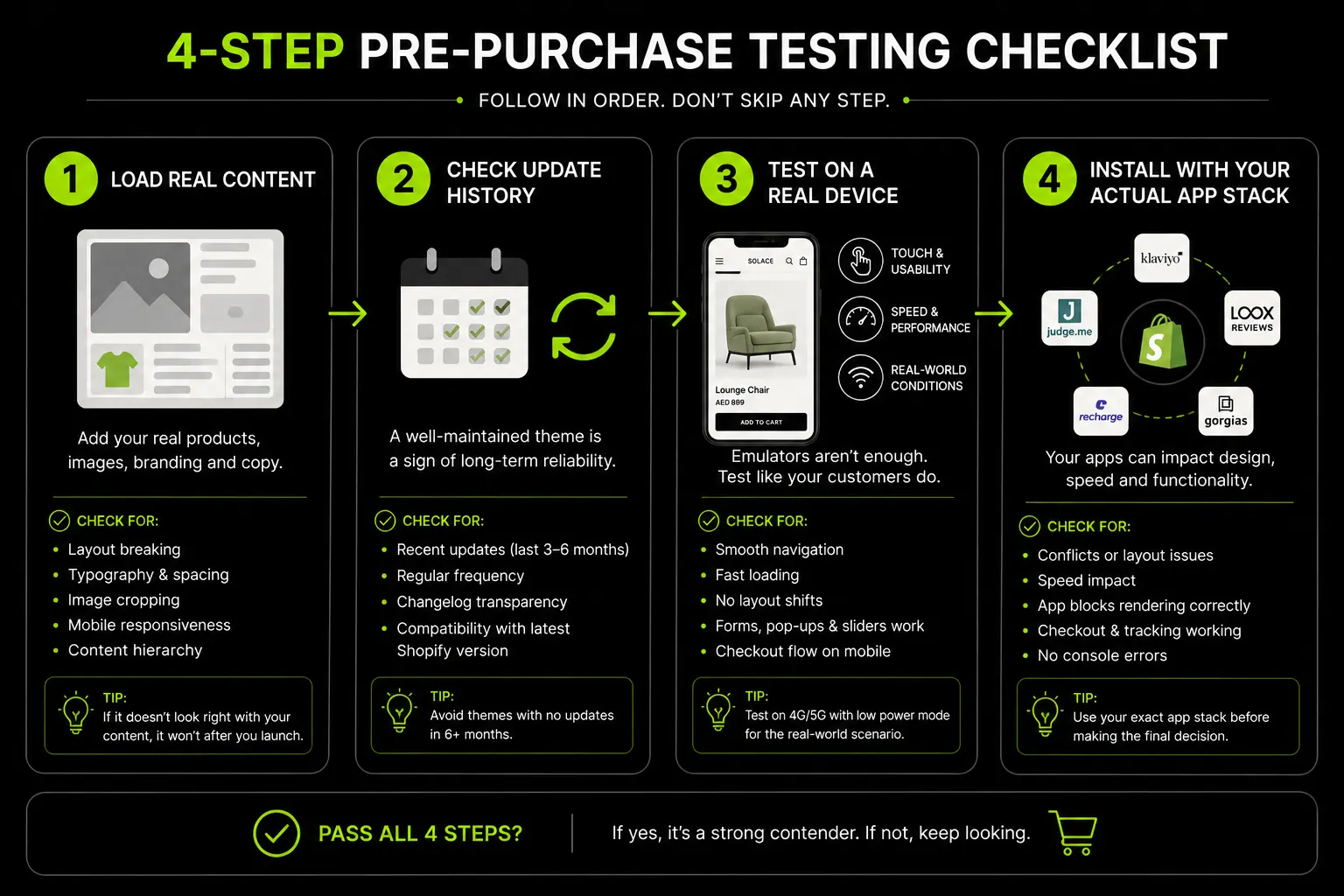
Most founders evaluate a theme by scrolling through its demo store once and deciding based on gut feeling. That approach misses almost everything that actually matters once real content is loaded. Here's a practical sequence to run before committing.
Load It With Your Own Content, Not The Demo Content
Every theme demo is populated with carefully curated placeholder products, professional photography, and short, punchy copy written specifically to make the layout look good.
Your actual catalogue almost certainly doesn't look like that. Before buying, check the theme's own documentation or reviews for how it handles longer product titles, inconsistent image aspect ratios, and products with more variants than the demo shows.
A theme that looks clean with six curated demo products can look cramped or broken with 40 real ones that don't share the same photography style.
Check The Theme's Update History And Support Responsiveness
A theme that hasn't been updated in over a year is a real risk, Shopify's platform, checkout, and API surface all continue evolving, and a stale theme can quietly fall behind on compatibility, security patches, or new Online Store 2.0 features as they roll out.
Check the theme's changelog in the Shopify Theme Store listing, and look at how recently the developer shipped an update.
For paid themes specifically, check support response times in reviews, a theme with weak support becomes expensive the first time you hit a genuine bug during a launch week.
Test On A Real Mobile Device, Not Just A Browser Resize
A browser window resized to mobile width is not the same as an actual phone. Touch target sizing, tap responsiveness, and how sections stack on a genuinely small screen all render differently on a real device than in a desktop browser's mobile preview mode.
Given how much of ecommerce traffic in most markets, and especially the UAE, is mobile, this step alone catches problems a desktop-only evaluation will miss entirely.
Install It On A Development Store With Your Actual App Stack
Themes and apps interact in ways that aren't always visible until they're running together. A subscription app, a reviews widget, and a size-chart app can each work fine independently and still conflict with each other, or with the theme's own JavaScript, once they're all installed at once.
Spin up a free Shopify development store, install the theme alongside the specific apps you already know you'll need and check for layout breaks, duplicate scripts, or slowdowns before you commit to a live launch on that combination.
This single step, run before any money changes hands, catches the conflicts that otherwise surface for the first time in front of real customers during launch week, when they're far more expensive to fix under pressure.
Theme Choice And App Compatibility
A theme doesn't exist in isolation. It's the layer every app you install has to work through, and a theme that fights your app stack creates ongoing friction long after the initial setup is done.
Why Some Themes Conflict With Apps More Than Others
Online Store 2.0 themes generally play better with apps because app developers can hook into the same section-based architecture the theme itself uses, rather than needing custom code injected into specific template files.
Legacy, non-Online Store 2.0 themes often require an app's installation script to modify theme code directly, which is more fragile, harder to undo cleanly, and more likely to break during a future theme update.
This is a second, practical reason Online Store 2.0 architecture matters beyond the customization flexibility covered earlier: it's also the difference between apps installing cleanly through the theme editor versus apps needing manual code edits that accumulate as technical debt over time.
The Apps Worth Checking Compatibility For Before You Commit
Not every app needs pre-purchase compatibility checking, but a few categories are worth confirming specifically, since they tend to touch the theme most directly:
- Subscription Apps: (Recharge, Bold, Shopify Subscriptions), since they often need to modify the product page's add-to-cart behaviour directly.
- Reviews and UGC Apps: since they typically inject content blocks into product and collection pages that need section-based placement to look intentional rather than bolted on.
- Size Chart and Product Configurator Apps: particularly relevant for fashion, beauty, and supplement brands, since these often need tight integration with variant selection logic.
- Currency and Market-Switching Apps: relevant for any brand running Shopify Markets across multiple GCC currencies, since these need to interact cleanly with the theme's header and pricing display logic.
A quick check of the theme's own documentation, or a direct question to the theme developer's support channel, on compatibility with your specific planned app stack, is a five-minute step that can save real rework later.
Skipping this check is one of the most common reasons a brand ends up mid-launch with a broken product page and no clear idea which of three recently installed apps is actually the cause.
Future-Proofing: What Happens When You Outgrow A Theme
Most theme guides focus on what fits your business today. A better question is whether the theme can support your business as it grows.
If you expect to adopt Shopify Plus within the next one to two years, consider that before choosing a theme. Checkout extensibility and advanced customisation features are available on Plus, and themes built on rigid or outdated architecture can make that transition far more complex than necessary.
The same principle applies if you may eventually move to a headless storefront or require deeper custom functionality. A well-built Online Store 2.0 theme provides a flexible foundation that supports future development without forcing a complete rebuild.
This doesn't mean every growing brand should invest in enterprise-level development today. It means evaluating whether the theme's architecture can evolve alongside your business.
If the answer is no, the cost of migration later will often exceed the savings made by choosing a cheaper theme today.
At Suplex, we recommend themes based on your growth trajectory, not just your current catalogue size. For brands planning larger-scale operations, Shopify Plus may become the right platform over time, while a platform consultation helps determine whether your current architecture will continue supporting your commercial goals as the business expands.
Suplex's Approach to Shopify Theme Selection and Customization
We evaluate every Shopify theme against three criteria before discussing design:
- Architecture: Can it support future growth without a rebuild?
- Performance: Will it remain fast as your catalogue, content, and app stack expand?
- Flexibility: Can it accommodate custom functionality without unnecessary technical debt?
We often start with a well-architected Online Store 2.0 theme instead of building everything from scratch. This reduces time to launch while providing a strong foundation for future development.
When a project requires capabilities beyond what an existing theme can support, we build custom Shopify themes tailored to the brand's operational and commercial needs.
Our approach in practice:
- Miho (Fashion): Persona-led wireframes, typography systems, and layouts designed around real shopping behaviour.
- Celesti (Skincare): Conversion-focused UX based on user research and behavioural data rather than assumptions.
The principle is simple: choose the right architecture first, then customize it to fit the brand. That approach creates a store that performs well at launch and continues supporting the business as it grows.
Choosing A Shopify Theme For UAE And Gulf Brands
Generic theme selection advice misses several things that matter specifically for a bilingual, mobile-first Gulf audience. Here's what changes.
Bilingual Arabic/English Support Is An Evaluation Criterion, Not An Afterthought
RTL (right-to-left) layout support needs to be confirmed as genuinely native to the theme, not a bolted-on translation app that breaks visual balance the moment Arabic content gets added.
A theme that only claims Arabic support through a translation layer, without RTL-aware layout logic underneath it, produces navigation that reads right-to-left in text but still interacts left-to-right, the same structural problem covered in our ecommerce development process guide.

Typography Matters More Than It First Appears
Many Western-designed themes default to fonts with poor Arabic character support or awkward line-height when rendered in RTL.
This undermines brand polish exactly where a Gulf audience will notice it first, a beautifully designed English storefront that looks amateurish the moment a shopper switches to Arabic sends a clear, unintended signal about which audience the brand is actually built for.
Mobile-First Weighting Matters Even More Here
With the UAE's high share of mobile ecommerce traffic, a theme's mobile experience deserves the same level of scrutiny as its desktop experience.
Performance, navigation, and usability should be evaluated on mobile first, not treated as a final quality check after the desktop design is complete.
A theme that performs well on desktop but delivers a slower or less intuitive mobile experience is failing the majority of your customers.
This is why mobile-first design should influence theme selection from the outset, rather than becoming an optimisation task after launch.
For brands selling across the GCC, mobile performance also needs to work alongside bilingual experiences.
We've selected and customised themes for UAE and Gulf brands with native Arabic RTL support, mobile-first architecture, and region-specific UX considerations built in.
As a Shopify, Meta, and Google Partner, we also assess how the chosen theme aligns with the brand's wider customer experience through a global aesthetic audit, ensuring design consistency across markets while maintaining strong mobile usability.
Frequently Asked Questions
How do I choose the right Shopify theme for my store?
Start with architecture, not aesthetics, confirm the theme is built on Online Store 2.0 (sections everywhere, metafields support), then evaluate page speed and how well it matches your catalogue size and vertical needs. Design preference matters, but only after these functional criteria are met.
Does the Shopify theme actually matter for conversion?
Yes. Theme architecture affects page speed, and page speed is a documented factor in mobile conversion and cart abandonment. A visually appealing theme that loads slowly or can't be customized cleanly on product and collection pages can cost more in lost conversions than it saves in setup time.
Should I use a free or paid Shopify theme?
Free Dawn-family themes are genuinely capable and Online Store 2.0-native, suitable for simpler catalogues and structures. Paid themes earn their cost through pre-built advanced features, sophisticated filtering, mega menus, industry-specific layouts, that would otherwise require stacking multiple apps to replicate.
Is it easy to change Shopify themes later?
Switching themes is possible, but content, sections, and customizations don't transfer automatically, except to rebuild layout and content work. This is exactly why evaluating a theme's flexibility and architecture upfront matters more than treating the initial choice as low-stakes or easily reversible.
What is Online Store 2.0 and why does it matter for theme choice?
Online Store 2.0 is Shopify's theme architecture allowing sections to be added to any page, not just the homepage, and metafields to drive flexible, structured content. A theme without this architecture is significantly harder to customize and extend later without a substantial rebuild.
Do I need a custom theme, or is a template enough?
Most brands can start with a well-chosen template theme, customized meaningfully rather than used as-is. Fully custom theme development typically makes sense once a brand's design ambitions, catalogue complexity, or functional requirements (like premium editorial storytelling) exceed what template customization can achieve.
How does theme choice affect Shopify Plus checkout customization?
Some checkout extensibility and advanced customization features are only available at the Shopify Plus tier. If Plus is plausible within your growth timeline, choosing a theme built on flexible, Online Store 2.0 architecture now makes that eventual transition considerably smoother than migrating off a rigid theme later.
Hi, I’m Rishabh Jain
I believe great digital experiences have the power to shape perception, build trust, and move businesses forward. That belief led me to found Suplex Design Studio, a global digital design and development studio helping FMCG and D2C brands build websites and digital experiences that are strategic, thoughtful, and commercially meaningful.
I started Suplex at 25 with a clear intent, to create digital experiences that look appealing, work seamlessly, and help D2C businesses grow. By 28, the studio had scaled globally, guided by a strong foundation in integrated design that I developed during my academic journey in London, where I was honoured with the Dean’s Award.
Over the years, I’ve had the opportunity to work with 100+ brands, from Fortune 500 organisations to family-run businesses, helping them build websites, e-commerce experiences, and digital products that create clarity, credibility, and long-term value.
Our work has been recognised internationally, including the Manifest Award (2024), the Clutch Global Award (2025), and features across platforms such as The Dieline, Packaging of the World, and the World Brand Design Society.
None of this would be possible without the people behind the work. I’m deeply grateful to the Suplex team, whose commitment, creativity, and attention to detail turn ideas into meaningful digital experiences every day.
At the heart of our work is a simple philosophy, digital design should be intentional, functional, and built to create real business value. That continues to guide everything we create at Suplex.





















Let’s Make It Happen
E-Commerce Success Stories

%201.avif)





.avif)
.avif)
Build Your D2C Business The Right Way
Build It With Suplex.


